Framekit templates
Start from a designer-made template
 Use template
 Use template
 Use template
 Use template
 Use template
 Use template
 Use template
 Use template
Comparing free tiers by counting features is useless, because they all have the features.
What separates them is the wall, and every vendor in this category has put the wall somewhere different: Frame.io stops you at two projects, Filestage at five files a month, Ziflow deletes your review history after sixty days, and Krock.io runs out of storage at two gigabytes.
A free video review tool is software that hosts a cut and collects timestamped comments from reviewers at no cost, subject to a limit that the vendor has chosen deliberately to be the thing you outgrow. Knowing which limit you will hit first is the whole decision.
Framekit has the best free video review tier for client work in 2026, because nothing is held back for paid plans: frame-accurate comments, drawing on the frame, version stacks, approval statuses and password-locked links are all free, reviewers need no account, and there is no cap on the number of reviews.
Its wall is storage, 3 GB of video inside a 10 GB pool with a 500 MB cap per cut, and it reviews video only.
ReviewStudio is the runner-up, with unlimited users and guests on 5 GB but only three active reviews at once, Krock.io offers unlimited reviewers behind a 2 GB, two-project wall, Filestage's free plan fits an internal team of 10, and Ziflow offers unlimited proofs but deletes review history after 60 days.
Disclosure: Framekit is our product and it is ranked first here. Its entry, like every other entry here, is written from published plan limits and features, we link to every competitor, and each review says where that tool beats us, which on NLE panels, team seats and proofing anything other than video, several do.
Every free tier here is mapped from the vendor's own published limits rather than from a review round we ran, and for each one we worked out which limit a normal client review reaches first.
Updated in September 2026: Framekit's video review launched after this guide first ran, so we added it from its published free-plan limits, re-verified against its live pricing page; competitor limits are as published in August 2026.
Revised 12 October 2026: we removed test-round claims and the per-tool notes written as if we had hit each limit in use, and re-read ReviewStudio's free plan, which moved it from sixth to second because it offers unlimited users rather than the single seat this page used to describe.
One finding is worth stating before the reviews, because it is the kind of limit nobody reads for. On one of these platforms, the approval record you are relying on expires while the project is still live.
How We Compared 8 Free Video Review Tiers, Plus Framekit
A free tier is easy to praise on day one and the only useful question is when it stops, so we built this comparison around the wall rather than the entrance, using each vendor's own published limits.
The reference scenario is one three-minute cut taken through four rounds of notes from three reviewers, with a replacement version mid-round, plus one reviewer with no instructions, because a free tool that a client cannot use is not free, it is unused.
For each tool we asked which published limit that scenario, repeated across a working month, reaches first.
That first limit is the number this guide is built on, and it is the number vendors state least prominently. We worked it out from the published caps on projects, files, storage, users and history, not by pushing each account until it refused something.
A figure marked published was taken from the vendor's own pricing page during the first week of August 2026.
Where an entry names the wall, it is the published limit the scenario reaches first, worked out on paper.
Where we describe what teams report, that is community sentiment offered as signal rather than proof.
Two limits. Nothing here was used over months, so a limit expressed in months, such as a review-history window, is reported from the vendor's own documentation. And we did not measure playback quality, because that will not decide a free-tier choice.
Where Each Free Tier Actually Stops
Nobody publishes these limits side by side, because seen together they make it obvious that a free tier is a choice about which resource the vendor wants you to run out of first, and that reordering is what this table is for.
| Tool | Users included | Reviewers | Storage | Projects or files | The wall you hit first |
|---|---|---|---|---|---|
| Framekit | 1 owner account | Unlimited, no account needed | 10 GB pool, 3 GB of it video | No cap on reviews, 500 MB per cut | Video storage |
| Krock.io | 1 | Unlimited | 2 GB | 2 projects, 1 workspace | Storage, then projects |
| Frame.io | Up to 2 members | Counted as members | 2 GB | Up to 2 projects | Projects, almost immediately |
| Ziflow Personal | 2 users | Unlimited | 2 GB | Unlimited proofs | 60 days of review history |
| Filestage | 10 team members | 2 reviewer groups | Not the binding limit | 1 active project, 5 new files a month | Five files a month |
| ReviewStudio | Unlimited users | Unlimited guests | 5 GB | 3 active reviews in total | Three live reviews at once |
| Vimeo | Free plan, trial for review depth | Counted as seats | Plan-dependent | Plan-dependent | Review features, not capacity |
| Dropbox Basic | 1 | Shared links | 2 GB on the free plan | Files, not projects | Storage |
| Google Drive and YouTube | 1 | Anyone with the link | 15 GB shared with Gmail | No project model | No timestamped comments |
Read the last column rather than the first. The tools are not more or less generous, they are generous along different axes, and the axis you care about is set by your work rather than by the vendor.
If you deliver to several clients at once, project caps are your wall, and Frame.io's two projects, Krock.io's two and ReviewStudio's three active reviews are all reached quickly.
If you work on one long project with many deliverables, Filestage's five new files a month is the tighter constraint even though it allows ten team members.
If your reviewers are external and numerous, everything except Framekit, ReviewStudio, Krock.io, Ziflow, and the Google baseline will start charging you.
The Ziflow row deserves its own sentence. Its free plan states 60 days of review history, which means the record of who approved what expires while a normal client relationship is still running.
For a tool whose entire purpose is producing an approval trail, that is the most consequential free-tier limit in this comparison and it is stated calmly in a feature list.
How we rated the free tiers
How our ratings work, scored from each tier's published limits and features rather than from use: reviewer access 30%, review depth on the free plan 25%, room before the wall 20%, team seats 15%, and history you can rely on 10%.
Reviewer access is weighted highest because on client work the reviewers are the people you cannot ask to sign up for anything, and that weighting helps Framekit while its single owner account costs it on team seats, where ReviewStudio and Filestage score highest.
ReviewStudio runs Framekit close: it wins on team seats and file formats and loses on room before the wall, with three active reviews in total, so if team seats counted for more than room, it would rank first.
| Tool | Reviewer access | Review depth free | Room before the wall | Team seats | Overall |
|---|---|---|---|---|---|
| Framekit | 10 | 10 | 7 | 3 | 9.0/10 |
| ReviewStudio | 10 | 8 | 4 | 10 | 8.8/10 |
| Krock.io | 10 | 8 | 5 | 3 | 8.6/10 |
| Ziflow Personal | 10 | 7 | 9 | 5 | 8.3/10 |
| Filestage | 6 | 8 | 4 | 10 | 7.9/10 |
| Frame.io | 4 | 9 | 3 | 5 | 7.2/10 |
In one linePick the free tier whose wall is furthest from how you actually work, because all of them are generous somewhere and all of them stop somewhere.
What Mapping Nine Free Tiers Changed Our Minds About
We expected free tiers to be uniformly crippled and to converge on the same shape. They do not, and two of them are complete products for a real working pattern.
The first surprise is that unlimited reviewers is more common on free plans than on paid ones elsewhere in software.
Framekit, ReviewStudio, Krock.io and Ziflow all include it at zero cost, which means a freelancer can run a five-stakeholder client review without paying anything, and that is genuinely unusual.
The second is that storage, not seats, is what actually ends most free plans in video. Two gigabytes is the recurring number and it is small: one three-minute ProRes master with a couple of versions exceeds it.
Uploading compressed proxies rather than masters costs nothing and multiplies the allowance by a large factor, which is the cheapest way to stay on a free tier longer.
The third is that the most restrictive-sounding limit is often not the one that bites. Filestage's one active project sounds fatal and is manageable, because archiving a finished project frees the slot.
Its five new files per month, which sounds mild, is what actually stops a working editor, because a single project with four deliverables and two revisions each is eight files.
1. Framekit: Best Free Video Review Tool for Client Work

Framekit is an AI website builder that also runs client galleries, Slides decks, a digital-download store and Frame.io-style video review in one account, and its free plan is unusual in this category because nothing about review is reserved for paying customers.
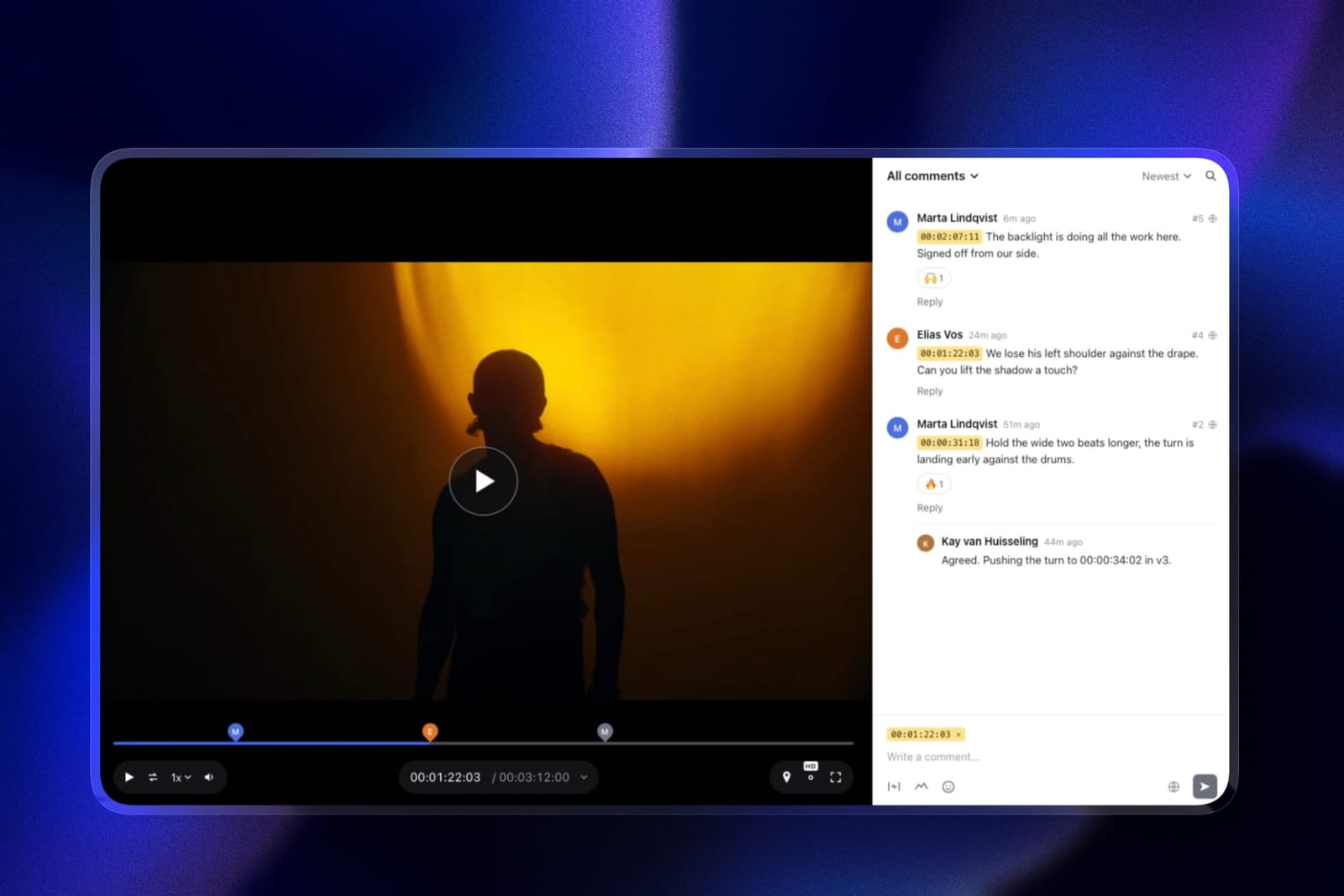
Every review feature is on the free plan: comments pinned to the exact frame with timecode chips, drawing on the picture, replies and emoji reactions, version stacks, approval statuses, password-locked links, and a logo, banner, fonts and accent colours on the review page.
Where the wall isvideo storage. The free plan's 10 GB pool allows 3 GB of video across reviews and galleries, and each cut can be up to 500 MB.
A three-minute cut exported as a sensible H.264 proxy fits comfortably, so the practical allowance is several client projects with a few versions each, but a ProRes master will not upload at all on free.
The standout detailthere is no project cap and no reviewer count. Reviewers comment without making an account, so a client with five stakeholders costs nothing, and when a new version goes up the older cut stays in the stack with its notes while each version carries its own approval status.
The honest gotchait reviews video only, so a key art file or a PDF one-sheet needs another tool, and attaching files to comments starts on Pro. There is no Premiere or Resolve panel, and reviews belong to one owner account rather than a team workspace.
The free plan also shows a Framekit badge on the review page; removing it and serving reviews from your own domain starts on Starter at 9 dollars a month.
Skip it ifseveral editors each need their own login, or you proof mixed media rather than cuts. ReviewStudio's unlimited free users, Filestage's ten team members and Ziflow's unlimited proofs fit those shapes better.
Verdict: The best free tier for anyone whose reviewers are clients, because it gives away the whole review product and limits only storage. When you outgrow 3 GB of video, Pro at 19 dollars a month lifts it to 150 GB and 2 GB per cut. Send your first cut free.
2. ReviewStudio Free: Unlimited Users, Three Live Reviews
ReviewStudio's free tier is far more generous than its per-seat paid ladder suggests: its Starter plan, re-read in October 2026, includes unlimited users, unlimited guests, 3 active reviews in total, 5 GB of storage, all file formats, task and approval management, versioning, compare mode and present mode, with Pro at 15 dollars per user monthly or 12 annually and Advanced at 25 or 20 annually with a five-user minimum.
Where the wall isthree active reviews in total. Storage at 5 GB is more than Krock.io or Frame.io give on free, and nobody is charged as a user, so the limit you meet is concurrency: a fourth live client review has to wait for one of the first three to close.
The standout detailunlimited internal users alongside unlimited guests, which makes this the most generous free tier here for a team of colleagues, and it proofs PDFs and images next to the cut, with a compare mode, at no cost.
The honest gotchacustom branding starts on Pro, so the free review page carries ReviewStudio's look rather than yours, and three live reviews is tight for a freelancer juggling several clients at once.
Where it beats Framekitteam seats, file formats and storage. Several editors can each have a login, a key art file can sit next to the cut, and 5 GB is more than Framekit's 3 GB of free video.
Skip it ifyou run more than three client reviews at the same time. Framekit's free plan has no review cap.
Verdict: The runner-up on our weights and the best free tier here for an internal team. If team seats counted for more than room before the wall, it would take first place.
3. Krock.io: Free Reviewers, and the Wall Is Storage
Krock.io has a free tier you can put in front of a paying client, because the limit is on your resources rather than on the people you are trying to impress.
Its free plan includes one user, 2 GB of storage, one workspace, two projects, 50 AI tokens, and unlimited reviewers, with Pro at 10 dollars per user when you outgrow it.
Where the wall isstorage, at 2 GB, before anything else. A three-minute ProRes 422 master at 1080p runs to about 3.3 GB at its roughly 147 Mbps data rate, over the cap on its own, while an H.264 proxy at 10 Mbps is about 225 MB, so proxies leave room for several versions.
The standout detailunlimited reviewers on the free plan means a client with five stakeholders costs nothing and requires no licence conversation, which is the single most useful property a free review tool can have.
The honest gotchatwo projects and one workspace means an agency juggling four clients is out of room immediately, and there is no way to archive your way around a workspace limit.
Where it beats FramekitKrock.io is a media review platform rather than video-only, so the storyboard and the animatic can sit in the same workspace as the cut.
Skip it ifyou run several client projects concurrently. The project cap is the real constraint for agency work.
Verdict: A strong free tier for client-facing review. Its wall is storage and projects, both of which arrive quickly, and Pro at 10 dollars per user is a modest step up.
4. Ziflow Personal: Unlimited Proofs, Sixty Days of Memory
Ziflow's free plan is the most generous on capacity in this comparison and carries the most consequential catch.
Unlimited proofs and unlimited reviewers is a serious offer. Sixty days of review history is the part to read twice: after that window, the record of the review is no longer accessible to you.
Where the wall istime rather than capacity. This limit expires rather than blocking, so you would discover it when you go looking for an approval from ten weeks ago and find it gone.
The standout detailunlimited reviewers plus unlimited proofs means the free plan handles genuine volume, and for a freelancer running many small reviews with no compliance need it is the most capable free tier here.
The honest gotchathe whole reason to use a proofing tool over a video link is the approval record, and a 60-day window removes exactly that on the free plan. Screenshot or export approvals you may need later.
Skip it ifyou need to prove sign-off after the fact, which is most client work with a contract attached.
Verdict: The most capacity of any free tier and the one whose limit is easiest to miss. Excellent for volume, wrong for anything you may need to evidence.
5. Filestage Free: Ten Team Members, Five Files a Month
Filestage's free plan is shaped for a team rather than an individual, which makes it unusual here.
Ten team members at no cost is among the most generous internal allowances in this comparison, second only to ReviewStudio's unlimited users, and the reviewer-group structure means internal and client feedback stay separated.
Where the wall isfive new files in a month. A single project with four deliverables and one revision each is eight files, so the monthly allowance is the binding constraint rather than the single active project.
The standout detailreviewer groups on the free plan let you route a file to your internal team first and the client second, which is a workflow the other free tiers do not offer at all.
The honest gotchathe file allowance resets monthly and does not roll over, so a quiet month buys you nothing and a busy one stops you dead in week two.
Skip it ifyou produce more than a handful of files a month, which is most working editors.
Verdict: The best free tier for a small team that reviews a few high-stakes files, and the wrong one for volume.
6. Frame.io Free: The Fastest Wall in the Comparison
Frame.io's free plan is best understood as a trial that does not expire.
Its free tier includes up to 2 members, 2 GB of storage, 2 GB of mounted storage, up to 2 projects, Camera to Cloud, and transcription and captions, with Pro at 15 dollars per member lifting you to five members, 2 TB, and unlimited projects.
Where the wall istwo projects. For anyone doing client work that is reached within the first couple of jobs, and there is no way around it short of deleting a project you may need.
The standout detailCamera to Cloud and transcription on the free plan are genuinely unusual inclusions, and for a solo shooter testing whether the workflow suits them that is a real evaluation rather than a demo.
The honest gotchamembers are counted, so your client is either one of your two members or reviewing through a share link with fewer capabilities. The free plan is not shaped for external stakeholders.
Skip it ifyou have more than two concurrent projects, which is most working professionals.
Verdict: The best free tier for evaluating a product and the weakest for actually working in. It is designed to convert you and does so quickly.
7. Vimeo: Free Hosting, Review Behind a Plan
Vimeo runs a free plan and its review and collaboration tooling is bundled with paid tiers, starting at Starter at 12 dollars per seat a month with 2 TB of storage, Standard at 25, and Advanced at 75.
Where the wall isfeature depth rather than capacity. You can share a video for free and collect comments in a general sense; the frame-accurate review tooling and version stacking that make this a review product sit on the paid tiers.
The standout detailif the review round is occasional and the hosting is the real need, the free plan plus a private link covers more ground than a dedicated review tool's free tier does.
The honest gotchait is not free video review so much as free video hosting with commenting attached, and conflating the two leads to disappointment.
Skip it ifstructured, versioned review is the job. This is hosting first.
Verdict: The best free option when hosting matters more than review depth. Not a free review tool in the sense the others are.
8. Dropbox Basic and Replay: Free Only If You Already Pay
Dropbox's free Basic plan includes 2 GB, and its Replay review layer is attached to paid plans, which read from a European address in August 2026 as Plus at 9.99 euros a month and per-user tiers at about 12 and 18 euros.
Where the wall isstorage, at 2 GB, which for video is roughly one master file.
The standout detailif your team already pays for Dropbox, the review layer may be included in a subscription you have, which makes it the cheapest possible option by being no extra money at all. Check before buying anything else.
The honest gotchaas a standalone free video review tool it is the weakest here, because the free tier's storage makes video impractical.
Skip it ifyou do not already pay for Dropbox. Nothing about the free tier recommends it for this job.
Verdict: Worth checking first if Dropbox is already in your stack, and not worth adopting for review alone.
9. Google Drive and YouTube: The Zero-Cost Baseline
The honest baseline is what most people actually do before they buy anything: upload to Drive or post an unlisted YouTube video and collect notes in a document or an email. Drive's free tier is 15 GB shared across Google services and YouTube's hosting is unlimited.
Where the wall isnot capacity, which is the point, but the workflow. There are no timestamped comments on the frame, no versions, and no approval state, so somebody spends the difference in time reconciling notes.
The standout detailcapacity is genuinely not a constraint, and anybody can open the link with no account, no instructions, and no software. On adoption alone it beats every tool in this comparison.
The honest gotchanotes arrive as at 1:32 the logo feels late, in an email, from three people, in three formats, which is the exact problem this software category exists to solve.
Skip it ifyou are running more than one review round. The reconciliation cost overtakes the subscription quickly.
Verdict: The right answer for a single round with one reviewer and the wrong one for anything repeated. Useful mainly as the thing to measure a paid tool against.
How to Make a Free Tier Last Twice as Long
Two gigabytes is the recurring storage number in this comparison and it is the limit most people hit first. It is also the easiest one to defer, and the technique costs nothing.
Upload proxies rather than masters.
A three-minute cut exported as a sensible H.264 is a small fraction of the ProRes original, and reviewers are judging pacing, structure, and whether the logo lands, none of which the compression interferes with.
Teams that do this stay on free tiers for months rather than days, and the only reviews that genuinely need the higher-quality file are colour and finishing passes.
Archive finished projects rather than leaving them open. On Filestage the single active project slot is freed by archiving, and on any tool a completed project sitting in your storage allowance is costing you room you could use.
Build the archive step into your delivery checklist and the project cap stops being a monthly annoyance.
Export the approval before the window closes.
This matters specifically on Ziflow's free plan with its 60-day review history, and it is good practice everywhere: when a version is signed off, take a PDF or a screenshot of the approval state and put it with the project files.
That record is what you will want in a dispute, and no free tier promises to keep it indefinitely.
Keep one paid month in reserve. Most of these tools let you upgrade for a single month and drop back, so a project that briefly needs five reviewers or twenty files does not have to force a permanent subscription.
Frame.io at 15 dollars, Krock.io at 10, and Wipster at about 12 monthly are all cheap enough to use as a temporary release valve.
In one lineUpload proxies, archive on delivery, and export the approval when it happens, and a 2 GB free tier lasts long enough to decide properly whether to pay.
When a Free Tier Stops Being Free Enough
There is a point where staying free costs more than paying, and it arrives earlier than people expect because the cost is in time rather than money.
The clearest signal is reconciliation. If you are copying notes out of one place into another, or maintaining a list of what has been addressed because the tool cannot show you, you have already spent more than a month's subscription.
One hour of a working editor's time is worth more than any entry plan in this comparison.
The second is the workaround becoming a habit. Deleting old projects to free a slot, keeping a spreadsheet of which version a client approved, or asking a reviewer to email you because they cannot be added as a user are all signs that the free tier has stopped fitting.
The third is exposure. If losing the approval record would cost you an argument with a client, the free tier is a risk position rather than a saving, and the fix is thirty dollars.
Against that, there are working patterns where free is genuinely correct and permanent: a solo editor with one or two concurrent projects, an internal team reviewing a handful of files, or anyone whose clients approve by email regardless of what tool you use.
If that describes you, none of the paid tiers will make the work better and the honest advice is not to buy.
Where the Approved Cut Should Live Afterwards
Review links are private by design and several expire, which is correct for work in progress and wrong for the finished film, so once a cut is approved it needs a delivery the client can download from and a permanent page that a commissioner or a future collaborator can find.
Most tools in this guide stop at approval, which means exporting the master and uploading it somewhere else.
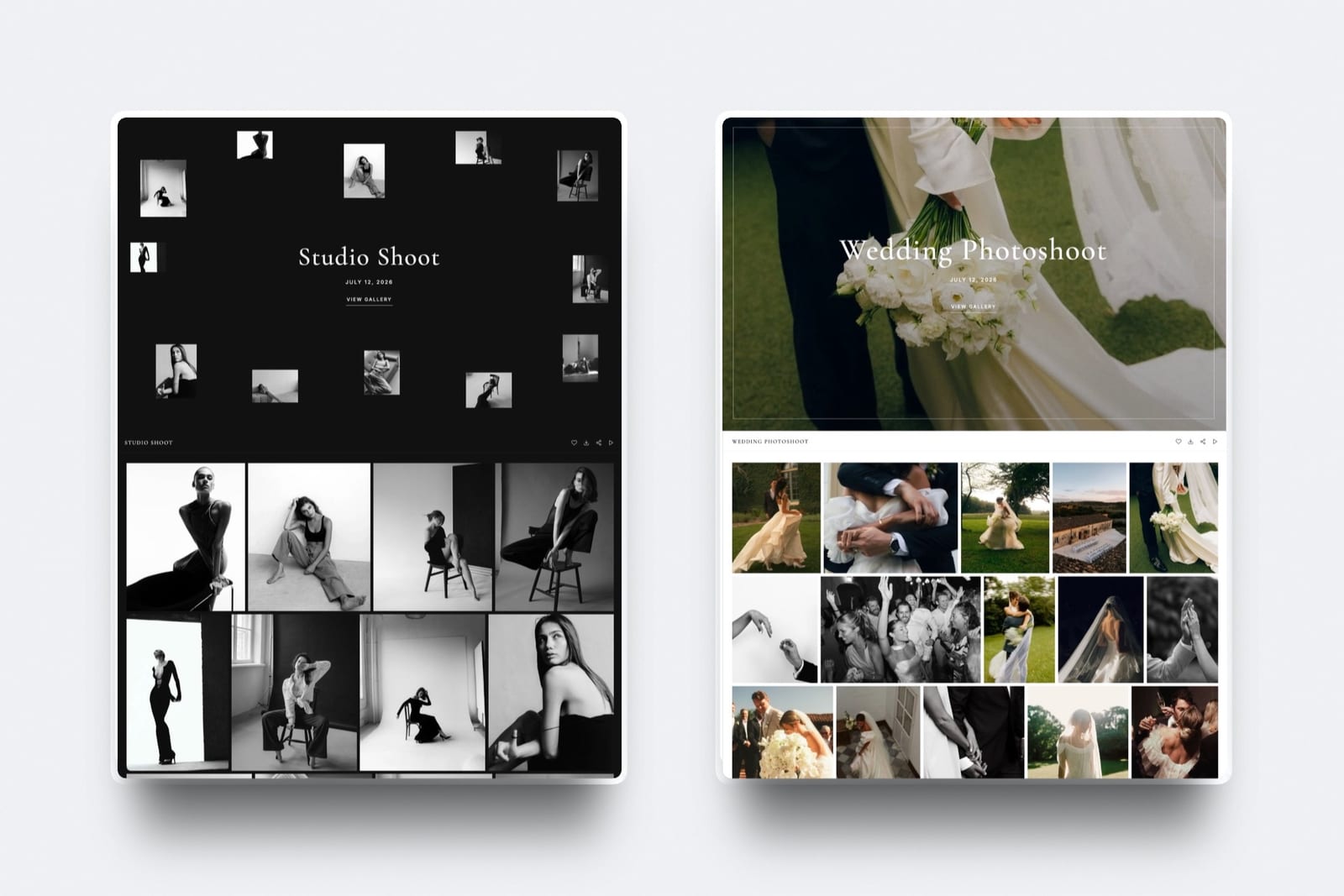
In Framekit the approved cut stays in the account: it can go into a client gallery with the stills, where downloads can be PIN-protected and videos are never watermarked, and onto your own site as a finished case study.
That is the part of the workflow a free review tier usually cannot help with.
Our comparison of Frame.io alternatives covers the paid options in depth, video hosting platforms covers public delivery, and website builders for filmmakers covers the portfolio itself.
What We Left Out of This Comparison and Why
Two whole categories are absent from the ranked list and one well-known vendor could not be assessed on its free tier at all, so it is worth being explicit about each decision rather than leaving the omissions to be noticed.
Wipster has no free plan, starting instead at 9.95 dollars a month billed annually, so it is not eligible here despite being one of the better cheap options. We covered it in our Frame.io alternatives comparison.
SyncSketch, which serves animation and VFX review, did not render usable pricing or free-tier terms to us in August 2026, so we are not describing limits we could not read.
We also excluded general file-transfer services and screen-recording tools that collect comments as a side effect, because they do not version, do not track approval state, and would flatter themselves in this comparison by not attempting the hard parts.
A Test You Can Run This Week
All nine are free, so the test is simply to run a real round rather than to read about one, and it takes a single project.
Pick your next actual client review and run it on two free tiers in parallel. Send both links to the same reviewers and see which one gets used without a question. That single observation predicts adoption better than any feature list, including this one.
Then push toward the wall deliberately. Upload a second and third project, add a fourth reviewer, and put up a revised version. You will find the limit within an afternoon, and knowing where it is turns the upgrade decision into arithmetic rather than a surprise.
Third, check the history. Look for where the tool tells you how long it keeps your reviews, and if it does not say, assume it is not forever. Export one approval to PDF and confirm it contains what you would need if somebody disputed it.
Last, measure your own time. Note how many minutes you spend reconciling notes across the round. Multiply by your rate. If it exceeds the price of the entry plan, the free tier is costing you money.
The Decision Guide
These are ordered so that the earliest match is the strongest signal about which wall you will hit, so read down and stop at the first line that describes your situation.
You review with external clients, want every review feature free, and your work is video. Framekit's free plan, accepting 3 GB of video and 500 MB per cut.
You review with external clients and also need storyboards or stills in the same workspace. Krock.io's free tier, with unlimited reviewers, accepting 2 GB and two projects.
You run high volume and do not need a permanent record. Ziflow Personal Free, with unlimited proofs and reviewers, and export anything you may need past 60 days.
Your reviewers are colleagues and there are many of them. ReviewStudio's free plan with unlimited users and guests, watching the three active reviews.
Your internal team wants reviewer groups. Filestage's free plan with 10 team members, watching the five-files-a-month allowance.
You are evaluating whether to buy Frame.io. Frame.io's free plan, which is a genuine evaluation of the product and will stop you at two projects.
You already pay for Dropbox. Check whether Replay is included before adopting anything else.
Hosting matters more than structured review. Vimeo's free plan with a private link.
You have one reviewer and one round. Google Drive or an unlisted YouTube link, and spend nothing.
You are reconciling notes by hand every week. Stop reading free-tier comparisons and buy the ten-dollar plan.
Frequently Asked Questions
What is the best free video review tool in 2026?
Framekit has the best free video review tier for client work, because every review feature is on the free plan, reviewers comment without an account, and there is no cap on the number of reviews; the wall is 3 GB of video with a 500 MB cap per cut.
ReviewStudio is the runner-up, with unlimited users and guests, 5 GB and three active reviews, and Krock.io follows with unlimited reviewers, 2 GB of storage and two projects.
Framekit vs Krock.io: which free tier lasts longer?
Framekit's free tier usually lasts longer for video, because it allows 3 GB of video with no project cap against Krock.io's 2 GB and two projects.
Krock.io lasts longer if you review stills and storyboards alongside cuts, or if a second editor needs their own login on a paid upgrade at 10 dollars per user.
Is Frame.io free?
Frame.io operates a free plan that includes up to 2 members, 2 GB of storage, up to 2 projects, Camera to Cloud, and transcription and captions.
The two-project cap is the practical wall for anyone doing client work, and Pro at 15 dollars per member lifts it to unlimited projects and 2 TB.
Which free video review tool has unlimited reviewers?
Framekit, ReviewStudio, Krock.io and Ziflow all include unlimited reviewers or guests on their free plans, and Framekit's reviewers do not need an account at all.
Ziflow also allows unlimited proofs, which makes it the most capable free tier on raw capacity, with the significant caveat that its free plan keeps only 60 days of review history.
What is the catch with free video review tools?
Each one places its limit somewhere different: Framekit stops at 3 GB of video and 500 MB per cut, Frame.io stops at two projects, Filestage at five new files a month, Krock.io at 2 GB of storage and two projects, ReviewStudio at three active reviews, and Ziflow deletes review history after 60 days.
The catch is not that they are crippled, it is that you have to match the limit to your working pattern.
How long do free plans keep my review history?
It varies and it is rarely prominent. Ziflow's free plan states 60 days of review history, which is the most consequential example we found because the approval record is the reason to use a proofing tool at all.
Where a vendor does not state a retention period, export approvals yourself rather than assuming they are permanent.
Can I use Google Drive or YouTube for video review?
You can, and many people do before they buy anything. Capacity is not the problem: Drive gives 15 GB and YouTube's hosting is effectively unlimited.
What you lose is timestamped comments on the frame, versioning, and an approval state, so notes arrive by email in three formats and somebody reconciles them by hand.
Why do free video review plans have such small storage?
Because video is large and storage is the vendor's real cost. Two gigabytes is the recurring figure and it is roughly one three-minute master with a couple of versions.
Uploading compressed proxies rather than masters is the single most effective way to extend a free tier, and it costs reviewers nothing in the judgements they are actually making.
Which free plan is best for a team rather than a freelancer?
ReviewStudio, whose free plan includes unlimited users and unlimited guests, the most generous internal allowance here, with three active reviews at a time as the constraint.
Filestage is the alternative when the team wants reviewer groups: 10 team members, one active project and five new files a month, with the file allowance resetting monthly and not rolling over.
When should I stop using a free tier and pay?
When you start reconciling notes by hand, when deleting old projects to free a slot becomes routine, or when losing an approval record would cost you an argument with a client.
One hour of an editor's time is worth more than any entry plan in this comparison, so the moment the workarounds take real time, the free tier is costing money.
Do free video review tools watermark my video?
None of the tools in this comparison lists a watermark on your uploads as a free-plan limit.
The constraints they publish are on capacity, users, projects, and retention rather than on the output, which is a meaningful difference from free tiers in adjacent categories such as video editing or presentation software.
Final Verdict: The Best Free Video Review Tool in 2026
Framekit wins because its free plan is the whole review product with a storage limit attached.
Frame-accurate comments, drawing, version stacks, approval statuses and password-locked links are all free, reviewers never make an account, and there is no project cap, so the only wall is 3 GB of video with a 500 MB ceiling per cut, which proxies push a long way out.
Where Framekit loses is worth stating. It reviews video only, so anyone proofing key art, PDFs or banner sets is better served by Ziflow.
It has no Premiere or Resolve panel and no team workspace, so a group of editors who each need a login should look at ReviewStudio's unlimited free users, Filestage's ten team members or Krock.io.
And the free review page carries a Framekit badge until you move to Starter.
ReviewStudio is the runner-up, with the most generous free seats here and a three-review cap that bites hardest on client work.
Krock.io follows, limited in the place that hurts least: 2 GB and two projects are constraints on your resources, not on your reviewers.
Ziflow Personal Free is the most capable on raw capacity and carries the limit most likely to hurt later, 60 days of review history on a tool whose purpose is producing an approval record.
Frame.io's free plan is an honest evaluation of a good product that will stop you at two projects.
The broader point is that free tiers in this category are not ranked so much as shaped. All of them are generous somewhere and all of them stop somewhere, so the useful question is which wall is furthest from the way you actually work.