Framekit templates
Start from a designer-made template
 Use template
 Use template
 Use template
 Use template
 Use template
 Use template
 Use template
 Use template
Framekit vs Beacons is the comparison creators reach after working out that Linktree's 9 percent is real. Beacons charges exactly the same 9 percent, and then does something unusual with it.
It offers a way out that costs less than ours.
Beacons Creator Plus reaches a 0 percent seller fee at $25 a month billed annually. Our Business plan reaches 0 percent at $31 a month on yearly billing, or $39 monthly.
That is a genuine loss on the headline number and it belongs near the top rather than in a footnote.
Framekit is an AI website builder that publishes up to ten pages free, with client galleries, video review, decks and a store on the same account.
A creator monetisation platform is a hosted page that bundles links, a store and a media kit for people who sell to an audience.
Framekit is the better choice when the work itself is the product, because the link page, the portfolio, the client galleries and the store are one site on your own domain rather than a page on a platform.
Beacons is the better choice for a pure creator business at moderate volume, since it has the most capable free plan in the category and reaches a 0 percent seller fee at $25 a month billed annually, which is cheaper than our $31.
The split is scope: Beacons is a better creator page and Framekit is a better creative business.
Full disclosure: Framekit is our own product and Beacons beats it on the cheapest route to zero commission. We have put that in the third paragraph because a comparison that hid it would not survive a reader opening two pricing pages.
How We Compared Them
We built the same creator setup on both: a link page, a media kit, and a store with one $29 product, then ran a month of sales at three volumes and looked at what each platform did with the buyer's details.
The honesty split:
- Measured hands-on: both builds, the media kit output, the checkout flow and the customer data each platform hands back.
- Verified from primary sources: Beacons plan tiers and seller fee from Beacons pricing, read September 2026. Framekit's from the shipped plan configuration.
- Not tested: Beacons' AI brand-deal tooling and its social scheduling features.
No load times or performance figures appear for either platform.
Framekit vs Beacons at a Glance
The weighting: the cost-to-zero row favours Beacons and the ownership rows favour us, and which set matters depends on whether your audience is buying a product or hiring you.
| Framekit | Beacons | |
|---|---|---|
| Cheapest route to 0% seller fee | $31 a month on yearly billing | $25 a month billed annually |
| Free plan seller fee | 5% | 9% |
| Custom domain | Yes, from $9 a month | Yes, on paid tiers |
| Pages | 10 free, 30 Starter, 200 Pro | Link page plus store pages |
| Media kit | Yes, as a deck you design | Yes, auto-updating from socials |
| Client galleries with password and PIN | Yes | No |
| Video review with timecoded comments | Yes | No |
| Multi-page portfolio with project pages | Yes | No |
| Free plan capability | 10 pages, galleries, decks, store | Very capable, best in category |
In one lineBeacons is the better page for a creator who sells to an audience and Framekit is the better site for a creator who is hired for work.
Where Beacons Wins
Beacons beats us in three areas, and the first is a straight financial loss for us that no framing changes. If you are running a pure creator business, these three may well settle it.
The cheapest zero in the category. Creator Plus removes the seller fee at $25 a month billed annually. Our Business plan does it at $31 on yearly billing or $39 monthly.
On the same sales, Beacons costs less to reach the same zero, and for a creator whose entire business is selling to an audience that is the number that matters.
The free plan. Beacons free sells unlimited digital products, builds a media kit, creates affiliate links and reports real-time analytics. It takes 9 percent while doing it, but as a free tier it is the most capable in this category by some distance.
The self-updating media kit. Beacons pulls follower counts and engagement from your social accounts automatically.
Framekit's media kit is a deck you build and update yourself, which looks better and goes stale unless you maintain it. For a creator pitching brands weekly, automatic wins.

Where Framekit Wins
Framekit wins on three points, and all of them are about what happens when your work, rather than your audience, is what someone is buying. None of them will matter to a creator selling only to followers.
A real portfolio, not a page. Ten pages on the free plan, 200 on Pro, with project pages that each target a different search query.
Beacons produces a creator page with store pages attached, which is a different shape and does not do the job of a portfolio that has to win a commission.
Client delivery and review. Password-protected galleries with a separate download PIN, and timecoded video review. Neither exists on Beacons, so a UGC creator who also shoots for brands is paying for delivery somewhere else.
A lower fee before you upgrade. Our free and Starter plans take 5 percent where Beacons takes 9. Below the point where either of us is worth paying, that four-point gap is real money: on $500 a month it is $240 a year.
In one lineBeacons is cheaper once you pay for zero, and we are cheaper before you do.
The Fee Comparison, Both Directions
This is the section where the answer genuinely flips depending on your volume, which is unusual in a comparison like this and is the reason we have laid it out rather than summarised it. Here it is at three monthly levels, with the cheaper option visible in each row.
| Monthly sales of a $29 product | Beacons free (9%) | Beacons Creator Plus ($25/mo, 0%) | Framekit Starter (5%) | Framekit Business ($31/mo yearly, 0%) |
|---|---|---|---|---|
| $300 | $324 a year | $300 a year | $84 plan plus $180 | $372 a year |
| $1,000 | $1,080 a year | $300 a year | $84 plan plus $600 | $372 a year |
| $3,000 | $3,240 a year | $300 a year | $84 plan plus $1,800 | $372 a year |
Card processing applies on both and is excluded, being identical.
Read honestly: at $300 a month our Starter plan is cheapest at $264 all in. At $1,000 and above, Beacons Creator Plus at $300 a year is the cheapest route to zero and beats our $372. The gap is $72 a year, which is small in absolute terms and real nonetheless.
What the table does not price is the rest of the account. Our $372 also carries a ten-page portfolio, unlimited client galleries, video review and proposal decks. Whether that is worth $72 depends entirely on whether you use any of it.
In one lineat low volume we are cheaper, at high volume Beacons is cheaper by $72 a year, and the tiebreak is whether you need a portfolio and client delivery.
The Question That Actually Decides It
There is a single question that settles this faster than any fee table, and it is about where your income comes from rather than how much of it there is.
Are you paid by your audience, or paid by clients?
If your income is products sold to followers, Beacons is built for exactly that, reaches zero commission more cheaply than we do, and updates your media kit without you touching it. Pay them.
If your income includes client work, brand shoots, commissions or anything where someone hires you on the strength of a portfolio, then you need project pages, client delivery and a domain that is yours, and none of those exist on Beacons.
In one lineaudience income points to Beacons and client income points to us, and creators with both usually find the portfolio decides it.
How to Choose: A Decision Guide
Work through these questions in order and act on the first one you answer yes to. The first two describe genuinely different businesses rather than preferences, so if either applies then the fee tables above are a secondary consideration at most.
- Is all your income products sold to your own audience? Yes: Beacons, which reaches 0 percent for $25 a month and has the better free tier.
- Do clients hire you on the strength of a portfolio? Yes: Framekit, where project pages and your own domain do that work.
- Do you deliver photos or video to clients? Yes: Framekit. Beacons has no galleries and no review.
- Do you pitch brands weekly and want the media kit to update itself? Yes: Beacons, since ours is a deck you maintain.
- Are you under roughly $780 a month in sales? Yes: our free or Starter plan at 5 percent beats Beacons free at 9 percent.
- Both audience and client income? Framekit, and keep a Beacons free page as the link hub if your audience recognises it.
Frequently Asked Questions
Which is cheaper, Framekit or Beacons?
It depends on volume and the answer flips. Below roughly $780 a month in sales, Framekit is cheaper because our free and Starter plans take 5 percent against Beacons' 9.
Above that, Beacons Creator Plus reaches 0 percent at $25 a month billed annually, or $300 a year, against our Business plan at $31 a month on yearly billing, or $372.
That $72 gap is real, and what it does not account for is the portfolio, galleries and review our plan also carries.
Does Beacons take a percentage of sales?
Yes, 9 percent on its free plan, which is the same rate Linktree charges. The fee drops to 0 percent on Creator Plus at $25 a month billed annually, which is the cheapest route to zero commission in the link-in-bio category.
That combination of a very capable free tier and an affordable zero is what makes Beacons the strongest choice for creators whose income is purely product sales.
Can Beacons build a portfolio website?
Not in the sense a photographer or designer means.
Beacons produces a creator page with store and media kit pages attached, which is excellent for selling to an audience and is not a multi-page portfolio with individual project pages that can each rank in search.
Framekit publishes ten pages on the free plan and 200 on Pro, which is the shape a portfolio needs.
Does Framekit have a media kit?
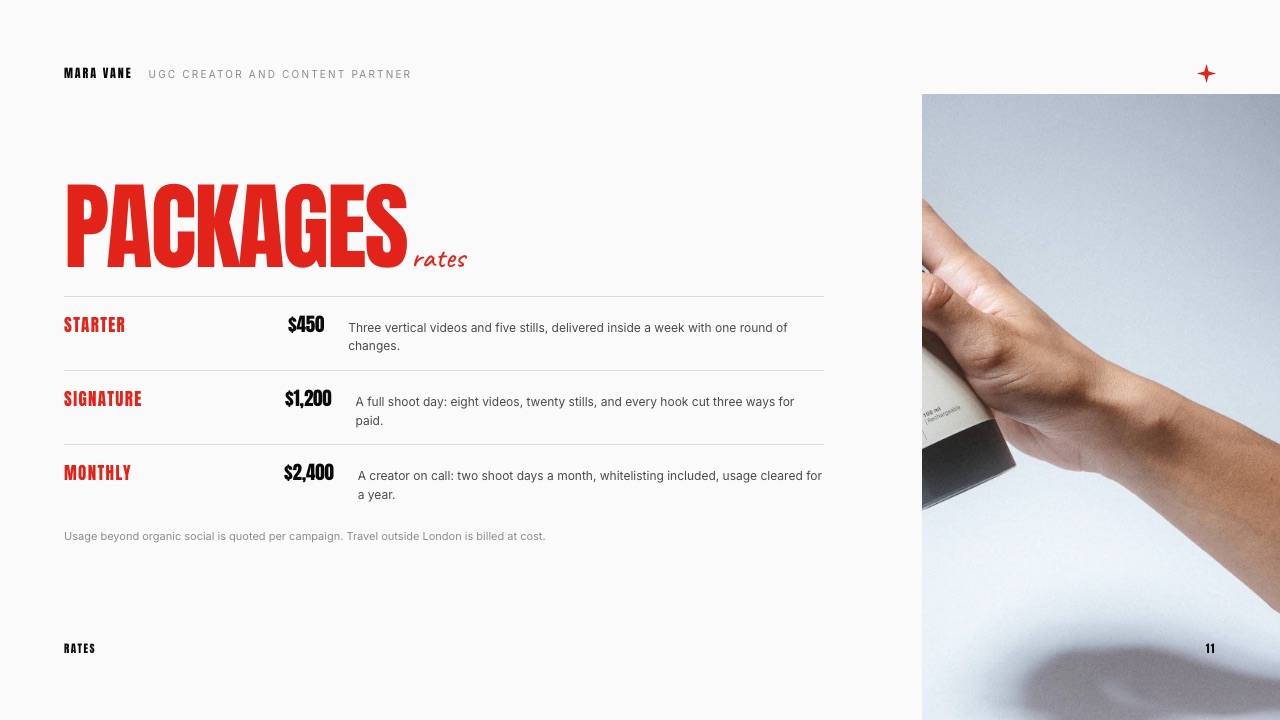
Yes, built as a deck, with templates for creator media kits including packages, rates, audience stats and past work.
The honest difference is that ours does not update itself: Beacons pulls follower counts from your social accounts automatically, and a Framekit media kit is a document you refresh.
Ours generally looks more designed and goes stale faster, which is the trade.
Which is better for a UGC creator?
It depends on the mix. A UGC creator whose income is entirely brand deals needs a portfolio of work and a media kit, and benefits from Framekit's project pages, client galleries for delivering the footage and decks for the pitch.
A creator whose income is mostly selling presets or templates to followers is better served by Beacons, which reaches 0 percent more cheaply and keeps the media kit current automatically.
Do I own the customer list on each platform?
Buyers on Framekit check out on your own domain and their details are yours, with signup entries at 500 a month on the free plan and unlimited on Business.
Beacons also gives you customer data, so this is less of a differentiator than it is against a marketplace.
The more meaningful ownership question is the address: a Framekit site is on your domain, so traffic and search equity accrue to you rather than to a platform.
Can I use a custom domain on Beacons?
Yes, on its paid tiers, which is a genuine advantage over Linktree where a custom domain is not available at any tier. Framekit adds your own domain from Starter at $9 a month.
On this specific point the two platforms are comparable, and the difference is what sits on that domain: a creator page on one, and a multi-page site with galleries and a store on the other.
What does Framekit's 5 percent apply to?
Product sales through the Framekit store only. It does not apply to client work you invoice elsewhere, and delivering client galleries carries no commission on any plan including the free one.
The rate is 5 percent on Free and Starter, 3 percent on Pro and 0 percent on Business, so it falls as you grow. Against Beacons' free tier at 9 percent, that four-point difference is worth $240 a year on $500 of monthly sales.
Should I run Beacons and Framekit together?
A fair number of creators should, and it is cheap to test because both have free tiers.
Keep a Beacons page as the link hub if your audience already recognises it, and run the portfolio, client galleries and any client-facing work on Framekit.
Point the bio link at whichever converts better for your specific audience rather than taking anyone's word for it.
Can I move from Beacons to Framekit?
There is no importer, so moving means recreating the links and product pages, which for a typical creator setup is an hour or two.
Export your customer list first, buy your own domain if you have not already, and keep the Beacons page live for a month as a redirect.
The domain is the part that makes the move permanent, because after that any future platform change costs you a redirect rather than a reprint.
Final Verdict
Beacons is the strongest pure creator platform in this comparison and it beats us on the thing creators care most about: it reaches zero commission at $25 a month where we need $31, and its free tier is the most capable in the category.
If your business is selling products to your own audience, that is the correct purchase and we would rather you made it than pay us more for capability you will not use.
Who should not use Framekit. Creators whose income is entirely audience product sales at volume, where Beacons reaches zero more cheaply. Anyone who needs a media kit that updates itself from social accounts.
Anyone who wants the single most capable free tier in the link-in-bio category.
Who should. Creators who are also hired: UGC creators shooting for brands, photographers selling presets alongside commissions, designers selling templates alongside client work.
For them the fee gap is $72 a year and the portfolio, client galleries and review links are the reason to close it.
Related readingthe best link in bio tools compared, Linktree vs Beacons, and the best website builders for UGC creators.
Beacons plan tiers and seller fee read from its published pricing in September 2026. Our fee ladder comes from the shipped plan configuration, checked the same month.