Framekit templates
Start from a designer-made template
 Use template
 Use template
 Use template
 Use template
 Use template
 Use template
 Use template
 Use template
Most articles about PowerPoint alternatives compare feature lists. That is the wrong test, because nobody leaves PowerPoint on a blank page.
You leave with twelve years of decks, a brand template someone made in 2019, and at least one client whose procurement system only accepts .pptx.
So this guide is organised around the migration instead of the feature list.
It starts from the elements that usually break - licensed fonts, a Morph transition, SmartArt, a linked chart, speaker notes, and a footer with slide numbers - and rates eleven alternatives, plus our own Framekit, on what their published import, export and font features say will happen to them.
Six of those elements are at risk wherever you go.
That changes the question for anyone whose decks are creative work.
If your licensed fonts, video and custom layouts break on the way out of PowerPoint no matter where you go, you are rebuilding either way, and the better question becomes which tool you would rather rebuild in.
We re-verified every price and plan limit on this page in September 2026 and re-ranked the list for that reader.
In October 2026 we also removed a migration test we could not document, so the at-risk list below comes from how each format works, with a check you can run on your own deck.
A 12 October re-read of Beautiful.ai's pricing page also corrected its Pro price to $174 a year and removed a project licence the page does not offer.
A PowerPoint alternative is any tool that can build, present, and share slide decks without Microsoft's software, ideally while still reading and writing the .pptx format the rest of the world uses. The good ones make the round trip. The rest quietly ask you to never go back.
The best PowerPoint alternative in 2026 for creative decks is Framekit Slides, because it is built for treatments, lookbooks and pitch decks: an AI writer lays out any slide from a description, shot lists, storyboards and moodboards are native elements, and a free plan presents, shares a link and exports PDF.
The trade-off is file exchange: it cannot import a .pptx, and its PowerPoint export (Pro and up) turns each slide into a picture.
Google Slides is the best choice if you must hand back editable .pptx files, Canva improves the look of business decks, and Apple Keynote is the best-looking free option on a Mac.
Full disclosure: Framekit is our own product and it ranks first here, so read the ranking with that in mind. Every entry, Framekit included, is rated from documented features and published plans rather than a hands-on migration, we link to every one, and Framekit scores lowest of the top four on file fidelity, the criterion this post originally weighted most. If you re-weight fidelity back up, Google Slides wins, and we show that math below.
How We Compared 12 PowerPoint Alternatives
Every tool was judged against one typical source deck from PowerPoint for Microsoft 365, used as a scenario rather than a test file: twenty slides, two licensed brand fonts, a Morph transition between two title slides, one SmartArt diagram, a chart linked to an Excel range, speaker notes on every slide, a slide-number footer, and one embedded video.
For each alternative we asked three questions of its published features: can it import a .pptx, what does its .pptx export hand a client, and how does it treat fonts you own.
Storydoc and Framekit cannot import a .pptx at all, so for them every old deck is a rebuild from the outline. No deck was imported, rebuilt or exported to produce this ranking.
Verified findings come from vendor pricing and documentation, which is where every price and plan limit here comes from, checked in August 2026 and re-verified in September 2026, with Framekit's per-deck slide limit corrected in October 2026. Community sentiment is flagged in the sentence where it appears.
What we weighted, and why
Creative-work fit is 30%: whether the tool builds the slides creatives actually send, such as shot lists, storyboards, moodboards, look pages and full-bleed image layouts, without hand-assembly. Design ceiling is 20%. File fidelity is 15%.
Cost is 15%. Collaboration is 10%. Presenting tools are 10%, covering presenter view, notes, and offline behaviour.
Creative fit carries the heaviest weight because this ranking is for photographers, filmmakers, designers and studios leaving PowerPoint, and fidelity matters less to them than it looks: the elements their decks depend on, licensed fonts, video and custom layouts, are the ones least likely to survive any move.
A rebuild you pay once per old deck costs less than hand-building a storyboard row on every new one. Fidelity still carries 15%, and it is where our own product scores worst.
What Breaks When You Leave PowerPoint
In one linelicensed fonts, Morph, SmartArt, linked charts, embedded video, and slide-number footers are PowerPoint-specific or machine-specific, so budget a rebuild pass on any deck that uses them, whichever tool you move to.
| PowerPoint element | Why it is at risk in a move | What to check in your own import |
|---|---|---|
| Licensed brand fonts | The licence covers machines the font is installed on, so browser tools substitute it unless you upload it, usually on a paid plan | Upload the font, or approve the substitute |
| Morph transitions | Morph is Microsoft's own transition; Keynote's nearest relative is Magic Move | Expect a simpler transition |
| SmartArt diagrams | SmartArt is an Office object, so other tools receive it as shapes or a picture | Rebuild the diagram natively |
| Charts linked to Excel | The link points at a workbook that only Office follows | Expect a static chart and update numbers by hand |
| Embedded video | Video stored inside a .pptx may not import, depending on the tool | Re-add it as a file or a YouTube or Vimeo link |
| Slide-number footers | Footers live in PowerPoint's slide master | Rebuild them in the new tool's master or theme |
| Speaker notes | Notes are plain text | Usually the safest element, but spot-check |
Storydoc and Framekit skip the import step entirely, because neither reads a .pptx; what Framekit carries into a rebuilt deck is speaker notes on every slide and your own uploaded fonts on paid plans.
Run this on yourself. Open your three most-sent decks and count how many use SmartArt, a linked chart, or a licensed font.
If the answer is all three, migrating is a rebuild project rather than an import, and the honest question is whether to rebuild in a better tool or stay where you are.
Quick Comparison: 12 PowerPoint Alternatives
Weighted on the six criteria above and re-scored in September 2026. Framekit leads while scoring lowest of the top four on file fidelity, which is the honest shape of this ranking: the tool best at creative decks is among the weakest at handing back an editable PowerPoint.
| Tool | Best for | Reads .pptx | Writes .pptx | Cheapest paid, per year | Rating |
|---|---|---|---|---|---|
| Framekit Slides | Treatments, lookbooks and creative pitches | No | Pictures of slides, Pro and up, max 60 | $0 needed; $84 removes the badge | 8.3/10 |
| Google Slides | The safest all-round replacement | Yes | Yes | $0 needed | 8.0/10 |
| Canva | Better-looking decks than PowerPoint | Yes | Yes, with drift | $144 | 7.9/10 |
| Apple Keynote | Design quality on Apple hardware | Yes | Yes, losing transitions | $0 | 7.8/10 |
| Gamma | Never making slides again | Import only | Flattened | $108 | 7.7/10 |
| Figma Slides | Designers who want exact control | Limited | Images, not editable slides | $192 | 7.6/10 |
| Pitch | Teams with a repeated house deck | Yes | On paid plans | About EUR 120 | 7.4/10 |
| LibreOffice Impress | A genuinely open-source escape | Yes | Yes | $0 | 7.2/10 |
| Beautiful.ai | Layout that fixes itself | Limited | Yes | $174 | 7.0/10 |
| Visme | Data-heavy decks and reports | Limited | On paid plans | $147 | 6.8/10 |
| Storydoc | Decks that report who read them | No | No | $237.60 | 6.5/10 |
| Prezi | Live, non-linear presenting | Import only | No | $84 | 6.1/10 |
All plan prices here were read directly from each vendor's published pricing in August 2026 and re-checked in September 2026.
The top four, criterion by criterion
Each rating is the weighted sum of six scores out of 10. Framekit's 4 on file fidelity is the second-lowest score in the table, beaten only by Keynote's 3 on collaboration, and its 5 on collaboration is the next one up.
| Criterion (weight) | Framekit | Google Slides | Canva | Keynote |
|---|---|---|---|---|
| Creative-work fit (30%) | 10 | 6 | 7 | 7 |
| Design ceiling (20%) | 9 | 7 | 9 | 10 |
| File fidelity (15%) | 4 | 10 | 8 | 7 |
| Cost (15%) | 10 | 10 | 8 | 9 |
| Collaboration (10%) | 5 | 10 | 9 | 3 |
| Presenting (10%) | 9 | 8 | 7 | 10 |
| Overall | 8.3 | 8.0 | 7.9 | 7.8 |
Re-weight it yourself. If you still exchange editable files every week, swap the weights on creative fit and fidelity (fidelity 30%, creative fit 15%).
Google Slides then scores 8.6, Canva 8.1, Keynote 7.8 and Framekit 7.4, last of the four. That is the right ranking for a corporate team, and the one below is the right ranking for a studio.
1. Framekit Slides: Best PowerPoint Alternative for Creative Decks

Our rating: 8.3/10
Framekit is an AI website builder that also includes Slides, a deck and treatment tool made for creative work, and it is the alternative for people whose PowerPoint files were never really business decks.
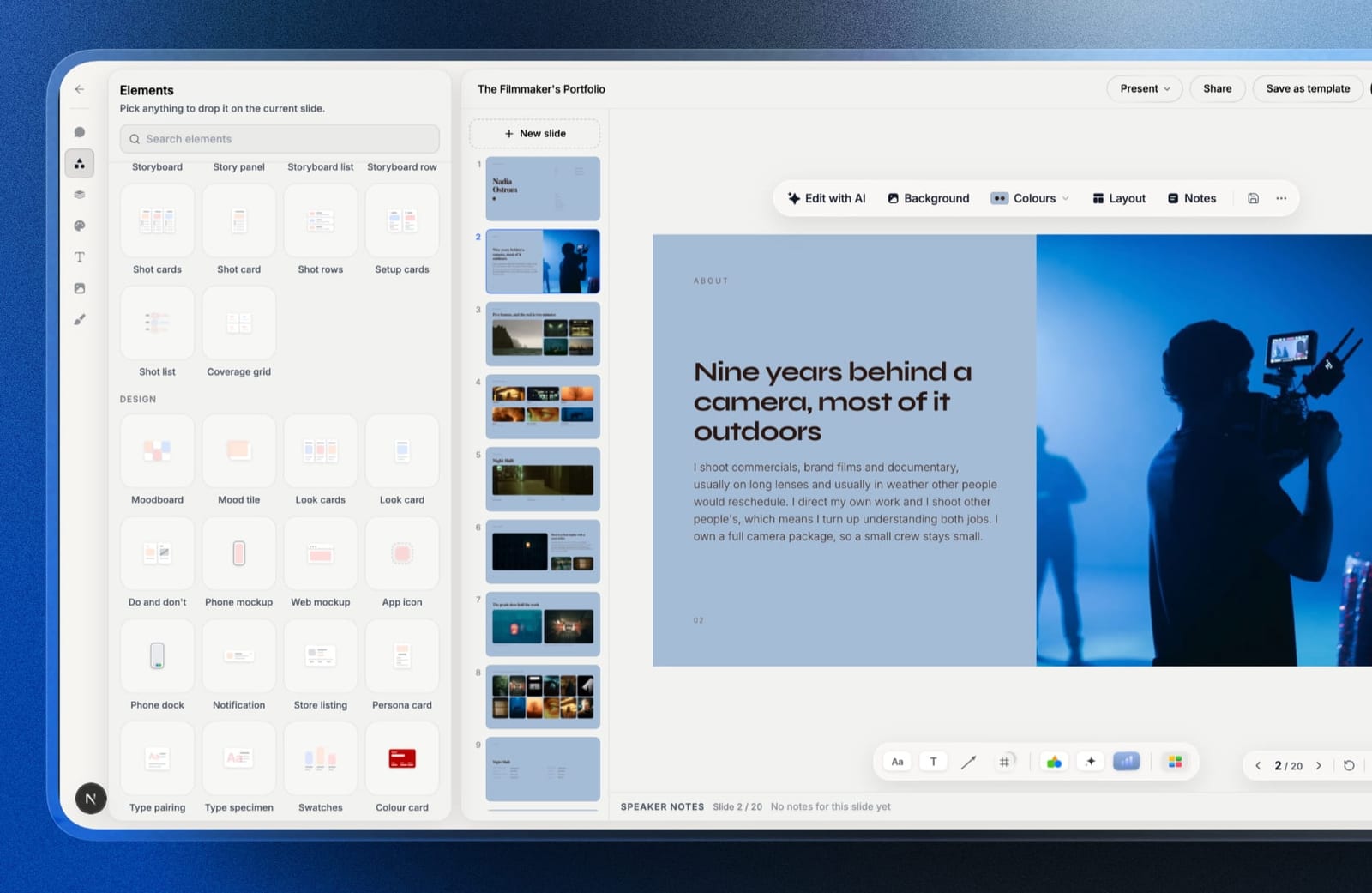
If what you keep opening PowerPoint for is a director's treatment, a lookbook, a shoot proposal or a portfolio pitch, Slides replaces the part of PowerPoint you were fighting: its templates are treatments, lookbooks, portfolio, campaign and pitch decks rather than quarterly reviews.
The working method is different from PowerPoint's blank placeholder boxes. You describe what a slide needs to say and the AI writes it and lays it out, and every word and block stays editable by hand afterwards.
The pieces a creative deck is built from are ready-made: shot lists, shot cards, storyboard panels and rows, moodboards, look cards, a coverage grid, phone and web mockups, colour swatches, type specimens and charts.
In PowerPoint each of those is a table or a grid of rectangles you assemble yourself.
Best forPhotographers, directors, designers and small studios who present their own creative decks or send them as a link, and rarely need anyone to edit the file after them.
The real number40 slides.
That is the most one Framekit deck holds, so a long PowerPoint deck has to be split before you rebuild it; the picture-based PowerPoint export, which starts on Pro at $19 a month ($15 billed yearly), is capped at 60 and is never the limit you hit first.
Everything else a PowerPoint leaver needs day to day, unlimited decks, the AI writer, full-screen presenting with speaker notes, a share link and PDF export, is on the free plan with no card.
The standout detailyour fonts and colours are set once for the deck and carry across every slide, so a lookbook stays on-brand without the slide-master archaeology PowerPoint asks for. Uploading your own font files is a paid feature, from Starter at $9 a month.
The gotchathe .pptx that comes out is pictures. Each slide is exported as an image with your speaker notes attached, so a client can present it in PowerPoint but cannot change a word, swap a photo or drop it into their brand template.
And nothing comes in: there is no .pptx or Google Slides import, so your old decks are rebuilt, not migrated.
There is also no offline desktop app, no password on the share link, no comments on a deck and no live multi-cursor co-editing, and free decks carry a "Made with Framekit" badge until you pay.
Pros:
- Treatment, lookbook and pitch templates instead of business layouts
- Shot lists, storyboards and moodboards as native slide elements
- Presenting, a share link and PDF export on the free plan
Cons:
- A deck holds up to 40 slides, and PowerPoint export is picture-based, Pro and up
- No .pptx import, so every old deck is a rebuild
- No offline app for a venue with no wifi
Skip it ifanyone downstream must edit your deck as a real PowerPoint file, such as an agency brand team, a procurement portal that re-uses slides, or a co-presenter who tweaks the numbers the night before. Google Slides or PowerPoint itself is the right tool for that job.
Verdict: Framekit Slides is the best way out of PowerPoint for creative work and a dead end for corporate file exchange. If your decks are presented or read, not re-edited, rebuild them here; if they bounce between companies as .pptx files, stay with a tool that writes real slides. Filmmakers comparing treatment tools specifically should see our best film treatment software guide.
2. Google Slides: The Safest Replacement
Our rating: 8.0/10
Google Slides is the alternative that costs you the least to adopt and the least to abandon, which is exactly what you want from a migration target. It imports and exports .pptx natively on a free account, and nobody you share a deck with needs anything installed.
Expect the ordinary import losses from the table above, substituted fonts, a simpler transition where Morph was, SmartArt as shapes, and check them in your own file.
None of them is beyond a rebuild pass, and speaker notes, being plain text, are the part most likely to come through intact.
Best forAnyone leaving PowerPoint who still has to exchange files with people who did not.
Key features:
- Free and unlimited with any Google account
- Native .pptx import and export on a free account
- Real-time co-editing and threaded comments that beat PowerPoint's
- Version history that restores a single slide
- Offline editing in Chrome once configured
The real number$0 permanently on a personal account. Google Workspace Business Starter, if you want it on a company domain, is $7 per user a month on annual billing, per Google's published pricing.
Against Microsoft 365 Personal at $99.99 a year, the personal tier saves you the whole subscription.
The gotchathe export is good, not perfect. A deck built natively in Slides and exported to .pptx picks up spacing drift on text-heavy slides, so if you are handing files to a client's brand team every week, check the export rather than trusting it.
Pros:
- A native .pptx round trip in both directions
- Free, permanent, and universally accessible
- Collaboration is genuinely better than the tool you are leaving
Cons:
- Design quality is a lateral move, not an upgrade
- Type and layout controls are thin
- Offline mode has to be configured before you need it
Skip it ifthe reason you are leaving PowerPoint is that your decks look dated. Slides will not fix that, and Canva or Keynote will.
Verdict: Google Slides is the correct default for a migration, because it minimises what you lose in both directions. Choose it when compatibility is the priority and something else when design is.
3. Canva: The Alternative That Improves the Output
Our rating: 7.9/10
Canva is the alternative most people actually want, because the complaint behind "I need a PowerPoint alternative" is usually aesthetic rather than technical. It imports .pptx, exports .pptx, and in between it gives you the largest well-designed template library in the category.
Expect licensed fonts to be substituted on import unless you upload your own on Pro. The real argument for Canva is repair: an import is imperfect everywhere, and its template blocks hand you a well-designed replacement for a broken slide instead of a blank one.
Best forCreatives and small teams whose decks need to look better, not just live elsewhere.
Key features:
- Imports and exports .pptx, with drift on complex slides
- The largest well-designed template library of the twelve
- Brand Kit on Pro for fonts, colours, and logos across every deck
- Exports to PDF, PPTX, MP4, and GIF
- One editor covering decks, social, print, and video
The real numberthe free plan handles import, export, and unlimited designs. Pro is $18 a month or $144 billed annually, about $12 a month, and Business is $25 per user a month. Custom brand-font upload requires Pro, which is the specific line that converts most people.
The gotchathe .pptx export drifts most on the slides you care about. Simple text slides survive; a three-column layout with tight spacing comes back needing adjustment. If your client will edit the file rather than view it, budget the fixing pass.
What reviewers say elsewhereCanva holds 4.7 out of 5 on G2 across more than 6,800 reviews, the largest verified review base in this comparison.
Pros:
- Template blocks that make repairing an imperfect import easy
- A genuine design upgrade over PowerPoint's defaults
- A free plan that covers the entire migration
Cons:
- Export drift is worst on complex layouts
- Custom fonts sit behind Pro
- Clients sometimes recognise the templates
Skip it ifyour decks get edited downstream by a corporate brand team every time. The round trip is where Canva is weakest.
Verdict: Canva is the best PowerPoint alternative for people whose real problem is that PowerPoint decks look like PowerPoint decks. Pair it with Slides if you also need clean file exchange. Designers weighing the wider toolkit should read our best AI tools for designers roundup.
4. Apple Keynote: Best Design Quality Off Microsoft
Our rating: 7.8/10
Keynote is free, better-looking than everything except a hand-built Figma deck, and, with LibreOffice Impress, one of two alternatives here that use fonts installed on the machine rather than a hosted library, so licensed brand fonts you already own carry over.
For a Mac studio leaving PowerPoint, that single behaviour removes the most common migration failure.
It also has the best presenting experience of the twelve. Presenter view, rehearsal timing, and Magic Move together are closer to PowerPoint's depth than any web tool manages.
Best forMac, iPad, and iPhone users who present their own decks and want a design upgrade for free.
Key features:
- Free on all Apple hardware and in a browser through iCloud
- Uses locally installed fonts, so licensed typefaces just work
- Magic Move transitions and strong animation controls
- Imports .pptx and exports back to it
- iCloud collaboration that reaches Windows users through a browser
The real number$0. Against Microsoft 365 Personal at $99.99 a year, a Mac-based team of three saves about $300 a year by moving, and gains the brand-font handling that Canva charges $144 for.
The gotchathe .pptx export cannot carry Magic Move, which PowerPoint does not implement. Any deck built around Keynote's best feature becomes an ordinary deck the moment it leaves for a Windows machine.
Pros:
- Uses your installed licensed fonts, with no upload paywall
- The best presenting toolset outside PowerPoint itself
- Free, with no credit meter or watermark
Cons:
- Requires Apple hardware to author
- Magic Move does not survive export
- No AI drafting, which is now a real speed gap
Skip it ifhalf your collaborators are on Windows. The friction lands in every shared edit rather than in a bill.
Verdict: for a Mac-based studio, Keynote is the strongest free upgrade available and the reason many people never needed a Microsoft subscription in the first place.
5. Gamma: For People Who Want to Stop Making Slides
Our rating: 7.7/10
Gamma is the alternative for people whose real objection is the slide format itself. It generates web-native cards that scroll and reflow, so a deck opened on a phone reads as a page rather than a shrunken 16:9 canvas, and it drafts a whole structure from one prompt.
It is a poor migration target and a good replacement. An imported .pptx becomes cards, so its layout re-flows, and an export back to .pptx flattens the scrolling layout that made Gamma worth using.
Best forAnyone whose decks are read as links rather than presented, and who is happy to leave the format behind.
Key features:
- Prompt-to-deck generation that produces structure, not just copy
- Web-native cards that reflow on mobile
- Built-in analytics on who opened a link and how far they read
- Import of existing decks and documents as a starting point
- PDF and PowerPoint export, flattened
The real numberthe free plan grants 400 credits once and they never refresh. Plus is $9 a month billed annually, $108 a year, refreshing 1,000 credits monthly; Pro is $18 a month billed annually, $216 a year, at 4,000.
Using the only published credit-to-slide ratio in the category, about 5 credits a slide, the free tier is roughly six decks in total.
The gotchathe free credits do not refresh, so free Gamma expires by use rather than by date. People routinely mistake the wall for a bug.
Pros:
- Genuinely better on a phone than any slide-shaped alternative
- The fastest route from a brief to a defensible draft
- Link analytics at a price nobody else matches
Cons:
- A weak .pptx round trip in both directions
- Free credits never refresh
- A recognisable house style until you override it
Skip it ifyou still exchange editable files with clients. Gamma is a one-way door and it is honest about that.
Verdict: Gamma is the right alternative when you have decided the problem is slides, not PowerPoint. If you need to send a .pptx next month, it is the wrong tool.
6. Figma Slides: Best for Exact Control
Our rating: 7.6/10
Figma Slides gives designers what PowerPoint never has: auto layout, components, and constraints, so a slide holds together when the copy length changes. For a studio that builds decks constantly, that turns a deck into a system.
As a migration path it is among the weakest of the top six. Import support is limited, and the export is images rather than an editable deck, so a client's brand team cannot pick up where you left off.
Best forDesign studios already working in Figma who build decks repeatedly.
Key features:
- Auto layout and components, so slides survive copy changes
- Exact typographic control with any font you can install
- Interactive prototypes embedded into slides
- Presenter view with notes
- Shared libraries so a studio deck inherits the studio's system
The real numberthe free Starter plan includes unlimited drafts and 150 AI credits a day, up to 500 a month.
A full Professional seat is $16 a month, Organization is $55 on annual billing, and Enterprise is $90, per Figma's pricing page.
A collaborator seat for client commenting is $3 a month, the cheapest review workflow in this comparison.
The gotchayou cannot hand someone an editable file. Exports are images or PDFs, which is fine for a viewer and useless for a collaborator on the client side.
Pros:
- The only alternative with true component-based slides
- Perfect font control with no upload paywall
- Client commenting at $3 a seat
Cons:
- Poor .pptx import and no editable export
- Slowest route to a finished deck
- Concepts take a day to learn if Figma is new
Skip it ifyou do not already use Figma. The advantages compound over many decks and cost you a day up front.
Verdict: Figma Slides is the best long-term home for a design studio's decks and a bad choice for a one-off migration. Designers should also compare their site tooling in our best website builder for graphic designers guide.
7. Pitch: Best for a Team With a House Deck
Our rating: 7.4/10
Pitch is built for teams who send the same shape of deck repeatedly, which describes most agencies leaving PowerPoint. Shared template libraries, teamspaces, and link controls with tracking and expiry are the features that make the sixteenth proposal quick to assemble.
It imports .pptx files, and the editor is more modern than anything Microsoft ships. What holds it back is the free plan's guest cap and pricing quoted in EUR.
Best forSmall teams standardising on a house deck and sharing it externally.
Key features:
- Shared template libraries across a workspace
- Advanced links with tracking, expiry, and per-recipient control
- Teamspaces and shared rooms for organising decks by client
- PowerPoint export on paid plans
- Real-time collaboration in a modern editor
The real numberthe free plan is one seat, unlimited presentations, 100 one-time AI credits, and two external guests. Plus is EUR 10 a month on annual billing, Team EUR 15, and Business EUR 20, per Pitch's pricing page.
The gotchaPowerPoint export is paid-only. For a tool positioned as a PowerPoint alternative, putting the escape hatch behind a subscription is a meaningful lock-in.
Pros:
- The best link controls at this price
- Template libraries that genuinely speed up repeat senders
- A properly modern editor
Cons:
- PowerPoint export requires a paid plan
- Two external guests on free is tight for client work
- EUR pricing complicates dollar budgeting
Skip it ifyou work alone on varied one-off decks. Pitch needs repetition to pay off.
Verdict: Pitch is an excellent team alternative and a mediocre solo one. Judge it on how often you send the same deck twice.
8. LibreOffice Impress: The Open-Source Escape
Our rating: 7.2/10
Impress is the only alternative here that answers the ideological version of the question. It is free and open source, it runs offline on Windows, macOS, and Linux, it opens and saves .pptx, and no company can change its pricing or shut it down.
It is also, visually, the most dated tool in this comparison by a wide margin. An imported deck stays readable and plain, and building anything that looks current means doing all the design yourself.
Best forAnyone who wants a permanent, offline, no-account, no-subscription tool and does not need it to look modern.
Key features:
- Free and open source, with no account and no telemetry requirement
- Runs offline on Windows, macOS, and Linux
- Opens and saves .pptx, .odp, and PDF
- Full local font access, so licensed typefaces work
- Cannot be discontinued, repriced, or migrated out from under you
The real number$0, permanently, with no plan tiers at all. It is the only tool in this comparison with no commercial model attached, which is the entire point of it.
The gotchacollaboration is effectively file-based. There is no real-time co-editing, so a team using Impress is emailing versions around, which is the workflow most people left PowerPoint to escape.
Pros:
- Genuinely free forever, with no vendor able to change the deal
- Works offline with full local font access
- Reads and writes .pptx without a subscription
Cons:
- The most dated interface and templates of the twelve
- No meaningful real-time collaboration
- No AI drafting and no modern sharing features
Skip it ifmore than one person touches the deck. Impress is a single-author tool in 2026.
Verdict: Impress is the right answer to "I never want to depend on a vendor again" and the wrong answer to almost every other version of the question. Visit LibreOffice
9. Beautiful.ai: Layout That Corrects Itself
Our rating: 7.0/10
Beautiful.ai targets the PowerPoint user whose decks are functional and badly spaced. Smart Slides rebalance as you add content, so a four-item row stays a proper four-item row rather than three items and an orphan.
Import support is limited, which makes it a rebuild rather than a migration, and on a Smart Slide the layout engine cannot be overridden when it is wrong; only a blank Classic Slide gives you free layout.
Those two together mean you are adopting a new way of working, not moving your existing decks.
Best forNon-designers in a business setting who want tidy output without making layout decisions.
Key features:
- Smart Slides with over 300 self-balancing layouts
- Custom branding applied across a whole deck
- Dynamic data visualisations linked to live sources
- Viewer and slide analytics on Team; Pro's viewer analytics appear in the pricing page's comparison table and FAQ but not on its plan card
- PowerPoint export on all plans
The real numberthere is no free plan.
Pro is $14.50 a month billed annually, $174 a year, or $45 for one month billed monthly, and Team appears twice on Beautiful.ai's pricing page, re-read on 12 October 2026: $40 a month including three users on the plan card, and $40 per user a month annually or $50 monthly for 2 to 20 seats in the FAQ.
There is no one-time project licence. The 14-day trial requires a card.
The gotchathe two-seat cliff. One Pro seat is $174 a year; two seats on the FAQ's per-user Team price are $960, or $480 if the card's three-users-included price is the one that applies. Nothing else in this comparison has a step that steep at the point a freelancer becomes a studio.
Pros:
- The most consistently well-spaced output of the twelve
- One $45 month of Pro, billed monthly, is a fair option for one important deck
- Solves a real problem non-designers cannot name
Cons:
- No free plan and a card-gated trial
- Weak import, so it is a rebuild not a migration
- Smart Slides cannot be overruled; free layout means a blank Classic Slide
Skip it ifyou have design opinions. The product is built to overrule them.
Verdict: Beautiful.ai replaces PowerPoint's flexibility with guardrails. Whether that is an upgrade depends entirely on who is building the deck.
10. Visme: Best for Data-Heavy Decks
Our rating: 6.8/10
Visme is the alternative to choose when your PowerPoint decks were mostly charts. Its data-visualisation library is the deepest in this comparison, and it handles the awkward space between a deck and a one-page report better than anything else here.
Everything else is mid-table. The editor is busier than Canva's, import support is partial, and the free plan puts a Visme logo on published work, so the migration effectively starts at $147 a year.
Best forDecks where charts, data, and infographics carry the argument.
Key features:
- The deepest chart and data-visualisation library of the twelve
- Infographic and report templates alongside slides
- Brand Kit, analytics, and privacy controls on Pro
- PPTX and HTML5 export on paid plans
- Content blocks bridging slides and long-form documents
The real numberthe free plan brands published work and limits downloads to JPG, PNG, and PDF. Starter is $12.25 a month at $147 a year and unlocks PPTX; Pro is $24.75 a month at $297, per Visme's pricing page.
The gotchafree-plan branding appears on the published link, not just downloads, so the free tier cannot carry client work at all.
What reviewers say elsewhereVisme holds 4.5 out of 5 on G2 across roughly 469 reviews, with charts the most praised element.
Pros and consthe best charts in this comparison and genuine report capability, against vendor branding on free published work, partial .pptx import, and an entry price above the category median.
Skip it ifyour slides carry photographs rather than figures.
Verdict: Visme is a data tool with slides attached. If numbers were the reason your PowerPoint decks existed, it is a real upgrade.
11. Storydoc: Decks That Report Back
Our rating: 6.5/10
Storydoc replaces the deck with an instrumented web document. You get scroll-based sections, embedded video, and section-level analytics telling you where a reader stopped, which for sales work is worth more than any template.
It does not read .pptx and does not write it, so this is a replacement rather than an alternative in the migration sense. The entry tier also caps you at five live documents.
Best forSales and business development teams who act on read data.
Key features:
- Scrolling, interactive web decks rather than slides
- Section-level read analytics on every share link
- Personalisation variables for per-recipient versions
- Embedded video and live data
- Version automation for sending variants of one document
The real numberStarter is $19.80 a month, billed $237.60 a year, capped at 5 active documents; Pro is $36 a month, billed $432 a year, at 30 active documents, per Storydoc's pricing page. That is the most expensive entry plan of the twelve.
The gotcha"active documents" counts what stays live. Archiving an old proposal to make room takes its link offline, which is the wrong behaviour when a client resurfaces months later.
Pros and consthe best read analytics here and genuinely mobile-friendly documents, against no .pptx support in either direction, the highest entry price of the twelve, and templates that read corporate.
Skip it ifyou will not change your follow-up based on the analytics.
Verdict: Storydoc is a sales instrument, not a PowerPoint replacement. Buy it for what it measures, not for what it builds.
12. Prezi: The Non-Linear Option
Our rating: 6.1/10
Prezi is the only alternative that changes the shape of a presentation rather than the software making it.
A zooming canvas can be genuinely more memorable in a live room, and Prezi Video, which puts the presenter beside the content on a call, is the quietly useful half of the product.
For a migration it is the poorest fit here. It imports PowerPoint files as a starting point and cannot export back, and the free plan makes your work public.
Best forLive presenters who improvise or teach, rather than people sending files.
Key features:
- A zooming canvas instead of linear slides
- Prezi Video for presenting alongside content on calls
- PowerPoint import as a starting point
- Analytics on shared presentations for paid plans
- Runs in a browser with nothing to install
The real numberBasic is $0 with public presentations. Standard is about $7 a month billed annually, which is $84 a year and tied with Framekit Starter for the cheapest paid plan of the twelve; Plus is about $15 and Premium about $25.
The gotchafree-plan presentations are public rather than unlisted, which disqualifies the free tier for anything commercial.
Pros and consgenuinely distinctive output and a strong remote-presenting feature at the lowest paid price here, against public free presentations, no export back to PowerPoint, and a format that fights a linear argument.
Skip it ifthe deck will be read rather than presented.
Verdict: Prezi is a format change disguised as a tool change. Choose it only if the zooming canvas is the point.
The .pptx Question: What Each Kind of Export Hands Your Client
In one line"exports to PowerPoint" covers three different files, and knowing which one a tool produces tells you whether your client can edit the deck, present it, or only look at it.
This is the detail most comparison pages skip, and it decides whether an alternative can replace PowerPoint in your working life or only on your own laptop.
| Export type | Tools here that produce it | Client can present it in PowerPoint | Client can edit text and images | Client can drop it into their template |
|---|---|---|---|---|
| Native, editable slides | Google Slides, Canva, Keynote, LibreOffice Impress, Beautiful.ai; Pitch and Visme on paid plans | Yes | Yes, with some drift | Mostly |
| Flattened layout | Gamma | Yes | Partly | Rarely |
| Slides as pictures | Framekit (Pro and up, up to 60 slides, speaker notes kept) | Yes | No | No |
| No PowerPoint export | Storydoc, Prezi | No | No | No |
Run this before you switch. Look at the last ten decks you sent and count how many came back to you edited by someone else.
If the answer is zero, a picture-based export costs you nothing and the creative tools at the top of this list are open to you.
If it is three or more, choose from the first row of the table and treat everything else as a second tool for the decks that never come back.
How to Choose a PowerPoint Alternative
Work down these in order and stop at the first yes.
1. Do you still have to send editable .pptx files to clients or colleagues? Google Slides. It reads and writes .pptx natively and costs nothing.
2.
Are your decks treatments, lookbooks, shoot proposals or creative pitches that you present or send as a link? Framekit Slides, for the creative templates, the AI writer and the shot list, storyboard and moodboard elements, free to start.
3. Is the real complaint that your business decks look dated? Canva if you are on any platform, Keynote if everyone is on a Mac.
4. Do you need it to work offline, forever, with no account? LibreOffice Impress. It is the only option that no vendor controls.
5. Does your team send the same deck shape more than ten times a year? Pitch, for the shared library and link controls.
6. Do you already work in Figma daily? Figma Slides, accepting that the export is images.
7. Do charts carry the argument, or do you need to know who read what? Visme for the first, Storydoc for the second.
8. Do you want to stop making slides entirely and are happy with links? Gamma, budgeting $108 a year.
Two of the closest contenders get a fuller treatment elsewhere: Keynote versus PowerPoint on handover, and Prezi versus PowerPoint on whether a zoomable canvas suits your argument.
Frequently Asked Questions
What is the best PowerPoint alternative in 2026?
The best PowerPoint alternative in 2026 for creative decks is Framekit Slides, which is built for treatments, lookbooks and pitches, with an AI slide writer and native shot list, storyboard and moodboard elements on a free plan.
It cannot import a .pptx and exports PowerPoint files as pictures, so if you must exchange editable files, Google Slides is the best alternative: it reads and writes .pptx natively and costs nothing.
Canva is better for making business decks look better, and Apple Keynote is the strongest free option on Mac hardware.
Framekit vs Google Slides: which should a creative switch to from PowerPoint?
Framekit Slides is the better switch if you build creative decks yourself and present them or send them as a link; Google Slides is better if your decks travel between companies as editable files.
Framekit gives you creative templates, an AI writer and storyboard and shot list elements, but no .pptx import and a picture-only .pptx export on Pro.
Google Slides gives you a clean .pptx round trip and live co-editing, with plainer design.
Is there a free alternative to PowerPoint?
Yes, several. Google Slides, Apple Keynote, LibreOffice Impress, and Canva's free plan all let you build, present, and share a complete deck without paying, and all four read .pptx files.
PowerPoint itself also has a free web version with a reduced feature set. The free option that best matches PowerPoint's file behaviour is Google Slides.
What breaks when you move a deck out of PowerPoint?
Six elements are the usual casualties of a move out of PowerPoint: licensed brand fonts, Morph transitions, SmartArt diagrams, charts linked to Excel, embedded video, and slide-number footers, because each depends on Office or on fonts installed on one machine.
Text, layout, images, and speaker notes are plainer data and travel better. Import one real deck into your chosen tool before you commit, and budget a manual rebuild pass on any deck that uses the six.
Can PowerPoint alternatives save as .pptx?
Most can, with varying fidelity. Google Slides, Canva, Keynote, LibreOffice Impress, and Beautiful.ai all export .pptx, and Pitch and Visme put the export behind a paid plan.
Figma Slides exports images rather than editable slides, and Gamma flattens its scrolling layout on export.
Framekit exports a .pptx on Pro and up in which every slide is a picture, up to 60 slides, with speaker notes kept, so it presents in PowerPoint but cannot be edited there. Storydoc and Prezi cannot export to PowerPoint at all.
Google Slides vs Canva: which is the better PowerPoint alternative?
Google Slides is the better alternative for compatibility and Canva for appearance.
Slides imports and exports .pptx natively, handles simultaneous editing more reliably, and is free without limits; Canva produces a far better-looking deck and its template blocks make repairing an imperfect import easier, but drifts on complex slides during export and puts brand fonts behind Pro at $144 a year.
Is Microsoft 365 worth it just for PowerPoint?
Usually not, if you are a solo creative. Microsoft 365 Personal is $99.99 a year and the features it adds over the free web version are offline editing, Morph transitions, and deeper layout tools.
If none of those decide your work, Google Slides or Keynote covers the same jobs for $0, and Keynote handles licensed fonts better than either.
Which PowerPoint alternative works offline?
LibreOffice Impress and Apple Keynote both work fully offline, and Google Slides works offline in Chrome if you configure it beforehand. Everything else in this comparison is web-native, so a venue with poor connectivity is a genuine risk.
Export a PDF backup before any important room, whichever tool you use.
Do I lose my old decks if I switch?
Not if you export first. Every tool here except Storydoc and Framekit can import a .pptx in some form, so old decks come across with the six at-risk elements listed above.
The greater risk is the reverse: a tool shutting down with your work inside it. Tome closed its presentation product on 30 April 2025 after reaching about 20 million users, which is the clearest recent reminder to keep exportable copies.
What is the cheapest PowerPoint alternative?
Four are free permanently: Google Slides, Apple Keynote on Apple hardware, LibreOffice Impress, and Canva's free plan.
Among paid options, Prezi Standard and Framekit Starter billed yearly are the cheapest at $84 a year each, followed by Gamma Plus at $108.
Framekit's free plan already presents, shares and exports PDF; Starter is what removes the "Made with Framekit" badge from shared decks. The most expensive individual plan in this comparison is Storydoc Starter at $237.60 a year.
Can I bring my existing PowerPoint decks into Framekit?
No. Framekit Slides has no .pptx or Google Slides import, so an old deck is rebuilt rather than migrated: you describe each slide to the AI writer or start from a template, then drop your images and notes in.
For a studio with a handful of pitch decks that is a manageable job; for a company with hundreds of .pptx files it is the reason to choose Google Slides or Canva instead.
Does Framekit work for presenting in a room without wifi?
Not reliably. Framekit Slides runs in the browser and has no offline desktop app, so export a PDF of the deck before any venue you have not checked. Keynote and LibreOffice Impress are the alternatives in this list that work fully offline.
Final Verdict
Framekit Slides is the best PowerPoint alternative in 2026 for creative decks, because fonts, video and custom layouts need a rebuild wherever you go, so the deciding question for a studio is which tool builds treatments, lookbooks and storyboards best, and that is the one it was made for.
Google Slides is the best alternative when editable .pptx files must keep flowing in both directions, Canva is the right choice when the complaint is how business decks look, Keynote is the best free upgrade on Apple hardware, and LibreOffice Impress is the only option that no vendor can take away from you.
The most useful thing to take from this page is the at-risk list.
Licensed fonts, Morph, SmartArt, linked charts, embedded video, and footers are the elements to check in any move, so the honest way to plan one is to count how many of your decks use them and price the rebuild rather than the subscription.
Where Framekit losesFramekit is not for anyone who must hand back an editable PowerPoint.
It cannot import a .pptx, its .pptx export (Pro and up, max 60 slides) turns every slide into a picture, it has no offline app, no password on the share link and no live co-editing, and free decks carry a "Made with Framekit" badge.
If your decks are re-edited by clients or colleagues, Google Slides is the better fit.
Keep reading: the best free presentation software, the best film treatment software, the best AI tools for filmmakers, and the best website builders for creative agencies.