Framekit templates
Start from a designer-made template
 Use template
 Use template
 Use template
 Use template
 Use template
 Use template
 Use template
 Use template
A pitch deck template does one genuinely valuable thing: it stops you spending Saturday choosing a typeface instead of writing your traction slide. That is worth a lot, and it is roughly the whole benefit.
What it will not do is make your argument, and the founders who most want a template are usually the ones whose real problem is that slide seven does not say anything.
Updated 12 October 2026: we took out results from a fill-in exercise we cannot document and corrected Beautiful.ai, which sells no one-off project licence.
A pitch deck template is a pre-built set of slides with a fixed layout, typography and slide order that you fill with your own content, usually structured around the standard fundraising sequence of problem, solution, market, traction, team and ask.
The best pitch deck template source in 2026 is Framekit Slides, because its investor deck carries the full problem-to-ask sequence and its AI drafts the whole deck from your own facts and an outline you approve, so you edit a drafted deck instead of filling empty frames.
The trade-off is that the template stays inside Framekit: there is no Google Slides or editable PowerPoint version.
Slidebean is the pick for coached investor structure, and Canva for design range, because nothing else has a library that deep.
HubSpot's free pack is the best genuinely free download, and the investor-published outlines from Sequoia and Y Combinator are the best structural reference of all and cost nothing.
The trap to avoid: heavily used free templates from the big marketplaces are recognisable to anyone who reads decks weekly.
Full disclosure: Framekit is our own product and it is ranked first below, so weigh that. Like the other ten sources, it is assessed from its published templates, plans and terms, not from a hands-on fill-in; it scores below Slidebean on written slide-by-slide guidance and below Slidesgo and HubSpot on file portability, and each of those reviews says so.
How We Assessed These Template Sources
We read each source's template pages, pricing and licence terms, set them against the eleven-slide seed-round sequence that the Sequoia and Y Combinator outlines describe, and looked at four things.
Structure versus decoration. Does the template tell you what belongs on each slide, or does it hand you attractive empty frames? This is the largest difference between sources and the one most people ignore.
Editability. How much resistance the editing model, as each tool documents it, puts up when your content does not fit the template's assumptions, which it will.
Licensing. What you are actually allowed to do with the file, particularly the stock imagery and fonts inside it, which is where founders get caught.
Recognisability. How likely an investor is to have seen this exact template before, which matters more at the top of the free marketplaces than anywhere else.
What was verified from published sources: pricing and licensing terms, checked against each provider's own pages in August 2026, with Framekit's plans re-verified on 19 September 2026 when we added it and Beautiful.ai's re-read on 12 October 2026.
What is judgement: design quality and recognisability, which are our calls from the published libraries and not the result of a survey or a fill-in test.
What the Ten Other Sources Offer at a Glance
Read side by side, the ten sources other than our own differ far more on structure, licensing and cost than on looks, and these are the patterns their own pages show:
- 4 of 10 sources give you a fundraising structure with guidance per slide rather than only a visual style: Slidebean, HubSpot, Y Combinator's guidance and Sequoia's outline.
- 3 of 10 are genuinely free with no watermark, no subscription and commercial use permitted: HubSpot's pack, Google Slides' own themes, and the investor-published outlines.
- The gap to check for in any visual-only library: eight well-designed frames and no traction slide worth the name.
- Slidesgo and Envato both carry licensing terms that matter for the imagery and fonts inside a template, which is the step founders skip most often.
- Expect your own content not to fit any template unchanged. Write your eleven sentences first, then count the slides you would cut or add in the template you like; that count is the argument against treating a template as a plan.
The 11 Best Pitch Deck Template Sources in 2026
How this ranking works: structural guidance 35%, design quality 25%, licensing clarity 20%, and cost 20%, each rated by us from what the source publishes.
Structure carries the most weight because the founders who need templates most are the ones who do not yet know what belongs on each slide, and a beautiful empty frame does not help them.
Framekit leads because it scores well on all four at once, but not top on each: on structure it scores 8 of 10 against Slidebean's 9, because it drafts slides rather than coaching you through them, and it is the least portable file in the table.
| Source | Best for | Cost | Gives you structure | Recognisable |
|---|---|---|---|---|
| Framekit | A template the AI fills in | $0, library from $84 a year | Yes, drafted by AI | Rarely, a new library |
| Slidebean | Investor narrative order | From $84 a year | Yes, strongly | Somewhat |
| Canva | Design range | $0 to $144 a year | Partly | Yes, at the top |
| HubSpot | The best free pack | $0 with an email | Yes | Somewhat |
| Sequoia and Y Combinator | The structural reference | $0 | Yes, definitively | Not a design |
| Pitch | Company-grade design | From about EUR 120 | Partly | Rarely |
| Slidesgo | Volume and variety | $0 to a subscription | No | Yes |
| Envato Elements | Professional design assets | Subscription | No | Less so |
| Gamma | A generated starting point | $108 a year | Yes, generated | Increasingly |
| Beautiful.ai | Layouts that self-correct | $174 a year, or $45 for one month | Partly | Somewhat |
| Google Slides themes | The free baseline | $0 | No | Extremely |
Pricing checked against each provider's own published pages during August 2026.
1. Framekit: Best Pitch Deck Template That Fills Itself In

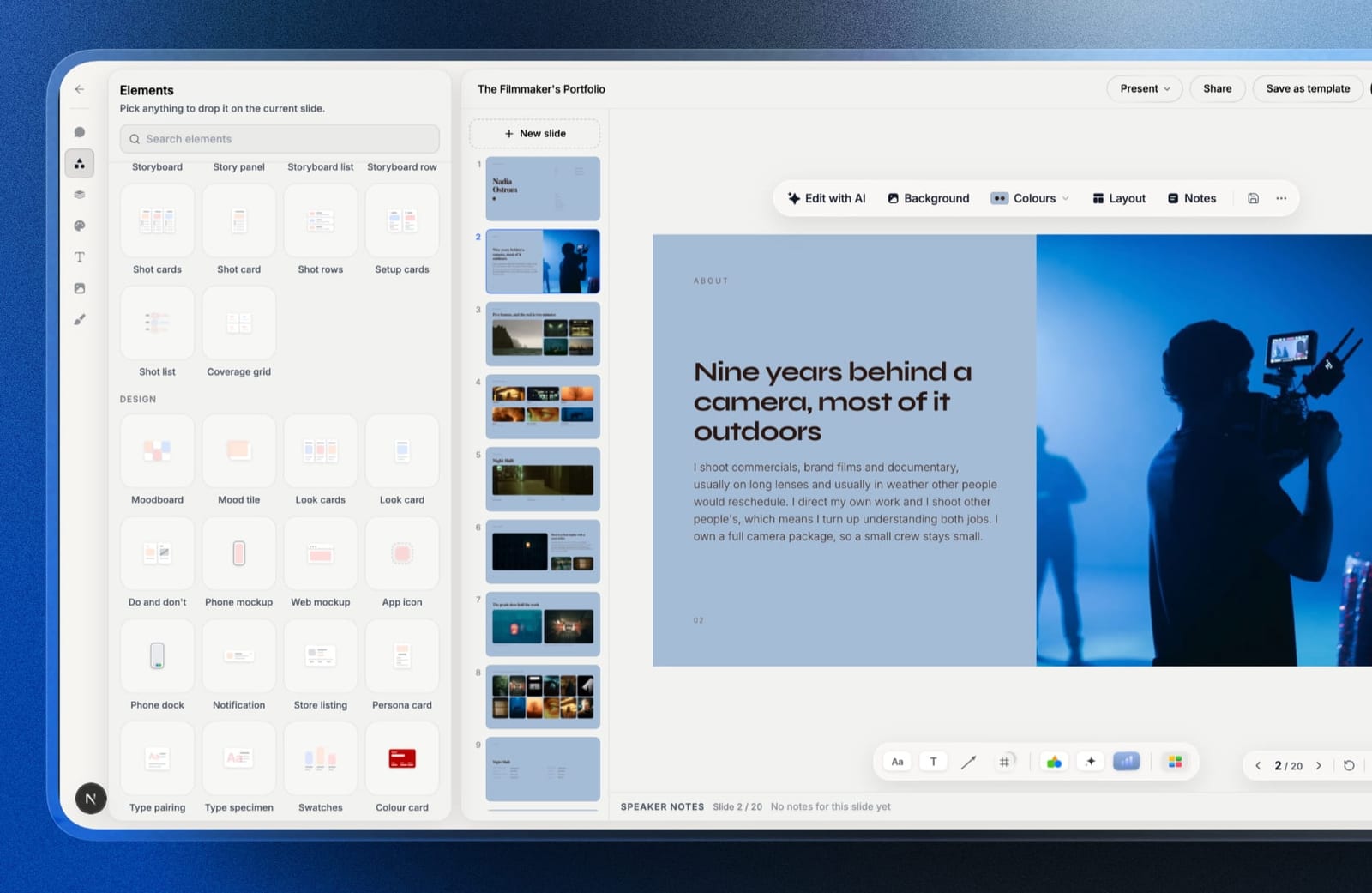
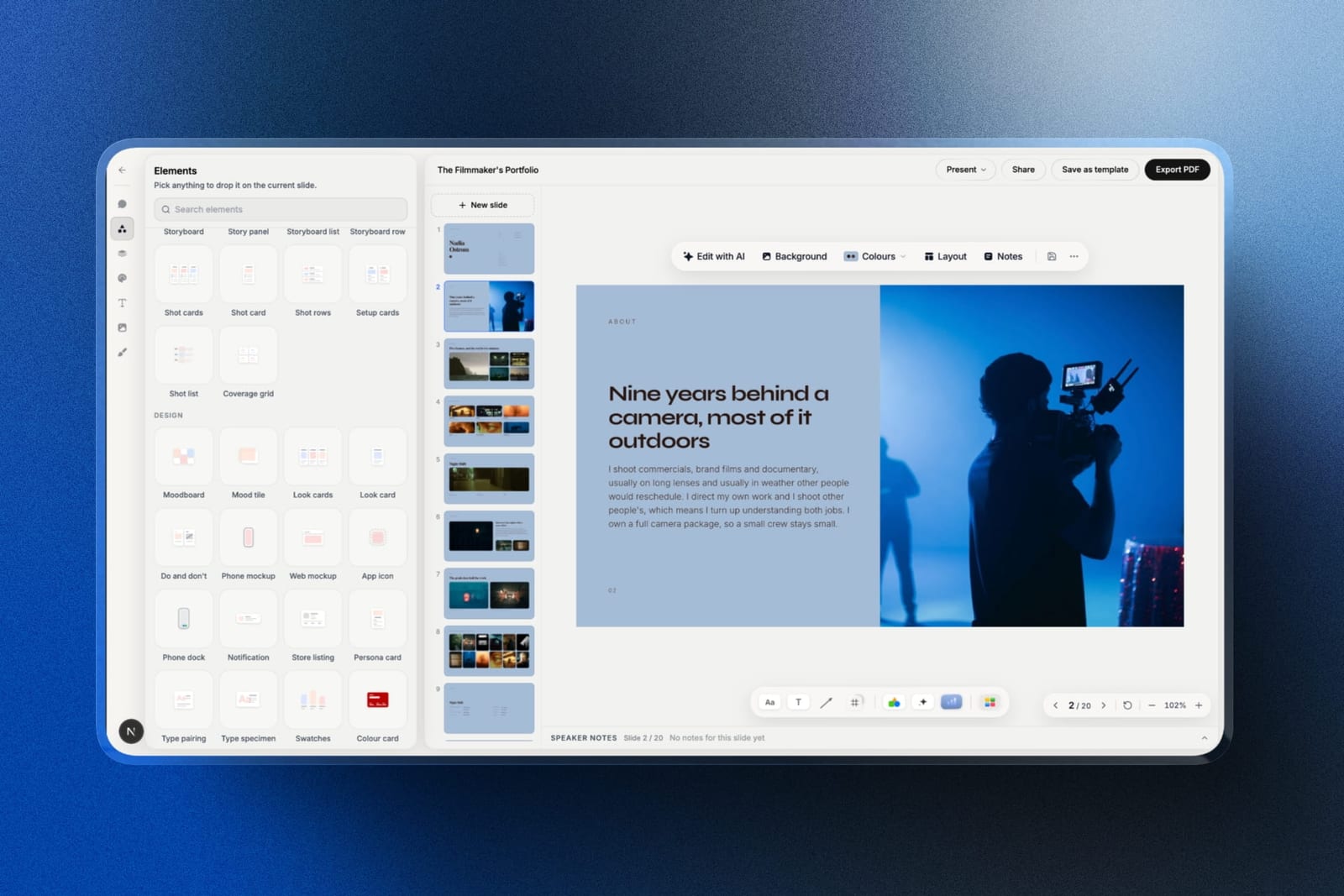
Framekit is an AI website builder whose account includes Slides, a deck editor with its own template library, and it answers the complaint this whole guide circles: a template hands you empty frames and leaves the argument to you.
Framekit's investor deck runs cover, contents, problem, solution, product, market, business model, traction, unique value, team, financials and a closing ask, and the AI drafts that whole sequence from the facts you give it, marking anything you did not supply as a placeholder rather than inventing a number.
The workflow is the order this guide recommends.
Write your one sentence per slide, paste it into the prompt with up to 12 product screenshots or team photos, answer the AI's few questions, approve the outline it proposes, and let it lay the deck out; then drag, cut or add slides by hand, because every element stays editable, or ask the AI for any single slide later.
There are also pitch templates aimed at creative studios and film projects, which matters if your company sells something visual.
Best forFounders who want structure and design in one step and would rather edit a drafted deck than fill an empty template.
The real numberthe free plan includes the AI writer on a monthly AI allowance, unlimited decks, a share link and PDF export with no card.
The full template library, including the investor deck, is on Starter at $84 a year on annual billing, the same as Slidebean Starter, which also adds your own fonts and removes the Framekit byline.
The standout detailrecognisability works in your favour. Investors have seen the top Canva and Google Slides templates many times; a library this new, drafted with your own words and images, is far less likely to look familiar.
The gotchathe template lives inside Framekit. You cannot download it into Google Slides or Keynote, the PowerPoint export on Pro is picture-based rather than editable, and decks are 16:9 with a 40-slide cap.
If an investor or co-founder insists on an editable .pptx, a Slidesgo or HubSpot file is the better start.
Skip it ifyou need the file to live in PowerPoint or Google Slides, or you want written coaching on what each slide should prove. Slidebean and HubSpot's pack explain the why; Framekit drafts the what.
Verdict: The best starting point here for a founder who has the argument and wants a deck that looks designed by lunchtime, with the company website buildable in the same account. Read the Sequoia and Y Combinator outlines first, then let it draft.
2. Slidebean: Best for Investor Narrative Order
Slidebean's templates carry the strongest opinion in this comparison about what your deck should say, and they coach it rather than draft it.
You get a fundraising outline that sequences the standard narrative and prompts you slide by slide, and for a first-time founder that guidance is worth more than any visual style here.
Because the outline already expects the standard sequence, most seed-round content has an obvious home in it. The friction comes when you want a slide the outline does not anticipate, which is the trade you make for structure.
Best forFirst-time founders who do not yet know what belongs on slide six.
The real numberSlidebean Starter is $84 a year on annual billing, one of the two cheapest paid plans in this whole category, and its templates are viewable at Slidebean's template library before you subscribe.
The gotchathe layout engine places your content and the override options are narrow, so the same structure that helps a first-timer frustrates an experienced founder within a week.
Verdict: the best template source if you need the argument scaffolded, and the most constraining if you already know it. See our best Slidebean alternatives for where founders go next.
3. Canva: Best Design Range
Canva's pitch deck library is the deepest here by a wide margin, and the quality range runs from generic to genuinely good. For a founder with a clear argument and no design ability, it is the fastest route to a deck that looks like someone was paid to make it.
The structure is thinner than the design. Canva templates give you named slides in a sensible order and no guidance about what makes a traction slide credible, so the thinking is still yours.
Best forFounders who know what to say and need it to look considered.
The real numberthe free plan covers a complete deck. Pro is $18 a month or $144 billed annually, per Canva's published pricing, and the line that pushes founders onto it is custom brand-font upload.
The gotchathe most-used templates at the top of Canva's library are genuinely recognisable, and investors who read decks weekly have seen them. Pick from further down the list, or restyle the top result.
Verdict: the best design library and a weak structural guide, which is fine if structure is not your problem.
4. HubSpot: Best Free Pack
HubSpot's free pitch deck templates are the strongest genuinely free download here, because they come with written guidance about each slide rather than only layouts. The design is corporate rather than beautiful, and the structural advice is sound.
The cost is an email address and the marketing that follows, which is a fair trade for a usable pack.
Best forFounders who want structure and guidance at $0 and can live with conservative design.
The real numberfree, in exchange for an email, at HubSpot's pitch deck template page.
The gotchathe aesthetic is business-conservative and will not flatter a consumer or design-led company. For a B2B software raise it is fine; for a creative brand it reads as a slide deck from a different industry.
Verdict: the best free pack with real guidance attached, and the design is the price you pay for it.
5. Sequoia and Y Combinator: Best Structural Reference
These are not templates and they belong in this list anyway, because they are the source most of the good templates are copying. Sequoia's business plan outline and Y Combinator's deck design guidance describe what investors want to see, from investors.
Read both before choosing any template. It takes twenty minutes and will tell you which templates are structurally sound and which are decoration.
Best forAnyone about to pick a template, as the thing you check it against.
The real number$0, and no email required.
The gotchathere is no file to download and no design, so you still need a tool. Treat these as the specification and a template as the implementation.
Verdict: the highest-value twenty minutes available in this whole category, and the reason many expensive templates turn out to be structurally hollow.
6. Pitch: Best Company-Grade Design
Pitch's templates are aimed at companies rather than at classrooms, which shows in the language as much as the layout: fewer decorative flourishes, more slides built for real business content like a pricing table or a hiring plan.
They are also less recognisable than the marketplace templates, because fewer people use them, which for a founder pitching investors who read constantly is a quiet advantage.
Best forFounders who want a professional starting point that will not look familiar to an investor.
The real numberPitch Plus is around EUR 120 a year, link tracking sits on the Team plan at EUR 15 a seat a month, and the templates come with the workspace rather than as a separate purchase.
The gotchathe library is small. If you like starting from a template and browsing until something clicks, you will run out of options here quickly.
Verdict: fewer, better templates, and the deck tool around them is the actual reason to be here. Our best pitch deck software comparison covers that in full.
7. Slidesgo: Best Volume and Variety
Slidesgo has an enormous library of Google Slides and PowerPoint templates, much of it free, and finding something in the right visual register takes minutes. For a founder who wants forty options rather than four, it is the fastest place to browse.
Quality varies widely and structure is essentially absent. These are visual themes with slide names, and the ones aimed at pitch decks are usually a generic business template relabelled.
Best forBrowsing a lot of visual directions quickly, particularly for Google Slides.
The real numbera large free tier with attribution requirements on free downloads, and a subscription that removes them, per Slidesgo's pricing page.
The gotchathe attribution requirement on free downloads is real and routinely ignored. Check the licence for the specific template before you send an investor deck carrying assets you have not cleared.
Verdict: great for browsing, weak for structure, and the licensing deserves five minutes of your attention.
8. Envato Elements: Best Professional Design Assets
Envato Elements is a subscription for design assets generally, and its presentation templates are made by professional designers rather than by a platform's template team. The best of them are noticeably better crafted than anything in the free marketplaces.
You are subscribing to an asset library rather than buying a deck, so it makes sense mainly if you will use the fonts, images and other assets too.
Best forFounders or agencies who need design assets beyond a single deck.
The real numbera monthly or annual subscription covering unlimited downloads across the library, at Envato Elements. Check current rates, which have changed more than once.
The gotchathe licence is tied to your subscription in ways that matter if you cancel, particularly for assets used in materials that stay in circulation. Read the terms before using assets in something permanent.
Verdict: the best-crafted templates here and an odd purchase if a deck is all you need.
9. Gamma: Best Generated Starting Point
Gamma is not a template library, it generates a deck from a written brief, and for a founder staring at a blank first slide that is a more useful starting point than any template.
Its documented flow turns a prompt into an editable outline and then a whole deck, and the output stays editable.
The trade is that generated decks share a house style, and investors who see many of them notice.
Best forFounders who would rather react to a draft than fill in a template.
The real numberGamma Plus is $108 a year, and the free plan is credit-limited enough to behave as a trial for anyone regenerating a deck several times.
The gotchathe family resemblance. Restyling the theme with your own fonts and colours removes most of it, and it is worth the time before an investor sees the deck. See our best Gamma alternatives for the wider AI field.
Verdict: a better answer than a template for the blank-page problem and a worse one for the design-quality problem.
10. Beautiful.ai: Best Self-Correcting Layouts
Beautiful.ai's templates adjust themselves as you add content, which means a founder with no design instinct cannot produce badly spaced slides. For a solo founder with one important deck, a single paid month is the sensible way to buy it.
The layout engine that guarantees consistency also overrules you, and the team pricing is steep enough to rule it out for anything beyond one person.
Best forA solo founder who wants tidy slides for one important deck.
The real numberPro is $14.50 a month billed annually, $174 a year, or $45 for a single month billed monthly, per Beautiful.ai's pricing page, re-read on 12 October 2026; there is no one-off project licence.
One $45 month, with the PDF exported before it ends, is the smart purchase for a single raise.
The gotchaa second founder means the Team plan, which the same page prices two ways: $40 a month including three users on the plan card, or $40 per user a month on annual billing in the FAQ.
For two founders that is $480 or $960 a year against $174 for one, so ask which applies before you add a seat.
Verdict: buy one $45 month for a single raise, not the annual plan, unless you are alone and presenting constantly.
11. Google Slides Themes: Best Free Baseline
Google Slides' built-in themes are free, instantly available, and the most recognisable designs in this comparison by a wide margin. Everyone has seen them, which is the whole objection.
They remain a legitimate choice, because a deck with strong content in a plain theme beats a weak deck in a beautiful one.
Best forFounders whose priority is the content and who will not be judged on design.
The real number$0, permanently, with nothing gated.
The gotchaan investor who sees the default theme forms a quick view about how much care went into the raise, fairly or not. If you use it, compensate with unusually specific numbers and a clean, considered layout.
Verdict: the honest free baseline, and the one place where a small amount of design effort has an outsized return.
When You Should Not Use a Template At All
In one linetemplates solve the design problem and quietly worsen the structure problem, because they let you fill twelve slides without deciding whether you needed twelve.
The mechanism is simple. A template presents empty frames, filling frames feels like progress, and you end up with a complete-looking deck built around the template's assumptions rather than your argument.
Real content rarely fits a template unchanged, and when it does not, the honest fix is to change the template rather than the content.
Write the sentences first. One sentence per slide, in a document, before you choose anything. If those sentences do not read as an argument, a template will hide that from you for another week.
Then pick the template that fits the argument you wrote, rather than writing the deck the template implies. That order is the difference between a template saving you a weekend and a template costing you a round.
Our guide to making a pitch deck covers the eleven slides and what belongs on each.
The Licensing Trap
In one linethe template is usually licensed clearly and the stock photography and fonts inside it often are not, and an investor deck is a commercial document.
Three specific things catch founders. Attribution requirements on free downloads from the large marketplaces, which are real and routinely ignored. Font licensing, where a template ships with a typeface you are licensed to view rather than to redistribute in an exported file. Stock imagery included for preview purposes only, which is common and rarely flagged prominently.
The practical rule: for anything you will send to investors, replace the stock imagery with your own product screens and your own team photographs, which is better for the deck anyway, and check the font licence before exporting a PDF that will circulate for months.
Frequently Asked Questions
What is the best pitch deck template in 2026?
The best pitch deck template source in 2026 is Framekit Slides, because its investor deck follows the full fundraising sequence and its AI drafts each slide from your description, though the template cannot leave Framekit as an editable file.
Slidebean is best for coached structure and Canva for design range.
HubSpot's free pack is the strongest genuinely free download with guidance attached, and the outlines published by Sequoia and Y Combinator are the best structural reference of all at no cost.
Are free pitch deck templates any good?
Some are, and the good ones are the ones that carry guidance rather than only layouts.
HubSpot's free pack includes advice per slide, Google Slides themes are free and extremely recognisable, and the large free marketplaces vary enormously in quality and carry attribution requirements on free downloads.
The genuinely free structural references from Sequoia and Y Combinator are more valuable than most paid templates.
Do investors recognise pitch deck templates?
Yes, particularly the most-downloaded templates from the big free libraries and the default Google Slides themes.
Investors who read decks weekly have seen them repeatedly, and the effect is a small loss of the impression that the deck was made for them.
It does not cause rejection, and picking from further down a library or restyling the top result removes most of it.
Should I use a template or start from scratch?
Use a template for the design and never for the argument. Write one sentence per slide in a document first, then choose a template that fits what you wrote, because doing it the other way around means writing the deck the template implies.
Before you commit to one, lay your eleven sentences against its slide list and count what you would cut or add; if the count is high, pick a different template.
How much should a pitch deck template cost?
Between $0 and about $144 a year, and most founders should not spend more.
HubSpot's pack, Google Slides themes and the investor-published outlines are free; Framekit Starter and Slidebean at $84 a year and Canva Pro at $144 a year are the paid options that earn their price.
Beautiful.ai has no one-off licence, but a single $45 month of Pro covers one raise if you export the PDF before it ends.
Can I use a Canva template for an investor deck?
Yes, and it is one of the most common ways decks get made.
The free plan produces a complete deck with no watermark, the design quality is high, and the only feature likely to force an upgrade is uploading a licensed brand typeface at $144 a year.
Replace the stock imagery with your own product screens and team photographs before sending.
What is the licensing risk with pitch deck templates?
The template is usually licensed clearly and the assets inside it often are not.
Free downloads from the large marketplaces frequently carry attribution requirements, fonts may be licensed for viewing rather than embedding in an exported file, and included stock imagery is sometimes preview-only.
For a deck that will circulate among investors for months, replace stock assets with your own and check the font terms.
How many slides should a pitch deck template have?
Between ten and fifteen, and be suspicious of any template with twenty or more.
A longer template encourages you to fill slides you do not need, which dilutes attention on the four that decide most seed outcomes: problem, traction, team and the ask. Put everything else in an appendix, where it costs nothing.
Framekit vs Slidebean: which pitch deck template is better?
Framekit is better if you want the template drafted for you and full control over the layout; Slidebean is better if you want coaching on what each slide should prove. Both cost $84 a year on their entry paid plans.
Framekit's AI writes the investor deck from your description and lets you move anything, while Slidebean's layout engine places content for you and adds viewer analytics beyond the single total view count a Framekit deck shows.
Is Slidebean worth it just for the templates?
At $84 a year, yes, for a first-time founder, because the structure is the product and it is the cheapest way to buy it.
What you are paying for is knowing what belongs on each slide, which is exactly what a first-time founder lacks and an experienced one does not. Once you know the structure, the layout constraints become the reason to leave.
Do I need a website as well as a pitch deck?
Yes, because the deck gets forwarded to people who will search your company before deciding whether to take a meeting, and an empty result reads as risk. It does not need to be elaborate: positioning, team, and a way to make contact.
Framekit is an AI website builder that generates that site from a description and publishes it free on a framekit.ai subdomain, or on your own domain from the $9 Starter plan, in the same account as its deck templates.
Final Verdict
Framekit Slides is the best pitch deck template source in 2026 for founders who want the template filled in rather than handed over: use the investor-published outlines from Sequoia and Y Combinator as the specification, then let Framekit's AI draft the deck.
Slidebean is the pick if you need the structure coached for you at $84 a year, and Canva if the structure is settled and the deck needs to look considered.
HubSpot's free pack is the best download that costs nothing and carries real guidance.
The advice that matters more than the source: write the sentences before you choose the template. Expect any template to need changing, because founders who let the template decide the shape of the argument end up with a complete-looking deck about nothing in particular.
Where a template will not help you: if your traction slide has no numbers on it, no layout in this comparison saves it, and the hour you would spend browsing templates is better spent finding the figure.
Where Framekit losesFramekit is not for founders who need the template as an editable PowerPoint, Keynote or Google Slides file, and it does not coach each slide the way Slidebean and HubSpot's guidance do.
Those sources are the better fit if portability or written guidance matters more than a drafted deck.
Keep reading: our guide to making a pitch deck, the best pitch deck software comparison, and the best presentation software roundup.