Framekit templates
Start from a designer-made template
 Use template
 Use template
 Use template
 Use template
 Use template
 Use template
 Use template
 Use template
Founders arrive at Slidebean alternatives from one of two directions.
Either the layout engine has stopped helping - you want the logo two centimetres to the left and the software will not let you - or you have looked at the pricing and noticed that the useful tier is not $7 a month, it is $99.
Slidebean Starter is $7 a month billed yearly, which is $84 a year and one of the cheapest plans in this whole category.
Accelerate is $99 a month, which is $1,188 a year, and what it buys is people: a strategy call, an investor CRM, and twice-monthly sessions with a pitch-writing team.
That is not a software upgrade. It is a consultant with a login attached.
A pitch deck tool is presentation software shaped around a fundraising narrative: templates that follow the problem, solution, market, traction, and ask structure investors expect, usually with view tracking so you know which investor opened which slide.
A Slidebean alternative is any tool that delivers that structure without Slidebean's fixed layouts or its services-priced upper tier.
Framekit Slides is one of them, and the only one that also builds the company website a partner opens in the next tab: it drafts the investor sequence with AI, then leaves every headshot, chart and logo on the slide free to move.
The best Slidebean alternative in 2026 is Pitch, because it gives you investor-grade design with full layout control, real link analytics that show who opened your deck, and a Team plan for up to 25 seats at EUR 15 a seat a month, paying yearly.
The trade-off is that Pitch has no investor-specific template narrative, so you supply the structure Slidebean would have handed you.
Framekit Slides is second, the pick if you want an AI-drafted investor deck with full layout control and the company website in the same account, though it shows only a total view count rather than who opened the deck.
Gamma is third and the fastest way to a first draft, Canva is the pick if design matters more than tracking, and Google Slides is the free answer once you know what your deck should say.
Full disclosure: Framekit is our own product. It is ranked second rather than first because it scores 1 of 10 on view tracking, a criterion this guide weights at 20%, for a total view count with nothing per investor, and we would rather say that than reweight the rubric in our favour. This update prints every tool's score on the five criteria, prices Pitch per seat on the Team plan that carries its tracking, and scores Gamma on the Plus plan its help centre says has limited or no analytics; that moved Gamma above Canva and Visme above Google Slides and left Pitch first. Like every entry, Framekit is scored from its published features rather than a hands-on build.
How We Compared 8 Slidebean Alternatives, Plus Framekit
Every tool was judged against the same seed-stage deck, as a scenario rather than a build: twelve slides following the standard investor narrative, with a market-size slide, a traction chart, a three-tier pricing slide, a team slide with five headshots, and a closing ask.
For each tool we asked what its sharing features say they report about who opened it.
Then we priced each one at the two moments that matter to a founder: while raising, and afterwards.
Verified covers prices, plan limits and tracking features taken from published vendor pages in August 2026; no deck was built or sent to produce them. Community sentiment is labelled where it appears.
This guide was re-verified on 19 September 2026 to add Framekit as a ninth alternative now that its Slides deck editor ships, and read through again on 20 September 2026 against the same five criteria; Framekit's prices were checked on its own pricing page both times, and competitor prices are unchanged from August.
In October 2026 we removed build-and-share test results we could not document and corrected Pitch's pricing, which is per seat.
On 12 October 2026 we re-read Pitch's and Beautiful.ai's pricing pages and Gamma's analytics help article, re-scored cost per seat on the plan that carries each tool's tracking, and printed every criterion score so the ranking can be checked.
The weighting
Layout control is 25%, because it is the first Slidebean complaint. Investor-deck structure is 20%. View tracking is 20%, since knowing which investor read to the ask changes your follow-up. Cost is 20%. Design ceiling is 15%.
View tracking carries an unusually high weight for a design comparison. In fundraising it is the one analytic that reliably changes behaviour: a deck opened three times by one partner is a different conversation from one opened once for forty seconds.
How the scores are set. Each criterion is scored 1 to 10, or 0 where a tool offers nothing, from the vendor's own pricing and help pages.
View tracking runs from 0 for nothing and 1 for a total view count, through 3 for limited data on the plan priced and 5 for analytics a pricing page lists inconsistently, to 9 for per-recipient slide views with expiry and revocation and 10 for section-level reading per recipient.
Cost is one founder's year on the plan that carries the features scored: 10 for free, 9 under $100, 8 under $150, 7 under $200, 6 for about $200 to $250 and 5 above that, with Pitch's EUR 180 Team seat placed at 6 because each co-founder doubles it.
What the Nine Alternatives Offer
- 5 of 9 include view or read tracking on some paid plan, and Framekit shows a total view count on every plan, free included, without saying who opened the deck.
- Slidebean is the tool here built around scripting and coaching the fundraising narrative; Framekit's investor template and Canva's pitch templates give you the page order but not the coaching.
- The cheapest paid alternatives are Framekit Starter at $84 a year, level with Slidebean Starter, then Microsoft 365 Personal at $99.99 and Gamma Plus at $108, so leaving on price alone does not work.
- 4 of 9 cost nothing at all in a form usable for a real raise: Google Slides, Canva's free plan, Framekit's free plan, and PowerPoint for the web.
- 0 of 9 replace what Slidebean Accelerate actually sells, because none of them include a human who reads your deck.
- Most of the nine let you place elements freely, which is the single most requested thing Slidebean does not do; Storydoc's scrolling format allows it only in part, and Beautiful.ai only on its blank Classic Slides.
Quick Comparison: 9 Slidebean Alternatives
Weighted on the five criteria above, with every score printed in the next section, Pitch leads while tying Canva for the lowest investor-deck structure score in the top four, which is precisely what you give up when you leave a fundraising-specific tool, and Framekit sits second because it scores 1 of 10 on view tracking.
| Tool | Best for | View tracking | Layout control | Cheapest paid with what is scored, per year | Rating |
|---|---|---|---|---|---|
| Pitch | Control plus real link analytics | Yes, advanced links on Team | Full | EUR 180 a seat (Team) | 8.05/10 |
| Framekit | AI-drafted investor deck plus the company site | Total view count only, 1/10 | Full | $84 | 7.30/10 |
| Gamma | The fastest structured first draft | Limited on Plus, full on Pro | Cards you rearrange | $108 | 6.85/10 |
| Canva | Design quality on any budget | No | Full | $144 | 6.80/10 |
| Storydoc | Knowing exactly what was read | Yes, section level | Partial | $237.60 | 6.55/10 |
| Visme | Market and traction charts | Yes, on Pro | Full | $297 with analytics | 6.35/10 |
| Beautiful.ai | Tidy slides without decisions | On Team; Pro listed both ways | Smart Slides locked, Classic Slides free | $174 | 6.30/10 |
| Google Slides | Raising with no tool budget | No | Full | $0 needed | 5.65/10 |
| Microsoft PowerPoint | Sending a file investors can edit | No | Full | $99.99 | 5.45/10 |
Prices in this table were checked against each vendor's own published plans during August 2026, with Pitch's and Beautiful.ai's re-read on 12 October 2026, and Pitch quotes in EUR.
How the Nine Alternatives Score on the Five Criteria
Every rating above is the sum of the scores below multiplied by this guide's weights, so you can see exactly why each tool sits where it does and re-rank the nine yourself if your raise values tracking or cost differently.
| Tool | Layout control (25%) | Investor structure (20%) | View tracking (20%) | Cost (20%) | Design ceiling (15%) | Score |
|---|---|---|---|---|---|---|
| Pitch | 10 | 6 | 9 | 6 | 9 | 8.05 |
| Framekit | 10 | 8 | 1 | 9 | 8 | 7.30 |
| Gamma, Plus | 8 | 8 | 3 | 8 | 7 | 6.85 |
| Canva | 10 | 6 | 0 | 8 | 10 | 6.80 |
| Storydoc | 5 | 6 | 10 | 6 | 6 | 6.55 |
| Visme | 9 | 5 | 6 | 5 | 6 | 6.35 |
| Beautiful.ai | 6 | 6 | 5 | 7 | 8 | 6.30 |
| Google Slides | 10 | 2 | 0 | 10 | 5 | 5.65 |
| PowerPoint | 10 | 2 | 0 | 9 | 5 | 5.45 |
Pitch's cost score fell from the 8 its EUR 120 Plus plan would earn to 6, because the advanced links that carry its tracking start on Team at EUR 15 a seat, and it still leads by 0.75.
Gamma's tracking score is 3 because its help centre gives the $108 Plus plan limited or no analytics; at that score it still edges Canva for third.
Under other weights. Lower view tracking to 10 percent and raise cost to 30, and Framekit leads at 8.10, ahead of Pitch at 7.75 and Canva at 7.60. With all five criteria at 20 percent, Pitch still leads at 8.0 and Framekit is second at 7.2.
In one lineThe order turns on view tracking, where Framekit scores 1 and Canva, Google Slides and PowerPoint score nothing, so a founder who will not act on read data should read this table with that column set to zero.
What View Tracking Actually Costs
In one lineamong the alternatives, the tracking you can count on starts at EUR 180 a seat on Pitch Team, and the most detailed is Storydoc at $237.60, while Slidebean itself tracks views on an $84 plan that undercuts both; Gamma's full analytics need Pro, and Beautiful.ai's Pro is listed both ways.
| Tool | What it tells you | On which plan | Per year |
|---|---|---|---|
| Slidebean | Who opened the deck | Starter | $84 |
| Gamma | Who opened it and how far they read | Pro; Plus gets limited or no data | $108 for Plus; Pro not readable in October |
| Pitch | Per-recipient link activity on advanced links | Team | About EUR 180 |
| Beautiful.ai | Viewer and slide analytics on shared links | Team; Pro listed both ways | $174 for Pro; Team priced two ways |
| Visme | Analytics on published projects | Pro | $297 |
| Storydoc | Section-level read data per recipient | Starter | $237.60 |
| Canva | Nothing | Any | Not available |
| Framekit | A total view count per deck, nobody named | Any | Included |
| Google Slides | Nothing | Any | Not available |
Run this on yourself. Count how many investors you will send the deck to in this raise. If it is under ten, tracking is a curiosity and you should optimise for design and speed.
If it is fifty, the difference between "opened" and "read to slide eleven" is worth more than any template, and Storydoc's price stops looking high.
1. Pitch: Best Overall Slidebean Alternative
Our rating: 8.05/10
Pitch is the closest thing to Slidebean with the handbrake off.
You get a designed editor with full control over every element, custom templates that become your own house structure, and link controls that go beyond simple tracking into expiry and per-recipient revocation, which is genuinely useful when a deck circulates further than intended.
The difference shows on a team slide: five headshots at slightly different crops, which Slidebean's layout engine arranges for you and Pitch lets you align by hand.
Best forFounders who want investor-grade design without a layout engine overruling them.
Key features:
- Full layout control with a modern, designed editor
- Advanced links with tracking, expiry, and per-recipient access
- Custom template libraries that become your house structure
- Teamspaces for organising versions by investor
- PowerPoint export and custom fonts on paid plans
The real numberthe free plan gives one seat, unlimited presentations, and two external guests, which is tight for a raise.
Plus is EUR 10 a month on annual billing, Team, where the advanced links live, is EUR 15 a seat for 1 to 25 seats, and Business is EUR 20 a seat, per Pitch's pricing page.
Prices are quoted in EUR, and every plan bills per seat, so two founders tracking a raise pay EUR 360 a year on Team.
The gotchatwo external guests on the free plan is the limit that bites during fundraising, because every investor you share with counts. Plan on the paid tier from the start rather than discovering it mid-raise.
Pros:
- Full control, which is the main thing Slidebean withholds
- The best link controls of the nine, including revoking a shared deck
- A Team plan for up to 25 seats, so co-founders and advisors edit in one workspace
Cons:
- No investor-narrative template, so you supply the structure
- Two external guests on the free plan
- Prices in EUR, which complicates a dollar budget
Skip it ifyou do not know what a seed deck should contain. Pitch gives you a canvas and Slidebean gives you a script, and if you need the script, that is a real reason to stay.
Verdict: Pitch is the right move for a founder who has the narrative and wants the deck to look like the company. Visit Pitch
2. Framekit: Best for an Investor Deck and a Real Company Site

Our rating: 7.30/10
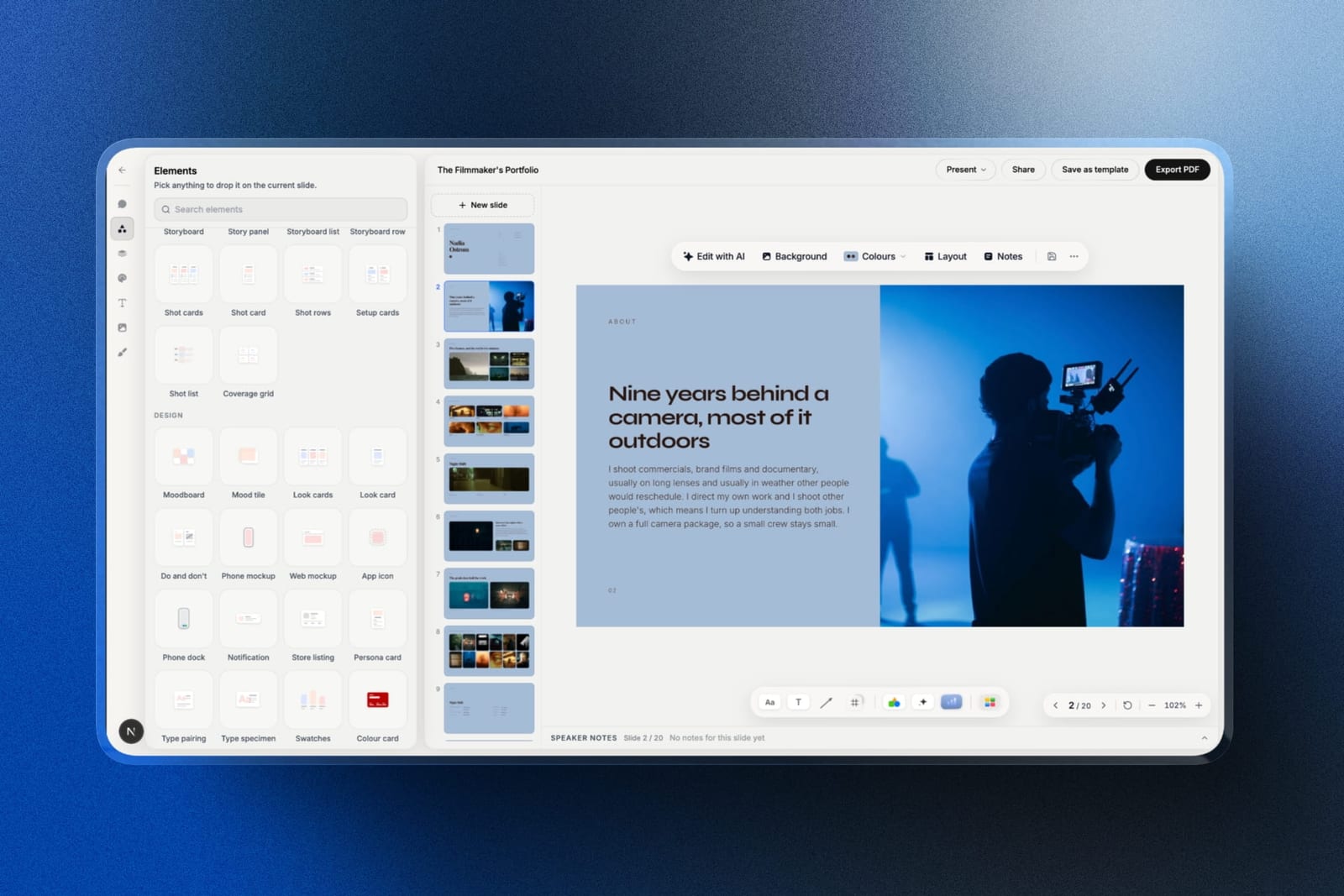
Framekit is an AI website builder that also ships Slides, a deck editor, which makes it the one alternative here that covers both artefacts a partner looks at: the deck, and the website they open in a new tab after the ask.
For the deck, you describe the company in the prompt, attach product screenshots or photos, up to 12 per prompt, and the AI writes and lays out the slides.
The paid template library includes an investor deck whose layouts run cover, problem, solution, product, market, model, traction, team, financials and the ask.
Unlike Slidebean, nothing is locked. The five-headshot team slide is the example: every portrait can be dragged, cropped and aligned by hand, or you tell Edit with AI to redo the slide around five people.
Best forFounders with a short, warm investor list who want the deck and the company site built in one place.
The real numberthe free plan includes the AI writer, unlimited decks, a share link and PDF export with no card.
Starter is $84 a year on annual billing, exactly Slidebean Starter's price, and adds the template library, your own fonts, a custom domain for the website and removal of the Framekit byline. PowerPoint export needs Pro at $180 a year.
The standout detailthe share link can be reset. If a deck gets forwarded somewhere it should not, one click kills the old address and issues a new one, and published deck links are marked noindex so they stay out of search.
The gotchathere is no per-investor tracking, which is why it is not first: a deck link shows a total view count and nothing about who opened it, so you will not know which partner read to slide eleven.
The .pptx export is also picture-based, so an investor who wants to drop your slides into their committee template gets images, and a deck holds up to 40 slides.
Skip it ifyou are sending to fifty investors and will change your follow-up based on read data. Storydoc or Pitch is the right tool for that raise.
Verdict: For a pre-seed or seed founder raising from a warm list, this is the most complete kit here: an AI-drafted deck you control completely, and the website that has to be ready when the partner goes looking, from one account.
3. Gamma: Fastest Route to a First Draft
Our rating: 6.85/10
Gamma does the one thing Slidebean's AI builder promises, faster and better. Given a paragraph about the company, one prompt returns a whole structure with a problem, a market frame and a closing ask.
Its analytics are the catch: Gamma's analytics help article says full analytics need Pro or higher and that Free and Plus get limited or no access, so the $108 Plus plan buys the drafting, not the investor tracking.
Best forFounders who need a draft to react to and a deck that will be opened as a link.
Key features:
- Prompt-to-deck generation producing structure as well as copy
- Analytics on who opened a link and how far they read, in full on Pro
- Web-native cards that reflow on a phone
- Image generation and stock search in the editor
- PDF and PowerPoint export, flattened on the way out
The real numberthe free plan grants 400 credits once and never refreshes them, which is roughly six twelve-slide decks using the only published credit-to-slide ratio in this category. Plus is $9 a month billed annually, $108 a year, refreshing 1,000 credits monthly.
The gotchainvestors often ask for a PDF or a .pptx, and Gamma's export flattens its scrolling layout into fixed slides. The deck you share as a link and the file you attach to an email are noticeably different artefacts.
Pros:
- The fastest structured draft of the nine
- Full analytics a plan away, on Pro, when the raise needs them
- Genuinely good on a phone, where a partner may first open it
Cons:
- Free credits never refresh
- Exports flatten the layout
- A recognisable house style until you override it
Skip it ifyour deck's final form is an attachment rather than a link.
Verdict: Gamma is the best first-draft tool for a founder and a compromised final-file tool.
4. Canva: Best Design on Any Budget
Our rating: 6.80/10
Canva is the alternative most founders end up using, and the reason is that a fundraising deck is a design problem more than a software problem.
Its template library includes plenty of pitch-shaped starting points, the free plan is genuinely usable for a real raise, and every element can be moved.
What it does not do is tell you anything about who opened your deck, which for a founder sending to forty investors is a real gap.
Best forFounders who care about how the deck looks and will track investor interest another way.
Key features:
- The largest well-designed template library in the category
- Complete control over every element on the slide
- A free plan with no watermark on standard exports
- Export to PDF and PPTX, which is what most investors ask for
- Brand Kit on Pro for fonts, colours, and logos
The real numberthe free plan covers a whole raise except brand fonts. Pro is $18 a month or $144 billed annually, about $12 a month, which is $60 a year more than Slidebean Starter and buys a far broader tool.
The gotchano analytics of any kind. If you want to know which investor opened the deck, you will be sending links through a separate service, and that is friction at exactly the wrong moment.
What reviewers say elsewhereCanva carries a 4.7 out of 5 rating on G2 from over 6,800 reviews, the largest verified review sample of any tool in this comparison.
Pros:
- The strongest design output here, free or paid
- Full layout control with no engine to fight
- A free plan you can genuinely raise on
Cons:
- No view tracking at all
- Custom brand fonts require Pro
- Premium stock assets watermark the export
Skip it ifknowing who read your deck matters to how you follow up.
Verdict: Canva is the best-looking answer and the least informative one. For a small, warm investor list that is the right trade. Designers should also read our best AI tools for designers roundup.
5. Storydoc: Best for Knowing What Was Read
Our rating: 6.55/10
Storydoc is the alternative for founders running a wide raise. Its section-level analytics tell you which investor reached the traction slide and which stopped at the market slide, and personalisation lets you send a version tailored to each fund without maintaining ten files.
It is the most expensive tool here and its templates read corporate rather than distinctive, which for a consumer or design-led startup is a real cost.
Best forFounders sending to a long investor list who will change their follow-up based on the data.
Key features:
- Section-level read analytics per recipient
- Personalisation variables for per-investor versions
- Scrolling, interactive documents that work well on mobile
- Embedded video and live data
- Version automation for sending variants of one deck
The real numberStarter is $19.80 a month, billed $237.60 a year, capped at 5 active documents; Pro is $36 a month, billed $432, at 30 documents, per Storydoc's pricing page. Starter is 2.8 times Slidebean's $84 a year.
The gotchathe five-document cap counts what stays live, so archiving an old version to make room takes its link offline. During a raise that means a link you sent in week two can go dark in week six.
Pros and consthe best investor read-data of the nine and genuinely personalised versions, against the highest price here, a live-document cap that breaks old links, and corporate templates.
Skip it ifyour list is short or you will not act on the data.
Verdict: Storydoc earns its price on a fifty-investor raise and wastes it on a ten-investor one.
6. Visme: Best for Market and Traction Charts
Our rating: 6.35/10
Fundraising decks live or die on two slides, market size and traction, and both are charts. Visme has the deepest chart library in this comparison, which makes it the strongest tool for the specific slides investors scrutinise most.
Everything around those charts is mid-table, and its free plan brands published work, so the practical entry price is $147 a year.
Best forDecks where the market and traction slides carry the argument.
Key features:
- The deepest chart and data-visualisation library of the nine
- Analytics on published projects on Pro
- Brand Kit and privacy controls on Pro
- PPTX and HTML5 export on paid plans
- Report templates for a data room leave-behind
The real numberStarter is $12.25 a month at $147 a year, and Pro, which is the tier with analytics, is $24.75 a month at $297, per Visme's pricing page. Analytics therefore costs 3.5 times what Slidebean charges for the same information.
The gotchathe free plan puts a Visme logo on published work, which on an investor-facing deck is the wrong signal at the wrong moment.
What reviewers say elsewhereVisme holds 4.5 out of 5 on G2 across roughly 469 reviews, with the chart tooling the most consistently praised element.
Pros and consthe best market and traction charts here and a useful report format for a data room, against branded free output, analytics only on the $297 tier, and a busier editor.
Skip it ifyour deck is narrative rather than numerical.
Verdict: Visme is a two-slide specialist. Those happen to be two important slides.
7. Beautiful.ai: Best If You Cannot Spot Bad Spacing
Our rating: 6.30/10
Beautiful.ai is the closest philosophical match to Slidebean in this list, which makes it a strange alternative: its Smart Slides take away layout control in the same way, for the same stated reason, and only its blank Classic Slides hand it back.
If your complaint was the constraint, this is a partial escape at best.
It is a genuine option if your complaint was the price ladder, because a $45 month of Pro, billed monthly and cancellable, buys the whole product for one deck.
Best forFounders who want guaranteed tidiness for a single important deck.
Key features:
- Smart Slides with over 300 self-balancing layouts
- Viewer and slide analytics on Team, while Pro's viewer analytics appear in one part of the pricing page and not another
- Dynamic data visualisations linked to live sources
- Custom branding applied across a whole deck
- PowerPoint export on all plans
The real numberPro is $14.50 a month billed annually, $174 a year, and the page offers Pro billed monthly at $45 for one-off projects; Team is $40 a month for up to three users on the plan card, or $40 per user a month on the FAQ, per Beautiful.ai's pricing page re-read on 12 October 2026.
The 14-day trial requires a card.
The gotchaa second founder means Team, $480 or $960 a year for two depending on which line of the pricing page holds, against $174 for one Pro seat, and the same page lists Pro's viewer analytics in its comparison table but not on the Pro plan card.
Pros and consthe tidiest output here, analytics on Team, and a $45 single month for one deck, against no free plan, a card-gated trial, layout control only on Classic Slides, and a second seat priced two ways.
Skip it iflayout control is the reason you are leaving Slidebean.
Verdict: Beautiful.ai swaps one layout engine for another. Buy one $45 month for a single deck rather than the subscription, and confirm the analytics in the trial if tracking is why you came.
8. Google Slides: Best Free Fundraising Tool
Our rating: 5.65/10
A large number of funded decks were built in Google Slides, and the reason is simple: once you know what your deck should say, the tool barely matters. It is free, it exports the .pptx and PDF investors ask for, and multiple co-founders can work on it at once without conflict.
It offers no structure and no analytics, so it is the right choice at exactly the point where you no longer need either.
Best forFounders who know their narrative and want to spend nothing on software.
Key features:
- Free and unlimited with any Google account
- Clean .pptx and PDF export, which is what investors request
- Reliable real-time co-editing between co-founders
- Version history that restores a single slide
- Comment threads for feedback from advisors
The real number$0 permanently on a personal account, or $7 per user a month on a company domain through Google Workspace Business Starter, per Google's published pricing.
Against Slidebean Starter's $84 a year, you save the entire subscription.
The gotchasharing defaults are closed, so the classic failure is an investor hitting a request-access screen. Set link sharing deliberately before every send.
Pros and consfree, reliable, universally openable, and the best co-founder collaboration here, against no investor structure, no analytics, and dated default templates.
Skip it ifyou need the deck to look designed and you cannot design.
Verdict: Google Slides is the correct answer for a founder with a strong narrative and a weak budget, which describes a lot of pre-seed.
9. Microsoft PowerPoint: Best for a File Investors Can Edit
Our rating: 5.45/10
Some investors, particularly at later stages and in corporate venture, will ask for an editable file and put your deck into their own template for an internal committee. PowerPoint is the only tool here where that never involves a conversion step.
It offers no structure, no analytics, and the most dated default templates in the comparison, so it is a compatibility choice rather than a creative one.
Best forRaises where the deck will be edited or re-formatted by someone else.
Key features:
- Native .pptx with no conversion in either direction
- Full offline authoring for pitching in rooms with poor connectivity
- Morph transitions and precise alignment tools
- Local font access on the desktop app
- A free web version with a reduced feature set
The real numberthe web version is free. The desktop app comes with Microsoft 365 Personal at $9.99 a month or $99.99 a year, per Microsoft's plan page. That is about $16 a year more than Slidebean Starter.
The gotchathe free web version has no offline mode and no local fonts, so it fixes neither of the reasons a founder would choose PowerPoint.
Pros and consperfect file compatibility, offline reliability, and the deepest presenting tools, against dated defaults, no analytics, and no investor structure.
Skip it ifyour investors read decks as links, which most early-stage investors do.
Verdict: PowerPoint is the later-stage answer. For a seed round it is usually unnecessary.
What Investors Look at After the Deck
In one lineevery investor who likes a deck immediately checks the company's website, and a founder with a strong deck and a placeholder site has moved the doubt rather than removed it.
The deck is not the last artefact in the chain, and founders underestimate the next one. A partner who reads to the ask opens a new tab and types your company name, and what loads next is doing as much work as slide eleven did.
A one-page site with the product, the team, and a way to get in touch is a small job that a surprising number of pre-seed companies postpone until after the raise.
This is the reason Framekit ranks where it does despite scoring 1 of 10 on view tracking: the same account that holds the deck builds that site, so the page an investor lands on shares the deck's fonts, colours and story.
Any tool above can build the deck; the site is the step that gets skipped.
Honest limitsa published Framekit deck is an unlisted link without a password, so a confidential data-room document belongs behind a proper access control rather than on a shared deck link.
How to Choose a Slidebean Alternative
1. Was the $99 Accelerate tier the problem? Recognise what it was: consulting. If you need a person to read your deck, hire one directly and use a $0 tool for the slides. Otherwise, go on.
2. Are you sending to a long list and will act on read data? Yes: Pitch Team for link controls at EUR 180 a seat, or Storydoc at $237.60 for the most detail; Gamma tracks in full only on Pro. No: go on.
3. Is your website still a placeholder too? Framekit Slides, which drafts the deck with AI and builds the site in the same account.
4. Was the fixed layout the only problem, and design is the priority? Canva, with complete control and the widest template range.
5. Do you have the narrative already and no budget? Google Slides, for free.
6. Do market and traction charts carry your story? Visme.
7. Will investors put your deck into their own template? PowerPoint, because every other export here, Framekit's included, needs converting or arrives as pictures.
8. Do you want tidiness guaranteed for one important deck? Beautiful.ai, for one $45 month billed monthly.
Frequently Asked Questions
What is the best Slidebean alternative in 2026?
The best Slidebean alternative in 2026 is Pitch, because it delivers investor-grade design with complete layout control and advanced link tracking that shows per-recipient activity on its Team plan, at EUR 15 a seat a month for up to 25 seats.
Framekit Slides is second, the pick for founders on a warm list who want an AI-drafted investor deck and the company website in one account, though it shows only a total view count.
Gamma is third and the fastest route to a structured first draft, and Canva is the better choice if design matters more than analytics.
Framekit vs Slidebean: which should a founder use?
Slidebean is better if you want the fundraising narrative coached and view tracking on an $84 plan; Framekit is better if you want full layout control and your company website built alongside the deck.
Both cost $84 a year on their entry paid plans. Framekit has no per-investor tracking, only a total view count, and no human pitch help, while Slidebean has no website builder and locks your layout.
Is Slidebean worth it for a pitch deck?
Slidebean Starter at $7 a month billed yearly, or $84 a year, is genuinely good value if you want the investor narrative handed to you and do not mind a layout engine deciding your arrangement.
It stops being worth it when you want control over the design, and its $99 a month Accelerate tier is a consulting product rather than a software upgrade.
Does Slidebean have a free plan?
Yes. Slidebean's free tier has no time limit and requires no credit card, and it allows unlimited presentations built from scratch or from a subset of templates.
That makes it one of the more honest free tiers among specialist tools, and the practical limit is the narrower template range rather than a countdown.
Which pitch deck tool shows who opened the deck?
Five of the nine compared include view tracking on some paid plan.
Pitch offers per-recipient link activity on its Team plan at EUR 15 a seat a month; Storydoc gives section-level read data at $237.60 a year; Gamma reports who opened a link and how far they read in full on Pro, with limited or no data on its $108 Plus plan; Visme puts analytics on its $297 tier; and Beautiful.ai lists them on Team, with its $174 Pro plan shown both ways on the same pricing page.
Canva and Google Slides offer none, and Framekit shows a total view count without names.
What is the cheapest way to make a pitch deck?
Google Slides at $0 is the cheapest, and it exports the PDF and .pptx investors ask for. Canva's free plan and Framekit's free plan, which includes AI drafting and PDF export, are the cheapest options that also look designed.
If you want view tracking as well, Slidebean Starter at $84 a year is the lowest-priced tool that includes it, followed by Pitch Team at EUR 180 a seat, since Gamma's $108 Plus plan has limited or no analytics.
Pitch vs Slidebean: which is better for founders?
Slidebean is better if you need the fundraising narrative supplied and want the software to make layout decisions; Pitch is better if you already know what your deck should say and want it to look like your company.
Pitch also has stronger link controls, including expiry and revocation, while Slidebean has the investor-specific template structure Pitch does not attempt.
Should a pitch deck be a PDF or a link?
Send both. Most early-stage investors read a link on a phone first, which favours tools with good mobile behaviour and view tracking, and then request a PDF for their internal notes.
A link lets you see engagement and correct a mistake after sending; a PDF is what survives being forwarded to a partner who does not click links.
Do investors care what tool the deck was built in?
No, but they notice the result. A recognisable template, a substituted font, or a watermarked stock image reads as haste, and a deck that will not open cleanly on a phone reads as carelessness.
Those are tool-driven outcomes even though the tool itself is invisible, which is why layout control and export quality matter more than the brand on the pricing page.
What should I do after sending the deck?
Check that your website is not a placeholder, because a partner who finishes the deck almost always opens a new tab and searches for the company.
A single page with the product, the team, and contact details closes the gap that a strong deck opens, and it is a smaller job than most founders assume.
Is Slidebean Accelerate worth $99 a month?
Accelerate is a services purchase rather than a software one: it buys a strategy call, an investor CRM, and twice-monthly sessions with a pitch-writing team. Judge it against the cost of a pitch consultant, not against Canva or Gamma.
At $1,188 a year it is reasonable if the human help is what you actually need and poor value if you only wanted better slides.
Final Verdict
Pitch is the best Slidebean alternative in 2026 because it fixes the complaint that sends most founders looking - a layout engine deciding things you would rather decide - while adding link controls that are genuinely useful during a raise.
Framekit Slides is second and the most complete kit for a warm-list raise, because it drafts the deck and builds the company site in one account.
Gamma is third and the fastest to a first draft, Canva the better pure design tool, and Google Slides the honest answer once your narrative is settled.
Be clear-eyed about what you are leaving, though.
No paid alternative here is cheaper than Slidebean Starter at $84 a year, Framekit Starter only matches it, and Slidebean includes view tracking that Canva and Google Slides do not offer at any price and that Framekit reduces to a total view count.
Where Framekit losesFramekit is not for a wide raise where read data drives your follow-up, because it has no per-investor view tracking and trails Pitch by 0.75 on this guide's weights, and it does not export an editable .pptx or password-protect a deck link.
Pitch, Storydoc and PowerPoint are the better fit for those jobs.
Keep reading: the best pitch deck software, the best pitch deck templates, the best website builders for creative professionals, affordable website builder options for freelancers, and are AI website builders any good.