Framekit templates
Start from a designer-made template
 Use template
 Use template
 Use template
 Use template
 Use template
 Use template
 Use template
 Use template
A production company's headcount is a fiction. On paper there are six of you.
In practice a commercial pulls in a freelance editor for three weeks, a colourist for four days, a sound designer for two, and a motion designer who does one title sequence and disappears until the next job.
Next month it is four different people.
Now license software for that. Most review platforms in this category charge per member per month, which means you are either paying year-round for people who work three weeks a year, or you are adding and removing seats constantly and hoping the billing prorates sensibly.
That mismatch, billing per project while licensing per seat, is the defining commercial problem of running a production company.
On 12 October 2026 we re-verified every vendor's pricing and permission documentation for this page, and Kollaborate's own feature list changed the top of the ranking: its projects are private by default and it can send password-protected upload links to people outside the team, so it now ranks first.
Framekit holds sixth, for the reason its entry spells out.
A video review tool for production companies is a platform that handles a roster which changes every job, letting freelance crew deliver and review files during a production without committing you to a permanent seat for each of them.
The best video review tool for production companies in 2026 is Kollaborate, because a flat $480 a year on Business covers 25 team members, projects are private by default, and upload links let a freelancer deliver a file without joining the team.
Frame.io Team at $25 a member a month is the deepest review toolkit with internal comments and restricted projects, PageProof at $2,499 a year removes seat arithmetic, and Krock.io gives per-project collaborators upload rights at $10 a user.
Framekit, sixth, fits only when one producer uploads everything and freelancers and clients just comment.
Full disclosure: Framekit is our own product and it ranks sixth of eleven here. Its free guest reviewers look like the perfect answer to freelancer churn and are not: only the account holder can upload a cut, so a freelance editor, a colourist and even your own staff editor have no way to deliver a file into a review. Five tools handle a moving roster better than we do, and each entry says where.
How This Ranking Was Built Without a Test Quarter
This page compares eleven tools on published pricing, published permissions and arithmetic for one realistic roster, and it separates what vendors state from what we calculated, so you can tell a quoted fact from our working.
From the vendors' own pages. Prices, seat rules, permission models and upload rights were read on each vendor's pricing, feature and help pages on 12 October 2026.
The heaviest claims are linked where they are used, including Kollaborate's feature list, Frame.io's plan grid and Krock.io's user roles.
Dropbox sets prices per country, and this page uses the US Replay price checked for our Framekit vs Dropbox comparison.
Our working. The carried roster is a quarter of real production: three overlapping jobs, a core team of four, and eleven freelancers rotating through, of whom six need to upload work and five only give notes.
Every annual figure is the published price multiplied out for that roster, with the billing basis stated.
Not claimed. No tool here was run through a live quarter for this article, so there are no timings, satisfaction scores or impressions of how billing behaved mid-month. Where a vendor's documentation is silent, the page says so rather than guessing.
The distinction that decides everything: commenting versus contributing
Every tool in this comparison gives you unlimited external reviewers. That sounds like it solves freelancer churn and it does not, because reviewers consume rather than produce.
A freelance colourist needs to upload a graded version. A motion designer needs to deliver a title sequence into the project. A sound designer needs to put a mix against picture.
Those are contributions, and on most platforms contributing requires a seat, which means a four-day colourist costs you a month of licence or an afternoon of admin.
Tools split three ways on this. Some sell seats and expect you to churn them. Some sell a flat account with member slots you reassign, and a few add upload links for people outside the team.
And some, including ours, treat everyone outside the account as a free guest who can comment but not upload.
Eleven Tools Against a Moving Roster at a Glance
Kollaborate, Filestage and Ziflow handle a rotating roster on a flat price, Frame.io, Krock.io, ReviewStudio and Wipster handle it per user, and Framekit handles only the half of the roster that comments, which is why the upload column decides more of this page than any review feature.
| Tool | Pricing shape | Can a freelancer deliver a file | Restricted access | Core 4 plus 6 uploaders, 1 year |
|---|---|---|---|---|
| Kollaborate | Flat, member slots | Yes, as a member or by upload link | Private projects and departments | $480 on Business, billed yearly |
| Frame.io | Per member | Yes, as a member | Restricted projects on Team | $2,640 on Team, billed yearly |
| PageProof | Flat, unlimited reviewers | Through workflows | Access and permission controls | $2,499 billed yearly |
| Krock.io | Per user | Yes, as a per-project collaborator | Collaborators see only assigned projects | $1,200 at the listed rate |
| ReviewStudio | Per user, 5-user floor on Advanced | Yes, as a user | Client and project teams on Advanced | $2,400 on Advanced, billed yearly |
| Framekit | Flat per account | No, only the account holder uploads | None | $84 to $372, client layer only |
| Ziflow | Flat, 15 users included | Within the 15 | Folder permissions on Pro | $2,388 on Standard, billed yearly |
| Filestage | Flat, 10 members included | Members; external partners on Business | Reviewer groups | $2,388 on Starter, billed monthly |
| Wipster | Per user | Yes, as a user | Not listed below Enterprise | $2,394 on Team, billed yearly |
| Dropbox Replay | Add-on per user plus Dropbox | Through Dropbox, add-on per uploader | Dropbox folder sharing | $1,200 in add-ons plus Dropbox |
| Vimeo | Per seat | Within seats, 5 on Standard | Not documented for review | 10 seats need Advanced, $9,000 |
Jump to the decision tree if you already know how many people need to upload.
The Numbers That Decide a Rotating Roster
Eight figures decide this category for a production company, and every one of them is about who can deliver a file and what that costs, not about how good the annotation tools are.
- 25 members for $480 a year: Kollaborate Business billed yearly, or $60 a month billed monthly, with 250GB.
- 15 members: the ceiling on Frame.io Team, at $25 a member a month or about $264 a year each on annual billing. Ten members is $2,640 a year.
- $10 a user: Krock.io Pro, where a collaborator added to one project can upload only to the stages they are assigned and sees no other project.
- 5 users minimum: ReviewStudio Advanced at $240 a user a year, which sets a $1,200 floor even for a core team of three.
- $2,499 a year: PageProof Team with unlimited reviewers, proofs and versions, and no seat count to manage.
- 1 uploader: Framekit Video Review, where the account holder uploads every cut and team members are site admins rather than review seats.
- 4 files: the Replay allowance on Dropbox Basic, Plus, Standard and Advanced before the per-user add-on.
- $9,000 a year: ten Vimeo seats on Advanced at $75 a seat billed yearly, because Standard stops at five.
The Best Video Review Tools for Production Companies in 2026
The ranking below orders tools by how well each survives a roster that changes every job, first on whether a rotating contributor can deliver a file without a permanent seat, then on client separation, then on review depth and price.
The first five tools all let rotating crew deliver work in some form. Framekit, at sixth, is the exception: it is placed there for the comment half of the roster and for small companies where one producer is the hub, and on the upload half it would finish last.
1. Kollaborate: Best Answer to Churn
Kollaborate is the most underrated tool in this series for a production company, because it does the two things a moving roster needs and almost nobody else combines at its price: real member slots on a flat account, and a way for people outside the team to deliver files.
Best fora production company whose crew changes every job and whose clients must not see each other's work.
The real numberSmall Business is $25 a month for 60GB and 5 members, Business is $60 for 250GB and 25 members, and Production is $129 for 1TB with unlimited members, billed monthly, with annual billing at $180, $480 and $1,188 a year.
Unlimited projects and unlimited bandwidth come on every tier.
The standout detailKollaborate's feature list says projects are private by default, users must be granted access to each one, departments limit what non-admins can open inside a project, and password-protected upload links request files from people who are not part of the project.
A four-day colourist can deliver a grade through a link without ever taking a member slot.
The gotchathe storage on the cheaper team tiers is small for video. Business's 250GB holds a few productions' worth of review copies, so a busy company lands on Production at 1TB sooner than the member count suggests, and the review page itself is plainer than Frame.io's.
Skip it ifyour editors want client notes inside Premiere Pro or Final Cut Pro, which Kollaborate does not document.
Verdict: the best value here by a wide margin for a company with a moving roster, and since its permissions and upload links are documented, the best fit for the problem this page is about.
2. Frame.io: Best If You Can Absorb the Seats
Frame.io is the strongest review product here and the one that costs most under churn, which makes it a genuine trade rather than an easy recommendation for a company whose crew changes monthly.
The real numberTeam is $25 a member a month for up to 15 members, with 3TB included plus 2TB per additional member, and adds internal comments and restricted projects and folders to Pro's toolset.
A core four plus six uploading freelancers is ten members, $3,000 a year billed monthly or about $2,640 billed yearly.
The standout detailinternal comments plus restricted projects on the same tier.
A freelance editor on one commercial cannot browse another client's unreleased campaign, and the producer and director can argue in a thread the client never sees, while the free plan already lists range comments, a comparison viewer, transcription and Premiere and Final Cut Pro integrations.
The gotchayou will be adding and removing members constantly, and that administration has an owner whether or not anyone admits it. Team also stops at 15 members, so a busy quarter with more uploaders than that is an Enterprise conversation.
Skip it ifyour freelancer churn is high and your margins are thin, because the seat model is working against your business shape and Kollaborate does the core job for a fifth of the price.
Verdict: the best review tool and an expensive fit for churn, which is an honest way to say that whether it is right depends on your headcount stability rather than on the software. Already paying for it? Our Frame.io alternatives guide covers who leaves and why.
3. PageProof: No Seat Arithmetic at All
PageProof removes the seat question entirely, which suits a production company whose crew size swings unpredictably and who would rather pay one fixed number than manage a variable one every month.
The real numberTeam is $249 a month or $2,499 a year, with unlimited reviewers, unlimited proofs and unlimited versions of any file type, automated workflows and reminders, and user management for access and permission controls.
Team Plus is $399 a month or $3,999 a year.
The standout detailthe absence of a seat count removes a whole category of administration. There is no adding, no removing, no proration and no month where you paid for a colourist who finished on the fourth.
The gotchaPageProof's published tiers include a basic audit only, and the full audit with compliance export and digital signing sits on Enterprise, so a regulated client asking for a signed approval record means a sales call.
Verdict: the right choice for a production company whose crew size swings unpredictably, and at ten uploaders it costs about the same as Frame.io Team billed yearly while never moving as the roster grows.
4. Krock.io: Per-Project Collaborators at $10
Krock.io is still priced per user, but at $10 rather than $25 and with a role built for exactly the freelancer who should touch one job and nothing else, which makes churn far less expensive than on Frame.io.
The real numberPro is $10 per user a month with unlimited team size and from 2TB, extra terabytes at $10 a month, with unlimited reviewers on every plan. Ten users is $1,200 a year at the listed rate.
The standout detailKrock.io's help centre describes a Collaborator role added per project, who can upload and delete files only in the stages they are assigned and has no access to other projects, alongside Members who see the whole workspace and Reviewers who comment only.
Its pricing grid also lists private comments, version compare, link expiry and passwords on Pro.
The gotchathe pricing page does not say whether per-project collaborators are billed as users on Pro, and its Enterprise tier, from $400 for 100 users, is the one that advertises unlimited collaborators. Ask before you assume a freelancer is free.
Verdict: the middle path. Still per user, so churn still costs something, but at $10 a head with per-project collaborators the sting is small and the storage headroom removes a separate problem.
5. ReviewStudio: Client Separation on a Budget
ReviewStudio gives a production company a real permission model at a lower price than Frame.io Team, with the trade that its best tier carries a five-user minimum that a very small core team pays for regardless.
The real numberAdvanced is $25 a user a month, or $240 a year billed yearly, with a five-user minimum, 50GB per user, unlimited active reviews, client and project teams, comment privacy, workflow automations and API access.
Ten users is $2,400 a year.
The standout detailReviewStudio's role model fits contributors. Collaborators and Reviewers see only the projects and reviews shared with them, and its FAQ says Reviewers can upload files to the specific reviews they take part in, while unlimited guests comment by link for free.
Verdict: $2,400 a year for ten users, with client and project teams giving you the confidentiality walls a flat tool might not, at a lower price than Frame.io Team. The five-seat floor means a core team of three pays for five.
6. Framekit: Best Client-Facing Layer When One Producer Uploads

Framekit is an AI website builder whose account also runs video review, client galleries, Slides decks and a digital-download store, and for a production company it is strongest where the work meets the client rather than where the crew meets the work.
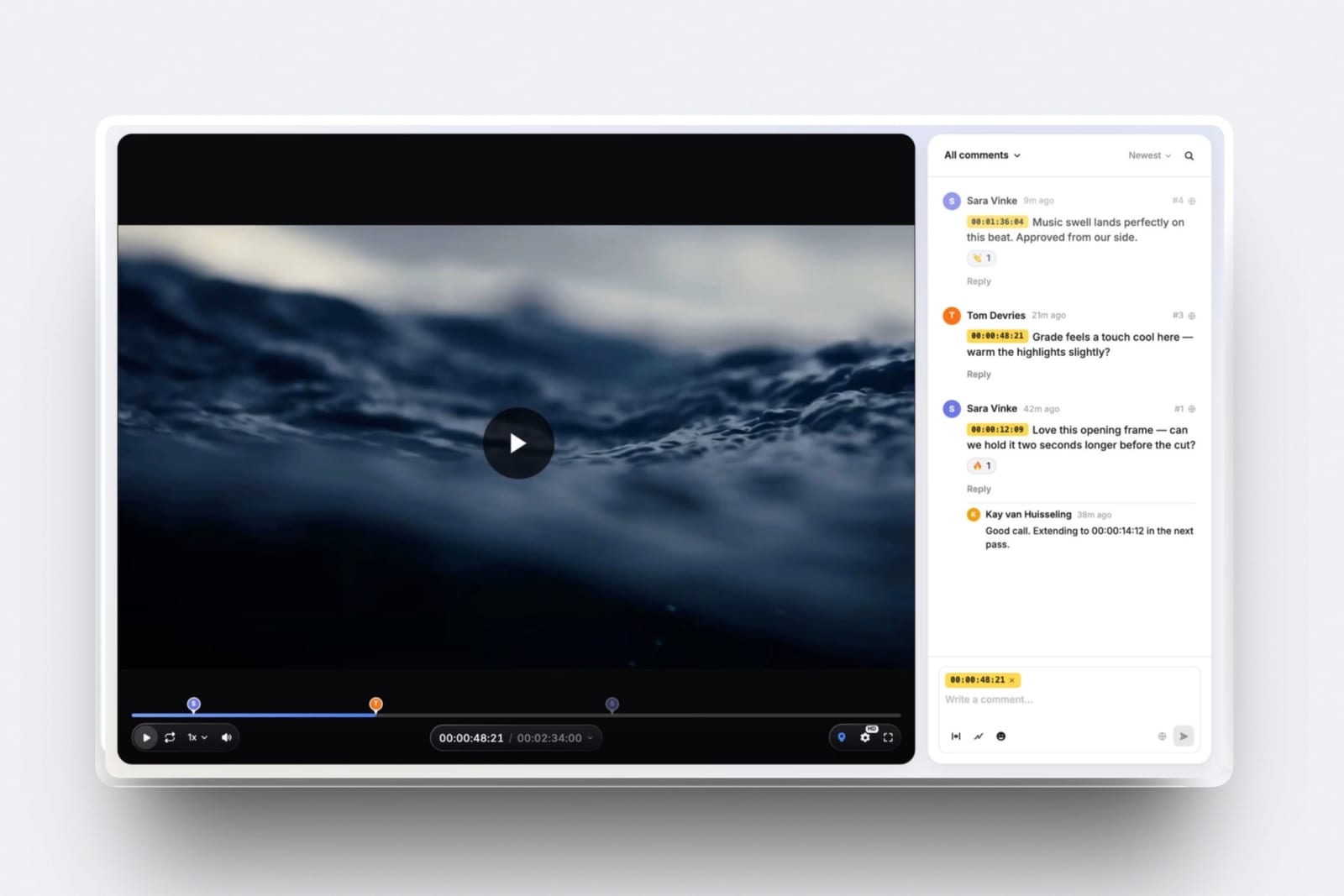
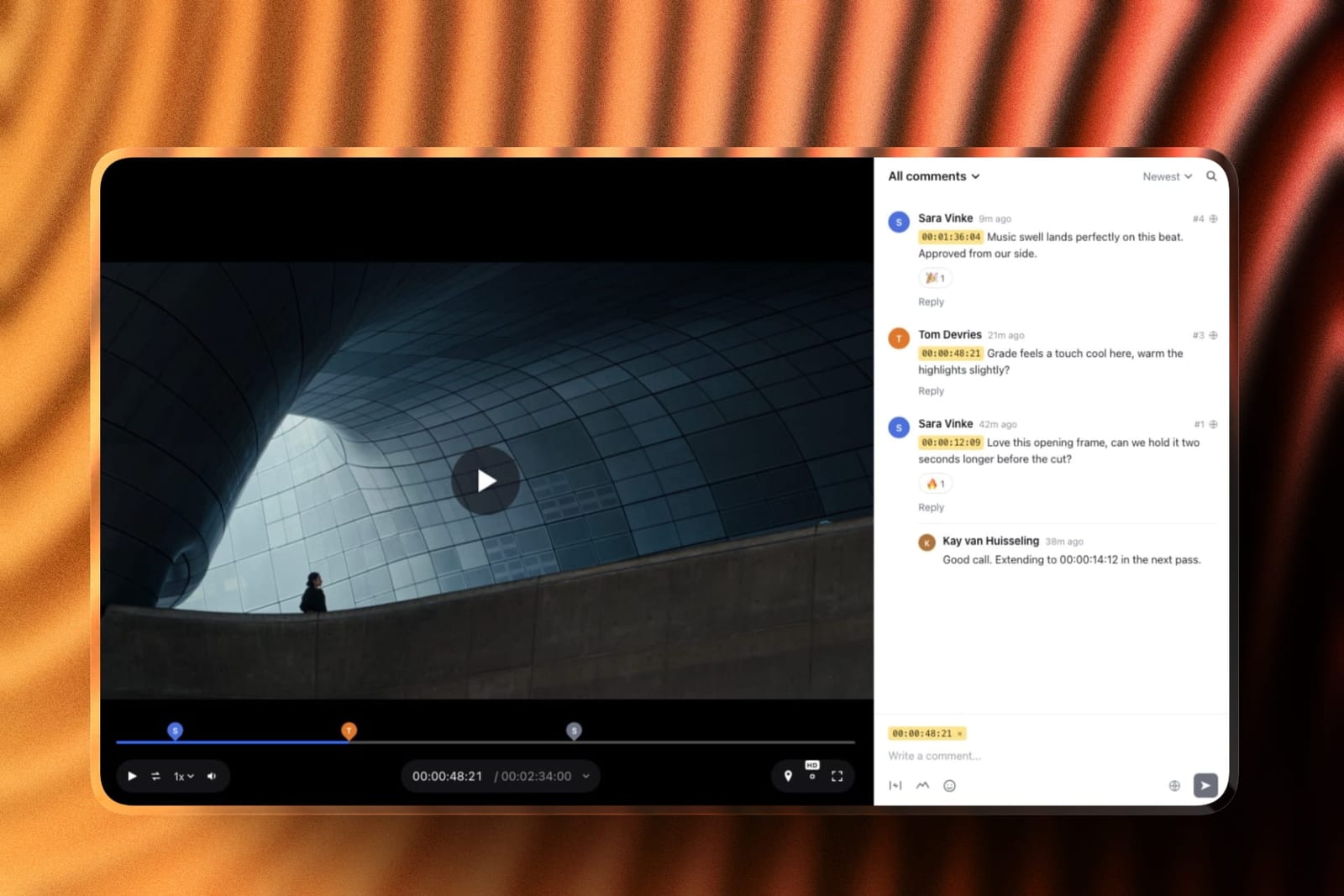
What review looks like. The producer uploads a cut, shares one link or sends it from Framekit with a note, and every reviewer, client, agency producer or freelancer, comments as a free guest with no account.
Notes pin to the exact frame or an in-and-out range and show as timecode chips; reviewers can draw with a pen, arrows, lines and shapes, reply and react.
New cuts stack as versions with older notes kept, and each carries a status: needs review, in progress, approved or needs changes, which the client can set if you allow it.
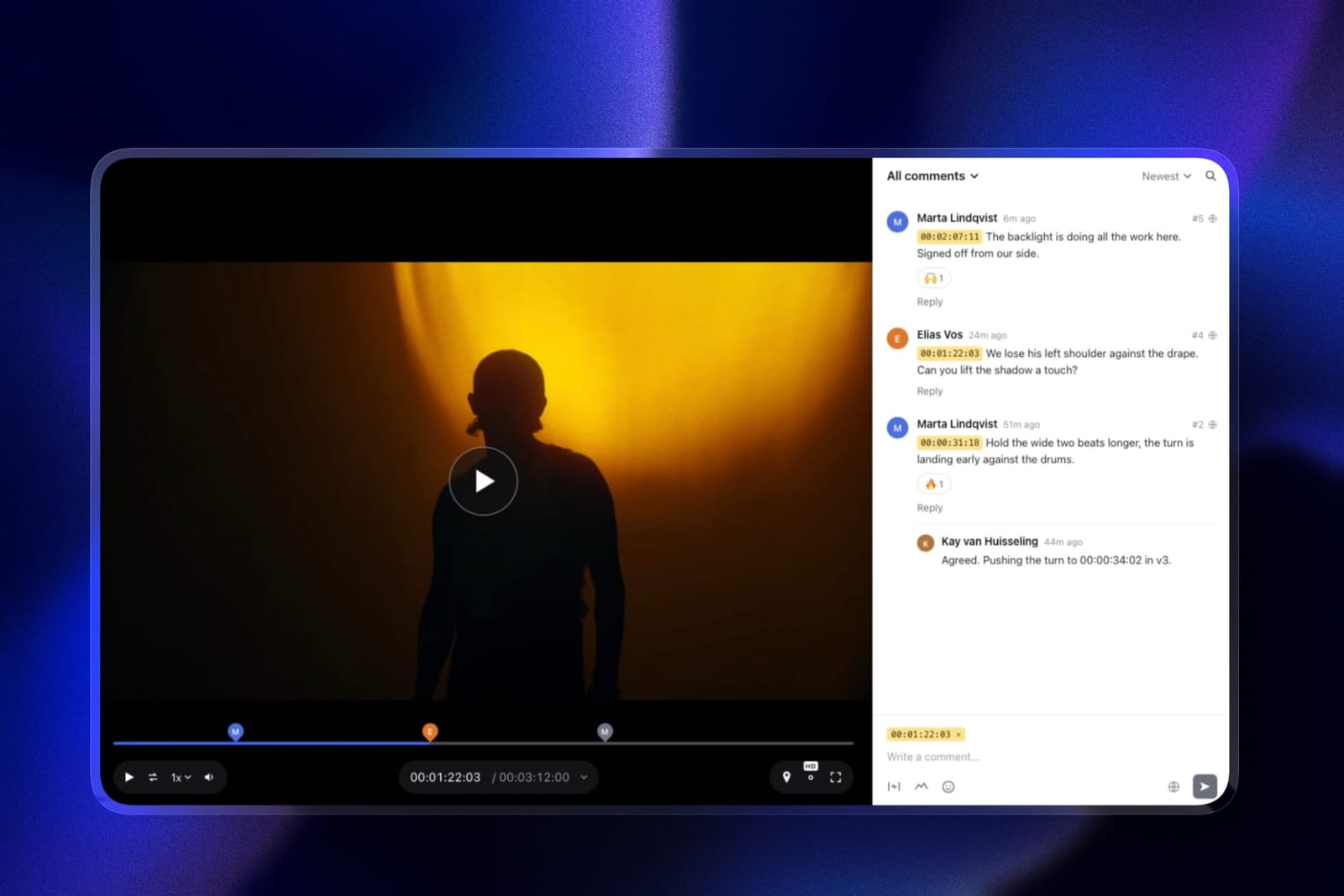
The real number$0 per freelancer or client who only comments, on every plan including Free. The account itself is $84 a year on Starter, $180 on Pro or $372 on Business billed yearly, and Business takes review files up to 3GB with a two-hour maximum per video.
The standout detailclient-facing polish at no extra cost.
Your logo, banner, fonts and accent colour on the review page; a password, an expiry date, an email gate and a downloads switch on every link; and an activity log recording comments, replies, approval changes, downloads and email registrations, which answers "who signed off v3" without an export.
The gotcha that is decisive hereonly the account holder uploads review cuts.
Framekit's team members, three on Pro and unlimited on Business, are site admins rather than review seats, so a freelance editor delivering three versions, a colourist returning a grade or your own staff editor cannot put a file into a review project.
The producer receives it another way and uploads it. There are also no restricted projects, no internal comment thread for staff, no side-by-side compare and no editing-app integration.
Who should skip itany production company where more than one person uploads cuts or runs review rounds, which for most companies with a staff editor is the entire point.
What it covers that the others do notthe rest of the client journey. Delivery galleries that hold the finished film and its stills under one link, the company site with its case studies, a credentials deck and a production proposal in Slides, all on the same account and domain as the review page.
Verdict: ranked sixth, and the honest scope is narrow. Score it on uploads alone and it would finish last of eleven; it sits here because for a small company whose producer is the hub, the comment half of the roster is free and best-presented, and the delivery, site and decks come on the same bill. Wrong the moment a contractor needs to hand something in.
7. Ziflow: Structured, 15 Users Included
Ziflow sells a flat block of users with approval workflow attached, which answers churn by giving you more slots than a small core team needs and lets you reassign them as freelancers come and go.
The real numberStandard is $199 a month billed yearly with 15 users, 1TB and two workflow stages, and Pro is $329 with 20 users, 2TB and three stages, with proof and folder access permissions on Pro and side-by-side comparison on every tier.
Verdict: 15 flat user slots at $2,388 a year is a reasonable churn answer, and you are paying substantially for workflow routing that most production companies do not need. Weighing it? Our Ziflow alternatives guide covers the field.
8. Filestage: Reviewer Groups, Ten Members
Filestage includes ten members on every plan, even Free, and puts the feature a production company most wants, uploads from external partners, on its Business tier.
The real numberStarter is $199 a month with 10 members, reviewer groups, due dates, version comparison and team-only comments, with extra seats sold in bundles of five and two months free on yearly billing.
Business at $329 a month adds external partner uploads, automations and PDF review reports, and the Free plan's real limit is one active project and five new files a month.
Verdict: correct if your productions involve client-side approval chains, and Business is one of the few tiers here that lets a freelancer outside the team deliver a file. At $3,948 a year billed monthly, it is a premium answer to a problem Kollaborate solves for $480.
9. Wipster: Per User, Adds Up Fast
Wipster is a capable team review tool whose per-user model punishes churn in the same way Frame.io's does, without the restricted projects that make Frame.io's price defensible for a company juggling rival clients.
The real numberTeam is $19.95 a user a month billed yearly, or $25 monthly, with team-only comments, custom branding, closed captions and 250GB to start, no user limit, and Premiere Pro and After Effects integration listed in the grid.
Verdict: $2,394 a year for ten users on yearly billing, which is Frame.io money without restricted projects. The Adobe integration is the reason to choose it, and only if your editors all work in Premiere Pro.
10. Dropbox Replay: Familiar, Capped
Most production companies already move files through Dropbox and most freelancers already have accounts, which is a real practical advantage, and Replay adds frame-accurate review, drawing, version comparison and transcription on top.
The real numberthe add-on is $10 a user a month billed yearly, or $12 monthly, on top of a Plus or higher plan, and Dropbox's Replay FAQ caps Basic, Plus, Standard and Advanced at 4 files without it.
Six uploading freelancers plus a core four is $1,200 a year in add-ons before the Dropbox seats.
The gotchathe add-on is per user, so every freelancer who uploads beyond the allowance is another subscription, and Replay files count against your Dropbox storage.
Verdict: the familiarity is worth more than feature comparisons admit, and the per-user add-on makes it the wrong shape for a roster that changes monthly. Leaving it? Our Dropbox Replay alternatives guide covers the options.
11. Vimeo: Distribution, Not Production
Vimeo is the right home for the finished film and the wrong one for a rotating production crew, because its review links are good but its seats are priced per uploader and capped by tier.
The real numberStandard is $25 a seat a month billed yearly for up to five seats and 4TB, and Advanced is $75 a seat for up to ten seats and 7TB, according to Vimeo's pricing page.
Ten uploaders is $9,000 a year on Advanced, while reviewers comment without a seat.
Verdict: usually correct as a second tool for publishing finished work rather than as a production review platform, since a review link that a client approves is already in the library you publish from.
What a Year Costs at Three Roster Sizes
The cheapest tool for a three-person company is not the cheapest for a twenty-person roster, so this table prices every tool for a small company where one producer uploads, for the carried roster, and for a larger quarter, each on the billing basis shown.
| Tool | Core 3, producer uploads, freelancers comment | Core 4 plus 6 uploading freelancers | Core 8 plus 12 uploading freelancers |
|---|---|---|---|
| Kollaborate | Small Business, $180 yearly | Business, $480 yearly | Business, $480 yearly, or upload links |
| Frame.io | Pro, 3 members, $468 yearly | Team, 10 members, $2,640 yearly | Over Team's 15 members, Enterprise quote |
| PageProof | Team, $2,499 yearly | Team, $2,499 yearly | Team, $2,499 yearly |
| Krock.io | Pro, 3 users, $360 | Pro, 10 users, $1,200 | Pro, 20 users, $2,400 |
| ReviewStudio | Advanced floor of 5, $1,200 yearly | Advanced, 10 users, $2,400 | Advanced, 20 users, $4,800 |
| Framekit | Starter $84 or Pro $180 yearly | Not workable for uploaders | Not workable for uploaders |
| Ziflow | Standard, $2,388 yearly | Standard, $2,388 yearly | Pro, 20 users, $3,948 yearly |
| Filestage | Starter, $2,388 billed monthly | Starter, $2,388 billed monthly | Starter plus two five-seat bundles |
| Wipster | Team, 3 users, $718.20 yearly | Team, 10 users, $2,394 | Team, 20 users, $4,788 |
| Dropbox Replay | 1 add-on, $120, plus Dropbox | $1,200 plus Dropbox seats | $2,400 plus Dropbox seats |
| Vimeo | Standard, 3 seats, $900 yearly | Advanced, 10 seats, $9,000 | Over 10 seats, Enterprise |
The first column is the only one where Framekit appears with a price, and it is the cheapest entry in it.
That is the honest boundary of Framekit's case: for a three-person company whose producer runs every round, $84 to $180 a year covers review, delivery galleries and the site.
The moment a second person needs to upload, the row reads "not workable" and the comparison moves to Kollaborate and Krock.io.
Run it yourselflist everyone who uploaded a file into your review tool in the last three months. If the list has one name, price Framekit's first column against what you pay now. If it has more than one, start with Kollaborate's Business tier and work up.
Limits and Permissions Side by Side
This table lists the permission and file limits that stop a production company's review round, because the question on a busy job is rarely whether a tool can annotate and usually whether the right person can upload and the wrong person cannot see.
| Limit or permission | Kollaborate | Frame.io | Krock.io | ReviewStudio | Framekit |
|---|---|---|---|---|---|
| Who can upload | Members, plus upload links for outsiders | Members: 5 on Pro, 15 on Team | Members, and collaborators in assigned stages | Users, and Reviewers into their reviews | The account holder only |
| Restricted access | Private projects and departments | Restricted projects on Team | Per-project collaborators and reviewers | Client and project teams on Advanced | None |
| Internal comments | Not documented | Team and up | Private comments on Pro | Comment privacy on Advanced | Account holder's team-only notes |
| Storage | 60GB to 20TB by tier | 2TB plus 2TB per member on Pro | From 2TB | 50GB per user on Advanced | 10GB to 2TB pooled with site and galleries |
| Largest review file | Not stated | 5TB per asset | Not stated | No limit stated | 500MB to 3GB by plan, 2 hours |
| Reviewer accounts | Password links, no account | Not needed for share links | Unlimited reviewers | Unlimited guests | Not needed |
| Password and expiry on links | Yes, with access caps | Pro and up | Pro | Password optional for guests | Every plan |
| Side-by-side compare | Yes | Every plan | Pro | Every plan | No |
Read the first two rows together. Kollaborate is the only tool here that documents both outsider uploads and private-by-default projects on a flat price, and Framekit is the only one that allows a single uploader.
The Freelancer Seat Problem
A colourist who works four days should not cost a month of licence, and the tools that solve that are flat-priced with member slots or upload links rather than tools with unlimited free reviewers, because reviewers were never the expensive part of the roster.
The trap is that unlimited reviewers sounds like the answer. Every tool in this comparison offers it, and it addresses the wrong half of the problem. Your client, your producer and your director are reviewers and they are free everywhere.
Your freelance editor, colourist and sound designer are contributors, and on most platforms contributing costs a seat.
Price the difference at the carried roster of a core four plus six uploading freelancers, on yearly billing where the vendor offers it. Frame.io Team: $2,640. ReviewStudio Advanced: $2,400. Wipster Team: $2,394.
Krock.io Pro: $1,200 at the listed rate. Kollaborate Business: $480. The spread between the top and bottom is over $2,000 a year for the same ten people doing the same work.
The structural answer is a flat plan with a member ceiling you fill differently each job, plus a way for a one-off contributor to deliver without a slot at all.
Kollaborate's upload links and Filestage Business's external partner uploads are the two documented versions of that second idea.
The test you can runlist everyone who uploaded a file into your review tool in the last three months, then check how many are still on your seat count. That difference is what churn is costing you.
What Production Companies Should Not Compromise On
Client separation is the one requirement a production company cannot solve with process, because a freelancer browsing another client's unreleased campaign is a contractual problem rather than an inconvenience, and no amount of asking people not to look is a control.
Six tools in this comparison document some form of separation. Kollaborate makes projects private by default and adds departments inside a project. Frame.io Team has restricted projects and folders.
Ziflow Pro has proof and folder access permissions. ReviewStudio Advanced has client and project teams. Krock.io keeps per-project collaborators and reviewers out of other projects.
PageProof lists access and permission controls on every tier. Framekit has none, and Wipster, Vimeo and Replay rely on how you share.
For a company handling one client at a time that is irrelevant. For anyone working with competing brands, or on anything under embargo, it is the requirement that overrides cost.
The good news since the October re-read is that the cheapest good answer to churn, Kollaborate, also documents private projects, so a small company no longer has to pay Frame.io Team prices to get both.
What Happens When a Job Ends or Goes Wrong
Review tools look identical on the day a job starts, so this section walks through the five moments that actually go wrong on a production with a rotating crew and what each tool does in every one of them.
A freelancer finishes on day four. On per-seat tools you remove them, which stops the charge, and someone has to remember.
On Kollaborate you reassign the slot, or never gave them one because they delivered through an upload link. On Framekit nothing changes, because guests were never seats.
A freelancer needs to deliver a file. Kollaborate sends an upload link, Filestage Business accepts external partner uploads, Krock.io adds them as a project collaborator, and Frame.io, Wipster and ReviewStudio add them as a paid user.
On Framekit they send the file to the producer, who uploads it.
A file is bigger than the plan allows. Framekit refuses review files over 3GB on Business, or over two hours on any plan, so the producer exports a lighter copy. Frame.io accepts up to 5TB per asset, and Replay up to 150GB.
A client wants to know who approved v3. Framekit's activity log records approval changes with the name or email of whoever made them. Frame.io lists downloadable and printable comments on every plan, and PageProof's basic audit tracks proof activity.
The company has a quiet quarter. Flat tools keep costing the same and per-seat tools can be shrunk. Framekit can drop to its permanent Free plan, but the pool falls to 10GB with 3GB for video and the file cap to 500MB, so clear finished jobs first.
After Approval: Delivery, the Company Site and the Next Pitch
An approved cut is the middle of a production company's client relationship rather than the end, because the finished film still has to be delivered, the case study still has to go on the site, and the next quote is already being written.
On Framekit those jobs sit on the same account as the review link.
A client gallery delivers the finished film and the stills from the shoot under one link, with favourites, full-set or favourites-only downloads and a download PIN, and video in galleries is never watermarked.
Galleries are unlimited on every plan.

The company site with its reel and case studies is built with the AI website builder on the same plan, and a credentials deck or a production proposal is built in Slides, where the AI builds a whole deck from a brief once you have approved its outline and pasted the real facts, such as clients, credits and rates.

None of this changes the ranking, which is about the roster. It is why a production company might run Kollaborate or Frame.io for crew review and still put delivery, the site and pitches on Framekit.
Our website builders for production companies guide covers that half.
Which Tool Fits a Changing Roster? A Decision Tree
Work down these eight questions in order and stop at the first yes, because the first two decide most of this page and neither is about review features, which is why price and annotation come last.
- Do freelancers need to upload work, not just comment? If yes, Framekit is out, because only its account holder uploads; go to question 2. If no, go to question 7.
- Do one-off contributors need to deliver files without joining the team? If yes, Kollaborate's upload links, or Filestage Business's external partner uploads. If no, go to question 3.
- Do you work with competing clients or embargoed material? If yes, Kollaborate's private projects, Frame.io Team, Ziflow Pro or ReviewStudio Advanced. If no, go to question 4.
- Is your roster large and unpredictable? If yes, Kollaborate Production at $1,188 a year for unlimited members, or PageProof at $2,499 a year with no seat count. If no, go to question 5.
- Do your editors work in Premiere Pro or Final Cut Pro and want notes there? If yes, Frame.io, or Wipster for Premiere Pro and After Effects. If no, go to question 6.
- Do your productions run through client approval chains? If yes, Filestage for reviewer groups or Ziflow for staged workflows. If no, Krock.io at $10 a user is the simplest per-user answer.
- Does one producer run every review round, with clients and freelancers only commenting? If yes, Framekit, from $84 a year on Starter, with delivery galleries, the company site and decks on the same account. If no, your own staff upload, so go to question 3.
- Do you also need a company site, case-study pages and pitch decks? Framekit runs those on the same account as its review links, whichever tool reviews your crew's cuts.
Frequently Asked Questions
What is the best video review tool for production companies in 2026?
Kollaborate is the best video review tool for production companies in 2026, because Business at $480 a year billed yearly covers 25 members, projects are private by default, and password-protected upload links let freelancers deliver files without a slot.
Frame.io Team at $25 a member a month has the deepest review toolkit with internal comments and restricted projects, and PageProof at $2,499 a year removes seat arithmetic entirely.
How do I handle freelancers who only work a few weeks?
Use a flat plan with a member ceiling you refill each job, plus upload links for one-off contributors.
Kollaborate Business covers 25 members for $480 a year and its upload links need no membership at all, and Krock.io adds per-project collaborators at $10 a user.
On per-member tools such as Frame.io Team at $25 a month, a four-day colourist costs a full month unless someone removes them.
Can freelancers upload work without a paid seat?
Sometimes, and this is the distinction that decides the category. Kollaborate sends password-protected upload links to people outside the project, and Filestage Business at $329 a month accepts external partner uploads.
On Frame.io, Wipster and ReviewStudio an uploader is a paid user. Framekit is the strictest case: only the account holder uploads, so a freelancer sends the file to the producer.
Kollaborate vs Frame.io for a production company: which is better?
Kollaborate handles churn better and Frame.io reviews better. Kollaborate Business is $480 a year for 25 members, with private projects and upload links for outsiders.
Frame.io Team is $25 a member a month, about $2,640 a year for ten members on annual billing, and adds internal comments, a comparison viewer, transcription and Premiere Pro and Final Cut Pro integrations.
Choose Frame.io if editors live in the edit suite.
Framekit vs Kollaborate: which handles a production company better?
Kollaborate handles the crew and Framekit handles the client. Kollaborate gives 25 member slots and outsider upload links for $480 a year.
Framekit lets only the account holder upload, so a freelance editor cannot deliver a cut into it, but its guest reviewers are free and unlimited, every link can be locked and branded on every plan, and delivery galleries, the company site and decks sit on the same account from $84 a year.
Can more than one person upload to Framekit Video Review?
No. Only the Framekit account holder uploads and manages review projects. Team members, three on Pro at $19 a month and unlimited on Business at $39, are site admins who help run the website, not review seats.
Reviewers are free and unlimited on every plan, but they can comment, draw, react and set approvals rather than upload, so a company with a staff editor who sends cuts needs a per-member tool.
How much does a rotating roster actually cost?
For a core four plus six uploading freelancers, the yearly spread is over $2,000 for identical work.
Kollaborate Business is $480, Krock.io is $1,200 at the listed rate, Wipster Team is $2,394, ReviewStudio Advanced is $2,400, PageProof is $2,499 and Frame.io Team is about $2,640 on annual billing.
Comment-only freelancers cost nothing on any of them.
Which tools keep competing clients separated?
Six document it.
Kollaborate makes projects private by default with departments inside them, Frame.io Team has restricted projects and folders, Ziflow Pro has folder permissions, ReviewStudio Advanced has client and project teams, Krock.io limits per-project collaborators to their projects, and PageProof lists permission controls on every tier.
Framekit has no restricted projects, so it suits one client at a time.
What is the difference between a reviewer and a contributor?
A reviewer consumes and comments; a contributor uploads and delivers. Clients, producers and directors are reviewers and are free on every tool in this comparison.
Freelance editors, colourists, sound designers and motion designers are contributors, and contributing usually needs a paid seat or an upload link.
Confusing the two is why "unlimited reviewers" reads as a solution to freelancer churn when it is not.
Should a production company pay per seat or buy a flat plan?
Flat, if your roster changes more than a couple of times a quarter, because per-seat plans turn churn into wasted licence or recurring admin. Kollaborate, Ziflow, Filestage and PageProof all sell flat plans.
Per-seat is defensible when the team is stable, and Frame.io Team at $25 a member is worth it for restricted projects and internal comments if your editors use its editing-app integrations.
What happens to a freelancer's access after a job ends?
On per-seat tools you remove them, which stops their access and the charge, and someone has to remember to do it.
On flat plans with member slots you reassign the slot, and on Kollaborate an upload link can expire or be capped by number of uses.
Check whether removing someone also removes their comments, because that can leave a gap in the record of who asked for what.
Can we use Dropbox Replay since freelancers already have Dropbox?
Often yes, and the familiarity is a real advantage.
Replay adds frame-accurate comments, drawing, version comparison and transcription, but Dropbox's FAQ caps Basic, Plus, Standard and Advanced at 4 Replay files, and the add-on that removes the cap is per user, $10 a month billed yearly.
Budget an add-on for every freelancer who uploads.
How do we stop paying for people who have left?
Audit every quarter, because this is the most common overspend on per-seat plans and nothing prompts you to fix it. List everyone who uploaded a file in the last three months and compare it with your billed seat count.
On Frame.io Team at $25 a member a month, three forgotten seats is $900 a year billed monthly, which is nearly two years of Kollaborate Business.
Final Verdict
Kollaborate is the best video review tool for production companies in 2026 because it fits the actual commercial problem, which is churn: 25 member slots for $480 a year, projects that are private by default, and upload links that let a one-off contributor deliver without taking a slot at all.
Frame.io Team is the better product for a company whose editors live in Premiere Pro or Final Cut Pro, at about $2,640 a year for ten members, and PageProof is the fixed-price answer for a roster that swings unpredictably.
Where Framekit loses, and who it is not for. Framekit is not for a company where more than one person uploads cuts.
Only the account holder uploads, team members are site admins rather than review seats, there are no restricted projects or staff comment threads, no side-by-side compare and no editing-app integration, and review files stop at 3GB and two hours.
On the upload half of the roster problem it would rank last, and five tools here handle a moving roster better, which is why it ranks sixth.
The configuration where Framekit is the better fit is narrow and common: a small company whose producer runs every review round, with clients and freelancers only commenting, and a need for delivery galleries, a site and pitch decks on the same bill.
Before choosing anything, run the seat audit in the FAQ above. Most production companies discover they are paying for people who finished a job two quarters ago.
Related readingvideo review tools for small video teams, video review tools for creative agencies, post-production collaboration tools, the 12 best video review tools, and client approval software compared.