Framekit templates
Start from a designer-made template
 Use template
 Use template
 Use template
 Use template
 Use template
 Use template
 Use template
 Use template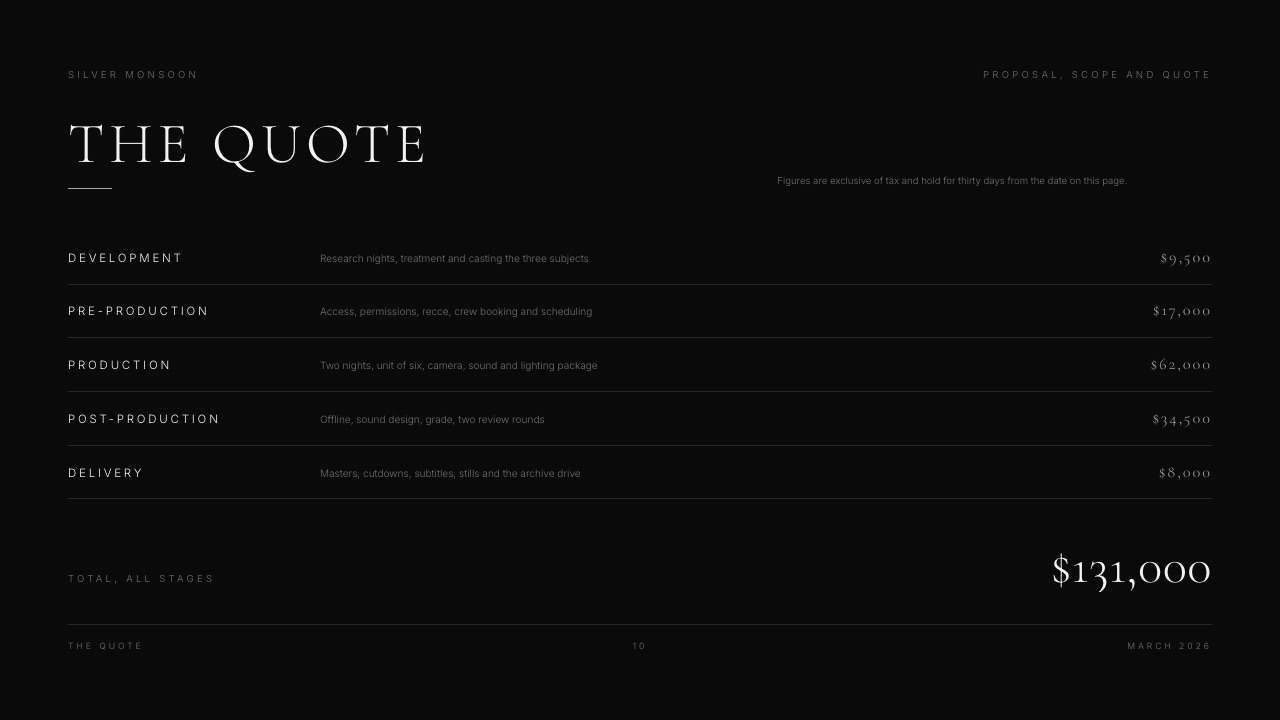
Every video production proposal gets read twice. The creative lead reads it for the look, then somebody holding the budget reads it for the scope, the quote and the terms.
In Proposify's 2026 analysis of 742,137 proposals, the terms and sign-off section drew 18.06 minutes of viewing against 2.63 minutes for "About us".
So this video production proposal template spends its words where the reading happens.
It follows the running order of the Film Production Proposal and Quote template in Framekit Slides, gives each section a word budget, and prices one example job line by line: a two-minute brand film plus three social cutdowns, quoted at $12,100 in example figures with the arithmetic shown.
A video production proposal is a document of roughly 8 to 15 pages or slides that tells a client what film you will make, how and when you will make it, exactly what they will receive and what it costs, and that becomes the working agreement once both sides sign it.
A video production proposal wins on the two pages most templates treat as filler: a scope that states what is out as plainly as what is in, and a quote split into production stages with the terms printed beside it.
Use ten sections in this order (introduction, reference frames, approach, statement, scope, deliverables, schedule, crew, the quote, terms), which is the running order of the Film Production Proposal and Quote template in Framekit Slides.
Framekit has no e-signature, so send the signature request through PandaDoc's free eSign plan (60 documents a year), or choose Proposify or Better Proposals if you want the quote to total itself and the signature to sit in the same link; HoneyBook suits solo shooters who want proposal, contract and invoice in one place.
Full disclosure: Framekit is our product, and its Slides templates illustrate the sections below. We did not trial the other tools hands-on; we read their pricing pages, help centres and published research on 19 September 2026 and link each one. Framekit loses on three things this post cares about: it has no e-signature, no pricing table that adds itself up, and no record of which person opened your deck (only a total view count). PandaDoc, Proposify and Better Proposals handle all three.
How This Template Was Built
Everything below comes from three kinds of evidence, labelled so you can tell a sourced figure from our own arithmetic, and none of it comes from a hands-on trial of the competing proposal tools.
Read at the source. Reading-time and close-rate figures come from Proposify's State of Proposals 2026, which analysed 742,137 proposals sent through its platform in 2025 across 30 industries.
That is a vendor's own dataset, not an independent study, and it covers every industry, so we quote its video-specific numbers separately.
Tool prices and features come from each vendor's pricing page or help centre, read on 19 September 2026.
Rendered and read. The section order, and the sample copy quoted in places, come from Framekit's Film Production Proposal and Quote template (12 slides) and two siblings, rendered slide by slide.
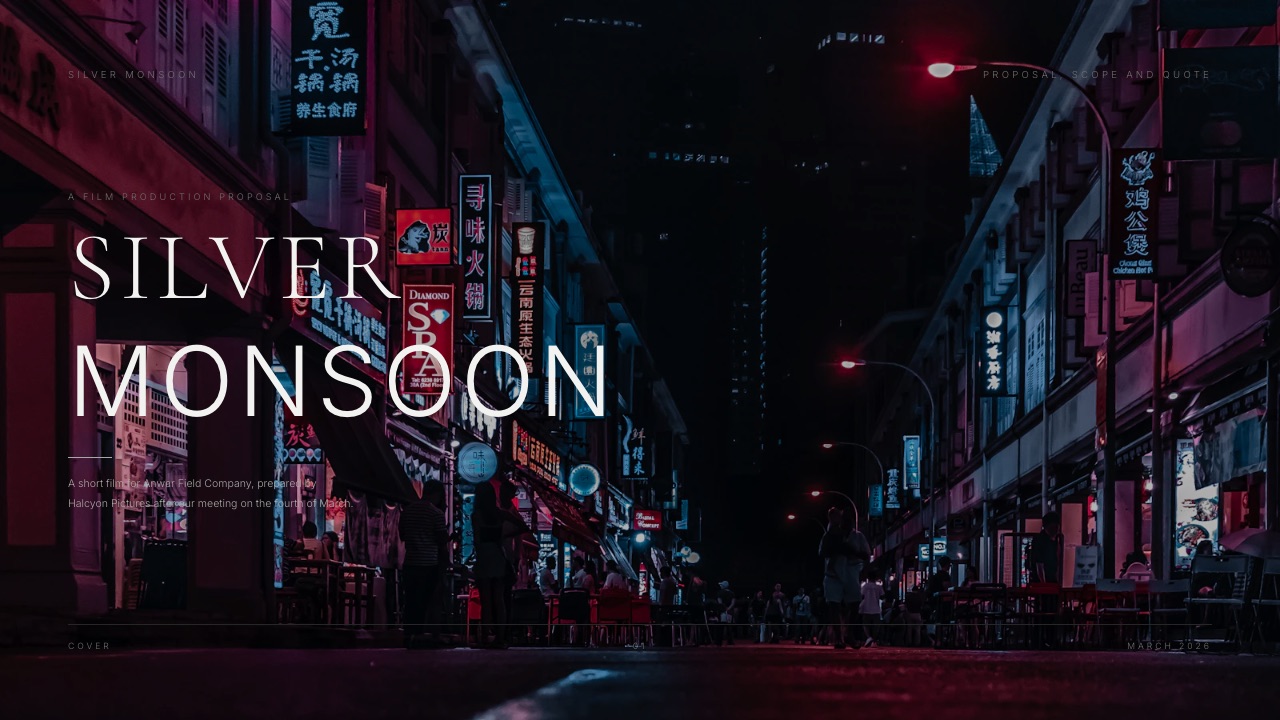
The sample job in that template is a short film called Silver Monsoon, priced at $131,000 across five stages.
Calculated. The worked quote is ours: a two-minute brand film plus three 30-second cutdowns for an outdoor-gear brand, one shoot day, a crew of three, two review rounds.
Every figure in it is an example chosen to show the structure, not a market rate. Replace them with your own day rates; the arithmetic is shown so you can.
Video Production Proposals by the Numbers
These are the figures that should shape how you write a proposal, all from Proposify's 2026 report unless marked otherwise, and each one points at a specific decision in the template below.
- 11 pages is the average length of a winning proposal, against 13 for a losing one, and winners average 7 sections.
- 35% is the close rate Proposify reports for the Motion Picture and Video industry, against a platform average of 34%, and video proposals took an average of 5.90 days to close.
- 83% of winning proposals include images, with an average of 12 images per winning proposal.
- 3.3x more likely to close when the buyer actually watches a video in the proposal, yet only 20% of proposals include one.
- 15% higher close rate and 60% faster close for proposals that include an e-signature.
- 2x more wins for teams using interactive pricing, where the client can choose optional items or quantities.
Where Clients Actually Spend Their Reading Time
In one linein Proposify's 2026 data, terms, pricing, scope and deliverables take about two thirds of the time buyers spend reading a proposal, while the "About us" section gets under 5%, so a video proposal should put its words there.
Proposify publishes a chart of view time by proposal section. The report does not explain exactly how the minutes are aggregated, so treat the numbers below as relative weight rather than as how long one client spends on one page.
| Proposal section | View time (minutes) | Share of total | Where it lives in this template |
|---|---|---|---|
| Terms and conditions / sign off | 18.06 | 32.8% | 10. Terms |
| Cover | 12.25 | 22.3% | Cover |
| Pricing / investment | 7.72 | 14.0% | 9. The quote |
| Approach / scope | 5.85 | 10.6% | 3. Approach and 5. Scope |
| Deliverables / timeline | 5.14 | 9.3% | 6. Deliverables and 7. Schedule |
| Summary / introduction | 3.33 | 6.1% | 1. Introduction |
| About us / our team | 2.63 | 4.8% | 8. Crew |
| Total | 54.98 | 100% |
Terms, pricing, scope and deliverables add up to 36.77 of 54.98 minutes, which is 66.9%. The practical rule that follows is blunt: write your company history in two sentences, and spend the saved effort making the scope and terms impossible to misread.
The cover's 22.3% is the other surprise. Our reading is that the cover is seen every time the proposal is reopened, and winning proposals are opened 12 times on average against 8 for losing ones.
Put the project name, the client, the date and one strong frame on it, and nothing else.
The 10-Section Video Production Proposal Template
In one linea video production proposal needs ten sections in a fixed order, from a one-paragraph introduction to signed terms, and the commercial sections (scope, deliverables, schedule, quote, terms) should carry more words than the creative ones.
This is the running order of Framekit's Film Production Proposal and Quote template, with a word budget for each section. Word budgets are our editorial guidance, sized so the whole proposal stays near the 11-page average of winning proposals.
| # | Section | What it must answer | Word budget |
|---|---|---|---|
| 1 | Introduction | What is being made, for whom, and why now? | 60 to 90 |
| 2 | Reference frames | What will it look like? | Captions only |
| 3 | Approach | How will you make it, in three or four decisions? | 120 to 180 |
| 4 | Statement | Why you, in one short paragraph? | 50 to 80 |
| 5 | Scope of work | What is in, what is out, stage by stage? | 150 to 250 |
| 6 | Deliverables | Exactly which files, lengths and ratios land? | 80 to 150 |
| 7 | Schedule | When does each stage happen, and what does it depend on? | 60 to 120 |
| 8 | Crew | Who is on it? | 40 to 80 |
| 9 | The quote | What does each stage cost, and what is the total? | Figures plus 30 |
| 10 | Terms | Payment, revisions, rights, what happens if things change | 150 to 250 |
Add a cover at the front and a short close with a single next step at the end, and you have the 12 slides of the Framekit template.
1. Introduction
One paragraph: the client's goal, the film, and the date it has to exist by.
The Silver Monsoon sample opens by naming the film, the company and the meeting it follows, which tells the reader this proposal answers a conversation rather than cold-pitching one.
Avoid the "we are a passionate team of storytellers" opener; it lands in the 4.8% nobody reads.
2. Reference frames
Six to nine stills that define the look, each with a two-to-four-word caption. Proposify's data puts images in 83% of winning proposals, averaging 12, and a video proposal has more reason than most to use them. Label them as references, not promises.
3. Approach and 4. Statement
The approach is where you turn taste into decisions: how the camera behaves, how the light works, how long the takes run, what the edit feels like. Keep it to three or four decisions with one sentence of reasoning each.
The statement is shorter still: why this crew suits this film, in a paragraph.
If a short video would help (a reel cut to the brief, or a 60-second talk-through), this is the place for it. Only 20% of proposals include video, and Proposify reports that a buyer who watches one is 3.3x more likely to close.
5. Scope of work
The scope lists each stage with its duration and what it contains.
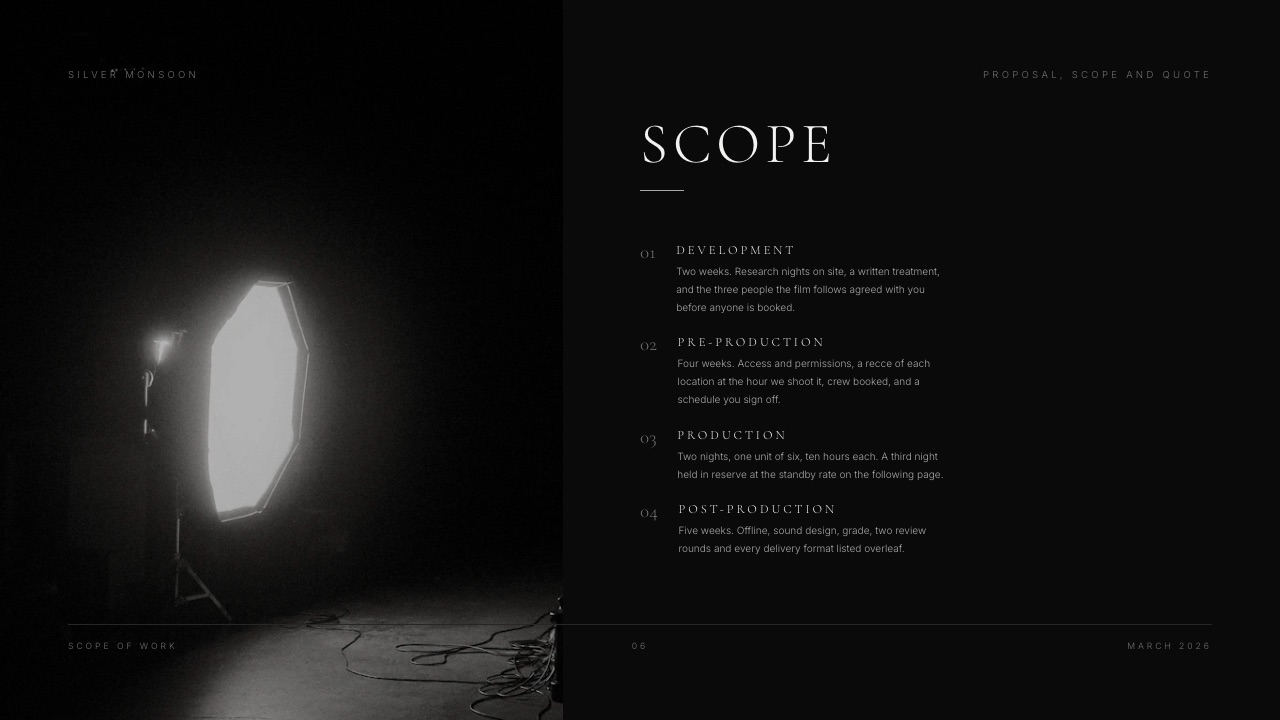
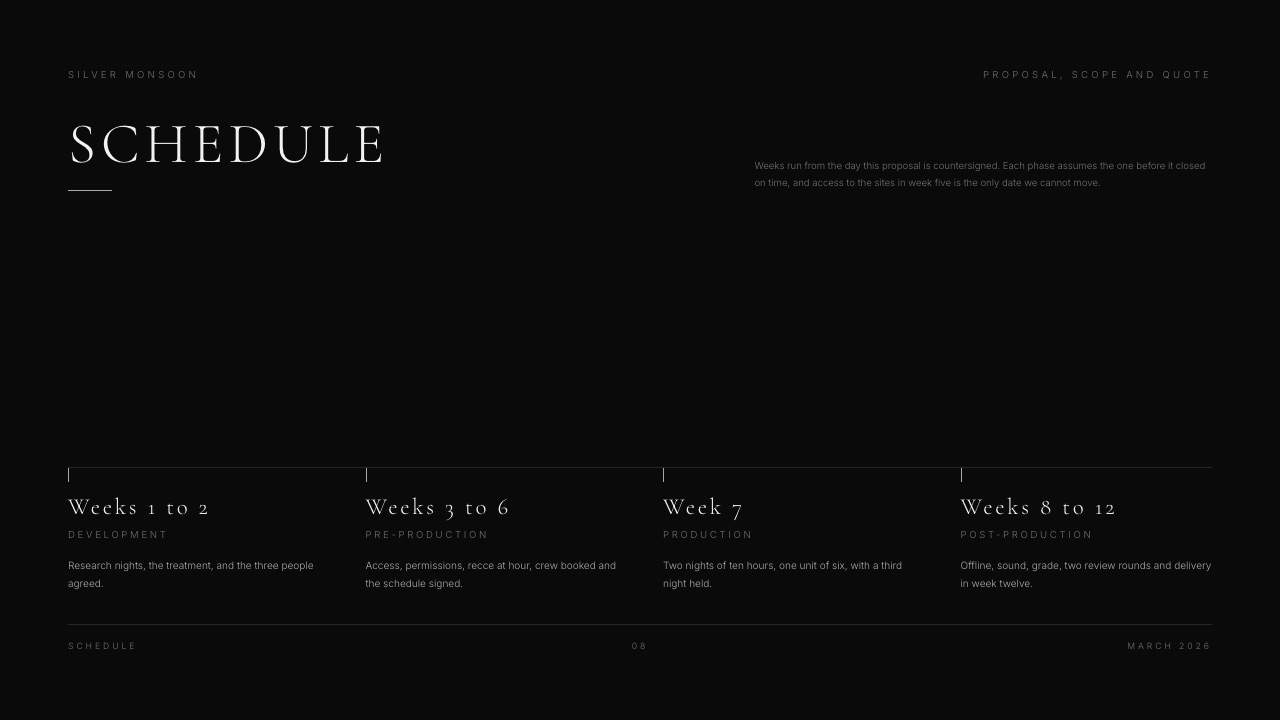
The Framekit sample splits the job into four stages: development (two weeks), pre-production (four weeks), production (two nights, a unit of six, ten hours each, with a third night held in reserve) and post-production (five weeks).
Each line says what happens in plain language.
The scope is also where you state what is out. More on that in the in-scope and out-of-scope table below, because it is the section that prevents most disputes.
6. Deliverables
List every file the client will receive, grouped by type, with length, ratio and format.
The Silver Monsoon sample groups them in three columns: the film (a fourteen-minute master, graded and mixed, a 16:9 master and a 4:5 version framed rather than cropped, burned and separate subtitles, a clean textless copy), cutdowns (three 60-second edits, vertical versions of all three, a 30-second teaser) and stills and assets (twenty frame grabs, unit photography, project files and archived rushes on a drive).
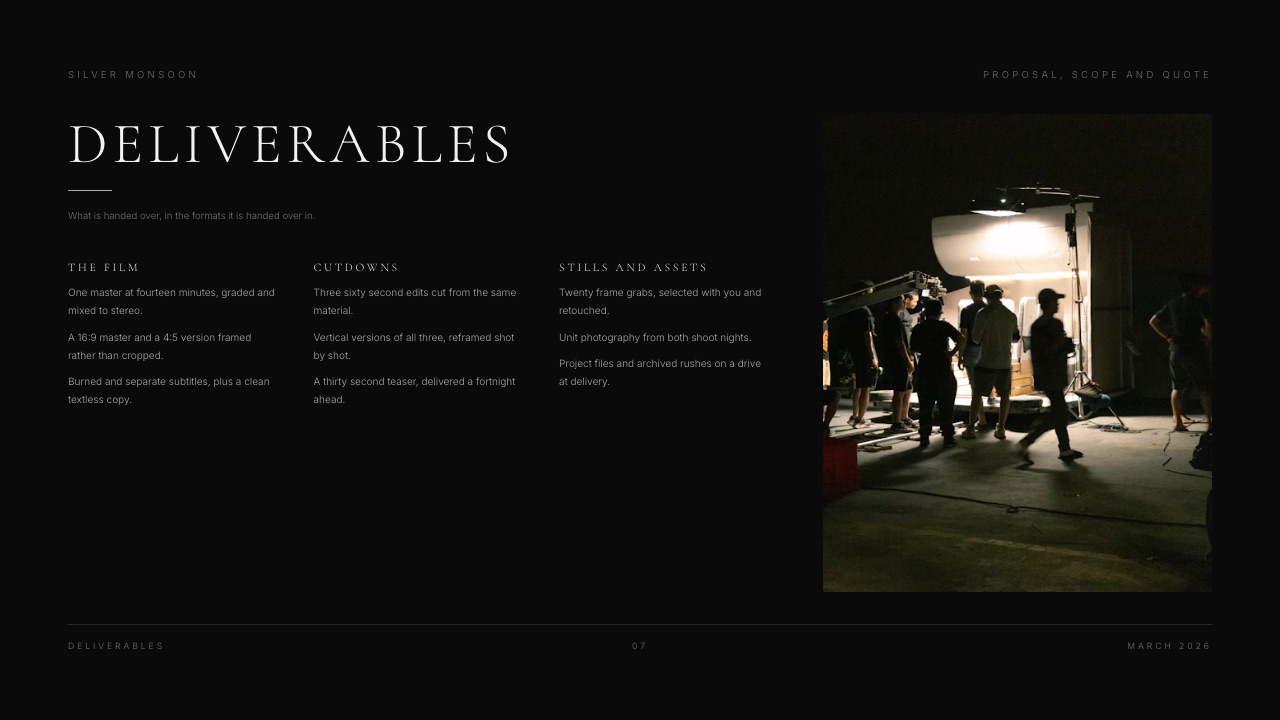
A deliverables list this specific does two jobs. It shows the client everything they are paying for, and it quietly defines the edge of the job: anything not listed is a change.
7. Schedule
Weeks, not dates, with a single anchor.
The sample's schedule slide runs weeks 1 to 2 (development), 3 to 6 (pre-production), week 7 (production) and 8 to 12 (post), and adds the sentence that protects you: weeks run from the day the proposal is countersigned.
If the client signs late, the delivery date moves with it, in writing, before anyone argues about it.
8. Crew
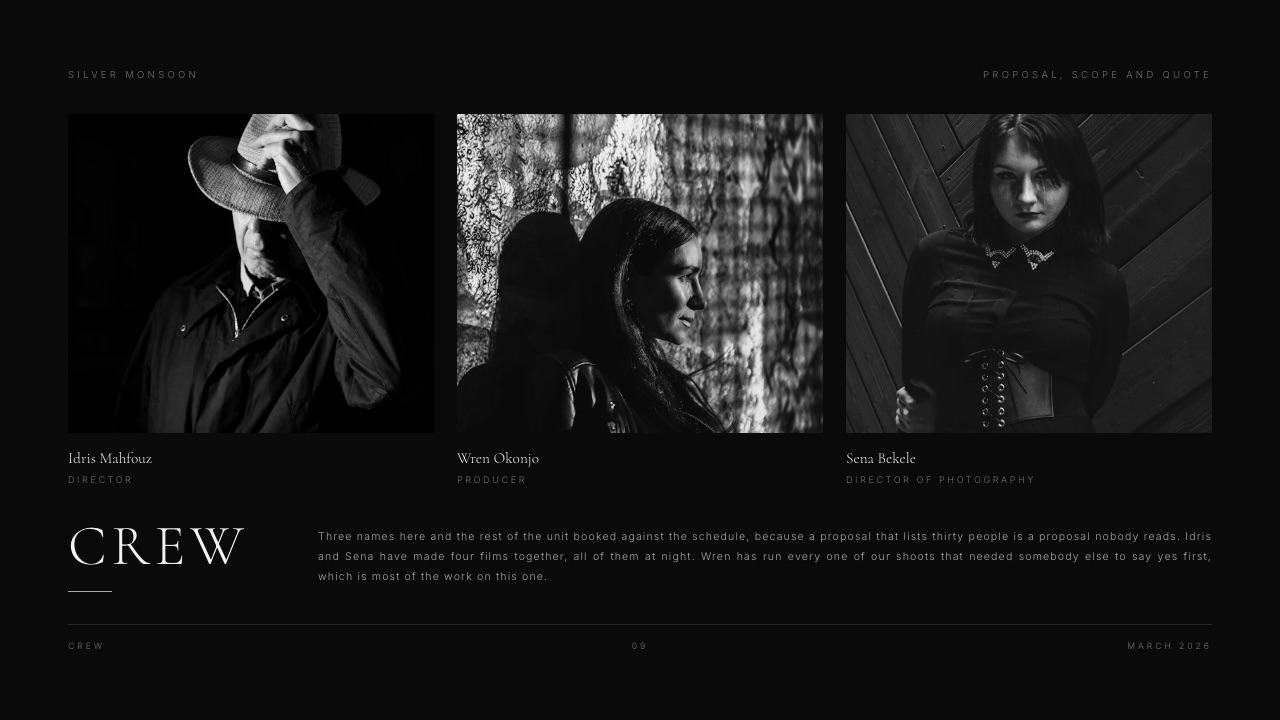
Three to five names with one line each. The Framekit sample lists a director, a producer and a director of photography, and explains why the list is short: a proposal that lists thirty people is a proposal nobody reads. Keep full crew lists for the call sheet.
9. The quote and 10. Terms
These two pages get the most reading time, so they get their own sections below: a worked line-item quote, and the payment, revision and rights language that should sit beside it.
A Worked Video Production Quote, Line by Line
In one linea video production quote should be split by stage (pre-production, production, post, delivery) with a contingency line and priced add-ons listed outside the total, so the client can see what each phase costs and what extra choices would cost.
The example job: a two-minute brand film for an outdoor-gear brand, plus three 30-second social cutdowns.
One shoot day, a crew of three (director-DP, gaffer, sound recordist), two review rounds. All figures below are example numbers chosen to show the structure, not market rates. Your day rates, city and client will change every line.
| Stage | Line item | Example figure |
|---|---|---|
| Pre-production | Written treatment and reference frames | $1,200 |
| Pre-production | Producer, 2 days (recce, casting, schedule) | $1,200 |
| Production | Director-DP, 1 shoot day | $1,500 |
| Production | Gaffer, 1 day | $650 |
| Production | Sound recordist, 1 day | $600 |
| Production | Camera, lens and lighting package | $950 |
| Production | Travel and parking | $150 |
| Post-production | Edit, 4 days at $600 | $2,400 |
| Post-production | Colour grade | $700 |
| Post-production | Sound mix | $550 |
| Post-production | Music licence, one track, online use | $350 |
| Post-production | Three 30-second cutdowns at $150 | $450 |
| Delivery | Masters, exports and archive drive | $300 |
| Subtotal | $11,000 | |
| Contingency, 10% | $1,100 | |
| Total | $12,100 | |
| Deposit on signature, 50% | $6,050 | |
| Balance on delivery | $6,050 |
The stage subtotals are $2,400 for pre-production, $3,850 for production, $4,450 for post and $300 for delivery, which is where the $11,000 comes from. If your client only reads one number, it will be $12,100, so make sure the terms beside it say what it includes.
Below the total, list the priced options the client can add without renegotiating the whole quote.
For the example job: an extra cutdown at $150, vertical reframes of all three cutdowns at $300, twenty retouched stills at $450, and an extra review round at $600 (one edit day).
This is the manual version of what Proposify calls interactive quoting and Better Proposals calls interactive pricing tables.
Proposify's report says teams using interactive pricing win twice as many proposals, so even a static list of options is worth including.
Framekit's own sample quote uses the same logic at a bigger scale.
Silver Monsoon is priced by stage (development $9,500, pre-production $17,000, production $62,000, post-production $34,500, delivery $8,000) to a total of $131,000, with a single line of small print: figures are exclusive of tax and held for thirty days.
Payment Terms, Revisions and Rights: Language to Adapt
In one linethe terms page is the most-read section of a proposal in Proposify's data, so write payment, revisions, rights, cancellation and validity as short, specific sentences with numbers in them, never as a paragraph of legal filler.
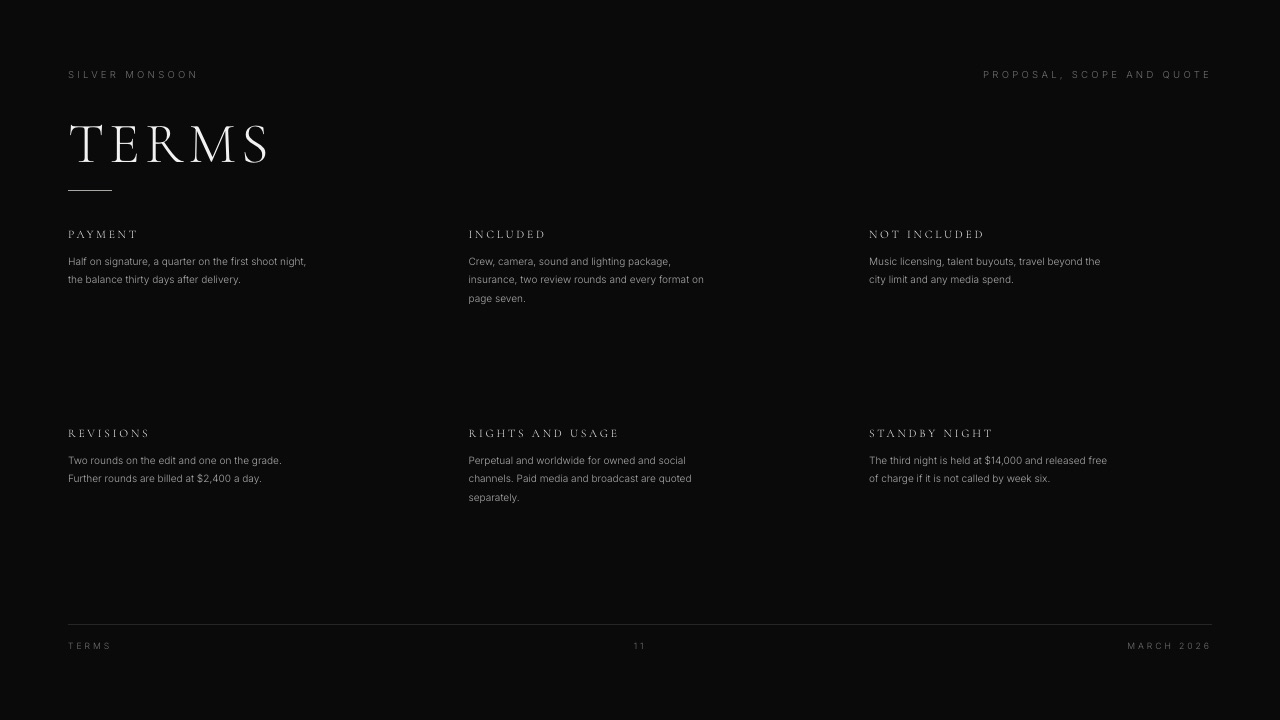
The Framekit template's terms slide groups six items. Here they are with sample language you can adapt, drawn from the template's own copy where marked. None of this is legal advice; if a job is large or unusual, have a lawyer read your standard terms once and reuse them.
| Term | Sample language | Why it matters |
|---|---|---|
| Payment | "50% on signature, 50% on delivery." (our worked example; the template sample splits it half on signature, a quarter on the first shoot night, the balance thirty days after delivery) | Crew and kit are booked before the client sees a frame; a deposit covers that risk |
| Included | "Crew, camera, sound and lighting package, insurance, two review rounds and every format on the deliverables page." (template copy, adapted) | Ties the price to the deliverables list |
| Not included | "Music licensing beyond the track named, talent buyouts, travel beyond the city limit and any media spend." (template copy, adapted) | The out-of-scope list is where disputes are prevented |
| Revisions | "Two rounds on the edit and one on the grade. Further rounds are billed at our edit day rate." | Unstated rounds are where scope creep starts |
| Rights and usage | "Perpetual and worldwide for owned and social channels. Paid media and broadcast are quoted separately." (template copy) | Usage is a price variable; say so before the client plans a TV buy |
| Validity | "This quote is held for thirty days." (template copy) | Stops a six-month-old price becoming a promise |
Two more lines are worth adding for most video jobs.
A cancellation line ("If the shoot is cancelled within seven days, the pre-production fee and any non-refundable bookings are due") and a weather or reserve-day line.
The Silver Monsoon sample handles the second elegantly: a standby night held at $14,000, released free of charge if it is not called by week six.
On revisions, Proposify's data has an interesting wrinkle: proposals with buyer-requested revision rounds closed more often (one round, 18% higher close rate; two, 28%; three, 45%). That is revision of the proposal, not the edit.
It suggests clients who negotiate the document are engaged buyers, so treat a request to change the proposal as a good sign rather than a threat.
What Belongs In Scope and What Stays Out
The scope and the out-of-scope list matter more than any other page for preventing arguments later, because every line you leave vague becomes a question about who pays when the client asks for it in week five of the edit.
| Usually in scope (price it) | Usually out of scope (say so) |
|---|---|
| Pre-production: treatment, recce, casting, schedule | Talent fees and buyouts beyond the day rate |
| Crew and kit for the stated shoot days | Extra shoot days, reshoots caused by client changes |
| A defined number of edit and grade review rounds | Rounds beyond that number |
| The deliverables list, by length, ratio and format | New versions, ratios or languages not on the list |
| One music track licensed for the stated usage | Commercial music, broader usage, broadcast |
| Standard insurance for the shoot | Location fees, permits or security the client arranges |
| Archive of rushes for a stated period | Long-term storage, raw footage handover, project files (unless listed) |
Two lines in that table deserve a specific price rather than "extra". Raw footage and project files are a common late request; quote them as an add-on if you are willing to hand them over, or state that they are not included.
Usage is the other: the difference between a film for the client's website and a film for a paid social campaign is a different licence for music and talent, and sometimes a different fee.
Adapting the Template to Three Kinds of Job
The same ten sections stretch to fit very different jobs, and what changes is mostly the weight: a small job compresses the creative sections, a commercial bid expands them, and a repeat client barely needs them at all.
A small job (a single interview film, an event recap). Keep the ten sections but let each be a line or two: one reference frame page, a scope of three lines, a quote with five items.
The terms page stays full length, because small jobs are where unpaid revision rounds hurt most.
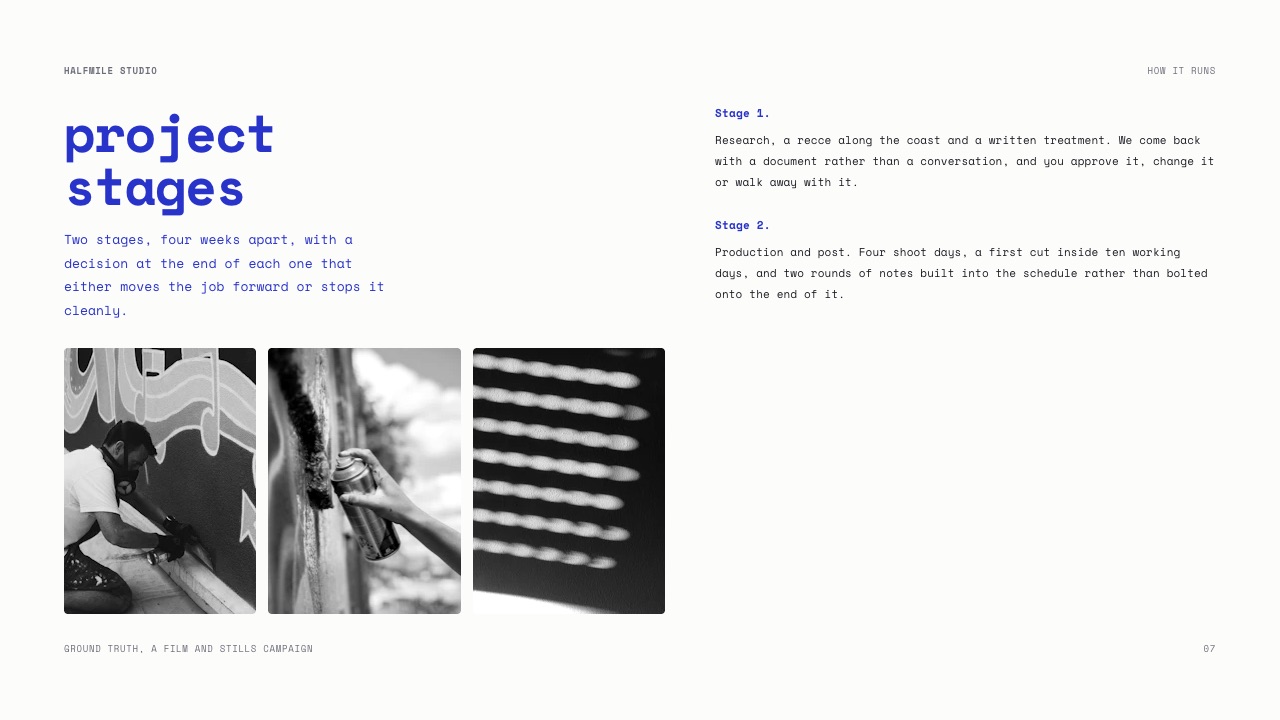
Framekit's Project Proposal for a Creative Studio template is a good lighter base; its sample proposal is "valid for sixty days" and sets out two stages four weeks apart, with a decision at the end of each that either moves the job forward or stops it cleanly.
A commercial or brand bid. When an agency or brand is comparing you with other production companies, the approach and reference pages carry more weight and the proposal starts to look like a treatment with a quote attached.
Framekit's Storyboard, Scope and Quote for a Bike Commercial template is built for this: concept, approach, mood, the boards and key shots first, then scope, schedule and the quote at the end.
A repeat client. You do not need to re-sell the look. Send a two-page version: scope and deliverables on one page, quote and terms on the other, with a line referencing the previous project's terms.
The proposal becomes paperwork, which is what a returning client wants.
For all three, keep the running order. Clients who receive several proposals from you learn where to find the quote.
How to Send It: Deck, PDF and Signature
In one linesend the proposal as a link or a PDF the client can open in a browser, and put the signature step in a tool built for signatures, because Proposify's data shows e-signatures close 15% more deals and 60% faster.
This is the part where the tool you design in and the tool you sign in may be different, and that is fine. A proposal made in Framekit Slides can be presented full screen on a call, shared as a link or exported as a PDF on every plan.
What it cannot do is collect a signature, add up a pricing table on its own, or tell you which person at the client opened it (deck links show a total view count only, and have no password).
The common two-tool pattern:
- Design and present the proposal in a deck tool, so the look and the reference frames carry the pitch.
- Export the agreed version as a PDF.
- Upload the PDF to a signature tool and send the signature request, ideally with your own signature already on it. Proposify's report found that signing before sending lifted close rates by 65% and closed deals 25% faster.
In the US, the ESIGN Act of 2000 is the federal law behind electronic signatures: a signature or contract "may not be denied legal effect, validity, or enforceability solely because it is in electronic form".
Other countries have their own rules; check yours if you work internationally.
If you would rather do everything in one tool, the proposal platforms below build the document, the pricing table and the signature into a single link.
Tools to Build and Send a Video Production Proposal
The six tools below split into two camps: design-first tools that make the proposal look like your work, and proposal platforms that make it easy to price, sign and track, and the right choice depends on which of those your clients actually reward.
| Tool | From (billed yearly) | E-signature | Pricing table that totals itself | Who opened it | Best for |
|---|---|---|---|---|---|
| Framekit Slides | Free; templates from $7/mo | No | No | Total view count only | The visual proposal and quote deck |
| PandaDoc | Free eSign $0; Business $49/user/mo | Yes (60 docs/yr on Free) | Business plan and up | Business plan and up | Signatures, and quotes that compute |
| Proposify | Basic $19/user/mo | Yes, all plans | Interactive quoting | Notifications and metrics | Proposal analytics and optional add-ons |
| Better Proposals | Starter $13/user/mo | Yes, all plans | Yes, all plans | Notifications and analytics | Lowest-cost all-in-one proposal tool |
| HoneyBook | Starter $29/mo | Yes (proposals and contracts) | Proposal with invoice | Client portal | Solo shooters who want CRM and invoicing |
| Google Docs | Free; eSignature on eligible Workspace plans | Eligible Workspace plans only | No | No | Plain-text proposals and quick edits |
1. Framekit Slides: Best for the Proposal Clients Look At
Framekit is an AI website builder for filmmakers and photographers whose Slides tool builds the proposal, and whose video review and client galleries handle the job after the client signs.
For this post, Slides is the piece that matters: its Film Production Proposal and Quote template is the running order used throughout this guide.
What it does wellthe reference frames and approach pages look like a film company made them, not a sales team.
Every plan, including Free, gets unlimited decks, the AI slide writer (describe the slide and the AI writes and lays it out), speaker notes, YouTube and Vimeo embeds so your reel plays inside the proposal, full-screen presenting, link sharing and PDF export.
The real numberthe full template library, including the proposal templates in this guide, your own uploaded fonts and removing the Framekit byline start on Starter at $9 a month, or $7 a month billed yearly ($84 a year).
The standout detailthe same account holds what happens after the signature.
Cuts go into Framekit's Video Review, where clients leave comments pinned to the timecode and approval statuses track each version, and finished files can be delivered through a client gallery.
The per-video upload cap is 1GB on Starter, 2GB on Pro and 3GB on Business, so large masters still belong on a transfer service or drive.
The gotchathere is no e-signature, no contract feature, no invoicing and no pricing table that adds itself up; the quote slide is a designed table you type. Deck links have no password and show only a total view count, not who opened it.
PowerPoint export (Pro and up) is picture-based. You will need a second tool to get the proposal signed.
Skip it ifyour clients are procurement teams who expect a priced, signable document in one link, or you send dozens of proposals a month and need the analytics.
Verdict: the best way to make the proposal itself persuasive, as long as you pair it with a signature tool. Most videographers can do that for free.
2. PandaDoc: Best for Signatures and Quotes That Compute
PandaDoc is one of the best-known proposal tools, and it is the natural partner for a design-first proposal: its free plan is a signature tool, and its paid plans add real document automation.
The real numberper PandaDoc's plan comparison in its help centre, the Free eSign plan sends 60 documents a year with up to 2 recipients each and allows up to 5 templates.
Starter is $19 per user a month billed yearly ($35 monthly) with unlimited e-signatures and Stripe payments. Business is $49 per user a month billed yearly ($65 monthly).
The standout detailpricing tables and the quote builder are on Business, where line items, quantities and optional items add themselves up and the client can pay through the document.
The gotchathe plans in between are easy to misread. Starter does not include pricing tables, the quote builder, document analytics or custom branding; those start on Business. A videographer who upgrades to Starter expecting a computing quote will not get one.
Skip it ifyou want the proposal to look like your film work; PandaDoc documents look like business documents unless you invest in the design.
Verdict: use the free plan as the signature step for a Framekit or PDF proposal; pay for Business only if computing quotes and analytics justify $588 a year. Weighing it up? Our client proposal software comparison covers the field.
3. Proposify: Best for Proposal Analytics and Add-Ons
Proposify is the tool behind the data in this guide, and its product leans on the same idea: see what the client reads, and let them build their own quote from options.
The real numberper Proposify's pricing page, Basic is $19 per user a month billed annually ($29 monthly) with 10 sends a month and $0.50 per extra send. Team is $41 per user a month billed annually with 30 sends. Business starts at $3,900 a year.
The standout detailinteractive quoting on every plan lets the client change quantities or tick optional add-ons, which is exactly the "extra cutdown, vertical reframes, extra review round" list from the worked quote above.
The gotchasends are metered. Drafting is unlimited, but each proposal shared with a client counts, and a busy month of small quotes can push a Basic account into overage fees.
Skip it ifyou send a handful of proposals a year; the analytics only pay off at volume.
Verdict: the strongest analytics-first choice for a small production company sending proposals every week.
4. Better Proposals: Best Low-Cost All-in-One
Better Proposals covers the whole proposal job (document, pricing table, signature, payment) at the lowest entry price in this list, and it offers a video production proposal template in its gallery.
The real numberper Better Proposals' pricing, Starter is $13 per user a month billed annually ($19 monthly) with legally binding digital signatures, interactive pricing tables, payment integrations and a 10-documents-a-month send limit.
Premium is $21 a month billed annually with 50 sends and a custom domain.
The standout detailinteractive pricing tables are included from the cheapest plan, which is not true of PandaDoc.
The gotchathe 10-document monthly limit on Starter is fine for most solo videographers but tight for a company quoting several small jobs a week.
Skip it ifyour proposals are image-heavy decks you design yourself; Better Proposals is document-first.
Verdict: the best value if you want one tool to price, send and sign.
5. HoneyBook: Best for Solo Shooters Who Want a CRM
HoneyBook is a client management platform rather than a proposal tool, and that is its appeal to solo videographers: the proposal, the contract, the invoice and the payment schedule live in one client file.
The real numberper HoneyBook's pricing page, Starter is $29 a month billed yearly, Essentials $49 and Premium $109, with a 30-day free trial. Billing yearly saves up to 18%.
The standout detailStarter already lists proposals and contracts alongside invoices and payments, so the client file carries the job from quote to paid.
The regional catchHoneyBook says it currently supports professionals in the US, Canada, the UK and Australia only.
The gotchaat $348 a year on Starter it is the most expensive way to just send proposals, and the proposal design is less flexible than a deck.
Skip it ifyou already use an invoicing and contracts tool you like. Already on it and reconsidering? See our HoneyBook alternatives guide.
Verdict: worth it when the CRM and invoicing are the point; overkill if you only need a signed proposal.
6. Google Docs: Best Free Option for Plain Proposals
A well-organised Google Doc is still a respectable video production proposal, especially for repeat clients who want the scope and the number, not a presentation.
The real numberfree with a Google account.
Built-in eSignature is available on Workspace Individual and on Business Standard, Business Plus and several Enterprise and Education plans when an administrator enables it, with up to 10 signers per request, per Google's eSignature help page.
Personal accounts are not on the list.
The gotchareference frames and layout are hard to make look good, and a Doc reads as a plain document next to a designed deck from a rival.
Verdict: fine for repeat clients and small jobs; weak for a first pitch.
What Each Setup Costs at 96 Proposals a Year
In one linefor a solo videographer sending eight proposals a month, a design tool plus a free signature plan costs $0 to $84 a year, while all-in-one proposal platforms run from $156 to $588, so pay for a platform only when its pricing tables or analytics earn it back.
The scenario: one person, 96 proposals a year (8 a month), yearly billing everywhere it exists. For the free signature route we assume you only send signature requests for accepted proposals.
At the 35% close rate Proposify reports for motion picture and video, that is about 34 signature requests a year, inside PandaDoc Free's 60-document allowance.
| Setup | Yearly cost | Fits 96 proposals a year? | What you give up |
|---|---|---|---|
| Framekit Free + PandaDoc Free eSign | $0 | Yes (about 34 signature requests) | No template library; you build the slides yourself |
| Framekit Starter + PandaDoc Free eSign | $84 ($7 x 12) | Yes | Two tools; no computing pricing table, no per-viewer tracking |
| Better Proposals Starter | $156 ($13 x 12) | Yes (120 sends a year) | Document-first design |
| Proposify Basic | $228 ($19 x 12) | Yes (120 sends a year, then $0.50 each) | Metered sends |
| PandaDoc Starter | $228 ($19 x 12) | Yes (unlimited e-signatures) | No pricing tables or document analytics on this plan |
| HoneyBook Starter | $348 ($29 x 12) | Yes | Less layout control; US, Canada, UK and Australia only |
| PandaDoc Business | $588 ($49 x 12) | Yes | Business-document look unless you design it |
One caveat on the free route: if you sent every proposal through PandaDoc Free rather than only the accepted ones, 96 documents would exceed the 60-a-year allowance and you would need Starter.
A test you can run on your own numbers: count last year's proposals, multiply by your close rate, and see whether the signature requests fit in a free allowance. If they do, the question is only which tool makes the proposal itself more convincing.
Seven Mistakes That Sink Video Proposals
Most lost proposals do not fail on price alone; they fail on something the client could not see clearly, such as an open-ended scope, a missing deliverable or a price that arrives without the terms that explain it.
- A company history up front. "About us" drew 4.8% of view time in Proposify's data. Two sentences, then move on.
- A single lump-sum price. A total with no stages invites the client to negotiate the whole number. Split it by stage so they can see where the money goes.
- No out-of-scope list. If talent buyouts, extra rounds or raw footage are not listed as excluded, the client will assume they are included.
- Unlimited revisions, by omission. Name the number of rounds on the edit and the grade, and the price of the next one.
- Deliverables in adjectives. "Social cutdowns" is a promise you cannot price. "Three 30-second 9:16 cutdowns" is a line item.
- Usage left vague. A film for the website and a film for a paid campaign are different licences. Say which one the quote covers.
- A proposal nobody can sign. A beautiful PDF with no signature step leaves the job sitting in an inbox. Proposify links e-signatures to a 15% higher close rate.
If you are still setting up the business behind the proposal, our guide to starting a videography business covers the groundwork, and how to get clients as a videographer covers where proposals come from.
For pricing the post side of the quote, see how much to charge for video editing.
Decision Guide: Which Proposal Setup Fits You?
Answer these in order and stop at the first one that settles it; the guide is built around volume, the kind of client you pitch, and whether you want the proposal, contract and invoice in one place or kept separate.
- Do you want proposals, contracts, invoices and payments in one client file, and are you based in the US, Canada, the UK or Australia? If yes, HoneyBook. If not, go to question 2.
- Do you send more than about ten proposals a month, or need to see which stakeholder opened what? If yes, Proposify (analytics, interactive quoting) or PandaDoc Business (pricing tables, quote builder). If not, go to question 3.
- Do you want one cheap tool that prices, sends and signs? If yes, Better Proposals Starter at $13 a month billed annually. If not, go to question 4.
- Does the look of the proposal help you win work, as it usually does for film and commercial clients? If yes, design it in Framekit Slides from the Film Production Proposal and Quote template and send the signature request through PandaDoc Free eSign. If not, a Google Doc and a signature tool will do.
Whatever you choose, the invoice is its own step.
Our roundup of invoicing tools for freelance creatives and the comparison of contract and proposal tools for creatives cover the pieces around the proposal.
Frequently Asked Questions
What should a video production proposal include?
A video production proposal should include an introduction, reference frames, your approach, a short statement, the scope of work, a deliverables list, a schedule, the key crew, a quote split by stage, and terms covering payment, revisions, rights and validity.
That is the ten-section order of Framekit's Film Production Proposal and Quote template. Proposify's 2026 data shows terms, pricing, scope and deliverables draw about two thirds of reading time, so give those sections the most care.
How long should a video production proposal be?
A video production proposal should usually run 8 to 15 pages or slides. Proposify's State of Proposals 2026 found winning proposals average 11 pages against 13 for losing ones, with an average of seven sections.
Framekit's Film Production Proposal and Quote template runs 12 slides, cover and close included. Shorter is fine for repeat clients; do not cut the scope or terms to get there.
How do I write a video production quote?
Write a video production quote by splitting the job into stages (pre-production, production, post-production, delivery), listing each line item with its figure, adding a contingency line and totalling it.
List priced add-ons such as extra cutdowns or review rounds below the total, and put payment terms beside it. This guide's example prices a two-minute brand film at $11,000 plus 10% contingency, $12,100 in total, in example figures.
What payment terms should a videographer use?
A common structure for videographers is a deposit on signature and the balance on or after delivery; the example in this guide uses 50% on signature and 50% on delivery.
Framekit's proposal template sample splits it three ways: half on signature, a quarter on the first shoot night, and the balance thirty days after delivery.
Whatever you choose, state it in the proposal beside the quote so it is agreed before work starts.
How many revision rounds should a video proposal include?
Most video proposals name a fixed number of rounds and price anything beyond it. Framekit's proposal template sample includes two rounds on the edit and one on the grade, with further rounds billed per day.
The worked quote in this guide prices an extra round at one edit day, $600 in example figures. The number matters less than writing it down, because unstated revisions are where scope creep usually starts.
Is a proposal made in Framekit legally binding?
No. A Framekit Slides deck is a presentation, not a contract: Framekit has no e-signature or contract feature.
To make the agreed proposal binding, export it as a PDF and send it for signature through a tool such as PandaDoc (60 free documents a year), Proposify or Better Proposals.
In the US, the ESIGN Act gives electronic signatures the same legal effect as paper ones.
PandaDoc vs Proposify for video production proposals?
PandaDoc is better if you want a free signature tool now and the option of pricing tables and a quote builder later on its $49-a-month Business plan.
Proposify is better if you want interactive quoting and proposal analytics from its $19-a-month Basic plan, with sends metered at 10 a month. For a design-first video proposal, PandaDoc Free as the signature step is the cheaper pairing.
Should I include a video in my proposal?
Yes, if it is relevant to the brief. Proposify's 2026 report says only 20% of proposals include video, but a buyer who watches one is 3.3 times more likely to close.
For a videographer, a short reel cut to the client's brief or a 60-second talk-through of the approach is the obvious fit. Framekit Slides embeds YouTube and Vimeo videos on the slide.
What should be out of scope in a video production proposal?
The out-of-scope list should name everything a client might assume is included: talent fees and buyouts, extra shoot days and reshoots caused by client changes, review rounds beyond the stated number, new versions or ratios not on the deliverables list, broader music or media usage, location fees and permits, and raw footage or project files unless you list them as an add-on.
Final Verdict
The best video production proposal template is the one that spends its effort where clients read: a stage-by-stage quote, a deliverables list specific enough to price, and terms that name payment, revisions, rights and validity in plain numbers.
Use the ten sections in this guide in that order, whatever you build it in.
For videographers and production companies whose look is part of the pitch, Framekit Slides' Film Production Proposal and Quote template gives you that running order in a deck that presents, shares as a link and exports a PDF, on the same account as your site, your review links and your client galleries.
Where Framekit loses: it does not collect signatures, total a pricing table or show who opened your deck, so pair it with PandaDoc's free eSign plan or choose Better Proposals or Proposify if you want one link that prices and signs.
Framekit is not for teams that need contracts and invoicing in the proposal itself; HoneyBook is the better fit there.
Related readingour client proposal software comparison ranks the proposal platforms in more depth, the contract and proposal tools guide covers the signature side, and how to start a videography business covers the business the proposal sits in.
To set the day rates the proposal quotes, use the videographer rate card template; agencies introducing the team first should start with the agency credentials deck template.