Framekit templates
Start from a designer-made template
 Use template
 Use template
 Use template
 Use template
 Use template
 Use template
 Use template
 Use template
A branding session that used to end with 320 stills now ends with 320 stills and three 45-second social cuts, because the client asked for both in the same quote. The selection round is the same as it always was.
The approval round is not, and most client proofing and review tools for photographers were designed before that was true.
So the day ends with the stills in a proofing gallery and the cuts somewhere else, and the client gets two links, two passwords and two sets of instructions for a single booking they thought of as one job.
A client review tool for photographers is a hosted gallery that lets a client see a set of images in the browser, mark the ones they want, leave comments on individual frames, and download the approved files, without needing an account or a copy of your catalogue.
Framekit is the pick for photographers whose shoots produce motion as well as stills, because unlimited client galleries and frame-accurate video review sit in one account on one bill while the client signs up for nothing at either end, with favourites, gallery passwords, a separate download PIN, watermarking, expiry and full-resolution downloads on every plan including Free.
The trade-off is that Framekit does not sell prints: there is no print lab, no fulfilment and no print-order proofing.
Pixieset is the better pick if your revenue comes from print sales, Pic-Time is the one to beat on the selling experience itself, and CloudSpot has the most usable genuinely free tier at 5GB and three galleries.
Full disclosure: Framekit is our product and we have ranked it first here, so the useful thing you can do with this page is check it, not believe it. Every competitor figure below was read on that company's own pricing page in September 2026 and linked, and two of those pages served European pricing to us, which is flagged where it happens. Framekit has no print store, no booking calendar, no invoicing, no contracts, no CRM and no face recognition, and Pixieset, Pic-Time, ShootProof and Zenfolio each beat it on at least one of those.
How the prices and limits here were checked
Three kinds of statement appear in this guide and they carry different weights, so it is worth being explicit about which is which before any of the numbers below get quoted anywhere.
Read at the source. Every plan name, price, storage figure and feature boundary was read on the vendor's own pricing page in September 2026 and is linked where it is used.
Zenfolio and picdrop served their prices in euro to us and not in dollars, so those figures appear in euro and are described as the European listing, never converted at an invented rate.
Calculated. The stack arithmetic runs on one carried example throughout: a branding photographer shooting a one-day session that delivers 320 stills for selection and three 45-second social cuts, with the client picking 40 images and approving all three cuts.
Every dollar figure in the cost tables is that example, billed annually, with the sum shown so you can check it.
Not claimed. Nothing here was subscribed to and no accounts were opened, so there are no timings, no reliability claims and no speed numbers anywhere on this page.
No ratings from software directories appear either, because the sites carrying them refuse automated readers and a rating nobody can verify is worth less than no rating at all.
The proofing market by the numbers
Six published figures explain most of the difference between these platforms, and each one settles a question that otherwise gets answered by whichever brand you saw on Instagram most recently.
- 15% commission on store sales on the free tiers of both Pixieset and CloudSpot, falling to zero on their paid plans.
- 0% commission on every plan, including free, on ShootProof, whose free tier is photos only with no video and unlimited galleries, capped at 100 photos in one of its plan tables and 3GB in the other.
- 3GB after six months is what the Pic-Time free plan reduces to, down from 10GB of photo storage plus 1GB of video.
- $5 a month per extra hour of video is Pixieset's published add-on price, on top of a plan that only supports video from Basic upward.
- Client favoriting appears on the Pro tier of SmugMug at $37 a month billed annually, which is the most expensive place in this guide to find a feature everyone else treats as standard.
- Unlimited galleries on every Framekit plan including Free, with favourites, passwords, a separate download PIN, watermarking, expiry and full-resolution downloads all included at $0.
In one linethe headline price of a proofing platform tells you very little, because the real cost is set by which of commission, storage, video and the favourites feature your particular business happens to need.
What each platform charges for, and where it hides
Every platform in this category picks a different thing to charge for, and once you can see the pattern the shortlist gets short quickly, because most photographers only care about two of the four columns below.
| Platform | Free tier | Commission on sales | Native video | Cheapest plan with no commission |
|---|---|---|---|---|
| Framekit | 10GB pooled, unlimited galleries | No store for prints at all | Yes, 500MB per file on Free | Digital store fee is 5% on Free, 0% on Business |
| Pixieset | 3GB, unlimited galleries | 15% free, 0% on paid | From Basic, plus $5/mo per extra hour | $8/mo billed annually |
| Pic-Time | 10GB photo, 1GB video, cut to 3GB at 6 months | On markup only, falls with plan | Yes, 1GB on free | $7/mo billed annually |
| ShootProof | Unlimited galleries, 100 photos and up to 5GB in one table, 3GB photos-only in the other | 0% on every plan | Not included on Free | Free |
| CloudSpot | 5GB, 3 galleries, JPEG only | 15% on Free and Entry | Vimeo or YouTube embeds only | $17/mo |
| SmugMug | 14-day trial only | Not published | Not the focus | $23.50/mo billed annually |
| Zenfolio | Trial only | Not published | 150GB video on Advanced | EUR 6/mo billed annually |
| picdrop | 3 galleries, 1GB | No store | Video conversion on paid plans | No store to take a cut |
Two rows in that table deserve a second look.
CloudSpot's free plan is the most generous on galleries and the most restrictive on file types: it is JPEG only and downloads are capped at 2048 pixels, which makes it a selection tool rather than a delivery tool.
And SmugMug charges for storage instead of for selling, which is why its numbers look strange next to the rest.

What a hybrid shoot really costs to review
In one linethe cost of reviewing a shoot that produced both stills and motion is not the price of a proofing plan, it is the price of a proofing plan plus a video review plan plus the friction of asking one client to learn two products in one week.
Take the carried example. The stills go into a proofing gallery on Pixieset Basic, which is $8 a month billed annually, or $96 a year.
The three cuts need frame-accurate comments, so they go to Frame.io Pro at $15 per member per month, which is $180 a year. Together that is $276 a year, two subscriptions to renew and two dashboards to keep tidy, for one booking.
The same work on Framekit Starter is $7 a month billed annually, which is $84 a year, with 50GB pooled across the galleries, the review pages and your website. On Pro it is $15 a month billed annually, $180 a year, with 300GB pooled.
Either way it is one subscription and one dashboard for you, and nothing for the client to sign up for.
| Setup | Annual cost | Subscriptions you run | Storage |
|---|---|---|---|
| Pixieset Basic plus Frame.io Pro | $276 | 2 | 10GB gallery plus 2TB Frame.io |
| Pic-Time Beginner plus Frame.io Pro | $264 | 2 | 20GB photo, 5GB video, plus 2TB |
| CloudSpot Lite plus Frame.io Pro | $384 | 2 | 100GB plus 2TB |
| Framekit Starter | $84 | 1 | 50GB pooled, 15GB of it video |
| Framekit Pro | $180 | 1 | 300GB pooled, 150GB of it video |
Read that table honestly and it says two things. Framekit is cheaper per surface and simpler for the client.
Frame.io on the other side of those sums is buying you 2TB and a set of craft features Framekit does not have, and if you need Camera to Cloud or a Premiere panel the comparison collapses in its favour.
Here is a test you can run this week without changing anything. Open your last five invoices, count how many of those jobs delivered video as well as stills, and multiply by the number of separate links you sent the client.
If the answer is bigger than the number of jobs, you are paying for a seam.
1. Framekit: Best for Photographers Who Also Deliver Motion

Framekit is an AI website builder that also runs client galleries, frame-accurate video review, a digital-download store and Slides on one account, which is the whole reason it sits first in a guide about photographers whose shoots have stopped being stills-only.
The stills go in a gallery, the cuts go on a review page, and the client gets one address.
The real numberunlimited galleries on every plan including Free, with photos up to 100MB each at full resolution, and video at 500MB per file on Free rising to 1GB on Starter, 2GB on Pro and 3GB on Business. Storage is one pool: 10GB free, 50GB on Starter, 300GB on Pro, 2TB on Business.
The detail nobody writesthe download PIN is separate from the gallery password.
That sounds like a small thing until the wedding where the couple want to share the gallery with family but nobody should be pulling full-resolution files, and you realise you have two independent controls instead of one.
Client-exclusive sets do the same job in the other direction, holding back frames only the paying client sees.
The gotcha that bites in week threethere is no print store. No lab, no fulfilment, no print-order proofing, no pricing sheets.
If prints and albums appear on your invoices at all, that absence is not a feature gap you work around, it is a different business model, and the entries below exist because of it.
The free plan also shows a Framekit badge and will not run on your own domain.
Who should skip itportrait and wedding photographers whose income depends on in-gallery print sales, and studios that need booking, invoicing and contracts in the same product. ShootProof does invoicing, contracts and e-signatures on its paid plans, and Framekit does none of the three.
Verdict: the best pick in this guide for the hybrid shoot, because it is the only one where the video half is native rather than an embed from a host you pay separately for. It is the wrong pick for a print-led studio, and it says so on the tin.
If you want the mechanics instead of the shortlist, how to create a client gallery covers the setup and how to organise client galleries covers what happens after the twentieth one.
2. Pixieset: Best for Print-Led Photographers
Pixieset is the default in this category for good reasons: the galleries look like a photographer designed them, the store is genuinely good at selling prints, and the free tier lets you put real work in front of a real client on day one. Its pricing page lists Free at 3GB with unlimited galleries, then Basic at $10 a month or $8 billed annually with 10GB.
The real number15% commission on store sales on the free plan, falling to zero on every paid plan. On $2,000 of print sales in a year, that is $300 handed over for the privilege of not paying $96, which makes Basic the obvious move the moment you sell anything at all.
The detail nobody writesvideo is metered separately and cheaply enough to be a trap. Video support starts at Basic, and extra video storage is an add-on at $5 a month per extra hour.
An hour sounds like plenty until you are storing three versions of three cuts across four clients, at which point the add-on is a recurring line item that grows with your workload rather than your revenue.
The gotcha that bites in week threeremoving Pixieset's own branding requires Basic. The free tier is a fine place to test the product and a slightly awkward place to hand work to a brand client, because the platform's name is on the page you are asking them to trust.
Who should skip itphotographers whose deliverable is mostly motion. Pixieset is built around stills and prices video as an afterthought, and the maths stops working quickly.
Verdict: still the best print-selling gallery for most photographers, and the reason a guide that ranks something else first has to be honest about where it loses. If prints are your margin, start here. Pixieset compared with ShootProof is the next page to read.
3. Pic-Time: Best Selling Experience in the Category
Pic-Time's distinguishing idea is that the gallery should sell for you, with automated campaigns and art gallery views that put frames on a client's wall in preview before they have committed to anything.
It is the most commercially minded product here and it does not pretend otherwise.
The real numberthe published plans run Free, then Beginner at $8 a month or $7 billed annually with 20GB of photo storage plus 5GB of video, Professional at $25 or $21 with 100GB plus 30GB, and Advanced at $50 or $42 with unlimited photos and 60GB of video.
The detail nobody writesthe free plan shrinks. Pic-Time's own pricing page says free storage is reduced to 3GB after six months, down from 10GB of photos plus 1GB of video.
That is not a trick, it is printed on the page, but it means a free Pic-Time account you set up in January is a different product in July.
The gotcha that bites in week threecommission is charged on your markup rather than on the production cost, and the rate falls as you move up the plans.
That is a fairer structure than a flat percentage of the sale, and it is also harder to predict, so build a sample order before you set your prices rather than after.
Who should skip itphotographers who do not sell anything through the gallery. Most of what you are paying for on Pic-Time is the selling layer, and if your clients only download files you are buying an engine you will not start.
Verdict: the strongest sales product in the category and the one to pick if you want the gallery to do commercial work rather than just hold files. ShootProof compared with Pic-Time covers the head-to-head properly.
4. ShootProof: Best Free Tier If You Sell Prints
ShootProof takes the clearest position on money in this whole guide: zero commission on every plan, including the free one. Its plans page lists Starter at $9.99 a month or $8.33 billed annually, Standard at $19.99 or $16.67, Professional at $31.99 or $26.67, and Premium at $60 or $50 for unlimited.
The real numberthe free plan is photos only, with no video formats supported and unlimited client galleries.
Both of the plan tables on that page agree on those three things and disagree on the ceiling, one calling it 100 photos with up to 5GB of estimated capacity and the other 3GB photos-only with 1,000+ estimated photos.
The detail nobody writesShootProof is the one platform here that meters in photos rather than gigabytes, and as of September 2026 it publishes both units at once, so the same Starter price appears as 1,500 photos in one table and 20GB of photo and video in another.
A photographer who shoots 40-image brand sets thinks in images and will prefer the first, but the number to plan a year around is whichever one the account itself enforces.
The gotcha that bites in week threepaid plans bundle invoicing, contracts and e-signatures, which is excellent value if you want them and dead weight in the price if you already run a separate studio management tool. Look at what you would actually switch off elsewhere before calling Standard cheap.
Who should skip itanyone who needs native video review. ShootProof is a stills business tool and the motion half of a hybrid shoot has to live somewhere else.
Verdict: the honest commission-free option and the best answer for a photographer who sells prints and hates percentages. ShootProof compared with CloudSpot is the next step if you are choosing between the two.
5. CloudSpot: Best Genuinely Usable Free Plan
CloudSpot has quietly built the most practical free tier in the stills half of this category. Its pricing page lists Free at $0 forever with 5GB and up to three client galleries, then Entry at $7 a month, Lite at $17, Pro at $34 and Unlimited at $50.
The real numberthree galleries and 5GB on the free plan, with a 15% commission on store sales that persists on Entry and disappears from Lite upward.
The detail nobody writesthe free plan is JPEG only and downloads are capped at 2048 pixels.
That is a genuinely smart product decision, because it makes the free tier excellent for the selection round and useless for final delivery, which is exactly where a free tier should stop. Just do not plan on handing over finals from it.
The gotcha that bites in week threevideo is embeds, not hosting. CloudSpot supports video through Vimeo and YouTube links, so the motion from your shoot lives on someone else's platform with someone else's limits, and you are back to two accounts.
Who should skip itanyone who wants the gallery to carry the video file itself rather than a link to it.
Verdict: the best free proofing tier for stills selection and a clear second platform requirement the moment your shoot produces motion.
6. picdrop: Best Fast Selection Tool for Commercial Work
picdrop comes from the editorial and commercial end of photography rather than the wedding end, and it behaves differently because of it.
The product is built around the selection round: a client opens a link, works through a contact sheet with colour markers, votes and comments, and hands back a shortlist.
The real numberthe pricing page, served to us in euro, lists a free plan of three galleries and 1GB of storage, with Pro at EUR 14.99 a month or EUR 8.39 billed annually for 500GB and unlimited galleries.
The detail nobody writesthe mental model is a job bag, not a shop. There is no store, no print pricing and no sales campaigns, which means nothing on the page is trying to sell your client anything, and for an agency reviewer that is a feature, not an omission.
The gotcha that bites in week three1GB on the free plan is roughly one shoot's worth of previews, and the only step above it is Pro at EUR 14.99 a month, or EUR 8.39 billed annually. There is no cheap middle tier for a photographer doing two commercial jobs a month.
Who should skip itconsumer photographers selling prints. There is nothing here to sell with, by design.
Verdict: the sharpest selection experience in this guide for commercial and editorial work, and the wrong shape entirely for a wedding business.
7. Zenfolio: Best If You Want Booking in the Same Product
Zenfolio's pitch is that the website, the galleries, the proofing and the scheduling are one subscription, which is genuinely appealing for a portrait or family studio running a calendar as well as a camera.
The real numberthe pricing page served us European figures: Basic at EUR 8 a month or EUR 6 billed annually with 15GB, Professional at EUR 20 or EUR 10 with 150GB, and Advanced at EUR 36 or EUR 18 with unlimited JPEG storage plus 150GB of video.
A booking and scheduling add-on is listed at EUR 10 a month and is included on Advanced.
The detail nobody writesclient favourites are not on the Basic plan.
Proofing is listed on every tier, but the favourites feature that most photographers mean when they say proofing starts on Professional, which moves the real entry price from EUR 6 a month billed annually to EUR 10, or from EUR 8 to EUR 20 if you pay monthly.
The gotcha that bites in week threethe annual and monthly prices diverge unusually far on the middle tier, so paying monthly on Professional costs twice the annual rate. Commit annually or pick a different plan.
Who should skip itphotographers who already run a separate booking system and only want galleries, because a large part of what you would be paying for is the calendar.
Verdict: the most complete studio-in-a-box here for a portrait business with a full appointment book, and an overbuy for anyone who just needs a proofing link.

8. SmugMug: Best Long-Term Archive
SmugMug solves a problem the rest of this category mostly ignores, which is what happens to a decade of work after the client has downloaded their files. Unlimited full-resolution JPEG storage on every plan is a real promise and very few competitors make it.
The real numberthe plans page lists Direct at $20 a month billed annually, Portfolio at $23.50, Pro at $37, and Enterprise on request, with a 14-day trial and no free plan.
RAW storage is a separate add-on at $10 a month for 1TB and $6 a month for each additional terabyte.
The detail nobody writesclient favoriting sits on the Pro tier at $37 a month billed annually. Almost every other platform here treats favourites as table stakes, so a photographer who picks SmugMug for the archive and then wants a selection round finds it two tiers up.
The gotcha that bites in week threeunlimited applies to JPEG. If your archive strategy involves raw files, the add-on is the actual price and it scales with your shooting habit rather than your client count.
Who should skip itanyone buying primarily for proofing. The feature ladder here is built around hosting and selling rather than selection.
Verdict: the best place in this guide to keep your work for ten years and an expensive place to run a selection round, which is a combination worth knowing before you commit.
9. Format: Best Portfolio-First Option
Format approaches this from the other direction: it is a portfolio website for photographers that happens to include client galleries, which suits anyone whose main problem is being found rather than being approved.
The real numberthe pricing page lists Basic at $10 a month billed annually with 10 client galleries, Pro at $12 with 50 galleries and 15 store products, and Pro Plus at $15 with 250 galleries and 1,000 products, with a 14-day trial and no card required.
The detail nobody writesgalleries are counted, not measured. Ten galleries is a hard number rather than a storage figure, which suits a photographer doing a handful of commissioned jobs a year and does not suit anyone shooting weekly.
The gotcha that bites in week threegallery password protection sits on Pro and above, so the cheapest plan is not the one you can send to a client who cares about privacy.
Who should skip ithigh-volume shooters. Counting galleries stops being a useful unit somewhere around twenty a year.
Verdict: a strong portfolio product with competent client galleries attached, best for a photographer whose website is the business and whose proofing is occasional.
10. Frame.io: Best for the Motion Half
Frame.io is not a photography tool and does not want to be, which is exactly why it belongs on this list. When a photography business starts delivering video, this is the product the video industry already standardised on, and everything in it assumes moving images.
The real numberthe free plan gives 2GB of storage, two projects and two members, and includes Camera to Cloud, transcription and captions, frame-accurate comments and annotations, and version stacks with the comparison viewer.
Pro is $15 per member per month and Team is $25.
The detail nobody writesCamera to Cloud on the free tier is remarkable and almost nobody uses it, because it needs supported hardware. If you shoot with a camera or recorder that supports it, takes can start uploading while you are still on set, which changes what a same-day turnaround means.
The gotcha that bites in week threethe free plan excludes share link expiry and custom-branded shares, so the link you send a brand client cannot be set to stop working and carries Frame.io's name.
Who should skip itphotographers whose video output is three social cuts a month. You are buying a professional post-production platform to solve a small delivery problem, and the free tier's 2GB will not hold much of it.
Verdict: the right tool for a photography business that has genuinely become a production business, and overkill for one that shoots the occasional reel.
11. Adobe Lightroom Shared Albums: Best If the Client Is Already in Adobe
Sharing an album straight out of Lightroom is the lowest-friction option for a photographer who already lives in the Adobe ecosystem, because the selection round happens against the same catalogue you are editing from.
The real numberthe Adobe Photography plan is listed at US$19.99 a month on the annual plan billed monthly, or US$239.88 a year prepaid, including 1TB of cloud storage.
The detail nobody writesalbum owners can turn on liking and commenting for viewers, and Adobe's documentation states that people with view access can comment on photos and mark them as favourites.
The comments come back into your Lightroom catalogue, which no dedicated proofing tool can do.
The gotcha that bites in week threereviewers sign in with an Adobe ID to open a shared album. A free Adobe account is enough, but "make an account first" is the single most reliable way to lose a client's momentum on a Friday afternoon.
Who should skip itanyone whose clients are brand managers with a corporate device policy, because the sign-in step becomes an IT conversation.
Verdict: excellent for collaborating with an assistant, a retoucher or a photographer friend, and fragile as a client-facing proofing flow because of the account requirement.
12. Google Drive and Dropbox: The Default That Costs You a Round
Shared folders are what most photographers used before they used anything else, and they are still the honest answer when a client refuses to open an unfamiliar tool. They deserve a fair entry, not a dismissal.
The real numbera personal Google account includes 15GB shared across Drive, Gmail and Photos, which is three times CloudSpot's free tier and five times Pixieset's.
The detail nobody writesDrive's Commenter role gives a client exactly the right permission level, letting them comment without editing or deleting. That is more control than the default sharing dialog suggests, and it costs nothing.
The gotcha that bites in week threethe selection comes back as filenames in a comment thread, or worse, in an email. Transcribing "IMG_4471, 4478, 4503 and the one with the hands" into a retouch list is a task you will do at the end of a long day and get wrong at least once a year. Every mistake is a round.
Who should skip itanyone billing fixed fees. The ambiguity cost lands entirely on your margin.
Verdict: the right tool for handing over finished files and the wrong tool for collecting a selection, which is worth holding onto even when a client pushes back. The comparison of client galleries and Dropbox makes the case in more detail.

Why proofing platforms handle video so badly
In one linestills proofing platforms treat video as an attachment to a photography product rather than a thing with its own review workflow, and that architectural decision is visible in every pricing page in this category.
Look at how each one words it. CloudSpot supports video through Vimeo and YouTube link embedding, which means the file is not in your gallery at all and its limits are set by a platform you have a separate relationship with.
Pixieset supports video from Basic upward and sells more of it at $5 a month per extra hour, pricing it as a storage commodity. Pic-Time gives 1GB of video on Free and 60GB on its top tier, against unlimited photos.
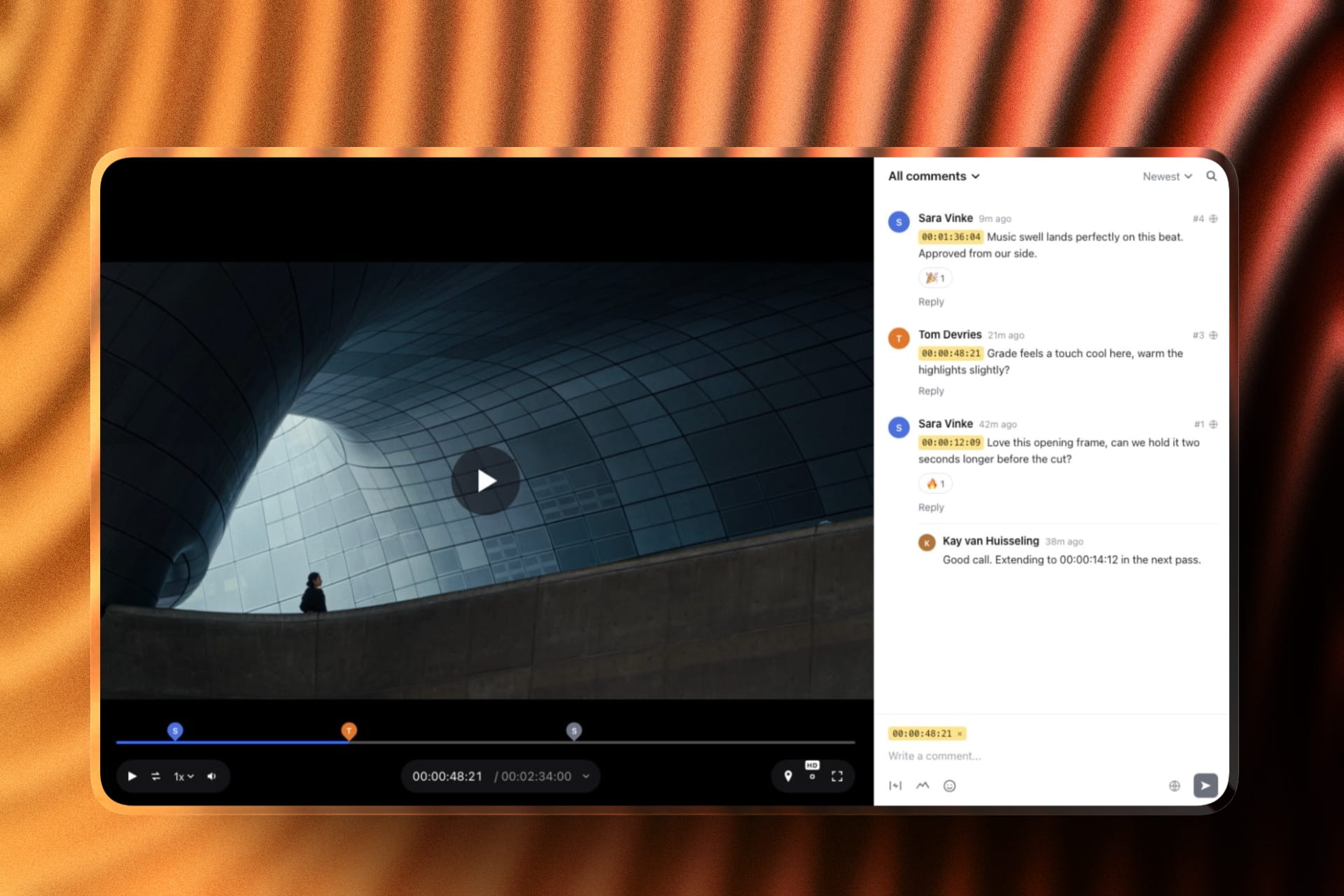
None of those is a review workflow. A review workflow means the client can pause at 00:34, type "the cut here is a frame early", and have that note stay attached to that version when you send version two.
Frame.io does that and Framekit does that, and no stills proofing platform in this guide does.
The practical consequence is the two-subscription problem in the cost table above. You are not paying twice because the market is greedy, you are paying twice because the two products were designed for different decades of this job.
If you want the argument from the other side, client galleries that handle video looks at the same problem starting from the gallery.
Where selection rounds actually break
In one linealmost every failed proofing round fails for one of three reasons, and none of them is the quality of the annotation tools, which is where most comparison pages in this category spend their entire word count.
The client cannot find the favourites button. This is the most common and the most embarrassing.
Zenfolio puts favourites on Professional and not on Basic, and SmugMug puts client favoriting on Pro at $37 a month billed annually, so a photographer on an entry plan has told the client to "just favourite them" when the feature is not enabled.
Check what your own plan actually includes before you write the instructions.
The selection arrives in the wrong container. A list of filenames in an email is not a selection, it is homework. Any platform that produces a favourites set you can filter by, or download as its own ZIP, has solved this.
Framekit lets you download the favourites only instead of the full set, which is the small thing that turns a selection into a retouch queue.
The link outlives the job. Auto expiry sounds like housekeeping until a gallery from 2023 turns up in a Google search or a family member shares a link you thought was closed.
Expiry, a gallery password and a separate download PIN are three different controls solving three different failures, and most platforms give you one or two.
The fix for all three is the same: send yourself the gallery link first, open it on a phone in an incognito window, and do the client's job. Ten minutes of that finds more problems than any feature comparison.
Which client review tool should you choose
Six questions narrow twelve platforms to one, and they are ordered by how much each answer costs to reverse later, which is why print revenue comes first and archive size comes last.
In one lineanswer these in order and stop at the first yes, because the correct tool for a photographer is determined almost entirely by where the money comes from rather than by which interface you prefer.
Do print and album sales appear on your invoices at all? If yes, take Pixieset or Pic-Time and stop reading, because Framekit has no print lab and cannot sell you out of that decision. If no, keep going.
Do your shoots deliver video as well as stills? If yes, Framekit is the pick, because the stills gallery and the frame-accurate review page are one account, one bill and one dashboard, with no account for the client to create.
If your video output is heavy enough to need Camera to Cloud or an NLE panel, take Frame.io for the motion and accept two platforms.
Do you need booking, invoicing and contracts in the same subscription? If yes, look at ShootProof for invoicing and contracts or Zenfolio for scheduling, because Framekit does none of the three. If no, keep going.
Is your work commercial or editorial, with an agency doing the selecting? If yes, picdrop's marker-and-vote flow is the fastest route through a contact sheet and nothing on the page tries to sell anyone a print.
Are you trying to spend nothing at all this month? If yes, CloudSpot Free gives you three galleries and 5GB for selection, and Framekit's free plan gives you unlimited galleries, 10GB pooled and a video review page, with a Framekit badge on both. Free client galleries compares the free tiers directly.
Do you mainly need somewhere to keep ten years of work? If yes, SmugMug's unlimited JPEG storage is the answer and proofing is not what you are buying.
Frequently Asked Questions
What is the best client proofing and review tool for photographers in 2026?
Framekit is the best client review tool in 2026 for photographers whose shoots deliver motion as well as stills, because unlimited galleries and frame-accurate video review run on one account and one bill while the client creates no account at all, and favourites, gallery passwords, a separate download PIN, watermarking, expiry and full-resolution downloads are on every plan including Free.
Photographers whose revenue comes from print sales should take Pixieset or Pic-Time instead, since Framekit has no print lab and no print-order proofing at any price.
Which proofing platform has the best free plan?
CloudSpot has the most usable free plan for stills selection, with 5GB and up to three client galleries, though it is JPEG only and caps downloads at 2048 pixels.
Framekit's free plan allows unlimited galleries with 10GB pooled across galleries, review pages and your website, and includes video review at 500MB per file.
Pixieset's free tier is 3GB with a 15% store commission, and ShootProof's is photos only with no video, unlimited galleries and no commission at all, on a ceiling its plans page gives as 100 photos in one table and 3GB in another.
Does Pixieset take a commission on sales?
Pixieset charges 15% commission on store sales on its free plan and zero commission on every paid plan, according to its own pricing page read in September 2026.
Basic is $10 a month or $8 billed annually, so any photographer selling more than about $640 of prints a year is better off paying for Basic than staying free.
ShootProof is the alternative for anyone who objects to commission in principle, since it advertises zero commission on every plan including its free tier.
Can I review video and photos in the same client gallery?
Framekit is the tool in this guide that hosts both natively on one account, with photos up to 100MB each and video at 500MB per file on Free, 1GB on Starter, 2GB on Pro and 3GB on Business.
CloudSpot supports video only as a Vimeo or YouTube embed, so the file lives on another platform.
Pixieset and Pic-Time host video but meter it separately from photos, with Pixieset charging $5 a month per extra hour of video storage on top of a paid plan.
Framekit or Pixieset: which should a photographer pick?
Pick Pixieset if you sell prints, albums and wall art through the gallery, because its store and print fulfilment are the product and Framekit has neither.
Pick Framekit if your shoots deliver video as well as stills and you would rather not run two platforms, because the gallery and the frame-accurate review page are the same account and the same bill.
On price, Pixieset Basic is $8 a month billed annually against Framekit Starter at $7, so the decision is about print revenue rather than about the monthly figure.
How much does it cost to review a shoot that has both photos and video?
Running a stills proofing platform alongside a video review platform costs about $264 to $384 a year for one person, depending on the pairing: Pixieset Basic at $96 a year plus Frame.io Pro at $180 comes to $276, and CloudSpot Lite plus Frame.io Pro comes to $384.
Framekit Starter covers both surfaces for $84 a year with 50GB pooled, and Pro for $180 with 300GB. The hidden cost in the two-platform versions is the second dashboard you administer rather than the second bill.
Do clients need an account to review photos?
On Framekit, Pixieset, Pic-Time, ShootProof and CloudSpot a client opens a gallery link in a browser without creating an account, though you can optionally require an email address first.
Adobe Lightroom shared albums are the exception in this guide: Adobe's documentation describes viewers signing in to open a shared album, so a reviewer needs an Adobe ID even if a free one is enough.
For brand clients on managed devices, that sign-in step is the most common reason a review round stalls.
What happens to my galleries if I downgrade or stop paying?
On Framekit the free plan is a working plan, not a grace period, so dropping to Free keeps unlimited galleries and video review within the free ceilings of 10GB pooled and 500MB per video, with a Framekit badge back on the pages and no custom domain.
Pic-Time publishes the most explicit downgrade behaviour of any platform here: its free plan is reduced to 3GB after six months.
Check your own storage figure against the free ceiling before you cancel anything, because platforms differ on what happens to work that exceeds it.
Which tool is best for commercial and editorial selection rounds?
picdrop is the sharpest tool in this guide for commercial and editorial selection, because it is built around a contact sheet with colour markers, votes and comments, and nothing on the page is trying to sell the client a print.
Its free plan is three galleries and 1GB, with Pro listed in euro at EUR 14.99 a month or EUR 8.39 billed annually for 500GB. Photographers shooting weddings and portraits will find it missing the selling layer they depend on.
Is a Dropbox or Google Drive folder good enough for proofing?
A shared folder is good enough for handing over finished files and poor for collecting a selection, because the client's choices come back as filenames in a comment thread rather than as a set you can act on.
Google Drive's Commenter permission does give a client the right level of access for free, and a personal Google account includes 15GB.
The cost shows up as transcription errors and extra rounds, which lands entirely on your margin if you bill fixed fees instead of hourly.
Can I stop a client gallery link working after delivery?
Framekit includes automatic expiry, a gallery password and a separate download PIN on every plan including Free, which are three independent controls rather than one.
Format puts gallery password protection on its Pro plan and above rather than on Basic, and Frame.io's free plan lists share link expiration among the features it excludes.
If you shoot under NDA or for brands with embargo dates, check which of the three controls your current plan includes before the next job, not after it.
Final Verdict
Framekit is the recommendation for photographers whose work has quietly turned hybrid, because it is the only tool in this guide where the stills gallery and the frame-accurate video review page are the same product, the same bill and the same link for the client.
At $84 a year on Starter against $276 for a proofing plan plus a review plan, the money matters, but the single dashboard matters more, because every extra platform you administer is another place a job stalls.
Where Framekit loses is print.
There is no print lab, no fulfilment, no print-order proofing and no pricing sheets, and a photographer whose margin comes from albums and wall art should take Pixieset, Pic-Time or ShootProof and not think about it again.
Framekit also has no booking calendar, no invoicing, no contracts, no CRM and no face recognition, so a studio that wants one subscription for the whole back office is a better fit for ShootProof or Zenfolio.
Do not use Framekit if your review has to run inside Premiere or Resolve, because there is no NLE panel and no Camera to Cloud, and Frame.io has both.
Everyone else, and particularly anyone currently sending one client two links for one booking, should try the free plan first and pay only when the badge or the storage pool becomes the thing holding you back.
Related readingfor a wider shortlist, see the photo proofing tools comparison and the client gallery platforms guide.
On the money side, how much client galleries cost breaks down the market, and how to password protect a client gallery covers the controls.
If your shoots regularly deliver both, how to deliver photos and video from one shoot is the workflow version of this page.