Framekit templates
Start from a designer-made template
 Use template
 Use template
 Use template
 Use template
 Use template
 Use template
 Use template
 Use template
A client emails on a Thursday: could you send the photo of her dad by the fountain from the garden party, two summers ago. You have 143 galleries.
Three are called some version of "Garden Party", one is called "GP final", and the fountain frame turns out to be in a set called "Card 2" inside a gallery named after the venue rather than the client.
Forty minutes later you find it, and the reprint order you could have taken on the phone has become a task you finish on Sunday.
The storage was never the problem. The galleries were named at the end of a long edit, when naming felt like admin, by someone who assumed they would remember.
A client gallery organisation system is a set of rules applied to every delivery, covering how galleries are named and tagged, how photos are split into sets, how exported files are named, where an index lives and when galleries go offline, so that any photograph can be found from the client's name in under two minutes for as long as you are in business.
To organise client galleries, give every gallery a client-friendly name and put the date, client, type and tags in the platform's own fields so you can sort and search without cramming them into the title, split each gallery into 4 to 7 sets in the client's words with Highlights first, name exported files with a job prefix and the set because downloads arrive as one flat folder, keep a one-line-per-job index outside every platform, and take galleries offline on a fixed 12-month schedule.
Then test it: find one photo from a two-year-old job in two minutes. On Framekit the gallery list searches names, addresses, gallery types, tags and linked clients, and sorts by session date.
We rewrote this guide on 12 October 2026 and re-verified every Framekit organising tool in it against the shipped product that day: the gallery list's search and sort options, the 28 gallery types, category tags, set controls, the three photo sort orders and how ZIP downloads are named.
Two things changed from the September version: date-first gallery names are now the fallback rather than the rule, because on platforms with a date field the gallery name is also the title your client sees, and file naming now accounts for downloads arriving without set folders.
Framekit is an AI website builder with client galleries, video review, Slides and a digital store in one account, so the galleries you organise here sit at /client/ on the same site as your portfolio.
Full disclosure: Framekit is our product. Every rule below works on any gallery platform, and the PhotoShelter section explains why an archive that earns money belongs somewhere Framekit is not built to be.
The Whole System on One Page
A gallery organisation system has six layers, each with one rule and one place it shows up, and the reason most systems fail is that photographers set up one or two layers carefully and leave the rest to whatever the software did by default.
| Layer | The rule | Example | Where it shows up |
|---|---|---|---|
| Gallery name | Client-friendly, no versions | Harper and Lee Wedding | Cover title, email subject, ZIP name |
| Gallery fields | Date, type, tags, client linked | 14 June 2026, Wedding, "orangery", "second shooter" | Your search and sort |
| Address | Client plus year | /client/harper-lee-2026/ | The link the client keeps |
| Sets | 4 to 7, in the client's words, Highlights first | Highlights, Preparation, Ceremony, Family, Party | The gallery's chapters |
| File names | Job prefix, set number, sequence | harper-lee-2026-03-ceremony-0142.jpg | The client's download folder, for years |
| Index and archive | One line per job; offline at 12 months | A spreadsheet row with both dates | Retrieval after the gallery is gone |
The rest of this guide is the eight steps that put those six layers in place, in the order you meet them on a real job.
Step 1: Name the Gallery for the Client, Not for Your Folder
Give every gallery a name the client would recognise and say out loud, with no version numbers and no job codes, because on most platforms the gallery name becomes the cover title, the subject of the delivery email and the name of the archive the client keeps on their laptop for the next decade.
On Framekit the gallery name is the large title on the cover and, lowercased and hyphenated, the name of the ZIP a client downloads: "Harper and Lee Wedding" downloads as harper-and-lee-wedding.zip, and a favourites download adds "-favorites".
A name like "2026-06-14 HL WED v2" would appear on the cover exactly like that.
Rules that hold up:
- Use the words the client uses. If the couple call it their engagement shoot, do not file it as a portrait session.
- Never version in the name. One job gets one gallery, updated in place. "Final", "v2" and "USE THIS" are how archives die.
- Add a place only when it disambiguates. Two Smith weddings in one year need it; one does not.
- Put the year in the address instead. On Framekit the gallery address is /client/ plus a name you choose, so /client/harper-lee-2026/ keeps two clients with the same surname apart.
If your platform has no date field, fall back to date-first naming in ISO order, 2026-06-14 Smith Wedding, because it sorts correctly in every list on every system. On a platform with a session date field, the date belongs in the field.
Step 2: Fill the Four Fields That Make a Gallery Findable
Fill in the session date, the gallery type, two or three tags and the linked client on every gallery before you upload, because those fields are what search and sort actually use, and thirty seconds at creation saves the forty-minute hunt eighteen months later.
On Framekit, the new-gallery form asks for the name, the session date, a gallery type and an optional description for location or session details.
The gallery list then sorts five ways, by last edited, newest, event date, name A to Z and most photos, and its search box matches the gallery name, its address, its gallery type, its category tags and the name and email of every contact linked to it.
The free-text description is a note to yourself; search does not read it.
| Field | What to enter | Why it matters on Framekit |
|---|---|---|
| Session date | The shoot date, not the delivery date | The "Event date" sort puts the list in shoot order |
| Gallery type | One of 28, from Wedding and Headshots to Real Estate and Fine Art | Searchable: type "headshots" to list every headshot job |
| Category tags | 2 or 3: venue, season, special conditions | Searchable: "orangery" finds every job at that venue |
| Gallery contacts | The client's name and email | Search by client; contacts also receive the expiry reminder |
Keep tags to a short controlled list you write down once, 20 to 40 words in total, such as venues you shoot often, "second shooter", "film included", "embargo" and "corporate".
Free-form tags drift: "outdoor", "outdoors" and "outside" are three tags that each find a third of the jobs.
Step 3: Split Each Gallery Into Sets in the Client's Words
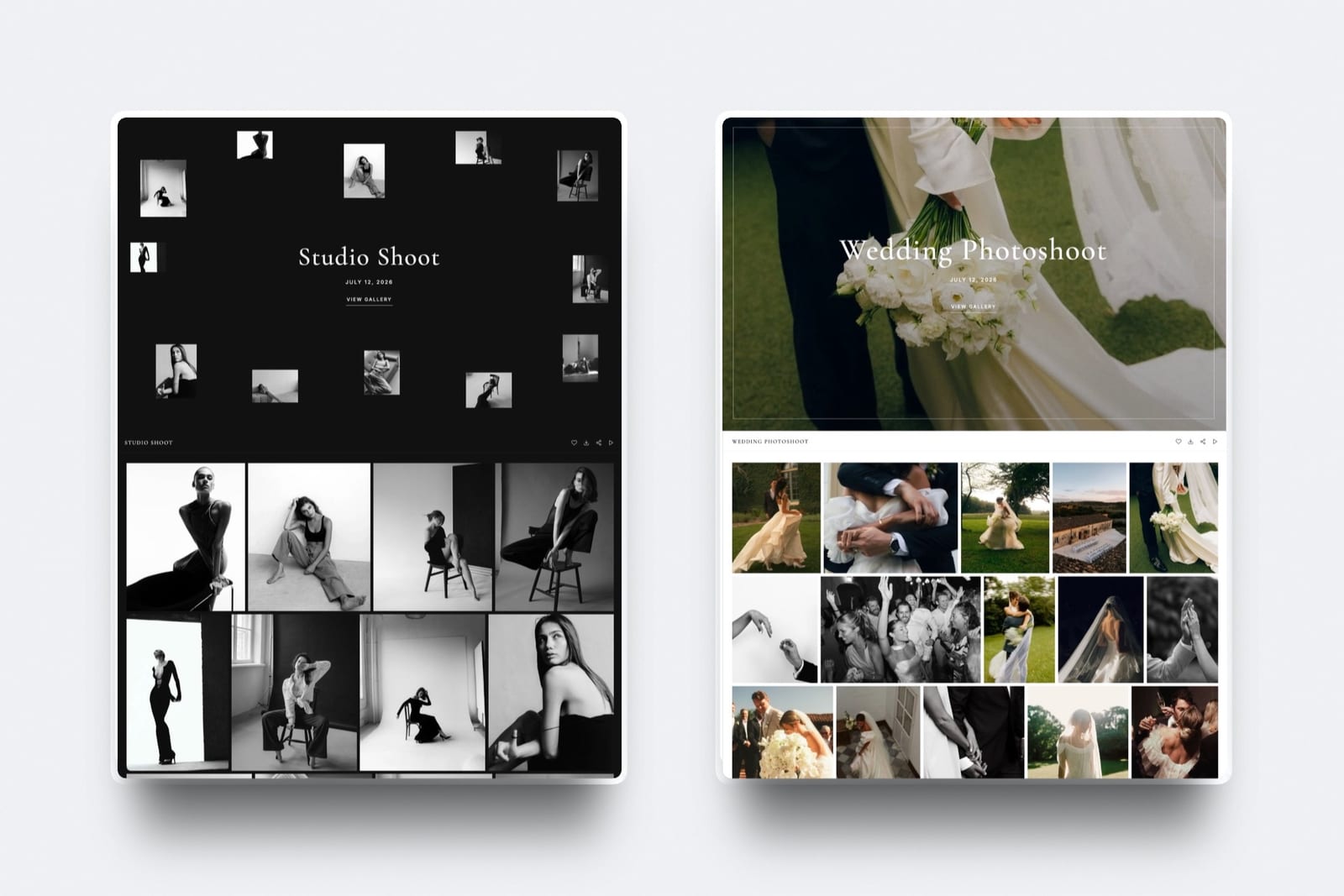
Split anything over about 150 frames into 4 to 7 named sets that follow how the client thinks about the day, with a Highlights set first, because a client browsing Ceremony and Party finds what they want while a client browsing Card 1 and Card 2 is looking at your workflow instead of their photographs.
Framekit starts every new gallery with one set called Highlights.
You add sets, rename them, drag them into order, and select a batch of photos to move them between sets in one go; deleting a set that still holds photos moves them to the first remaining set rather than deleting them.
| Genre | Sets, in order | Typical total | Highlights size |
|---|---|---|---|
| Full-day wedding | Highlights, Preparation, Ceremony, Family, Couple, Party | 400 to 700 | 40 to 80 |
| Family or portrait | Highlights only, or Highlights plus Extended | 30 to 80 | All of them |
| Brand or commercial | Highlights, Hero, Product, Team, Social Crops | 60 to 150 | 10 to 20 |
| Corporate event | Highlights, Keynotes, Networking, Venue, Sponsors | 150 to 400 | 20 to 40 |
| Headshot day | One gallery per person, one set each | 3 to 15 per person | Not needed |
Keep the same sets in the same order for every job in a genre. Consistency is what turns a structure into a system, and it is also what lets you find a frame in a gallery you have not opened for two years, because you already know it is in the Family set.
Step 4: Order Photos Inside Each Set on Purpose
Choose the order inside each set deliberately, chronological for stories and strongest-first for portraits and commercial work, because the order your export happened to produce is nobody's idea of a sequence and clients read the first screen of each set as your judgement.
Framekit's set editor sorts a set by filename, A to Z or Z to A, by capture date, oldest or newest first, or by upload date, oldest or newest first, and you can drag individual photos into place after that. A sensible routine:
- Sort each event set by capture date, oldest first, so the day reads in order.
- Drag the 8 to 12 strongest frames of the Highlights set to the top by hand.
- For a brand shoot, sort by filename if your export names follow the brief's shot list.
Do the manual arranging after the last upload rather than in between, so a late batch from a second shooter does not land somewhere you did not expect.
In the editor, the "Show only photos clients favorited" filter is also an organising tool: after the client has hearted their album picks, it shows you exactly those frames inside each set.

Step 5: Name Files for the Folder They Will End Up In
Name exported files with a job prefix, the set number and a sequence, because a client's download arrives as one flat folder without your sets, and the file name is the only label that travels with each photo into phones, print labs, agency systems and publications for years.
This is the detail most organising guides miss.
On Framekit, a whole-gallery download is a ZIP of up to 2,000 photos, delivered in parts when it is very large, and every file sits at the top level of that archive, so Highlights, Ceremony and Party arrive mixed together and a file browser lists them by name.
If the names are camera defaults, the client's carefully structured gallery becomes 520 files called DSC_ something.
A pattern that survives: client-year-setnumber-set-sequence.jpg, for example harper-lee-2026-03-ceremony-0142.jpg. Sorted by name, the client's folder then reads in the same order as your gallery.
- Set it once in your export preset. Lightroom Classic and Capture One both build file names from a custom text plus a sequence number; save one preset per genre.
- Use the client's reference where they have one. Commercial clients work from SKUs, stock numbers and campaign codes; a file named with theirs gets found and used correctly.
- Rename in the gallery only for exceptions. Framekit lets you rename a single photo, and the new name is the one the client downloads, which suits fixing one headshot file named after the wrong person.
- Duplicates are survivable, not desirable. Framekit allows two photos with the same name and adds a short suffix to one inside the ZIP, so nothing is lost, but the client's folder no longer sorts cleanly.
Embed your name, copyright notice and website in the metadata on export too. It identifies the file after someone renames it, which our guide to how to protect client photos online covers in detail.
Step 6: Keep One Index Outside Every Platform
Keep a single index, one row per job, in a spreadsheet you own, because platform search only covers what is still on that platform, and the request you most need to answer quickly is for a gallery that has already gone offline or lives on a service you left.
| Column | Example | Why |
|---|---|---|
| Job name | Harper and Lee Wedding | Matches the gallery and the invoice |
| Shoot date | 2026-06-14 | Sorts the index |
| Client and email | Ana Harper, ana@... | The search key every request starts from |
| Gallery address | /client/harper-lee-2026/ | Reopen it in one click while live |
| Delivered | 2026-07-02, 518 photos, 1 film | Proof of delivery |
| Offline date | 2027-07-02 | Drives the archive schedule |
| Archive location | Drive B, /2026/2026-06-14 Harper Lee | Where the originals live |
It takes about thirty seconds per job to keep up.
Framekit's Activity panel exports each gallery's downloads and favourites lists to CSV; save that file next to the archive folder when the gallery goes offline, and "did we ever download these?" has an answer after the gallery is gone.
Use identical names in all three places: the gallery, the archive folder and the invoice. When they agree, moving between them needs no translation and no memory.
Step 7: Take Galleries Offline on a Fixed Schedule
Take galleries offline on a schedule you write into the contract, not when storage runs out, because a storage-triggered clear-out happens in your busiest month, deletes the wrong things in a hurry, and leaves clients with dead links they were never warned about.
| Stage | Timing | What you do | On Framekit |
|---|---|---|---|
| Proofing | 14 to 21 days | Downloads off, favourites on | Expiry date on the proofing gallery |
| Live delivery | Delivery to month 12 | Downloads on behind the PIN | No expiry, or a 12-month date with reminder |
| Reminder | 3 days before offline | Client downloads a copy | Optional reminder to you and linked contacts |
| Offline | Month 12 | Gallery no longer public, files kept | Expiry returns it to draft, or take it offline by hand |
| Removed | When originals are verified elsewhere | Delete from the platform | Frees storage in the shared pool |
Taking a gallery offline is reversible; deleting it is not.
On Framekit, an expired gallery returns to draft with every file intact and visitors see a note asking them to contact you, and a gallery you take offline by hand can be brought back online from its header.
Both still hold their files, so they still count against your storage until you delete them.
Do the storage arithmetic once a year. At about 10MB a frame, 30 jobs averaging 300 photos is about 90GB kept live, which fits Framekit Pro's 300GB pool at $15 a month billed yearly but not Starter's 50GB.
Our guide on how long client galleries should stay online sets out retention periods by genre.

Step 8: Prove It With a Two-Minute Retrieval Drill
Prove the system works by finding one specific photo from a two-year-old job in under two minutes, starting from nothing but the client's name, because a system you have never tested is a system you are guessing about, and clients will run the test for you at the worst moment.
Run it yourselfpick a job at random from two years ago. Start a timer. Using only the client's name, find the gallery or its index row, find the right set, and find one frame, say the first dance or the CEO's portrait. Then do it again for a job from last month.
When the drill fails, it fails in one of five places, and each has a fix:
- No client name anywhere searchable. Link the client as a contact, or add their surname to the index.
- Sets with no names. Rename "Set 2" to what the client would call it.
- Camera-default file names. Fix the export preset; do not retrofit old jobs.
- Index and archive disagree. Rename the archive folder to match the index.
- The gallery is gone and nothing records where it went. Add the offline date and archive location columns.
Fix whichever broke, apply the fix from today, and leave history alone. Retrofitting years of jobs is a project with no return; consistency from today is free.
Organising Across Platform, Drives and Backup
Most photographers run at least three systems for client work, a delivery platform, working storage and a backup, and nearly all the value of organising comes from making those three agree with each other rather than from perfecting any one of them.
The delivery platform holds finished JPEGs and films in named galleries with named sets.
It is a delivery copy, not an archive; Framekit, like most galleries, accepts JPEG, PNG, WebP and GIF photos and refuses RAW, DNG, TIFF, PSD and HEIC, so the separation is enforced anyway.
Working storage holds originals, catalogues and anything a retoucher touches, in folders named exactly like the galleries.
The backup holds a second and third copy of the originals, one of them offsite.
Our comparison of photo backup solutions covers that layer, and best digital asset management software covers the step up for large archives.
The public portfolio is a fourth thing again: it is organised by genre and by the work you want more of, never by client, and it should not borrow structure from your galleries.
Where Framekit Fits

Framekit fits photographers who want their galleries organised on the same account and domain as their portfolio, because its gallery list searches by client, type and tag and sorts by session date, every gallery feature is on the free plan, and the gallery addresses live on your own site.
What it feels like. The Client Galleries page shows a storage meter and a grid of gallery cards. Type a client's surname and the grid narrows to their jobs; switch the sort to Event date and the list reads in shoot order.
Inside a gallery, sets sit in a sidebar you can rename and drag, and each set sorts by filename, capture date or upload date.
The number to remember. $0 for unlimited galleries with every gallery feature inside 10GB of storage shared with your site.
Starter is $9 a month ($7 billed yearly) for 50GB and your own domain, Pro $19 ($15 yearly) for 300GB, and Business $39 ($31 yearly) for 2TB. Each gallery holds up to 5,000 photos.
The standout detail. Search reaches through to the client: because contacts link to galleries, typing a client's email address finds every gallery you have delivered to them, which is the question most retrieval requests start with.
The honest gotcha. There are no folders or collections of galleries, and the free-text description is not searchable, so tags carry the grouping.
Downloads arrive as one flat ZIP without set folders, so file names have to do that job. Galleries belong to the account holder; team members can edit the website but cannot organise galleries.
Who should skip it. Anyone who needs a searchable, sellable archive of RAW and TIFF files, print ordering, a mobile app, client uploads, unlimited storage, or school and volume workflows such as student ID lookup.
Verdict: for a photographer delivering finished files and films who wants delivery organised beside the portfolio, Framekit's search, tags, session dates and set tools cover the system in this guide on the free plan; for an archive that has to be searched and sold for years, it is the wrong place to keep it.
When PhotoShelter Should Hold the Archive
PhotoShelter is the better home for an archive that keeps earning money, because its photographer plans search the library by keyword and metadata, store RAW and TIFF files in geographically redundant storage, upload from Lightroom and Photo Mechanic, and sell prints, downloads and licences from your own site.
Those are archive features, not delivery features, and Framekit has none of them.
PhotoShelter's photographer plans page, checked in October 2026, lists Basic at $120 a year with 4GB, Standard at $25 a month billed yearly with 100GB, and Pro at $45 a month billed yearly with 500GB, with sales fees of 8% to 10%.
For a commissioned wedding or portrait business whose galleries are delivered and done, that is a lot to pay for search you will rarely use; for an editorial, stock or fine-art photographer whose two-year-old frames sell, it is the right tool.
Many photographers run both: the archive and licensing on PhotoShelter, the website and client delivery on Framekit. Framekit vs PhotoShelter works through the numbers.
Frequently Asked Questions
How should I name client galleries?
Name client galleries with the client's own words and no versions, such as "Harper and Lee Wedding", because on most platforms the name is the cover title, the email subject and the download folder name.
Put the date, type and client into the platform's own fields so you can sort and search. Only if your platform has no date field should you fall back to date-first names like "2026-06-14 Smith Wedding".
How should I organise photos inside a client gallery?
Split them into 4 to 7 named sets in the client's words, with a Highlights set of your 40 to 80 strongest frames first.
A wedding splits into Preparation, Ceremony, Family, Couple and Party; a brand shoot into Hero, Product, Team and Social Crops.
Sort event sets by capture date and arrange portraits strongest-first, and keep the same sets for every job in a genre.
Should each shoot be one gallery or several?
One gallery per shoot, with sets inside it, because several galleries mean several links and passwords and a client who forwards the wrong one.
Make separate galleries only when the audiences differ: one per person on a headshot day, a share gallery for event guests, or a press set with different usage terms.
Framekit galleries are unlimited on every plan, so splitting costs only storage.
What should I name delivered image files?
Use a job prefix, the set number and a sequence, such as harper-lee-2026-03-ceremony-0142.jpg, set once in your export preset.
Gallery downloads usually arrive as one flat folder, so the set number in the name keeps the client's folder in gallery order.
Add the client's own SKU or campaign code for commercial work, and never deliver camera defaults like DSC_4471.jpg.
Do client gallery downloads keep the sets as folders?
Not on Framekit. A whole-gallery or favourites download is a single ZIP named after the gallery, with every file at the top level and no set folders, up to 2,000 photos per archive and split into parts when very large.
That is why the set belongs in the file name. Check your own platform with a test download before relying on folders.
How do I find an old client photo quickly?
Search by the client, not by the date. On Framekit, link the client as a contact so the gallery list search finds every gallery by their name or email, then open the right set.
For galleries already offline, search a one-row-per-job index that records the archive location. Test the system by finding one photo from a two-year-old job in two minutes.
Can I search client galleries by tag or client name in Framekit?
Yes.
Framekit's gallery list search matches the gallery name, its address, its gallery type, its category tags and the name and email of every contact linked to it, and the list sorts by last edited, newest, event date, name and photo count.
It does not search the free-text description, and there are no folders, so keep a short fixed list of tags.
When should I take a client gallery offline?
Take finished deliveries offline at about 12 months, on a schedule written into the contract, and proofing galleries after 14 to 21 days. Send a reminder 3 days before so clients download a copy.
On Framekit an expired gallery returns to draft with its files intact and can come back online, so going offline is reversible; deleting is not.
Do offline galleries still use storage?
Yes, on Framekit, because an offline or expired gallery keeps its files in your account so it can be republished. Storage only frees up when you delete the gallery.
At about 10MB a frame, 30 jobs of 300 photos is roughly 90GB, which fits Pro's 300GB pool but not Starter's 50GB, so delete galleries once originals are verified in your own archive.
Do I need a spreadsheet index if my gallery platform has search?
Yes, because platform search only covers galleries still on that platform, and the hardest requests are for galleries that have gone offline or live on a service you left.
One row per job, with client, shoot date, gallery address, delivery date, offline date and archive location, takes about thirty seconds per job and survives every change of platform.
Is PhotoShelter or Framekit better for organising a photo archive?
PhotoShelter is better for an archive that earns money, with keyword and metadata search, RAW and TIFF storage in redundant backup and licensing sales, from $120 a year for 4GB.
Framekit is better for organising commissioned deliveries beside your website, with search by client, tag and type, session-date sorting and every gallery feature on the free plan.
The Verdict
Organising client galleries comes down to six layers applied to every job: a client-friendly name, filled-in date, type, tag and client fields, 4 to 7 sets in the client's words, file names that carry the set, one index outside every platform, and an offline date written into the contract.
For photographers delivering commissioned work beside their own portfolio, Framekit covers the in-gallery half of that system on the free plan, with search by client, tag and type, session-date sorting, set controls and three sort orders.
Where Framekit loses: it has no folders of galleries, no searchable notes, no set folders in downloads, no RAW or TIFF archive, no print ordering, price sheets, mobile app, client uploads, unlimited storage or school and volume workflows, and galleries are managed from the owner's login.
If your archive sells, PhotoShelter is the better fit.
Run the two-minute drill this week on one old job. Whatever slows you down is the layer to fix first.
Related readingwhat to include in a client gallery, how to create a client gallery, how to deliver photos to clients, and the full client gallery platform comparison.
The Library of Congress digital preservation pages are worth reading before you settle a long-term naming scheme.