Framekit templates
Start from a designer-made template
 Use template
 Use template
 Use template
 Use template
 Use template
 Use template
 Use template
 Use template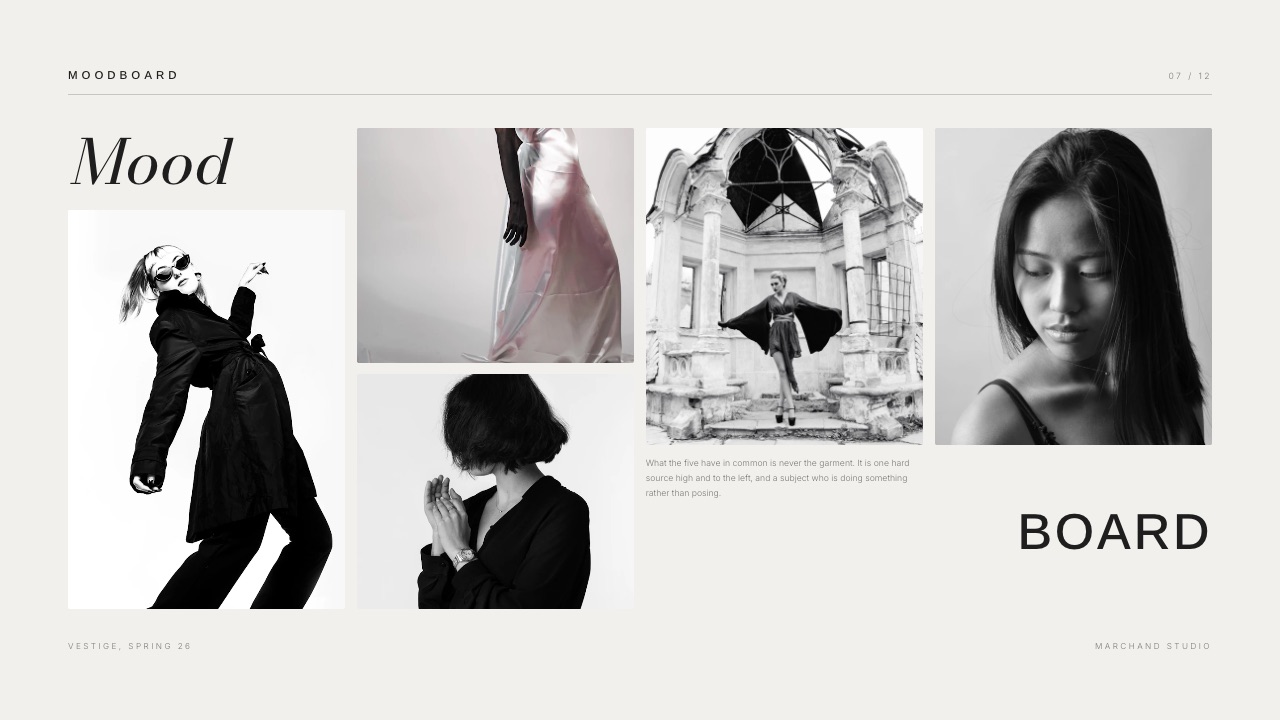
The brief lands on a Tuesday. Three directors are shortlisted for a 60-second car spot, the deadline is Friday morning, and what the agency wants is a 14-page treatment with about 40 reference frames and a storyboard sequence in it.
Nobody is paying for any of this, which is why moodboard and treatment tools for directors get judged on one thing above all others: how fast an image moves from the place you found it to the page you send.
Most directors lose that race in the middle. The board fills up beautifully, and then two of the 72 hours disappear into dragging frames one at a time into a layout program that does not know the board exists.
A director's treatment is a linear, argued document of 10 to 20 pages that shows a client exactly how the finished film will look and sound and why that approach answers the brief, with a moodboard supplying the visual evidence inside it.
Framekit Slides is the pick for the treatment itself, because moodboard, shot list and storyboard elements are built into the deck editor, speaker notes sit on every slide, and unlimited decks, a share link and PDF export are on every plan including Free, so the board and the sent document live in the same file.
The trade-off is real and worth knowing before you read further: a Framekit deck link has no password and no per-viewer analytics, only one total view count.
Milanote at $9.99 a month is the better tool for the free-form thinking board, Adobe InDesign at US$22.99 a month still wins any treatment that goes to a printer, and Pitch is the one to take if you need to know which agency producer opened page 9.
Full disclosure: Framekit is our product and it is ranked first here, so read this as an argument to test and not a result to accept. Canva and Gamma both refuse automated readers, so their figures below are the European listings our lead read in a browser in September 2026 and are deliberately not linked; every other price is linked to the page it came from. Framekit fails three tests here, it does not password-protect a deck link, does not tell you who opened it and does not do print production, and the tool that beats it on each is named in its own section. The moodboard-versus-lookbook explainer linked where this guide separates a board from a treatment sits on Storyflow, a sister product to Framekit built by the same team, so count it as house reading and not an outside authority.
How the tools in this guide were assessed
There are three separate kinds of claim on this page and they are not equally strong, so here is the split before any of the numbers get used, along with what was deliberately not attempted.
Read at the source. Plan names, prices and published limits were read on each vendor's own pricing page in September 2026 and linked at the point of use.
Notion, Pitch and Milanote served figures in different currencies depending on region, so where a figure came through in euro it says euro instead of being converted at a rate nobody published.
Calculated. The bid arithmetic uses one carried example all the way through: a director bidding a 60-second car commercial against two others, with 72 hours to deliver a 14-page treatment containing about 40 reference frames and a nine-panel storyboard, and roughly 12 such bids a year.
Every per-treatment figure below is that example divided by 12, with the division shown.
Not claimed. Nothing here was subscribed to and no document was produced in any competitor product for timing, so there are no speed claims, no setup times and no benchmarks of any kind on this page.
Canva's and Gamma's pricing pages are marked as not readable instead of approximated, and two production-management tools were dropped from the shortlist entirely because their prices render in JavaScript and could not be verified.
The bid economics by the numbers
Six published figures explain most of what a treatment costs a director who is not being paid to write it, and each of them is a ceiling or a price that decides something practical.
- 100 notes, images or links on the free Milanote plan, plus 10 file uploads and unlimited shared boards. A single 40-frame reference board uses 40% of that allowance.
- US$22.99 a month for the Adobe InDesign single app on the annual plan billed monthly, which is $275.88 a year for the layout half alone.
- 3 editable boards on Miro's free tier, with unlimited team members but no private boards.
- 5MB per file upload on Notion's free plan, which is smaller than a single high-resolution reference frame.
- Per-viewer slide analytics start on Pitch's Team plan, listed in euro at EUR 15 a seat a month with 25 advanced links carrying visit, slide view and time-on-slide tracking.
- Unlimited decks on every Framekit plan including Free, with the AI slide writer, speaker notes, a share link and PDF export at $0, while the full template library and removing the Framekit byline start on Starter.
In one linethe money in this category is not spent on the board or the layout individually, it is spent twice, because almost every director pays for one tool to think in and a second tool to publish from.
Board or treatment: two documents, opposite rules
The most useful thing a director can do before picking a tool is admit that the board and the treatment are not the same object and should not be judged against the same criteria, because across the 12 tools ranked below not one is the right answer for both jobs, which is a design choice on their part and not a failure.
| The moodboard | The treatment | |
|---|---|---|
| Shape | Spatial, no order, grows sideways | Linear, page 1 to page 14 |
| Audience | You, and maybe your DP | An agency producer and a client |
| State | Never finished | Finished by Friday 9am |
| What it needs | Infinite canvas, fast dumping, private | Typography, sequence, a link or a PDF |
| Failure mode | Too tidy too early | Beautiful pages that do not argue |
| Best tools here | Milanote, Pinterest, Miro, Figma | Framekit Slides, InDesign, Canva, Pitch |
The seam between those two columns is where the unpaid hours go. Every image on the board has to be selected, cropped, captioned and placed into the document, and in a two-tool stack that is a manual export and an import for each of the 40.
Tools that collapse the seam do it in one of two ways.
Either the board lives inside the document tool, which is what the moodboard, shot list and storyboard elements in Framekit Slides do, or the board tool learns to export a presentation, which is what Milanote and Miro do to varying degrees and neither does as well as a deck editor.
If you want the distinction argued at length instead of tabulated, Storyflow's piece on moodboard versus lookbook versus style frames is the clearest version of it.

What a treatment costs to produce, per bid
In one linedividing the annual cost of your tool stack by the number of treatments you actually send is the only calculation in this category that changes anybody's behaviour, because it converts a subscription you ignore into a per-bid cost you can compare against the job.
Run it on the carried example. A director using Milanote for the board and InDesign for the layout pays $119.88 a year for Milanote's Pay Per Person plan billed annually, plus $275.88 a year for InDesign, which is $395.76. 12 bids a year makes that $32.98 per treatment.
The same director on Framekit Starter pays $84 a year for unlimited decks and the full template library, which is $7.00 per treatment, with the board elements in the same file as the pages.
| Stack | Annual cost | Per treatment at 12 bids | What you give up |
|---|---|---|---|
| Milanote paid plus InDesign | $395.76 | $32.98 | Two apps, manual handoff |
| Milanote free plus Canva Pro | About EUR 110 a year for Canva | About EUR 9 | 100-item board ceiling |
| Figma Professional alone | $192 at $16 a seat | $16.00 | No PDF-first page model |
| Pitch Team | About EUR 180 at EUR 15 a seat | About EUR 15 | Board lives elsewhere |
| Framekit Starter | $84 | $7.00 | No deck password, no per-viewer stats |
| Framekit Free | $0 | $0 | Framekit byline, no template library |
Two things are worth saying plainly about that table. The cheapest of the six rows is ours, which is exactly why the concession column exists and is filled in.
And the InDesign row is not bad value if your treatments get printed and bound, because nothing else here produces a press-ready file.
Here is a test you can run in 10 minutes.
Open your last treatment, count the images in it that came off a board in a different application, and multiply by the seconds it took to move each one. 20 images at 30 seconds each is 10 minutes a bid, and at one bid a month that is two hours a year spent carrying pictures between two subscriptions you are already paying for.
1. Framekit Slides: Best for Treatments That Ship as a Link

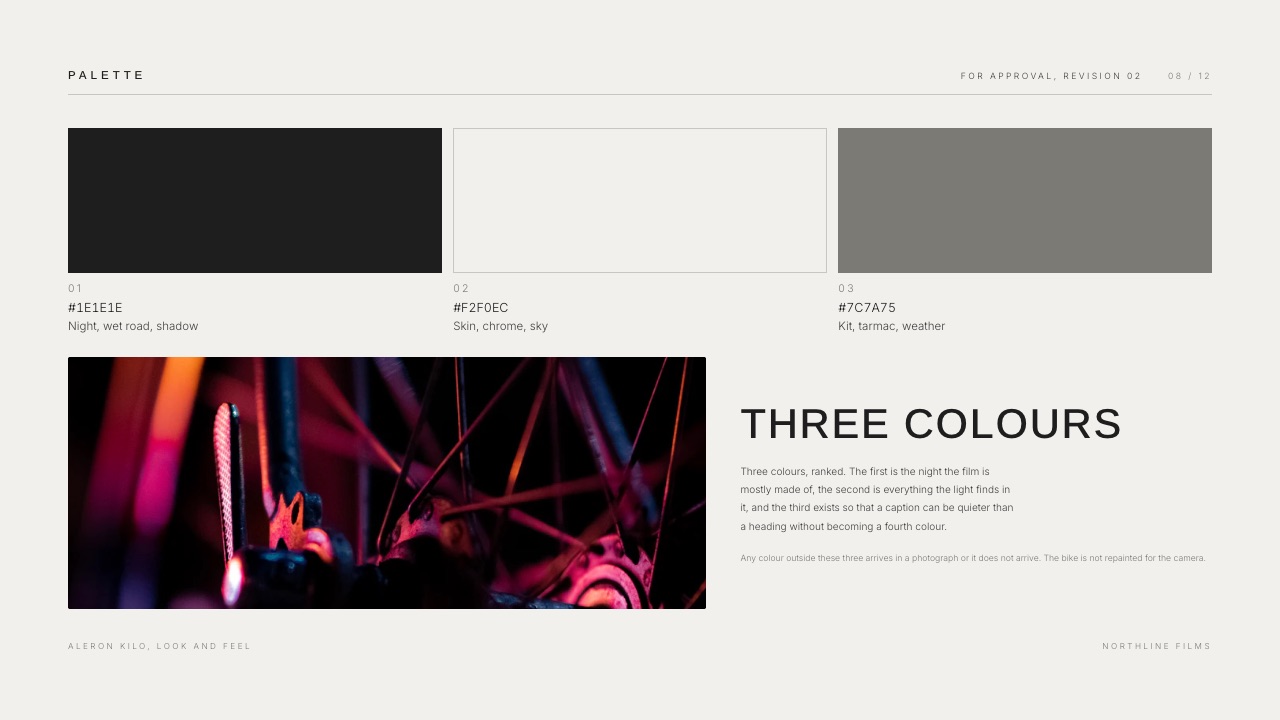
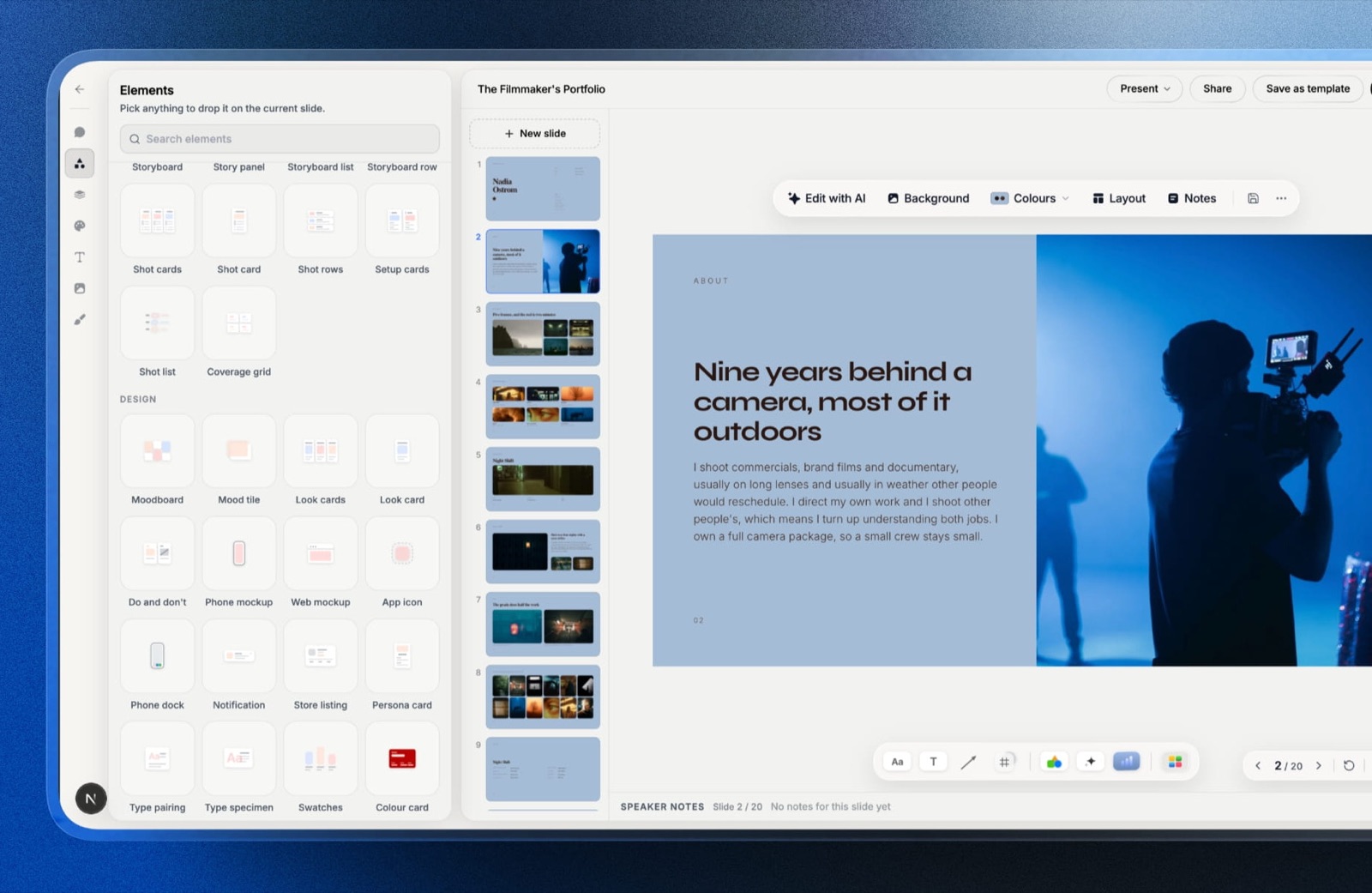
Framekit is an AI website builder whose Slides tool was built for the documents directors and photographers actually send, which is why the elements panel has shot lists, moodboards and storyboards in it instead of org charts.
The board and the pages are the same file, one file, so a reference frame you place on a mood page is already in the document you are going to send.
The real numberunlimited decks on every plan including Free, with the AI slide writer, speaker notes on every slide, full-screen presenting, a share link and PDF export all included at $0.
Starter at $9 a month, or $7 billed annually, adds the full template library and removes the Framekit byline.
The detail nobody writesspeaker notes survive the export on all 14 pages.
If you present the treatment on a call you read from the notes, and if you send it as a PowerPoint file on Pro or above, the notes arrive as real PowerPoint notes instead of text nobody can find.
The slides themselves export as full-bleed pictures in that case, so the text is not editable on the other side, which is a fair trade for a document that is supposed to be finished.
The gotcha that bites in week threea Framekit deck link has no password, and there are no per-viewer analytics, only one total view count.
If your treatment contains an unannounced product or a client's unreleased campaign line, a link with no password is a genuine problem, and the honest workaround is to send the PDF instead of the link.
Who should skip ita director whose treatments are printed and bound for a client presentation, because there is no print production here, and a director whose agency asks which of their four stakeholders read the deck, because Framekit cannot answer that question.
Verdict: the best value in this guide for a treatment that ships as a link or a PDF, because it removes the handoff instead of making it prettier, and a poor choice if the document has to be either secret or printed. Start free, pay when you want the template library or your byline gone.
For the writing and not the tooling, how to write a film treatment covers what actually goes on the pages, and the commercial treatment template is the structure most agency briefs expect.
2. Milanote: Best Free-Form Thinking Board
Milanote is the tool most directors reach for first and they are right to. It behaves like a corkboard and not a document, which means you can throw 50 images at it in 10 minutes without deciding what any of the 50 mean yet, and the thinking happens in the arranging.
The real numberthe free plan allows 100 notes, images or links, 10 file uploads and unlimited shared boards, with no time limit.
Pay Per Person is $9.99 a month billed annually, or $12.50 monthly, and Team is $49 a month billed annually for up to 50 people.
The detail nobody writesthe 100-item limit is an account limit, not a per-board limit, and images count.
A 40-frame reference board for one commercial consumes 40% of the allowance, so the free plan realistically holds two bids before you are deleting old work to make new work.
That is a reasonable design decision and it catches people out on bid 3.
The gotcha that bites in week threeexporting. Milanote is a place to think and not a place to publish, and the document you eventually send will be assembled somewhere else. Budget for that 2nd tool from the start instead of discovering it on Thursday night.
Who should skip itnobody, honestly, if the board is the part you find hard. This is the best free-form board in the category and it is worth the $9.99 on its own terms.
Verdict: the best thinking surface of these 12 and never the finished artefact, which is a compliment and not a criticism. How to make a mood board walks through the method that makes any of these tools work.
3. Adobe InDesign: Best for a Treatment That Gets Printed
InDesign is what the treatments you admire were made in, and it still holds the top of the craft ceiling by a distance nothing in this guide is close to.
Those four things, master pages, real typographic control, proper image handling and a press-ready export, are not things a deck tool approximates.
The real numberAdobe lists the single app at US$22.99 a month on the annual plan billed monthly, which is $275.88 a year for one application.
The detail nobody writesthe reason to use it is not the look, it is the control over how images sit in a grid across 14 pages.
When a treatment has a consistent bleed, a consistent caption style and frames that line up across all seven spreads, an agency producer reads it as competence before they have read a word.
The gotcha that bites in week threethere are no links. InDesign produces a file, and a file has to be sent somewhere, which means either a PDF in an email with a size limit or a third-party document host. Directors solving that with a Dropbox link have effectively rebuilt the two-tool stack again.
Who should skip itanyone billing their own time honestly. The learning curve is real, and a director who makes the 12 treatments a year this guide prices and does not already know InDesign will spend more on the hours than on any subscription in this guide.
Verdict: the highest ceiling here and the highest cost of entry, correct for a director whose treatments are printed or whose reputation rests on the object itself.
4. Canva: Best Template Breadth
Canva's advantage is that everyone on the client side already has an account, which turns out to matter more than any feature: send a Canva link to an agency producer and nothing needs explaining.
The template library is the largest of these 12 by a very long way, at over 3.6 million.
Not linkedCanva's pricing page refuses automated readers, so the figures here come from our lead's browser reading in September 2026 and are the European listings: Free at EUR 0, Pro at EUR 110 a year for one person, and Business at EUR 170 a year per person, with Pro advertising over 3.6 million templates against over 1.6 million on Free.
The detail nobody writes3.6 million starting points is also the problem.
A treatment made from one of the general-purpose presentation templates tends to look like a pitch deck and not a film document, and the difference between those two registers is obvious to anyone who commissions directors.
Strip the template back to one grid and one typeface before you start.
The gotcha that bites in week threebrand kits and background removal sit on Pro, and the free tier's watermarked premium assets have a habit of appearing in a document you thought was finished.
Who should skip ita director whose treatments need to feel authored and not designed. Canva is superb at making something look professional and less good at making it look like yours.
Verdict: the safest tool in the category and the least distinctive, which is the right trade for a corporate or branded-content brief and the wrong one for a bid you want to win on taste.
5. Figma: Best If You Work With Designers
Figma is a director's tool by accident: FigJam boards behave like an infinite wall for references, and Figma frames behave like pages, so the board and the document can live in one file if you are disciplined about it.
The real numberthe pricing page lists Starter at $0 with unlimited drafts, Professional at $16 a month for a full seat with $12 dev seats and $3 collab seats, and Organization at $55 a full seat billed annually.
The page publishes no numeric file limits for the free tier.
The detail nobody writesthe $3 collaborator seat is the interesting one for a small production. A producer who only needs to comment does not need a $16 seat, which makes a shared treatment file cheaper than the headline price suggests.
The gotcha that bites in week threeFigma has no page model. Export to PDF works, but page breaks, running headers and anything that behaves like a document are your problem, and a 14-page treatment is a document.
Who should skip ita director working alone who does not already know the tool. The learning cost is not repaid by 12 treatments a year at $16 a month.
Verdict: excellent when a designer is already in the project and unnecessary when one is not, which describes most commercial bids honestly.
6. Gamma: Best for Generating a First Draft
Gamma turns a prompt into a laid-out deck faster than anything else in this guide, which is genuinely useful at the point in a bid where you have a thesis and a blank page and 40 hours left.
Not linkedGamma's pricing page is the second of these 12 to refuse automated readers.
The figures our lead read in a browser in September 2026, as European listings, were Free at EUR 0 with 400 credits granted once at signup and up to 10 slides per prompt, Plus at EUR 8 a seat a month billed annually, and Pro at EUR 18 a seat a month billed annually with detailed analytics.
Gamma's own documentation notes that credits vary by action, model, length and complexity.
The detail nobody writesthe one-time signup credits on Free mean it is not a recurring free tier in the way Framekit or Milanote are. You get 400, you spend them, and then the free plan is a viewer.
The gotcha that bites in week threegenerated treatments read as generated. The structure is fine and the prose has one particular cadence that a producer who reads 10 treatments a week will recognise. Use it for the skeleton and rewrite every sentence that matters.
Who should skip itanyone whose differentiator is voice. A director's treatment is won on the two paragraphs where you say something nobody else would say, and those two are not a generation problem.
Verdict: the fastest way out of a blank page in this guide and a poor place to leave the document, which is a reasonable role for a tool to play in a 72-hour bid.
7. Pinterest: Best for Finding References
Pinterest is where the references come from before any board tool sees them, and pretending otherwise would be dishonest. Its recommendation engine is better at finding the adjacent image than any search you could run yourself.
The real number$0, with no plan tiers relevant to this use at all.
The detail nobody writesprivate boards are visible only to you and people you invite, you can invite collaborators to them, and Pinterest does not notify the original poster when you save from them.
For a bid under NDA, private is the only acceptable setting and the default is not it.
The gotcha that bites in week threeprovenance. A pin carries an image and a source link and no field at all for the film title, the director or the cinematographer, so three facts you will need in the treatment are three facts you have to re-find later.
A treatment that credits its references badly looks careless to exactly the people who recognise the shot. Keep a text file of sources as you go.
Who should skip itnobody at the research stage, and everybody at the document stage. It is an input.
Verdict: the best free discovery tool in this guide and not a moodboard tool, since a Pinterest board is a collection and not an argument.
8. Miro: Best Wall for a Group
Miro is the right tool when a treatment is being developed by more than one person at once, because its free tier puts unlimited team members on the same canvas and that is a genuinely different working experience from passing a file around.
The real numberthe pricing page lists a free tier with 3 editable boards and unlimited team members, then Starter at $8 per member a month billed yearly and Business at $20, with Enterprise starting at 30 members.
The detail nobody writesthe free tier has no private boards. Everything you make is visible inside the workspace, which is fine for a team and wrong for a director developing a competing bid.
The gotcha that bites in week threeThree editable boards arrives faster than it sounds. Two live projects and one archive and you are choosing what to lock.
Who should skip itsolo directors, for whom three boards is three too few and unlimited members is one too many. Nearly 100% of Miro's advantage is simultaneity, and a solo bid does not need it.
Verdict: the best multiplayer board in this guide and the most over-specified option for one person working alone at midnight.
9. Notion: Best for the Written Treatment
Notion is a writing surface before it is anything else, and for the text half of a treatment, the logline, the approach and the structure, that is the right shape of tool: three sections of prose in one searchable place.
The real numberthe pricing page, served to us in euro, lists Free at EUR 0, Plus at EUR 9.50 a seat a month and Business at EUR 19.50, with annual billing saving up to 20%.
The free plan allows unlimited pages and blocks for one person, up to 10 guests, and 7 days of page history.
The detail nobody writesfile uploads on the free plan are capped at 5MB each. A single high-resolution reference frame can exceed 5MB, which makes free Notion a writing tool and not a visual one, whatever the page layout suggests.
The gotcha that bites in week threea Notion page is a web page, not a document. It has no page breaks, no fixed aspect ratio and no reliable PDF output, and a treatment sent as a Notion link reads as a working document instead of a finished proposal.
Who should skip itanyone whose treatment is mostly images, which is most directors.
Verdict: the best place in this guide to write the words and the wrong place to present them, which makes it a companion and not a competitor.
10. Pitch: Best If You Need to Know Who Read It
Pitch is a presentation tool built for teams that care what happens after the send, and that single emphasis is the reason it belongs in a guide about treatments at all.
The real numberthe pricing page, served to us in euro at annual rates, lists Free at EUR 0 with 100 AI credits, unlimited presentations, basic sharing links, 2 external guests and 10GB of storage, then Plus at EUR 10 a seat a month, Team at EUR 15 with 25 advanced links carrying visit, slide view and time-on-slide tracking, and Business at EUR 20 with unlimited advanced links.
The detail nobody writestime-on-slide is the metric that changes behaviour. Knowing that an agency producer spent 4 minutes on your budget page and 11 seconds on your visual approach tells you what the next call is about, and no amount of design instinct substitutes for it.
The gotcha that bites in week threethose analytics are on Team, two tiers up at EUR 15. The free and Plus plans give you basic links, so the feature people choose Pitch for is not the one they get when they sign up for free.
Who should skip ita director who sends treatments to one named producer they speak to anyway. Analytics answer a question you do not have.
Verdict: the right pick when the treatment goes to a committee and you need to know which part of it landed, and an unnecessary expense when it goes to a person.
11. Google Slides: Best Free Baseline
Google Slides is the floor everything else in this guide has to beat, and it is a higher floor than snobbery allows: free with any Google account, collaborative, and universally openable.
The real number$0, for anyone with a personal Google account, with no item limits, no credit systems and no watermarks.
The detail nobody writesimage handling is the weak point, not the typography. Large reference frames get resampled, and a 14-page treatment full of them becomes a heavy file that scrolls awkwardly on a producer's laptop.
The gotcha that bites in week threethe default templates are instantly recognisable, and a treatment that looks like a quarterly business review is competing against two directors whose documents do not.
Who should skip itnobody, for a first pass. It is the correct place to structure the argument before you care what it looks like.
Verdict: the most honest free option here, and the one that will never win a bid on the strength of the object.
12. Apple Keynote: Best for Presenting in the Room
Keynote remains the nicest thing to stand next to. If the treatment is being presented instead of emailed, its transitions, its presenter display and its behaviour on an unreliable conference-room projector are all better than the alternatives.
The real numberit comes with Apple devices, and Keynote for iCloud lets you create, edit and collaborate on shared presentations in a web browser, which covers the client who does not have a Mac.
The detail nobody writesit runs offline, properly. All 11 of the other tools in this guide degrade when the venue wifi does, and a director presenting from a laptop in a production office basement will eventually be grateful for a local file.
The gotcha that bites in week threethe handoff to non-Apple clients is still the weak link, and exporting to PowerPoint moves fonts and spacing in ways you will not see until someone else opens it.
Who should skip itanyone whose treatments are read instead of presented, which is most commercial bids.
Verdict: the best in-the-room tool in this guide and a mediocre choice for a document that has to travel as a link.
What the handoff between board and document actually costs
In one linethe hours a director loses on an unpaid bid are concentrated in a single mechanical task, which is moving images out of the place they were collected and into the pages that get sent, and every tool decision should be judged against that task first.
Break the task down and it has four steps per image: find it on the board, export or screenshot it, crop it to the shape the page needs, and place it with a caption. On 40 frames that is 160 small actions, all of them at the end of the week when your judgement is worst.
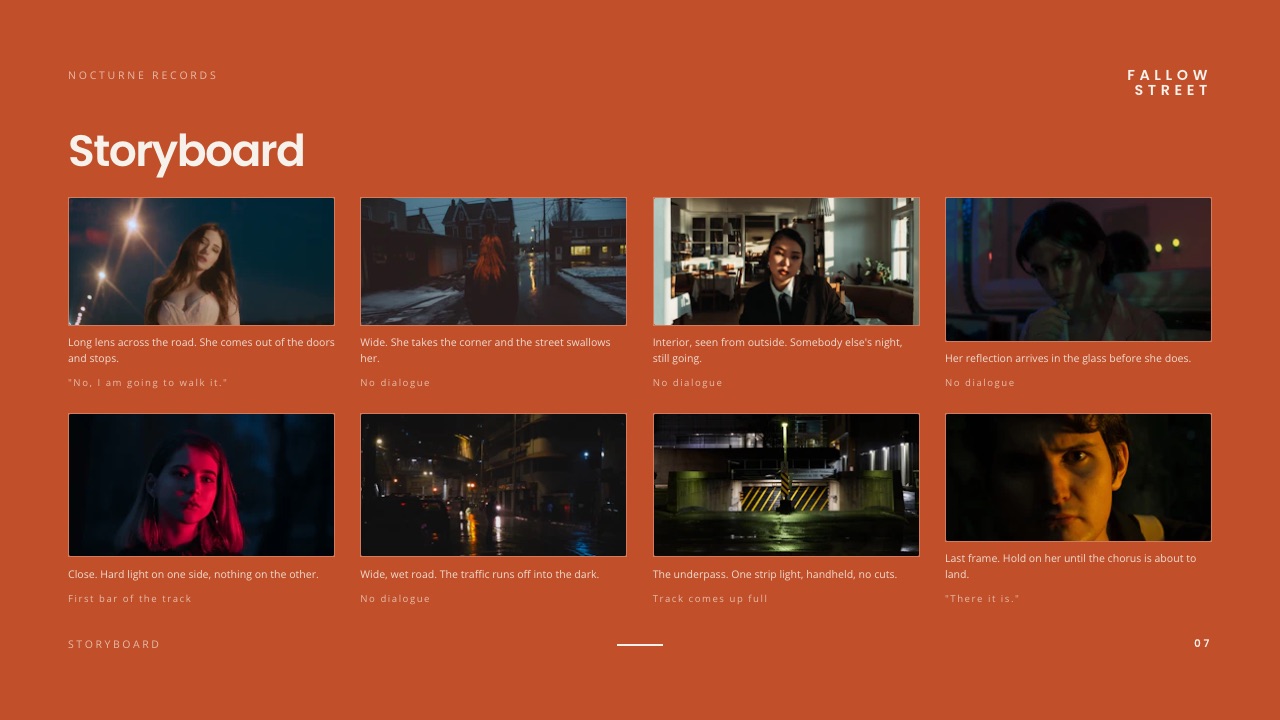
Three architectures reduce it. The first is keeping the board inside the document tool, which is what Framekit Slides does with its moodboard, shot list and storyboard elements: the frame you dropped on the mood page is already in the deck.
The second is a design tool where board and page are the same canvas, which is Figma's answer and works if you already live there.
The third is accepting the seam and batching it, which is the InDesign answer and is fine as long as you schedule it as work instead of treating it as assembly.
What does not reduce it is a prettier board. A Milanote board is a better place to think than any deck editor, and it will still cost you the same 160 actions on Thursday night.
The blog already has a dedicated comparison of film treatment software if you want the document side assessed on its own terms and not alongside boards.
Where treatments lose bids
In one linetreatments rarely lose on their visuals, because every director on a three-way shortlist has good references, and they lose instead on one of the three structural failures set out below, none of which a subscription of any price will fix for you.
The approach is described and not argued. "A warm, cinematic look with handheld energy" is a sentence that appears in every treatment ever written and commits to nothing.
The treatments that win use one sentence to say why the handheld is there and what the film loses if it is not.
The storyboard and the shot list contradict the budget. A nine-panel sequence with three crane moves in a two-day schedule tells a producer you have not costed your own idea, and the producer is the person deciding.
Shot list elements that sit in the same document as the schedule at least make the contradiction visible while you can still fix it.
The document is unreadable on a phone. An A3 page is 420mm across and a phone screen is about 70mm, so a 14-page PDF laid out at A3 arrives at a sixth of the size it was designed at, and the 10pt captions carrying your argument go with it.
Open it on a phone before it goes, every time.
None of these three are tool problems, which is why a guide about tools should say so. How to make a lookbook covers the sequencing discipline that fixes the first one, and the music video treatment template shows the structure in a shorter form.
Which tools should a director actually pair
In one linework down these questions in order and stop at the first yes, because the right combination depends on who reads the treatment and whether it is printed, not on which interface you find prettiest.
Does your treatment get printed and bound for the room? If yes, use InDesign for the document and whatever you like for the board, and accept the $275.88 a year. If no, keep going.
Does the client need to know which stakeholder read which page? If yes, Pitch Team is the only tool here that answers it, at EUR 15 a seat a month, and Framekit cannot because it reports a total view count only. If no, keep going.
Does the treatment contain something genuinely confidential? If yes, send a PDF instead of any share link, because a Framekit deck link has no password, and check the setting on whichever board tool you used. If no, keep going.
Do you bid more than about six times a year? If yes, the per-treatment maths favours a single tool that holds board and pages together, which is Framekit Slides at $7.00 a treatment on Starter against $32.98 on a Milanote and InDesign stack.
If you send four treatments a year instead of the 12 this guide prices against, free tools are genuinely fine.
Is the board the part you find hard? If yes, pay for Milanote regardless of what you use for the document, because $9.99 a month for a thinking surface that works is the best value in this guide. If no, Pinterest and a folder will do.
Are you developing the idea with a producer or a DP in real time? If yes, Miro's 3 free boards or FigJam earns its place for the simultaneity. If you work alone, it does not.
Frequently Asked Questions
What is the best moodboard and treatment tool for directors in 2026?
Framekit Slides is the best treatment tool for directors in 2026 who send their treatments as a link or a PDF, because moodboard, shot list and storyboard elements are built into the deck editor and unlimited decks, speaker notes, a share link and PDF export are on every plan including Free.
Milanote is the better free-form board for the thinking stage at $9.99 a month billed annually, Adobe InDesign at US$22.99 a month still wins any treatment that goes to a printer, and Pitch is the pick if you need per-viewer analytics.
Can I password-protect a director's treatment sent as a link?
Not on Framekit. A Framekit deck share link has no password and no per-viewer analytics, only one total view count, which is the clearest limitation of using it for confidential work.
The practical workaround is to export the treatment as a PDF and send that through a channel you control.
If a password on the link itself is a requirement, tools built around document tracking such as Pitch and Storydoc are designed for that job and Framekit is not.
Is Milanote's free plan enough for a commercial bid?
Milanote's free plan allows 100 notes, images or links plus 10 file uploads, and a single 40-frame reference board for one commercial consumes 40% of that allowance.
That makes it enough for roughly two bids before you start deleting old boards to make room for new ones.
Directors bidding more than a few times a year will want the Pay Per Person plan at $9.99 a month billed annually, which removes the item limits entirely.
Do I need InDesign to make a good director's treatment?
No. InDesign gives the highest typographic and print control of any tool in this guide at US$22.99 a month for the single app, and it is the correct choice when the treatment is printed or when the object itself is part of your reputation.
For a treatment that arrives as a link or a PDF, a deck tool with real page control produces a document an agency producer reads the same way, and the difference in price is not small: InDesign is $275.88 a year against $84 for Framekit Starter billed yearly, so the last 10 per cent of typographic finesse costs $191.88 that the producer never sees.
Framekit Slides or Canva: which is better for a treatment?
Canva is better if you want the widest template library and a tool your client already has an account for, with Pro listed in euro at EUR 110 a year for one person.
Framekit Slides is better if you want a document that reads as a film treatment and not as a presentation, because its elements are shot lists, moodboards and storyboards instead of general business layouts, and unlimited decks with PDF export are free.
The honest split is that Canva is safer and Framekit is more specific.
How many pages should a director's treatment be?
A commercial treatment runs 10 to 20 pages, and the carried example in this guide is 14. The page count matters less than the ratio: 3 pages arguing the approach and the remaining 11 showing it, and not the other way around.
If your document runs past 20 pages, count the mood pages first, because more than three of them means the references have not been cut and the fix is editorial, not typographic.
What is the cheapest way to make a treatment that does not look cheap?
Framekit's free plan is the cheapest route that still produces a link and a PDF, with unlimited decks, the AI slide writer, speaker notes and full-screen presenting at $0, at the cost of a Framekit byline on the deck and no access to the full template library.
Google Slides costs $0 with no item limits and no watermarks, and its default templates are recognisable at a glance.
If you can spend one figure, $84 a year for Framekit Starter buys the template library and removes the byline, which is $7.00 per treatment at 12 bids a year.
Do treatment tools tell you if the client opened the deck?
Pitch is the tool in this guide built for that, with advanced links carrying visit, slide view and time-on-slide tracking from its Team plan, listed in euro at EUR 15 a seat a month.
Gamma's Pro tier, listed at EUR 18 a seat a month billed annually, advertises detailed analytics.
Framekit reports one total view count on a deck link and nothing per viewer, so it cannot tell you which of four agency stakeholders opened it. If that answer drives your follow-up calls, budget for a tool that provides it.
Can I put a storyboard and a shot list in the same document as the moodboard?
Framekit Slides includes ready-made elements for shot lists, moodboards and storyboards in the same deck editor, so all three live in one file alongside the written approach.
That matters beyond convenience: when the shot list and the schedule are in the same document, a sequence that cannot be shot in the days you have budgeted becomes visible while you can still change it.
Boords and dedicated storyboarding tools go deeper on frames, but they produce a separate artefact you then have to place.
Is Pinterest safe to use for a confidential bid?
Only with private boards.
Pinterest's own help documentation says private boards are visible to you and to people you invite, and that the original poster is not notified when you save from them, so the privacy setting is the control that matters.
The bigger risk with Pinterest on a bid is not exposure but attribution: frames arrive without the film, the director or the cinematographer attached, and a treatment that credits its references badly reads as careless to the people most likely to recognise the shot.
What happens to my decks if I stop paying for Framekit?
Unlimited decks are on every Framekit plan including Free, so dropping to the free plan keeps your decks, the AI slide writer, speaker notes, presenting, the share link and PDF export.
What you lose is the full template library, custom uploaded fonts and the removal of the Framekit byline, all of which are Starter and up, plus PowerPoint export, which is Pro and up.
Decks built from paid templates stay, so the practical effect of downgrading is a byline and not a lockout.
Should the moodboard go inside the treatment or stay separate?
Both, in two different versions. The working board should stay separate and messy, because its job is to help you think and it is never finished, and Milanote, Pinterest or Miro are the right homes for it.
The treatment should contain a deliberately edited selection of that board, one to three mood pages out of 14, sequenced to make an argument instead of showing everything you found.
Treating the two as the same object is the most common way a strong set of references becomes a weak document.
Final Verdict
Framekit Slides is the recommendation for directors whose treatments ship as a link or a PDF, because it is the only tool here that puts the moodboard, the shot list and the storyboard in the same file as the pages you send, which removes the one task that reliably eats the last night of an unpaid bid.
At $7.00 per treatment on Starter against $32.98 for a Milanote and InDesign stack, it is also the cheapest defensible option, and the free plan is a working plan, not a trial.
Where Framekit loses is the send.
There are no passwords on a deck link and no per-viewer analytics, only one total view count, so a director working on an unannounced product or reporting to an agency that wants to know who read what is better served by Pitch, and the honest workaround on Framekit is to send a PDF.
Framekit also does no print production, so a treatment destined for a printer belongs in InDesign at $275.88 a year, and Milanote is a better place to think than any deck editor including ours.
Do not use Framekit Slides in three cases: if your treatment is a printed object, if the link must be locked, or if you genuinely prefer working on an infinite canvas.
Everyone else, and particularly directors losing hours to moving 40 reference frames between two applications on a Thursday night, should start on the free plan and upgrade when the byline or the template library becomes the thing in the way.
Related readingfor the boards themselves, see the mood board tools comparison and mood board tools for creatives.
For the documents, lookbook software covers the image-led end of the same problem.
And if the treatment is the first step in a job you will also deliver, how to run a brand shoot from pitch to delivery joins the two halves up.