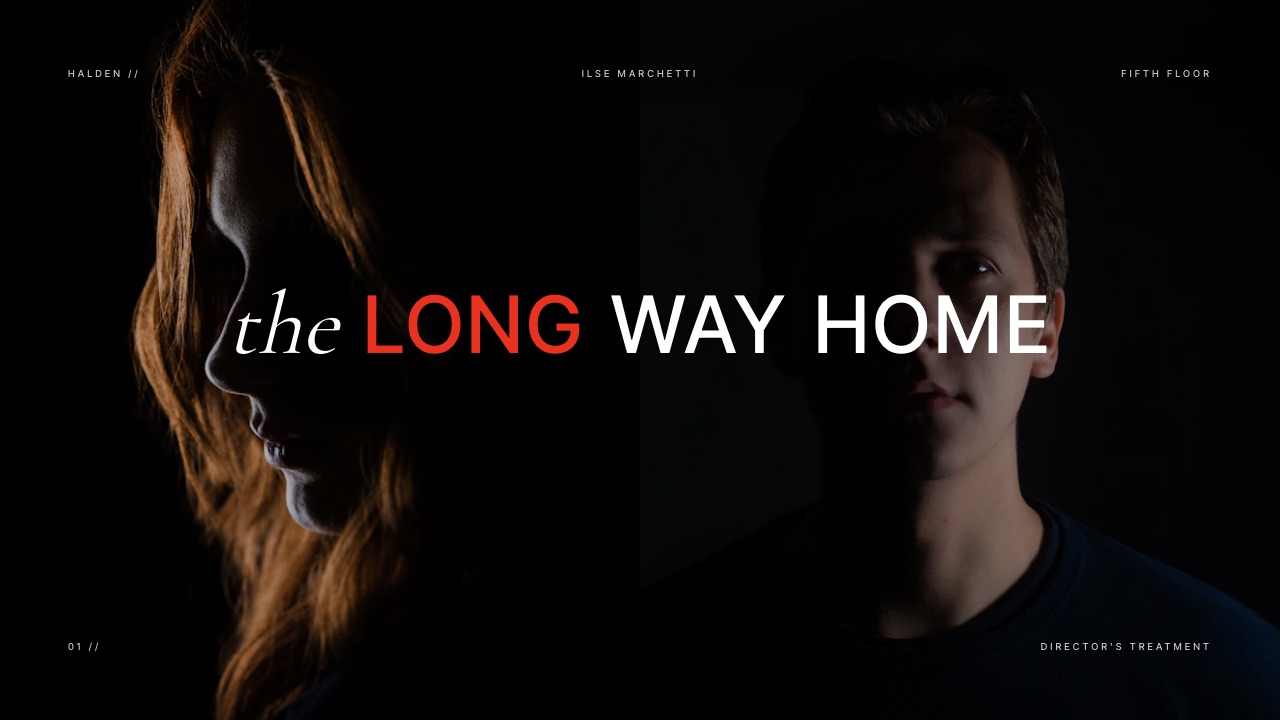
Framekit templates
Start from a designer-made template
 Use template
 Use template
 Use template
 Use template
 Use template
 Use template
 Use template
 Use template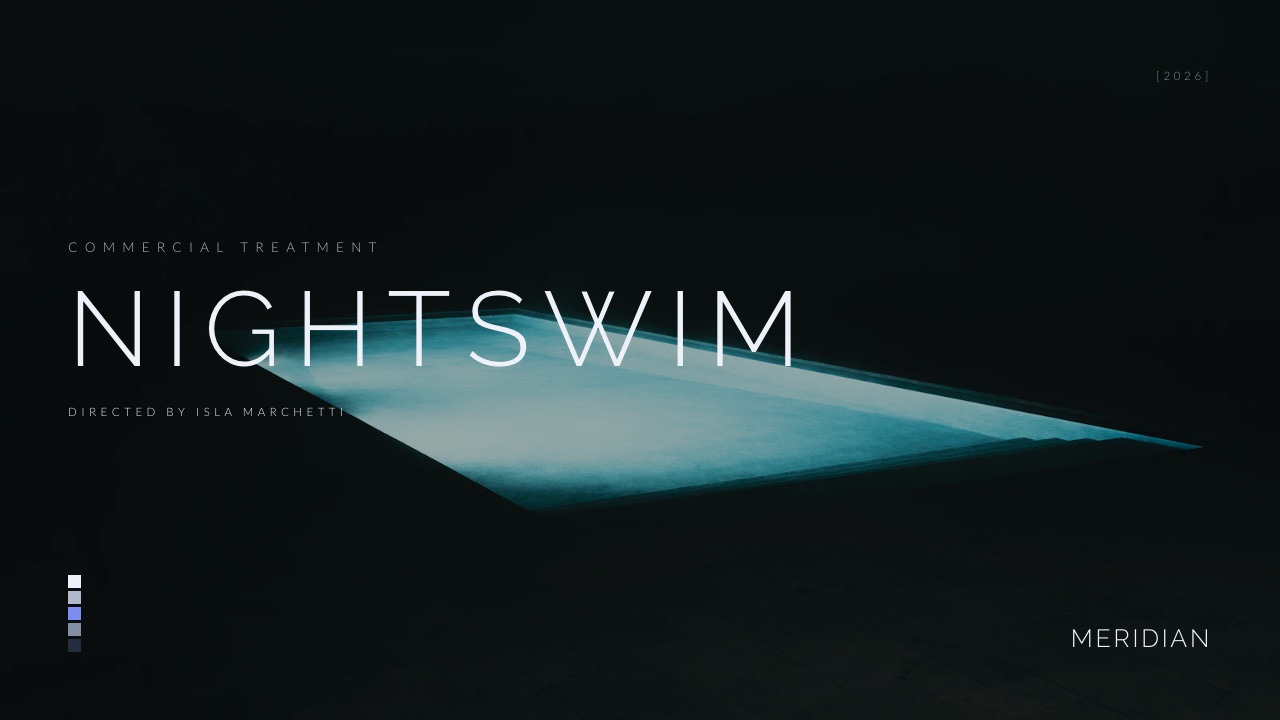
An agency producer has three PDFs open on a Thursday night. Same 60-second script, same brand, same budget range, three directors.
By Monday one of them gets the job, and the only thing the brand's marketing lead will actually read before the call is the commercial treatment template each director filled in.
That is the whole game. The bid form gets checked by a producer, the reel got you onto the list, but the treatment is the part of the bid the client reads, and it is read side by side with two rivals answering the identical brief.
A commercial treatment is a director's visual pitch for an advertising film: a 12 to 20 page deck, usually sent as a PDF or a link, that shows how that director would shoot a specific script, with the idea restated, the look, the references, the cast, the schedule and the deliverables, so the agency and brand can compare it against the other directors bidding on the same job.
The best commercial treatment template in 2026 is one built around the comparison the client will make, which is why this guide walks through Framekit's Director's Treatment for a Commercial (20 slides, from Logline to Delivery) and its four sibling templates: the slides are already in the order an agency reads, and the deck presents, shares as a link and exports as a PDF from the same account as your reel site.
The trade-off is sharing control: Framekit deck links have no password and no per-viewer analytics, and templates need a paid plan.
Keynote is the free industry default for directors on a Mac, InDesign is still the pick for print-grade layout, and Pitch is the choice when you need tracked or passcode-protected links.
Full disclosure: Framekit is our product, so weigh our ranking accordingly. We did not use the competing tools for this guide; we read their pricing and help pages on 19 September 2026 and link to each one, and we rendered Framekit's five commercial treatment templates slide by slide to write the walkthrough. Keynote beats us on price (free) and offline control, InDesign beats us on typographic precision, and Pitch beats us on link security and analytics. Storyflow, mentioned once below for the writing stage, is a sister product to Framekit.
How This Guide Was Put Together
This guide combines three kinds of evidence, kept separate so you can judge each one on its own terms: industry rules read at the source, Framekit templates rendered and read slide by slide, and simple cost arithmetic you can redo yourself with your own numbers.
Read at the source. The bidding rules come from the AICP National Guidelines for live action production, the closest thing American advertising has to a rulebook for how bids are run.
Tool prices and features come from each vendor's own pricing or help pages, read on 19 September 2026. Where a page served euro prices to our reader, the euro figure is quoted as listed for European buyers rather than converted.
Rendered and read. Framekit's five commercial templates were rendered slide by slide with the editor's own builders, and the example content in this guide (a 60-second outdoor film called Northbound, a 90-second night film for a brand, a swimming spot called Nightswim) is the real sample copy that ships inside those templates.
None of it is a client job.
Calculated. The yearly cost table multiplies each tool's published price by twelve months for one director. No competing app was timed or tested hands-on.
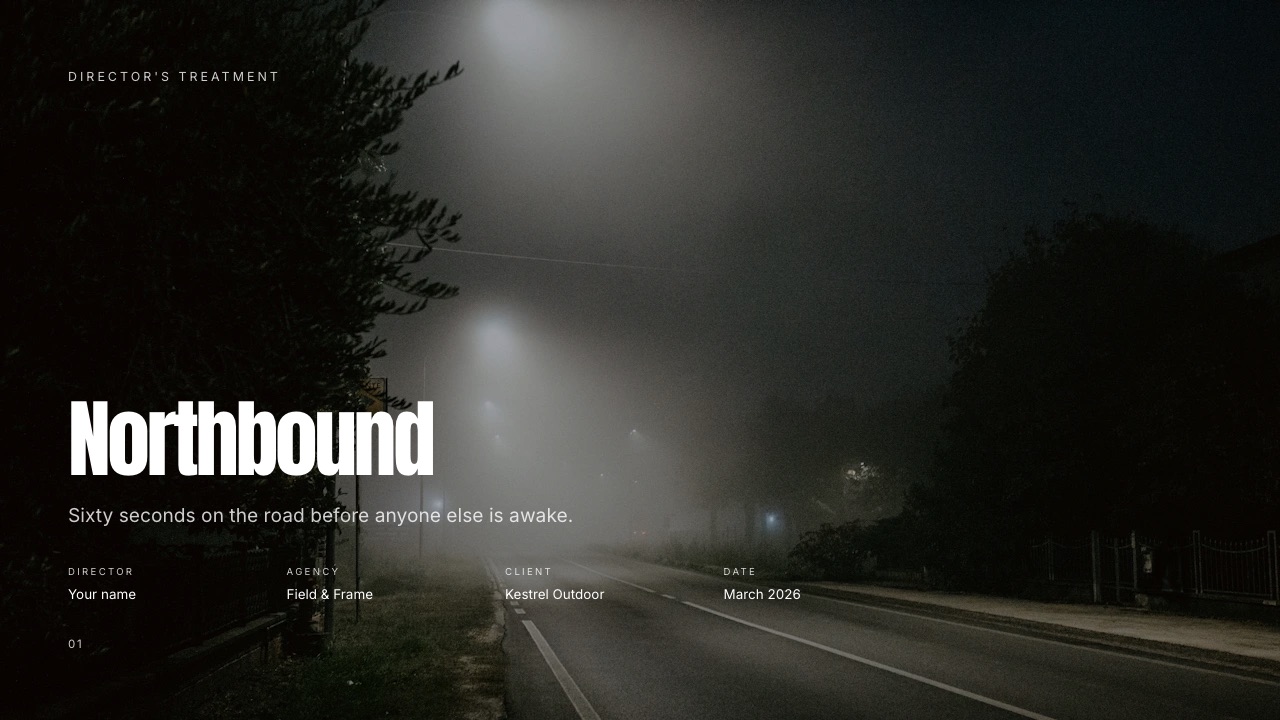
The carried example throughout is Northbound: sixty seconds on the road before anyone else is awake, for an outdoor brand, shot over three short days with a local crew of nine.
It is the sample job inside Framekit's Director's Treatment for a Commercial, so every slide type a bid needs is filled in once.
Commercial Treatments by the Numbers
The treatment sits inside a bidding process with published rules, and the numbers below are the ones that shape how long it should be, who sees it and what happens to your ideas if you lose the job.
- 3 directors is the ceiling the AICP guidelines set for a competitive bid "unless there are extenuating circumstances". That is where the term triple bid comes from.
- 0 treatments should be required on a single bid, according to the same guidelines. If you are the only director bidding, the agency is not supposed to make you write one.
- 1975 is the year the original AICP bid form was introduced, per Wrapbook's guide to the form; the director's creative fee still sits on its own line (Section L).
- 10 to 12 pages is how long one working director at Assemble says they keep their treatments; Framekit's commercial templates run 12 to 20 slides.
- 1 woman director per triple bid is the pledge agencies and brands sign under Free the Bid, launched in September 2016 by director Alma Har'el.
- 5 delivery formats sit on the final working slide of Framekit's 20-slide template: broadcast, online hero, social vertical, retail screens and stills.
Why the Treatment Decides a Triple Bid
In one linein a triple bid, three directors answer the same script, so the treatment is the only document where the client can compare how each of them thinks, and it wins or loses on the differences it makes visible.
The mechanics matter because they explain what a treatment is for.
An agency gets a script approved by the brand, the agency producer picks three directors (usually through their production companies), and each company returns a bid proposal.
The AICP guidelines describe that proposal as something that "may include a financial bid, bid letter, treatment and/or storyboards". The financial bid goes to producers and, on bigger jobs, a cost consultant.
The treatment goes to everyone, including the brand.
That split creates the first rule: the budget is read by specialists, the treatment by people deciding on taste. The brand manager on the call has usually not opened your AICP form, but has flipped through three decks.
The second rule follows from the comparison. Every director bidding has the same script, so restating the script earns nothing.
What earns attention is what only your version contains: the casting choice nobody else made, the camera idea that changes how the product is seen, the schedule that proves you can do it in the days the budget allows.
A treatment page that could appear in any of the three decks is a wasted page.
What agency producers and brands look for
Five different people read a bid treatment for different things, and a good one serves all of them without splitting into separate documents.
| Reader | What they check first | What loses them |
|---|---|---|
| Agency creative director | Whether you understood the idea and made it better, not different | Rewriting the script or the tagline |
| Agency producer | Whether the plan fits the days and the money | A look that obviously needs twice the shoot days |
| Brand marketing lead | Whether the film looks like their brand at its best | References that look like a competitor's advert |
| Production company EP | Whether the director's vision is bid-able and safe | Promises the crew cannot deliver |
| Cost consultant (large brands) | Whether the creative justifies the numbers | Vague deliverables that hide scope |
Who owns the ideas if you lose
This is the question every director asks privately and few guides answer.
Under the AICP guidelines, ideas in a bid proposal that were not already in the client's own material belong to the production company, and they transfer to the client only when the job is awarded and paid in full.
If the job goes to someone else, using the losing bidder's treatment ideas is described as "misappropriation of intellectual property", and the agency is not supposed to share a bid proposal with other companies at all.
In one lineyour treatment ideas are yours until the job is awarded and paid, so credit and date every page, send it to named people, and keep a record of what you sent and when.
Five Commercial Treatment Templates, Compared
Framekit ships five templates that cover the commercial treatment job from different angles, and choosing the right starting point saves you rebuilding the slide order: the 20-slide Director's Treatment for a Commercial is the full bid document, and the other four are shorter or more specialised.
| Template in Framekit | Slides | Distinct slides | Best starting point for |
|---|---|---|---|
| Director's Treatment for a Commercial | 20 | Director's statement, Coverage, Shoot days, Crew, Pre, shoot, post, Delivery | A full triple-bid treatment with the production plan inside |
| Commercial Treatment for an Agency | 12 | The idea, The story, The look, The cast, The director, The grade, The craft, The plan | A lean, image-led treatment where the grade is part of the pitch |
| Commercial Treatment for a Brand | 12 | What we are making, Tone and reference, By the numbers, Director's note, Who is making it | Pitching a brand directly, with no agency between you |
| Director's Treatment for a Bid | 12 | Opening, Approach, Tone, Light, The build, Palette, References | A mood-first treatment for a performance or narrative spot |
| Mood Board and Look Approval for a Commercial | 12 | The grade, Key frames, Camera and format, Type on screen, Approval, Sign off | After you win: getting the look signed before the shoot |
All five are in the full deck template library, which is a paid feature on Framekit (Starter and up). The free plan still gives you unlimited decks, the AI slide writer and PDF export, so you can build the same structure by hand from the slide order in this guide.
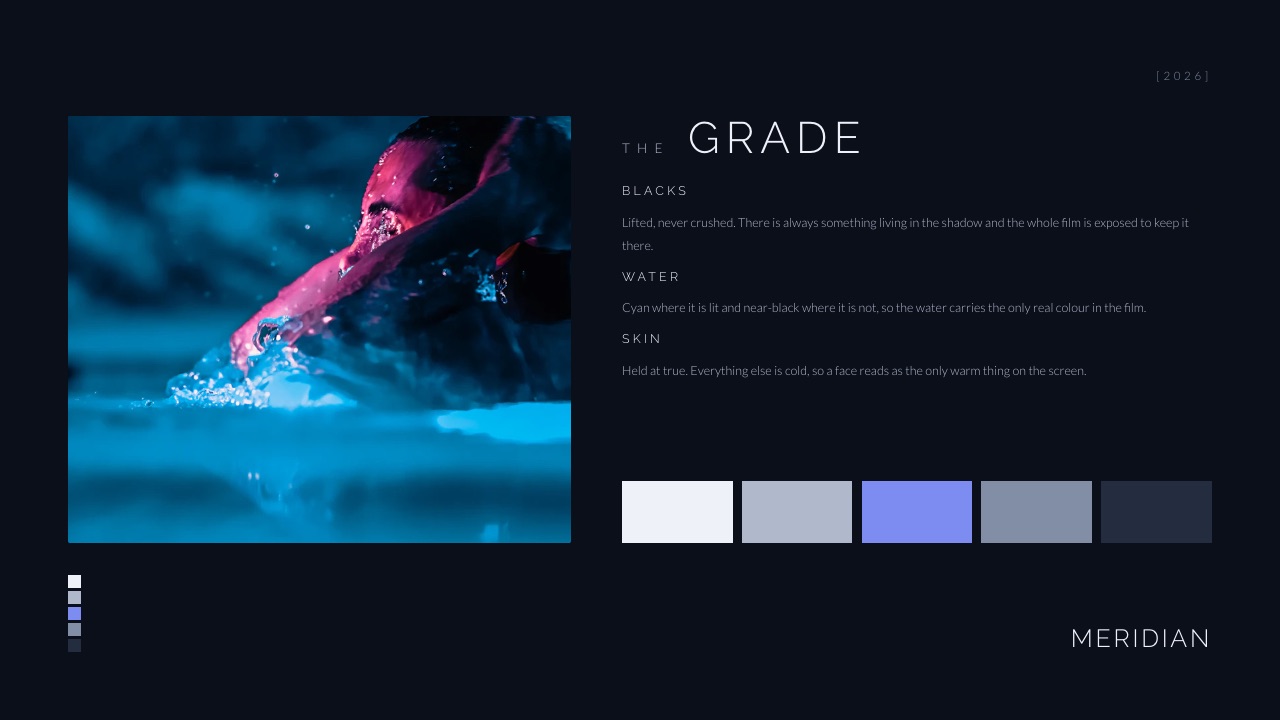
The agency template's grade page is worth a look even if you use another tool.
It names three things the colour will do (blacks lifted and never crushed, water cyan where lit and near-black where not, skin held true as the only warm thing on screen) and then shows the five swatches.
That is a grade described as decisions, which a brand can react to, rather than as adjectives, which it cannot.
The Commercial Treatment Template, Slide by Slide
In one linea winning commercial treatment runs roughly twenty pages in reading order, idea first, pictures second, plan last, and each page answers one question a specific reader in the bid is asking.
This is the order of Framekit's Director's Treatment for a Commercial, with the question each slide has to settle and a word budget that keeps the page readable when it is flipped past in a meeting. Word budgets are our editorial guidance for a 16:9 slide, not an industry rule.
| # | Slide | The question it answers | Word budget | Main reader |
|---|---|---|---|---|
| 1 | Cover | Whose film is this, for whom, and when? | 15 | Everyone |
| 2 | Logline | What is the film in one sentence? | 25 | Brand |
| 3 | The message | What should a viewer feel or do afterwards? | 40 | Brand, agency CD |
| 4 | Director's statement | Why you, and what will your version do that the others will not? | 150 | Agency CD |
| 5 | Story beats | What happens, second by second? | 120 | Agency CD, producer |
| 6 | Visual approach | How will it look, in decisions not adjectives? | 80 | Brand |
| 7 | Mood and feel | What will it feel like to watch? | 40 | Brand |
| 8 | References | Which frames prove the look is achievable? | 30 | Everyone |
| 9 | Camera and movement | How does the camera behave, and why? | 60 | Agency CD |
| 10 | Casting | Who is on screen, and why them? | 60 | Brand |
| 11 | Wardrobe | What do they wear, and does it fight the product? | 40 | Brand |
| 12 | Locations | Where, and can you get there in the days you have? | 50 | Producer |
| 13 | Music and sound | What do we hear, and is it licensable? | 50 | Agency CD |
| 14 | Storyboard | What are the key frames, in order? | 30 | Everyone |
| 15 | Coverage | What will you shoot beyond the script, for the cutdowns? | 50 | Producer |
| 16 | Shoot days | How does the schedule actually run? | 60 | Producer |
| 17 | Crew | Who are your heads of department? | 50 | Production EP |
| 18 | Pre, shoot, post | What happens from award to delivery? | 50 | Producer |
| 19 | Delivery | What lands, in what shape? | 40 | Producer, brand |
| 20 | Closing | What is the one line they should remember? | 15 | Everyone |
That totals about 1,050 words across twenty slides, which is roughly a four-page essay spread over pages built mostly from images.
Slides 1 to 4: the idea and the case for you
The first four slides are the only part of the deck some readers will see closely, so they carry the argument.
The cover in the Northbound sample holds four facts and a line: director, agency (Field and Frame), client (Kestrel Outdoor), date (March 2026), and "Sixty seconds on the road before anyone else is awake." A producer flipping through three covers knows immediately which job this is.
The director's statement is where most treatments go wrong in two opposite ways: a CV nobody asked for, or a mood poem that says nothing. The sample in Framekit's template does neither.
It is headed "I want to shoot the waiting, not the arriving", and it makes one argument: most films in the category open at the summit, and this one will spend its money on the ninety minutes before it.
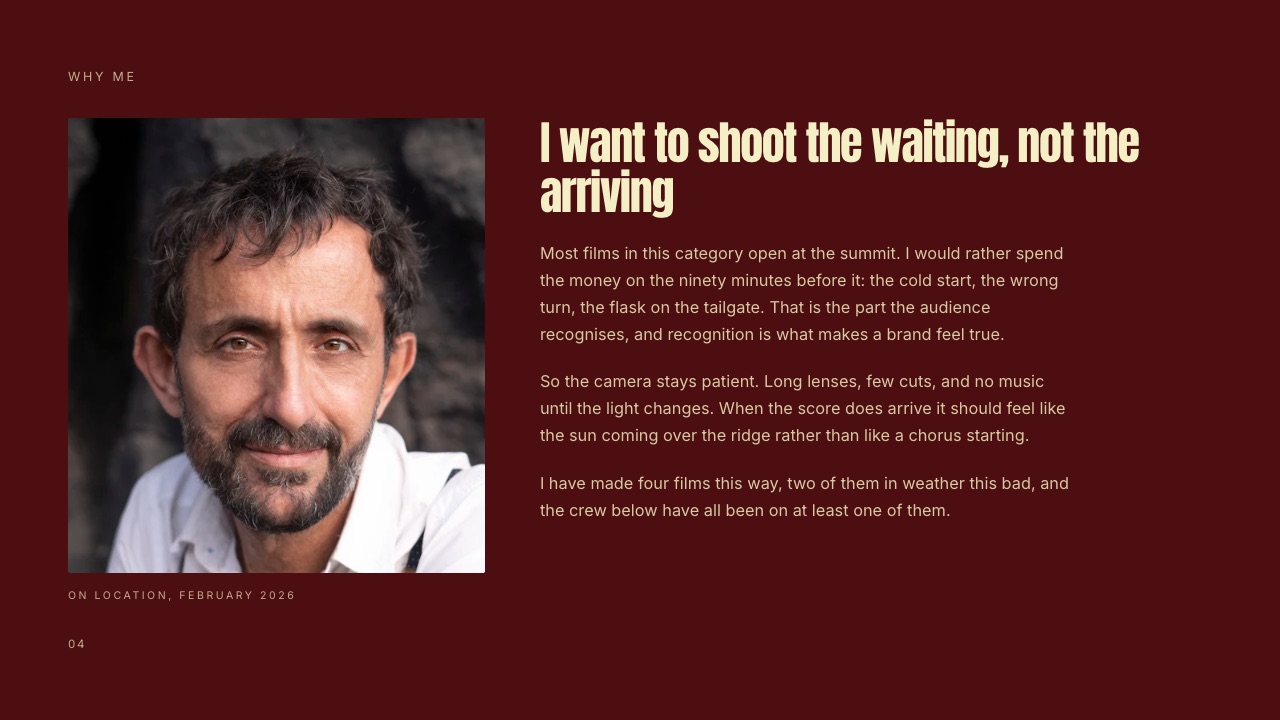
That is the shape to copy: name what the other two directors will probably do, then say what you will do instead and why it serves the brand.
Slides 5 to 8: the story and the look
The story beats slide should read like a timeline, not a synopsis. A beat list that accounts for every second of the minute, with rough timings against each beat, tells the agency you have already cut it in your head.
The visual approach slide in the Northbound sample is a model of the "decisions, not adjectives" rule.
It is headed "Available light, and a lot of patience", and then it commits to three things: the palette (slate, rust and bone, nothing saturated until the sun lands), the contrast (deep shadow, protected highlights, no crushed blacks) and the texture (fine grain held through the grade, never added after).
References come next, and the sample's caption is the most important sentence on the page: "These are here for tone and for cutting rhythm.
None of them is a shot we intend to copy." Say it: a reference that reads as a shot you plan to copy invites the wrong conversation about originality and rights.
Slides 9 to 14: camera, people, places, sound
The middle of the deck is where treatments get padded. Keep camera and movement to one idea per slide, and casting to the type of person and one reason.
Locations is the first page the producer reads closely, because it hides a cost: say where, how far from base, and how many company moves it implies. Music and sound should say whether the track is licensed, commissioned or placeholder.
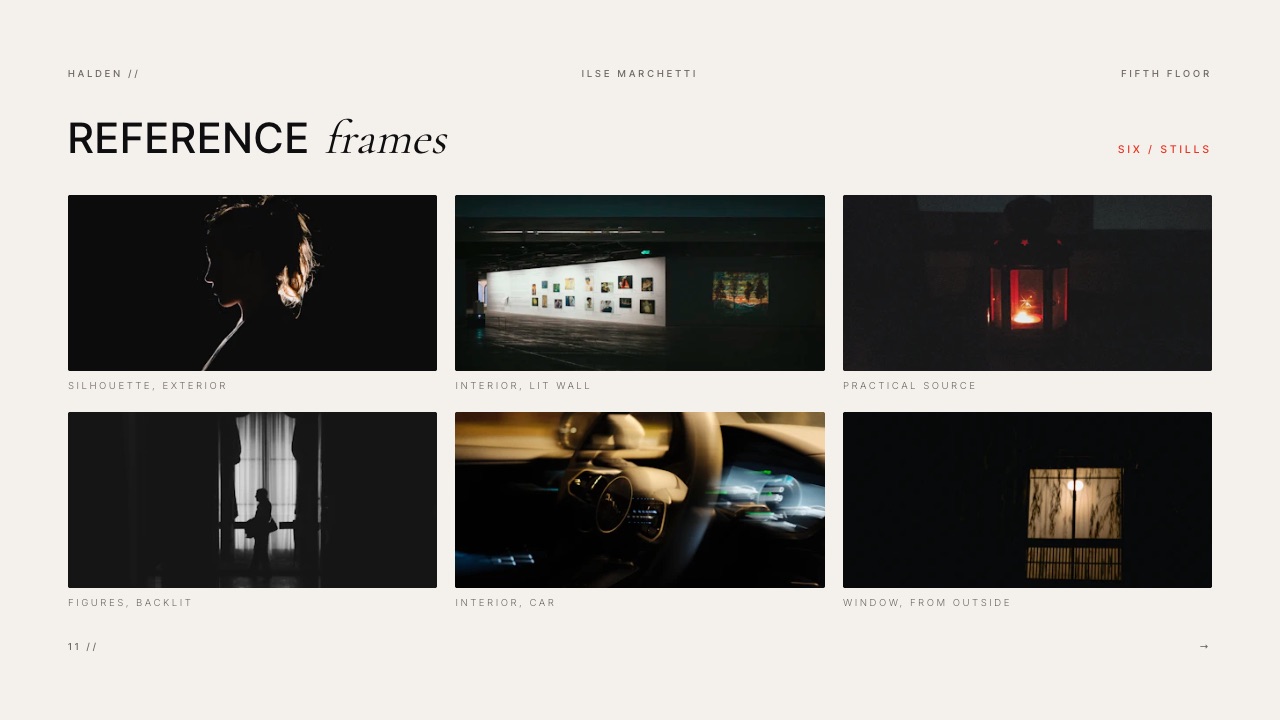
The storyboard slide is a sequence of key frames, not a full board. The Northbound sample uses six frames, captioned by beat (hallway, dark; tailgate, headlights; road, tracking; weather closes; ridge, first light; out of the car).
Six is enough to show structure without inviting frame-by-frame notes before you have the job.
Slides 15 to 20: the plan, which is where bids are really won
Most free treatment templates stop after the pictures, which is exactly where a triple-bid treatment should keep going: the producer needs to see that your film fits the days and the money.
The Northbound shoot days slide is titled "Three days, all of them short" and gives call and wrap times for each: day one on the high road (call 04:30, first light 06:12, wrap by 13:00), day two at the forest edge, day three in town and interiors with controlled light.
The crew slide names four key crew and adds a line a producer reads twice: a local crew of nine, hired within two hours of base, with no unit move longer than forty minutes.
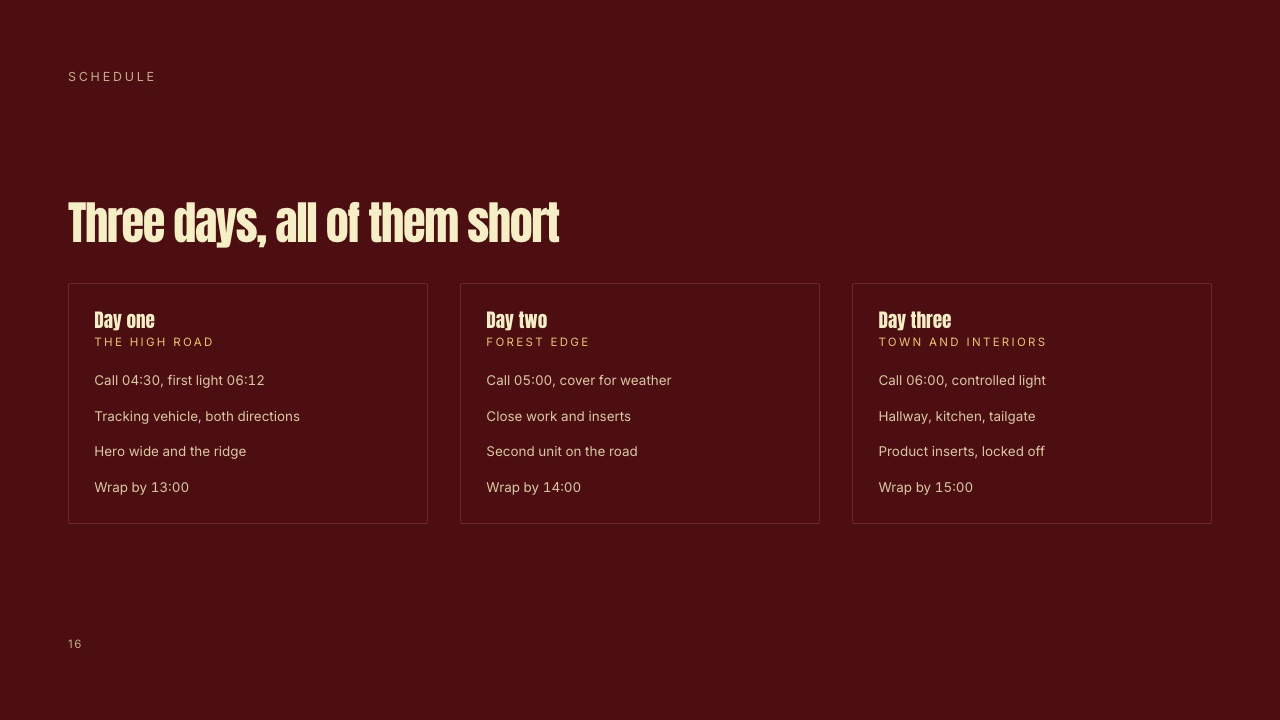
In one linethe last six slides are the ones your rivals are most likely to skip, so a clear coverage plan, schedule, crew and delivery page is the cheapest competitive advantage in the whole treatment.
The Delivery Page: What Lands, and in What Shape
In one linethe delivery slide turns a sixty-second film into the full list of files the brand will actually receive, and it is the page that tells an agency producer you have thought about cutdowns before they had to ask.
A modern commercial is a hero cut plus shorter versions and aspect ratios for every screen the media plan buys, and each version costs time in the edit and the grade.
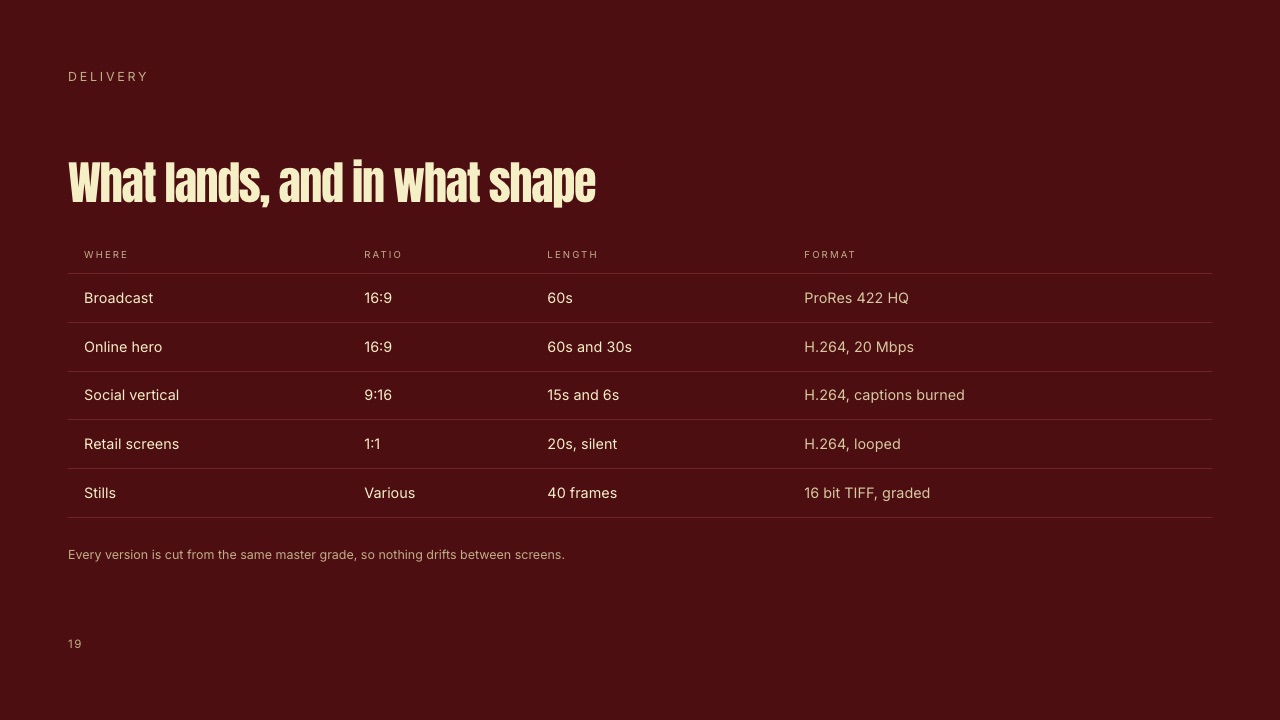
Here is the delivery table exactly as it appears in the Northbound sample of Framekit's template, under the headline "What lands, and in what shape". Treat it as an example structure, not a spec: your agency's media plan decides the real list.
| Where it runs | Ratio | Length | Format |
|---|---|---|---|
| Broadcast | 16:9 | 60s | ProRes 422 HQ |
| Online hero | 16:9 | 60s and 30s | H.264, 20 Mbps |
| Social vertical | 9:16 | 15s and 6s | H.264, captions burned |
| Retail screens | 1:1 | 20s, silent | H.264, looped |
| Stills | Various | 40 frames | 16-bit TIFF, graded |
Under the table the sample adds one sentence that does real work: every version is cut from the same master grade, so nothing drifts between screens.
That is a promise about consistency, which is precisely what a brand manager worries about when one film becomes six cuts and a stills set.
Two things to check before you copy the structure into your own treatment:
- Ratios drive coverage. A 9:16 cutdown framed from a 16:9 master loses most of the frame. If vertical versions matter, say on the coverage slide whether you will protect for them or shoot them separately.
- Silent versions change the edit. Retail screens and many social placements play without sound, so the story has to read with the audio off. Say so on the delivery slide and the agency knows you have planned for it.
Bid Treatment vs Look Approval Deck
In one linea bid treatment persuades three companies' worth of readers to choose you, while a look approval deck, sent after you win, asks a smaller group to sign off specific decisions before the shoot, so the two documents should never be the same file.
Reusing the winning treatment as the pre-production deck causes confusion: one is written to persuade, the other to be signed.
| Bid treatment | Look approval deck | |
|---|---|---|
| When it is sent | During the bid, before award | After award, before the pre-production meeting |
| Who reads it | Agency creatives, producers, the brand | The brand, the agency, the director and heads of department |
| Job | Win the comparison with two rivals | Get the grade, frames, format and type on screen signed |
| Tone | Persuasive, with room to change | Specific, with nothing left open by accident |
| Typical length | 12 to 20 slides | Around 12 slides in Framekit's template |
| Key slides | Director's statement, visual approach, plan | The grade, key frames, camera and format, approval |
| What happens after | Award, or it becomes a record of your ideas | Sign-off, then the shoot |
The approval page in Framekit's Mood Board and Look Approval for a Commercial template is a good example of the difference.
Headed "What is signed", it lists each decision (grade and look, key frames, camera and format, locations, type on screen, music and sound) next to the person who owns it (director, agency, cinematographer, production, client) and a status: approved, for approval or open.
A treatment never has a page like that, and a pre-production deck should never be without one.
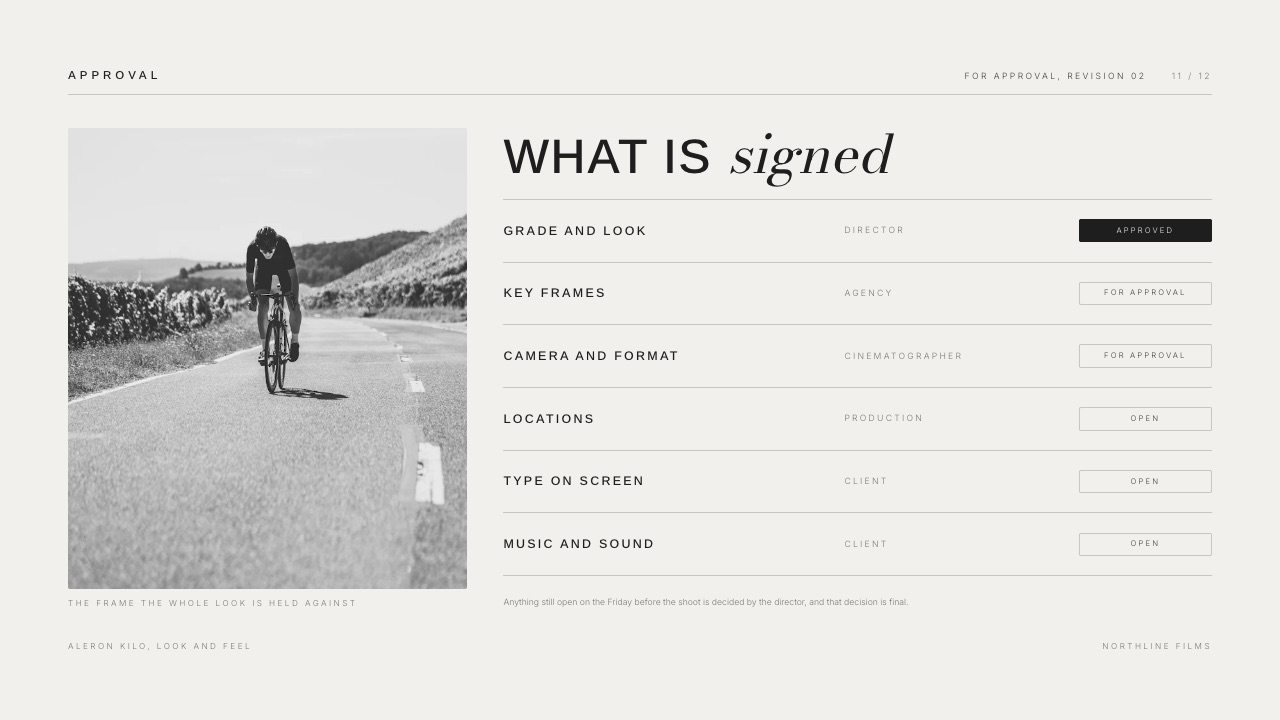
The practical rule: when you win, duplicate the treatment's look slides into a look approval deck, tighten every adjective into a decision, and add the sign-off page. The treatment stays as the dated record of what you pitched.
TV Spot, Brand Film or Direct-to-Brand: Three Variations
The same template bends three ways depending on who is buying and how long the film is, and the differences are mostly about which slides grow, which shrink, and who reads the plan section.
A broadcast spot through an agency. This is the classic triple bid. The script is fixed and approved, so the treatment should not reopen it.
The director's statement and visual approach carry the pitch, and the plan section is written for the agency producer.
Use the full 20-slide Director's Treatment for a Commercial, or the 12-slide Commercial Treatment for an Agency when the agency asked for something short.
A longer brand film. A 90-second or three-minute brand film usually has a looser script, sometimes only a brief. Here the story beats slide becomes the most important page, because you are partly writing the film.
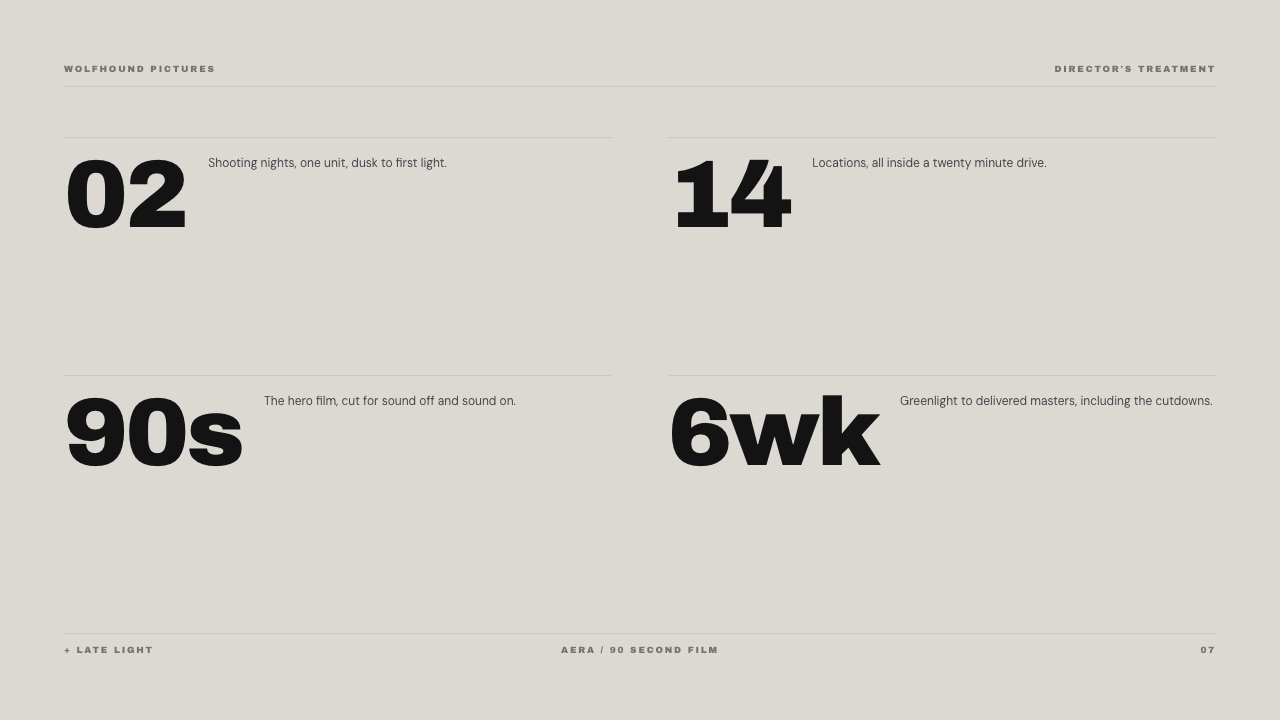
Framekit's Commercial Treatment for a Brand sample (a 90-second film called Late Light, shot across one night in a city) handles the numbers on a single page: 2 shooting nights with one unit, 14 locations inside a twenty-minute drive, a 90-second hero film, and 6 weeks from greenlight to delivered masters including cutdowns.
A direct-to-brand pitch. With no agency in the middle, the brand reads everything, including the plan.
The treatment has to do an agency's job too: restate the objective, say who the film is for, and explain how success will be judged.
Keep it less insider: the brand needs to know the film works on a phone and a store display, not what ProRes 422 HQ is.
Six Mistakes That Lose the Comparison
The mistakes below are the ones that make a treatment look worse next to two rivals, which is the only test that counts in a triple bid, and every one of them is avoidable before you press export.
- Rewriting the script. The agency sold that script to the brand. Improve how it is shot, not what it says, unless the brief explicitly invites it.
- References that look like someone else's advert. A reference frame from a competitor's campaign is a gift to your rivals. Label every reference as tone, not a shot to copy.
- Adjectives instead of decisions. "Cinematic, warm, authentic" appears in all three decks. "Nothing saturated until the sun lands" appears in one.
- No plan. The producer reads the schedule and crew pages to decide whether your film is bid-able. Leaving them out hands the decision to the rival who included them.
- Unreadable text on image. A treatment gets flipped past on a laptop in a meeting room. Light grey type over a photograph disappears.
- Sending a file nobody can open. An unusual file format, or a link that asks for a login, costs you the first read. Send a PDF or a link that opens in a browser.
If the writing itself is the hard part, Storyflow's guide on how to write a director's treatment covers the drafting stage, and our own film treatment writing guide covers the long-form version for narrative projects.
This post is about the template and the bid deliverable.
Where to Build a Commercial Treatment in 2026
The tool matters less than the structure, but it decides three practical things: how the finished treatment reaches the agency (a PDF, a link or both), how much the layout costs you in hours, and whether the deck can live next to your reel and the rest of your work.
| Tool | Price for one director (Sept 2026) | Ready-made treatment structure | How it is sent | Link protection or tracking |
|---|---|---|---|---|
| Framekit Slides | Free; templates from Starter at $9/mo ($7 billed yearly) | Five commercial templates, 12 to 20 slides | Link, PDF, full-screen present; PPTX (as images) on Pro | No password; total view count only |
| Keynote | Free; Creator Studio $12.99/mo adds premium templates | None built in; paid template shops sell them | PDF, PowerPoint, Keynote file | None in the app |
| InDesign | EUR 25.99/mo on an annual plan (European listing) | None; build or buy a layout | None | |
| Google Slides | Free with a Google Account | None built in | Link, PDF, PowerPoint | Google sharing permissions |
| Canva | Free; Pro EUR 110/year (European listing) | General presentation templates | Link, PDF, PowerPoint | Not compared in this guide |
| Pitch | Free; Plus $13/seat/mo billed yearly | General deck templates | Link, PDF; PowerPoint from Plus | Tracked links from Team, passcodes on Business |
The ranking below is for this one job: a director or production company writing commercial treatments for bids.
1. Framekit Slides: Best for Directors Who Bid Often
Framekit is an AI website builder that also runs your client galleries, frame-accurate video review and a Slides tool for treatments, so the deck you bid with sits on the same account as the reel site the agency producer checked before calling you.
What makes it the first pick here is the template set: the five commercial templates already contain the pages a bid needs and generic tools lack (coverage, shoot days, crew, pre-shoot-post, delivery), so you replace sample copy rather than invent structure.
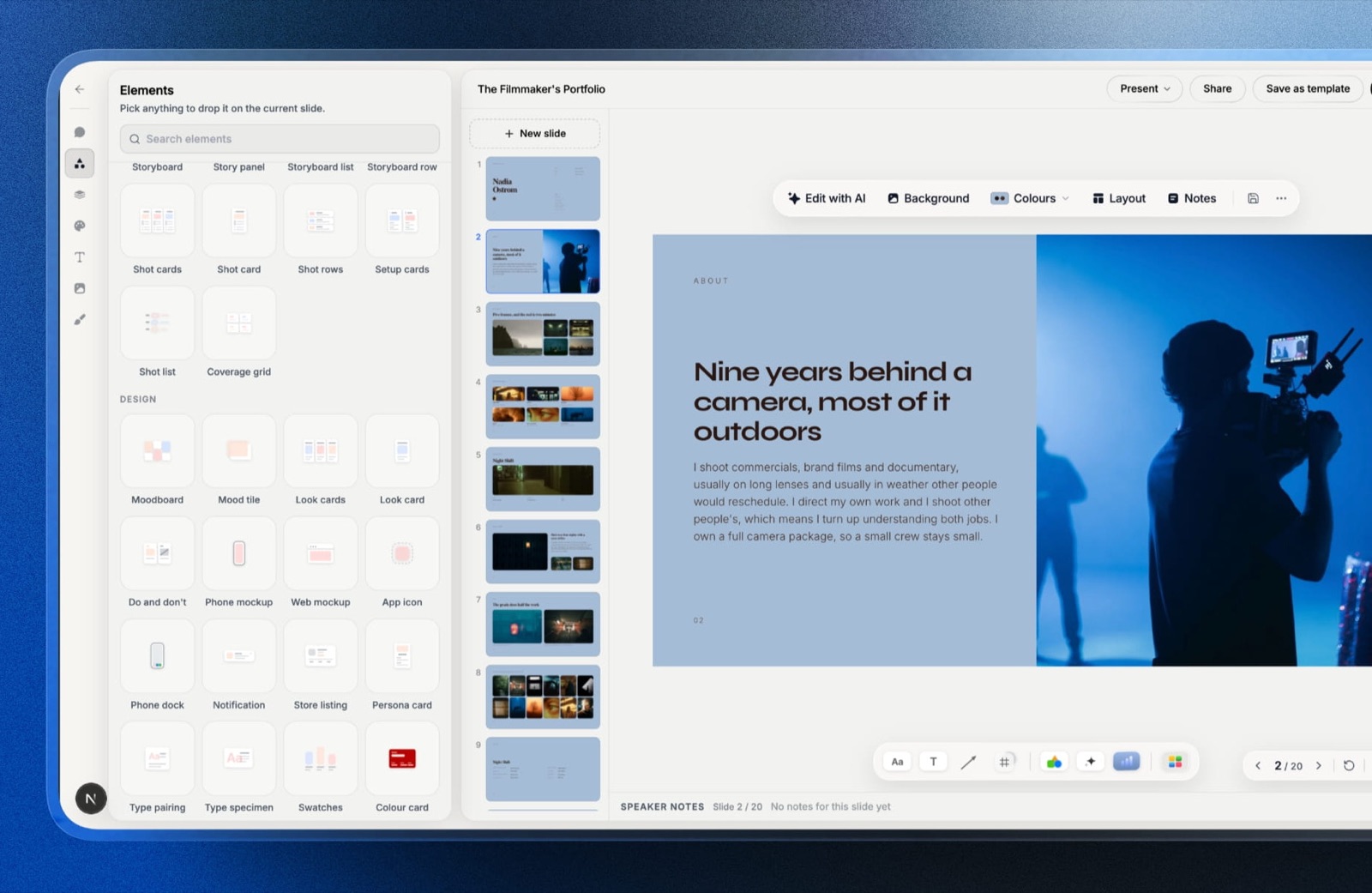
What it does wellevery plan, including Free, gets unlimited decks, the AI slide writer (describe the slide and it writes and lays it out), speaker notes on every slide, YouTube and Vimeo embeds for video references, and ready-made shot list, moodboard and storyboard elements.
You can present full screen, send a link or export a PDF on any plan.
The real numberthe template library, your own uploaded fonts and removing the Framekit byline start on Starter, which is $9 a month or $84 a year billed yearly. It unlocks all five commercial templates at once, rather than one design per purchase.
The standout detailvideo references can be embedded on the slide itself from YouTube or Vimeo, so a "cutting rhythm" reference plays inside the deck instead of becoming a list of links the client never clicks.
The gotchadeck links have no password and no per-viewer analytics, only a total view count.
For a document the AICP guidelines treat as confidential intellectual property, that matters: send the PDF to named people when confidentiality is a concern, and use a tracked-link tool if you need to know who opened it.
PowerPoint export is Pro and up and exports each slide as a full-bleed picture, so an agency that wants to edit your text in PowerPoint cannot.
Skip it ifyour production company already has a designed house template in Keynote or InDesign that its treatments are known for, or you need passcode-protected, tracked links on every bid.
Verdict: for a director who bids several times a quarter and wants the plan pages done properly without paying a designer, Framekit is the fastest way from brief to a treatment that reads in bid order. It is the wrong tool if link security is non-negotiable.
2. Keynote: Best Free Option for Mac-Based Directors
Keynote is the quiet default for treatments: free, good with full-bleed images, clean PDF export.
Apple's own page for its new subscription bundle is explicit: "You can continue using Keynote, Pages, Numbers, and Freeform for free." What the free app lacks is a treatment structure, which is why template shops sell Keynote treatment files.
The real number$0 for the app. If you want Apple's premium templates, image library and AI features (including presenter notes and outline-to-deck generation in beta), Apple Creator Studio costs $12.99 a month or $129 a year.
The standout detailKeynote exports to PowerPoint and PDF from one menu, per Apple's export guide, so the same master file can produce a PDF for the bid and an editable file for the rare agency that asks for one.
The gotchathe full Keynote app runs on Apple devices only.
Apple says collaborators can edit shared presentations "from a web browser on your Mac or Windows computer" through iCloud, but a PC-based producer is working in the browser version, and fonts that are not installed on the other machine get substituted.
Skip it ifyou work on Windows, or you want the treatment structure handed to you rather than designed.
Verdict: Keynote is the right answer for a director on a Mac who enjoys layout or buys a treatment template once and reuses it. Already outgrowing it? See our Keynote alternatives roundup.
3. Adobe InDesign: Best for Print-Grade Treatment Design
InDesign is what treatment designers use when a production company wants a document that feels closer to a magazine than a slide deck. Master pages, precise grids, real typographic control and precise PDF output make it the professional's tool for the print-first look.
The real numberInDesign Solo was listed at EUR 25.99 a month on an annual plan billed monthly for European buyers when we read Adobe's plans page in September 2026, which is EUR 311.88 over a year.
The standout detailparagraph and character styles mean a house treatment template stays consistent across dozens of bids with different directors, which suits a production company with an in-house designer.
The gotchaInDesign is a layout tool, not a presentation tool. Its presentation view is a way to look at pages, not to run a pitch, there is no share link, and the learning curve is measured in weeks. A director doing their own treatment the night before a deadline is fighting the tool.
Skip it ifyou are writing and designing the treatment yourself on a deadline. If you want InDesign-style layout without the subscription, Affinity now says it is "free for individuals", with only its AI features tied to a paid Canva plan.
Verdict: the best output quality in this list, and the worst fit for a solo director on a 48-hour bid.
4. Google Slides: Best for Co-Writing With a Producer
Google Slides wins on one thing that matters during a bid: several people editing the same deck at once from any computer. An executive producer can fix the schedule page while the director rewrites the statement, and nobody emails a file.
The real numberfree. Google's own product page says "Anyone with a Google Account can create in Slides", and it opens and edits PowerPoint files directly.
The gotchait is the plainest-looking tool in this list. Font choice is limited to the Google Fonts library, full-bleed image handling is basic, and a treatment built in Slides tends to look like a business deck unless someone with design skill spends real time on it.
Skip it ifthe look of the document is part of the pitch, which in commercial work it usually is.
Verdict: excellent for drafting and internal review, rarely the file you should send. More options in our Google Slides alternatives guide.
5. Canva: Best for Fast Visual Drafts
Canva is quick, visual and forgiving, and a director with no layout experience can make something presentable in an evening. Its template library is vast, and dragging in stills and colour swatches is easy.
The real numberthe free plan is usable; Canva Pro was listed at EUR 110 a year for one person for European buyers in September 2026, with Business at EUR 170 per person per year.
The gotchaCanva's templates are built for general presentations, so expect to adapt one rather than find the full bid structure (coverage, shoot days, delivery) ready-made, and popular templates are used widely enough that a treatment built from one can look familiar to an agency that sees dozens of bids.
Skip it ifyou want the bid structure built in, or your treatment needs to feel unmistakably bespoke.
Verdict: a fair choice for a first treatment and a weak one for a signature look. See our Canva alternatives for presentations if you are already feeling the limits.
6. Pitch: Best When You Need Tracked, Protected Links
Pitch is a collaborative presentation tool with the strongest sharing controls in this list, and for treatments that matters more than it might seem. Knowing whether the brand opened your deck before the call changes how you run the call.
The real numberper Pitch's pricing page, billed yearly per seat, Plus is $13 a month and adds PowerPoint export and custom fonts; Team is $19 and includes 25 advanced links that track visits, slide views and time on slide; passcode-protected links are on Business at $25.
The standout detailtime on slide. If the brand spent four minutes on your visual approach and ten seconds on the schedule, you know what to lead with when the call starts.
The gotchathe features that make Pitch distinctive for bids (tracking and passcodes) sit on the Team and Business plans, so a solo director on Plus gets a well-made presentation tool without the reason to choose it.
Skip it ifyou only ever send PDFs, since the link features are the point.
Verdict: the best choice for a production company that sends treatments as links and wants to know who read what. Comparing options? Our Pitch alternatives guide covers the field.
7. Treatment Template Shops: Best for a One-Off Signature Look
Specialist shops sell pre-designed director's treatment files, mostly for Keynote, and they are a sensible middle path between building a layout yourself and hiring a designer for every bid.
The real numberPre-Production Design lists its best-selling Keynote treatment templates (Tech Grid, Bold Wave, Soft Poet) at EUR 48.00 each including VAT, and offers a free limited 13-page version to newsletter subscribers.
The gotchaone purchase is one look. Directors who bid across genres (a car spot one week, a beauty film the next) end up buying several, and the file still has no plan pages unless the design includes them.
Verdict: worth it for a director who wants a distinctive Keynote look and will reuse it; less so if you need several styles.
What a Year of Treatments Costs in Each Tool
In one linefor a director writing treatments all year, the gap between the cheapest and the dearest setup here is a few hundred a year, so price should break ties rather than decide; the real cost is the hours spent rebuilding structure for every bid.
The arithmetic below prices one director for twelve months at each tool's published rate, using yearly billing where it exists. Euro figures are as listed for European buyers and are not converted.
| Setup | Yearly cost | What you get for it |
|---|---|---|
| Keynote, free | $0 | The app; you design or source the layout |
| Google Slides, free | $0 | Co-editing and comments; plain design |
| Framekit Free | $0 | Unlimited decks, AI slide writer, link and PDF; no template library |
| Keynote plus one template from a shop | EUR 48 once | One designed treatment layout |
| Framekit Starter, billed yearly | $84 ($7 x 12) | All five commercial templates, own fonts, no byline |
| Canva Pro | EUR 110 | Templates and brand kit |
| Pitch Plus, billed yearly | $156 ($13 x 12) | PowerPoint export, custom fonts |
| Framekit Pro, billed yearly | $180 ($15 x 12) | Adds picture-based PowerPoint export, 300GB pooled storage |
| Pitch Team, billed yearly | $228 ($19 x 12) | Adds 25 tracked links |
| InDesign Solo | EUR 311.88 (EUR 25.99 x 12) | Print-grade layout, PDF only |
A test you can run on your own year: count the treatments you wrote in the last twelve months, estimate the hours each one spent on layout rather than ideas, and multiply by your day rate.
If that number is larger than any line in this table, the tool that removes layout hours is the cheap one, whichever it is.
Decision Guide: Which Template and Tool Should You Use?
Work through these questions in order and stop at the first one that settles it; each answer points to a specific starting template or tool rather than a general recommendation, so the guide stays useful whether you bid monthly or twice a year.
- Does your production company already have a house treatment design? If yes, keep using it in whatever tool it lives in, and borrow only the slide order and the plan pages from this guide. If not, go to question 2.
- Do you need to know who opened the treatment, or protect the link with a passcode? If yes, use Pitch on a Team or Business plan (or send PDFs through a tracked-document tool). If not, go to question 3.
- Is the treatment going through an agency on a triple bid? If yes, start from Framekit's Director's Treatment for a Commercial (20 slides) or, for a short ask, the Commercial Treatment for an Agency (12). If it is a direct-to-brand pitch, start from the Commercial Treatment for a Brand.
- Is the pitch carried by mood and light rather than story? If yes, the Director's Treatment for a Bid is the better base. If not, stay with the full template.
- Did you just win? Then build a separate look approval deck with a sign-off page, and send the cut through a review tool when the edit starts. Our guide to video review tools for production companies covers that stage, and storyboard software covers the boards that come after the treatment.
Frequently Asked Questions
What should a commercial treatment template include?
A commercial treatment template should include the logline, the message, a director's statement, story beats, the visual approach, references, camera, casting, wardrobe, locations, music, a storyboard, and then the plan: coverage, shoot days, crew, pre-shoot-post and delivery.
Framekit's 20-slide Director's Treatment for a Commercial uses exactly that order. Most free templates stop after the pictures, which leaves out the pages an agency producer uses to judge whether your film fits the days and budget.
How many pages should a commercial treatment be?
A commercial treatment is usually 12 to 20 pages.
One director writing for Assemble keeps treatments around 10 to 12 pages, and Framekit's commercial templates run 12 slides for focused versions and 20 for a full bid document with the production plan.
There is no official rule; the AICP guidelines do not set a length. Aim for the shortest deck that answers every question the agency, producer and brand will ask.
What is a triple bid in commercial production?
A triple bid is a competitive bid in which an agency asks three directors, usually through their production companies, to bid on the same approved script.
The AICP guidelines say bidders "should be limited to three directors unless there are extenuating circumstances" and that bidding companies should be told who else is bidding.
Each company returns a bid proposal that can include a financial bid, a bid letter, a treatment and storyboards.
Who owns my treatment ideas if I lose the bid?
Your production company does, according to the AICP guidelines.
Ideas in a bid proposal that were not already in the client's own material belong to the production company and transfer to the client only after the job is awarded and paid in full.
Using a losing bidder's treatment ideas is described as misappropriation of intellectual property. Guidelines are not law, so date your treatment, send it to named people and keep a record.
Should a commercial treatment include the budget?
Usually not. In a triple bid the budget travels separately on the bid form, typically the AICP form, and is read by producers and cost consultants, while the treatment is read by everyone including the brand.
What the treatment should include is the plan that makes the budget believable: shoot days, crew size, locations and deliverables. On a direct-to-brand pitch with no agency, a one-page cost summary can sit at the end.
Should I send a commercial treatment as a PDF or a link?
Send a PDF when confidentiality matters or the agency asks for one, and a link when you want the deck to play video references or be updated after the call.
Framekit exports a PDF and shares a link on every plan, but its deck links have no password or per-viewer analytics.
If you need to know who opened the treatment, Pitch's Team plan includes tracked links and its Business plan adds passcodes.
What is the difference between a director's treatment and a commercial treatment?
A director's treatment is the general term for a director's written and visual pitch for any film, while a commercial treatment is a director's treatment for an advertising job, usually written for a triple bid against an approved script.
The commercial version adds pages a narrative treatment rarely needs, such as cutdown coverage, a tight shoot schedule and a delivery table listing every ratio and length the media plan buys.
Can AI write a commercial treatment?
AI can draft slides and tidy copy, but it cannot supply the one thing a triple bid rewards: your specific idea for this script.
Framekit's AI slide writer, on every plan, writes and lays out a slide from a description, which is useful for structure pages like the schedule or delivery table.
The director's statement and visual approach should come from you, because they are what differentiates your treatment from two rivals using the same brief.
Can I password-protect a confidential treatment sent from Framekit?
No. A Framekit deck link has no password and no per-viewer analytics, only a total view count, and for a document the AICP guidelines treat as confidential intellectual property that is a real limitation.
The practical workaround is the one most directors already use: export the PDF and send it to named people on the bid list rather than posting a link into a group thread, and reach for a tracked-link tool when you genuinely need to know who opened it.
If per-viewer tracking is a hard requirement of how you bid, a tool built around document tracking is the better pick and we would rather you knew that before the triple bid than after.
Final Verdict
A winning commercial treatment is not the prettiest of the three decks on the agency's screen; it is the one where every page answers a question the client was about to ask, in the order they ask it, and where the plan proves the look is achievable in the days and money on the table.
Use the 20-slide structure in this guide whatever tool you pick.
For directors who bid often and want that structure ready-made, Framekit's Director's Treatment for a Commercial and its four sibling templates are the quickest route, and the deck lives beside your reel site, your client galleries and the review link you will send once the edit starts.
Where Framekit loses: it does not password-protect deck links or show who opened them, its PowerPoint export is picture-based, and its templates are a paid feature.
Production companies that need tracked, passcode-protected links are a better fit for Pitch, and designers who want print-grade control will be happier in InDesign or Affinity.
Framekit is not for a company with a signature house template it already loves.
Related readingcompare the dedicated tools in our best film treatment software guide, see the wider field of presentation tools for filmmakers, and if your reel site needs work before the next bid, read our guide to the best website builder for production companies.
Once the treatment wins, the video production proposal template prices the job, and the music video treatment template covers the other brief most directors write every month.