Framekit templates
Start from a designer-made template
 Use template
 Use template
 Use template
 Use template
 Use template
 Use template
 Use template
 Use template
A photographer sends a wedding through WeTransfer on a Tuesday. The couple are on honeymoon, open the email the following Saturday, and find a page telling them the transfer has expired. They write asking for it again, and she re-uploads 6GB over hotel wifi in another time zone.
That failure has nothing to do with file size or connection speed. It is a design decision: on WeTransfer's Free and Starter plans, a transfer lives for up to 3 days.
WeTransfer is built to move files quickly and then let them go, which is exactly right for a colourist and exactly wrong for a client who will come back to their photos next spring.
A client gallery is purpose-built delivery software that presents a finished shoot as a branded page that stays online until you choose otherwise, with favourites, a password, a separate download PIN and an optional expiry date, while WeTransfer is a file transfer service that sends any files to anyone and, on its cheaper plans, deletes them after a few days.
Use a client gallery for every paying client and keep WeTransfer for working files and one-off sends to collaborators.
WeTransfer wins on any file type at any size, no setup and receiving files, and in 2026 it added previews with favourites and comments; but its Free plan is non-commercial, Free and Starter transfers expire within 3 days, and links that never expire cost $228 a year on Ultimate.
A gallery wins on link life, your branding and domain, a separate download PIN and favourites returned as lists.
Framekit's free plan gives unlimited galleries for client work at $0, and Starter adds your own domain for $84 a year, the same price as WeTransfer Starter.
This comparison was rewritten and re-verified on 12 October 2026 against WeTransfer's pricing page and product updates; the September version said passwords were paid-only and that WeTransfer had no favourites, and both lines are corrected below, because WeTransfer now offers passwords on every plan and favourites and comments on previews.
Full disclosure: Framekit makes a client gallery and is not trying to replace WeTransfer for working files, so the section on what WeTransfer does better comes before ours, and every WeTransfer rule below is quoted from its own pages.
Client Gallery vs WeTransfer at a Glance
The short version is that WeTransfer is the better courier and a client gallery the better showroom, and the rows below, read from WeTransfer's pricing page and Framekit's plan table on 12 October 2026, show where the line between them falls for client work.
| Client gallery (Framekit) | WeTransfer | |
|---|---|---|
| Built for | Delivering a finished shoot that stays up | Sending any files to anyone, fast |
| How long the link lives | Until you set an expiry date | Up to 3 days on Free and Starter; never expires on Ultimate |
| Commercial use on the free plan | Yes | No; Free is for non-commercial use |
| Entry paid plan | Starter, $84 a year, your own domain | Starter, $84 a year, 300GB a month, 10 transfers |
| File types | JPEG, PNG, WebP, GIF photos; MP4, MOV, M4V, WebM, MKV video | Any file |
| Largest single file | 100MB per photo; 500MB to 3GB per video by plan | No limit on transfer size on Ultimate |
| What the client opens | A designed page with cover, sets and grid | A transfer page with previews |
| Password | Every plan | Every plan |
| Separate download PIN | Every plan | No |
| Favourites | Named lists, notes, Send to photographer | Favourites on previews when switched on |
| Branding | Cover styles on every plan; your domain from Starter | Your page, emails and wallpapers on Ultimate |
| Receive files from clients | No | Every plan |
In one lineif the file is unfinished or the recipient is a collaborator, send it by WeTransfer; if the recipient paid you and should find the work again next year, deliver it in a gallery.
How We Compared Them
This page compares the two tools on the job photographers and filmmakers actually use both for, getting finished work to a client, using what each company publishes about itself in October 2026 plus arithmetic on those numbers, so every figure can be rechecked.
Read at the source. WeTransfer's plans, prices, transfer limits, expiry rules, storage and the non-commercial rule on Free come from WeTransfer's pricing page, read as a US visitor on 12 October 2026.
Its preview, favourites and comments features come from WeTransfer's product updates. Framekit's figures come from its published plan table and the shipped gallery settings.
Calculated. Three photographers' years of delivery, with storage worked out at 10MB per JPEG and 10 Mbps for films.
Not claimed. No upload or download speeds for either service. Where WeTransfer's pages do not say which plans include a feature, we say so rather than guess.
WeTransfer: What It Does Well
WeTransfer is the simplest way to move a large file from one person to another, with no account needed at either end, and in 2026 it added preview pages with favourites and comments, so recipients can react to files before downloading them.
The plans. Free costs nothing but is for individual, non-commercial use, with up to 3GB a month across 10 transfers that live for up to 3 days.
Starter is $7 a month billed yearly ($84 a year) or $10 monthly, with 300GB a month, still 10 transfers and still a 3-day expiry.
Ultimate is $19 a month billed yearly ($228 a year) or $25 monthly, with no limit on transfer size, unlimited transfers, transfers that never expire, recovery of expired transfers and custom branding.
Teams starts at $25 a user a month for at least 2 users. Every account stores up to 2TB.
Previews and feedback. Recipients can play MP4 and MOV files up to 300MB in the browser, at slightly lower resolution than the original.
Since April 2026, senders can switch on favourites and comments in transfer settings, so recipients mark the files they like and comment on individual clips, with no account.
Transfers can be password-protected or restricted to a list of email addresses.
Receiving and selling. Every plan can request and receive files, and WeTransfer lets you put a price on a transfer so the recipient pays before downloading.
The number that matters3 days. On Free and Starter, a transfer lasts at most three days, so a client who comes back next month finds nothing unless you pay $228 a year for Ultimate.
The gotchaWeTransfer's Free plan is for non-commercial use, per its own pricing page, so delivering paid client work on Free is outside its stated terms. Its comments sit on a file, not on a moment in a film, and its product update does not say which plans include favourites and comments.
Verdict: WeTransfer is the right tool for working files, collaborators and one-off sends of any size; a link built to expire is the wrong home for a delivery a client keeps.
Framekit: A Gallery That Stays Up on Your Own Domain

Framekit is an AI website builder with client galleries, video review, Slides and a digital store on one account, so a Framekit gallery is a private page of your own portfolio site that holds a shoot's photos and films together, stays online until you set an expiry, and is allowed for client work on the free plan.
The gallery. Unlimited galleries on every plan. One link per shoot holds photos and films; films are transcoded for smooth playback and never watermarked.
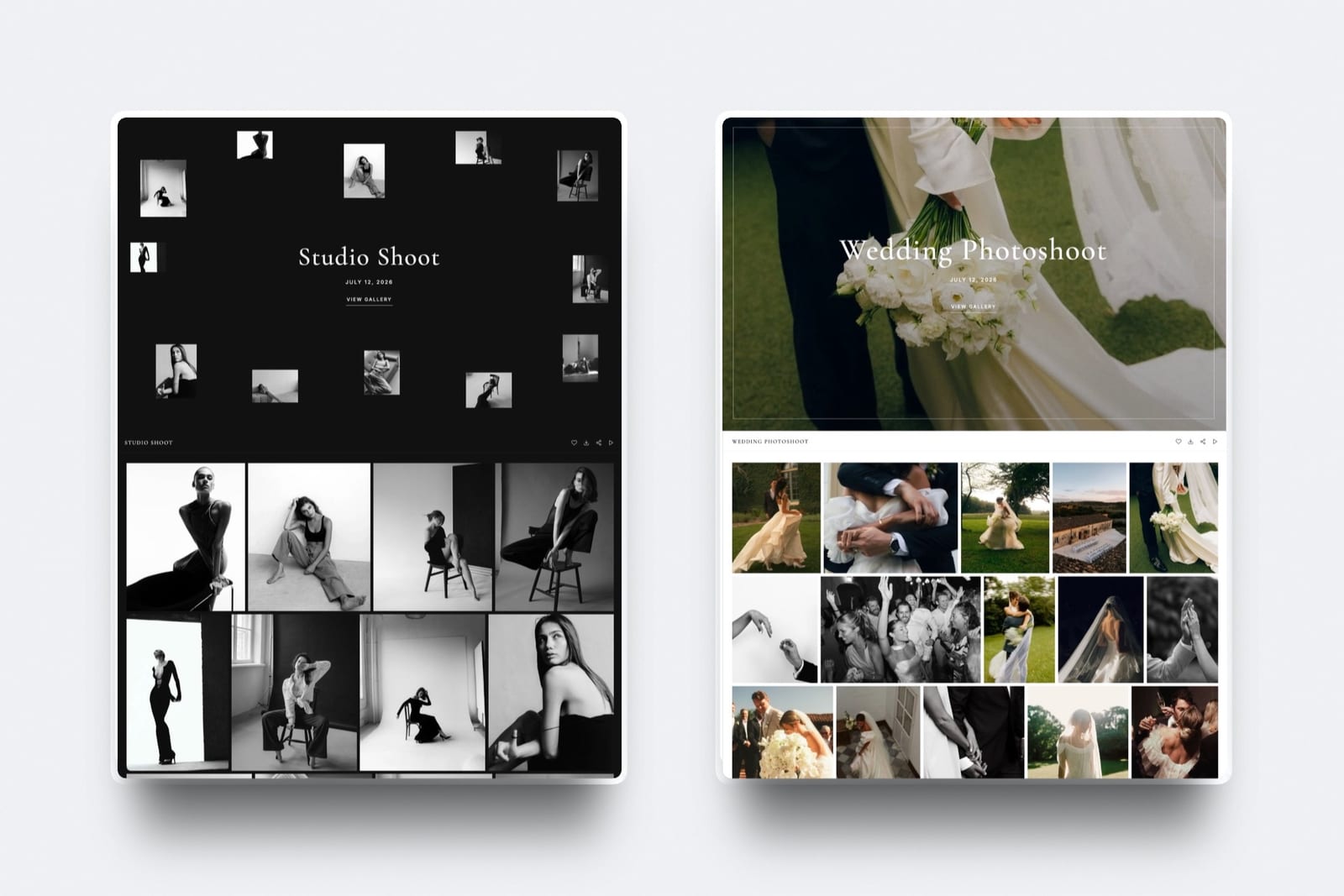
Clients heart favourites into named lists, add notes to photos and press Send to photographer, and can download the whole gallery or only their favourites.
Very large galleries download in archive parts, and the client can ask to be emailed when the download is ready.
The gates. A gallery password, a separate download PIN, a downloads switch, photo watermarks (shown on screen, while downloads deliver the clean original), email registration before viewing, and an optional expiry date with a reminder three days before.
Wrong passwords are rate-limited.
The address. Each gallery lives at /client/ on one of your sites: a framekit.ai address on Free, your own domain from Starter, with 17 cover styles, 18 typography presets and 7 interface languages.
The number that matters$84 a year. Framekit Starter, billed yearly, costs the same as WeTransfer Starter, and buys 50GB, your own domain on every gallery and links that do not expire after 3 days.
The gotchagalleries refuse RAW, DNG, TIFF, PSD and HEIC; films stop at 500MB on Free, 1GB on Starter, 2GB on Pro and 3GB on Business, and 2 hours on any plan. There are no client uploads, no print ordering, no mobile app and no unlimited storage.
Galleries belong to the account holder; Framekit team members on Pro and Business are website admins and do not manage galleries.
Verdict: Framekit is the better home for the delivery a client keeps, and its free plan lets you run it alongside WeTransfer at no cost.

Where WeTransfer Wins
WeTransfer beats a client gallery on four counts, and the first rules a gallery out of an entire half of a working photographer's week, so these are not gaps to argue around but a different product doing its own job well.
Any file, at size. RAW, DNG, PSD, TIFF, ProRes masters, project folders, fonts and LUTs all go by WeTransfer, and Ultimate has no limit on transfer size. A gallery takes common photo and video formats only, and Framekit tops out at 3GB per video on Business.
No setup. Drop the files, add an email, send. For a one-off favour to a colleague, building a gallery is more work than the job deserves.
Receiving files. Every WeTransfer plan can request and receive files, so a client can send you references or their own photos. Framekit galleries do not take uploads.
Paid handoffs. WeTransfer lets you price a transfer so the recipient pays before downloading. Framekit's store sells digital downloads too, at a 5% fee on Free and Starter, 3% on Pro and 0% on Business, but it is a store, not a one-off paid send.

Where a Client Gallery Wins
A client gallery wins on five counts, and every one of them happens after the send rather than during it, which is why the difference is invisible on delivery day and obvious three months later when the client comes back.
The link does not expire. A client who returns in eight months finds the photos and the film. WeTransfer matches this only on Ultimate at $228 a year.
It is allowed on the free plan. WeTransfer Free is non-commercial; Framekit Free is built for client work, with unlimited galleries and every gallery feature.
Two gates, not one. A password decides who gets in and a separate PIN decides who downloads, so a wedding gallery can go to forty guests who browse and heart while only the couple saves files.
WeTransfer has a password per transfer and an email allow-list, but no separate download gate.
It is yours. Cover, typography and colour theme on every plan, your own domain from Starter, so a forwarded link carries the same address as your portfolio, though the gallery page does not link to it. WeTransfer's own branded page and emails come with Ultimate.
Selections come back as lists. Named lists with notes and a Send to photographer button, which arrive as a list you can download. WeTransfer's favourites mark files on a preview; its pages do not describe lists or notes per photo.
Feedback on Photos and Film: Favourites, Comments and Review
WeTransfer's 2026 previews narrowed the feedback gap with galleries, but they collect a different kind of feedback: reactions to files, rather than selections returned as lists or notes pinned to a moment in a film, and the table below shows where each tool's feedback stops.
| Feedback feature | WeTransfer previews | Framekit gallery | Framekit video review |
|---|---|---|---|
| Recipient account needed | No | No; first heart asks for an email only | No |
| In-browser video playback | MP4 and MOV up to 300MB, slightly lower resolution | Every video up to the plan cap, transcoded | Every cut up to the plan cap, transcoded |
| Favourites | On files, when switched on | Named lists with per-photo notes | Not applicable |
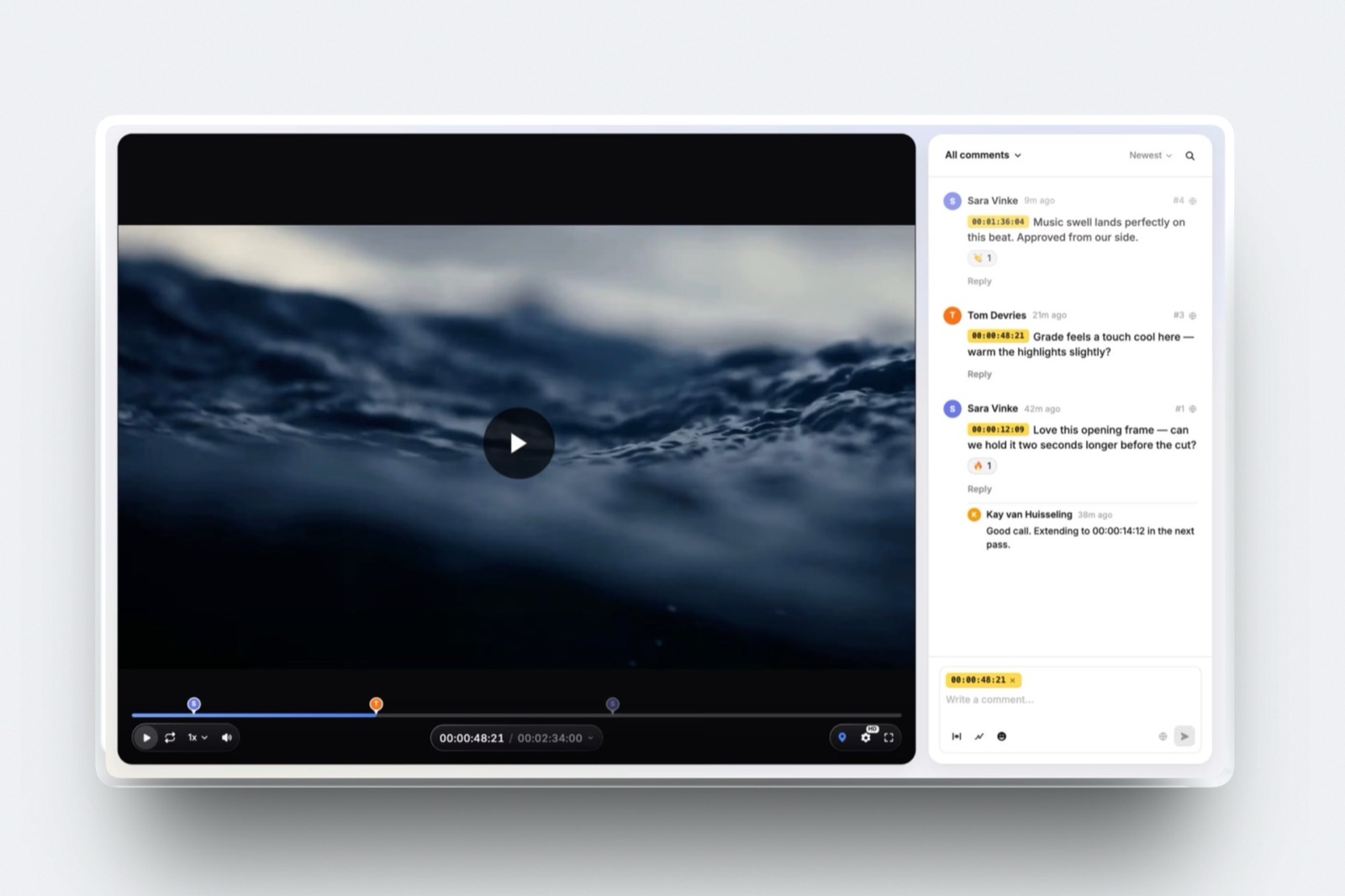
| Comments | Tied to a file or clip | Notes on individual photos | Pinned to the exact frame, with drawing |
| Versions and approval | Not described | Not applicable | Stacked versions; needs review, in progress, approved, needs changes |
| Which plans | Not stated on WeTransfer's pages | Every plan, Free included | Every plan, Free included |
For filmmakers, the useful split is three links, not two: video review for the cut, where the client leaves notes at the exact frame and you mark the version approved; a gallery for the final film and stills; and WeTransfer for the ProRes master to the colourist.
The Framekit vs WeTransfer head-to-head covers the review side in more depth.
What Happens When: Six Moments After You Hit Send
The difference between a client gallery and WeTransfer shows up in what happens after delivery, so here are the six moments clients and photographers ask about most, described as each service documents them.
The client opens the email late. On WeTransfer Free and Starter, after 3 days the transfer is gone and you send it again; Ultimate can recover expired transfers. A gallery with no expiry date opens whenever they get to it.
The client wants one photo on a phone. On WeTransfer they can preview, then download from the transfer. On a gallery they open the photo, tap download and enter the PIN, or download only their favourites as a ZIP.
The link is forwarded to guests. On WeTransfer, anyone with the link and the password can download. On a gallery, guests with the password browse and heart, but need the separate PIN to download.
The film is large. WeTransfer previews MP4 and MOV up to 300MB in the browser; bigger files must be downloaded to be watched.
Framekit plays every gallery video in the browser up to the plan's file cap and refuses anything over 2 hours or the cap at upload, before the client sees a broken link.
A proofing round should close. On WeTransfer it closes itself after 3 days whether or not the client is done. On Framekit you set the date; the gallery unpublishes then, returns to draft with files kept, and you and the client get a reminder three days before.
You need proof the client downloaded. Framekit's Activity panel logs each download and favourites list by client email, with the PIN used and the date, and exports to CSV.

What a Year Costs at Three Usage Levels
A year of client delivery by WeTransfer, by a gallery, or by both costs between $0 and about $312 for most freelancers, and the cheapest setup depends on whether you deliver finished work to clients, heavy working files to collaborators, or both.
Assumptions: yearly billing, prices read on 12 October 2026, deliveries kept available for the year where the client is expected to return.
| Usage level | WeTransfer only | Year | With Framekit | Year |
|---|---|---|---|---|
| Portrait photographer: 4 client deliveries a month, about 1GB each | Starter, since Free is non-commercial; links last 3 days | $84 | Framekit Free if galleries expire after about two months, or Starter to keep the year online | $0 or $84 |
| Wedding photo-and-film studio: 25 weddings, film plus 600 stills, clients return months later | Ultimate, for links that never expire and branding | $228 | Framekit Pro for galleries, review of every film and the site | $180 |
| Freelance editor: weekly 40GB project folders to colourists, client cuts for sign-off | Ultimate, for size; client notes as file comments | $228 | Ultimate for project folders plus Framekit Starter for review and delivery | $312 |
In the first two rows a gallery costs the same or less: the portrait photographer's 4GB a month fills Framekit Free's 10GB in about two months, so keeping a year online means Starter at $84, the same as WeTransfer Starter but with links that do not expire; the wedding studio saves $48 on Pro while gaining favourites, a PIN and review.
The third row is where both is the honest answer: an editor moving 40GB project folders needs WeTransfer, and pays $84 more for a place to deliver and review.
Run it yourselfsearch your sent WeTransfer history for the last 12 months, separate client deliveries from collaborator sends, and count how many client transfers you re-sent after they expired. Multiply by 15 minutes and your hourly rate.
That is what link life is costing you on Free or Starter.
Use Both: Working Files One Way, Deliveries the Other
Most photographers and filmmakers should keep both tools and draw one line between them, by whether the file is finished and whether the person receiving it paid you, because each tool is good at exactly the job the other is bad at.
- WeTransfer for RAWs to a retoucher, ProRes to a colourist, a project folder to an editor, files a client needs to send you, and any one-off send to a collaborator.
- A client gallery for the finished photos and film the client paid for: the delivery that should persist, carry your name, collect favourites and still be there next year.
- Video review for the cut that needs a sign-off, with notes pinned to frames and an approval status on the version.
If you pay for WeTransfer Ultimate only so client links never expire, moving client deliveries to a gallery may let you drop to Starter, or to Free if every remaining send is non-commercial.

Moving Client Delivery Off WeTransfer
Moving client delivery off WeTransfer is the easiest delivery change in a photography business, because there is no archive to migrate: expired transfers are already gone, and only new deliveries move to galleries, so the whole switch is one evening of setup.
- Split your sends. Go through last month's transfers and separate client deliveries from collaborator sends. Only the client deliveries move.
- Check formats and sizes. Finished JPEGs up to 100MB and films under your plan's cap: 500MB Free, 1GB Starter, 2GB Pro, 3GB Business, 2 hours on any plan. RAW, PSD and HEIC stay on WeTransfer.
- Build the site and connect a domain. Free works on a framekit.ai address; Starter at $84 a year puts galleries on your own domain.
- Build one gallery per job. Upload the stills and the film together, split into sets, and pick a cover style you will reuse.
- Set the gates. A unique password for viewing, a separate PIN for downloading, downloads on for finals and off for proofs.
- Decide on expiry. Leave finals up, or set 12 months with the reminder on; set 14 to 21 days for proofing rounds.
- Move sign-off rounds. Send cuts that need approval as review links; WeTransfer comments do not carry over.
- Re-send recent deliveries. Clients whose transfers expired get a fresh gallery link, which is also a natural moment to mention prints or a second session.
- Re-check your WeTransfer plan. If you bought Ultimate for link life, Starter may now cover your working-file sends.
How to Choose: Five Questions
Ask these five questions in order, because each removes one option for a concrete reason, and almost every photographer or filmmaker has an answer by the third question without weighing feature lists against each other.
1. Is the recipient a collaborator who will process the files? If yes, WeTransfer. If no, go to 2.
2. Are the files RAW, layered, project files, or a single file over 3GB? If yes, WeTransfer. If no, go to 3.
3. Is this paid client work? If yes, WeTransfer Free is outside its terms, so the choice is a paid WeTransfer plan or a gallery; go to 4. If no, WeTransfer Free is fine.
4. Should the client find the delivery after three days? If yes, it is WeTransfer Ultimate at $228 a year or a gallery from $0, and the gallery adds favourites, a PIN and your domain. If no, WeTransfer Starter works.
5. Do you also deliver films that need sign-off? If yes, a gallery plus video review on the same account; Framekit Pro covers both at $180 a year.
Frequently Asked Questions
Is WeTransfer good for delivering client photos?
WeTransfer is good at moving files and weak at delivering client work. Its Free plan is for non-commercial use, Free and Starter transfers expire within 3 days, and there is no separate download PIN or named favourites list.
It is an excellent tool for sending working files to a retoucher or editor, which is a different job from handing finished photos to a paying client.
How long do WeTransfer links last in 2026?
Up to 3 days on WeTransfer Free and Starter, per its pricing page on 12 October 2026. Ultimate, at $228 a year billed yearly or $25 monthly, keeps transfers indefinitely and can recover expired ones.
A Framekit gallery stays online until you set an expiry date, on every plan including Free.
Can I use WeTransfer Free for client work?
No, not within WeTransfer's terms: its pricing page describes Free as for individual, non-commercial use and points business users to a paid plan. Paid client deliveries need WeTransfer Starter at $84 a year or more.
Framekit's free plan, by contrast, is built for client work, with unlimited galleries and every gallery feature in 10GB.
Can I password-protect a WeTransfer link?
Yes. WeTransfer lets you password-protect a transfer or restrict it to a list of email addresses. What it does not have is a separate download PIN: anyone who can open the transfer can download.
Framekit galleries have both a gallery password and a separate download PIN on every plan, so guests can browse while only the client downloads.
Does WeTransfer have favourites now?
Yes. Since April 2026, WeTransfer lets senders switch on favourites and comments on transfer previews, so recipients can mark files and comment on individual clips without an account.
Its pages do not say which plans include it, and it does not describe named lists or notes per photo. Framekit galleries return named favourite lists with per-photo notes on every plan.
Which is better for wedding photo and film delivery?
A client gallery. A wedding delivery needs a link that still works when the couple return from honeymoon, a password plus a download PIN for a link forwarded to guests, favourites for the album and the film in the same place.
Framekit Pro holds 300GB with a 150GB video share and films up to 2GB each for $180 a year, against $228 for WeTransfer Ultimate.
Is WeTransfer cheaper than a client gallery?
At the entry level they cost the same: WeTransfer Starter and Framekit Starter are both $84 a year billed yearly. Framekit's free plan is cheaper than any WeTransfer plan that allows client work.
For links that never expire, WeTransfer Ultimate is $228 a year, more than Framekit Pro at $180, though Ultimate sends files of any size and type.
Can clients send files to me through a client gallery?
Not through a Framekit gallery, which is one-way delivery with no client uploads.
WeTransfer can request and receive files on every plan, which is one reason most photographers keep it alongside a gallery: clients and collaborators send files in by WeTransfer, and finished work goes out in a gallery.
Can I put my own branding on a WeTransfer page?
Yes, on Ultimate. WeTransfer's pricing page lists custom branding on Ultimate, $228 a year billed yearly: your own WeTransfer page, personalised emails, your own wallpapers and social links. Free and Starter use WeTransfer's own page.
Framekit galleries carry your cover style, typography and colours on every plan, and sit on your own domain from Starter at $84 a year.
Should I use WeTransfer and a client gallery together?
Yes. Keep WeTransfer for RAW files, project folders, inbound files and anything a collaborator will process, and use a gallery for the finished work a paying client keeps.
If you were paying for WeTransfer Ultimate only for link life, moving client deliveries to a gallery may let you drop to Starter.
Can I share video previews through a client gallery like WeTransfer?
Yes, and without the 300MB preview limit. Framekit plays every video in a gallery in the browser, transcoded for smooth playback, up to the plan's per-file cap of 500MB, 1GB, 2GB or 3GB and 2 hours, and never watermarks films.
For feedback on a cut, Framekit video review pins comments to the exact frame, which WeTransfer's file comments do not.
The Verdict
WeTransfer is excellent at the job it was built for: moving any files, at any size, to someone who will process them, with no account on either end. In 2026 it also previews, favourites and comments.
It was never built to be the last impression a paying client has of your studio, and its 3-day links and non-commercial free plan show it.
Use a gallery for clients and a transfer for collaborators.
Framekit does the client half on its free plan and moves it to your own domain for $84 a year, the price of WeTransfer Starter; it does not take RAW files, receive uploads or sell prints, which is why WeTransfer stays in the workflow.
Related readingclient gallery vs Google Drive, what a client gallery is, how to create a client gallery, best WeTransfer alternatives, and WeTransfer vs Dropbox for photographers.