
Framekit templates
Start from a designer-made template
 Use template
 Use template
 Use template
 Use template
 Use template
 Use template
 Use template
 Use template
Framekit vs Payhip is one of the cleaner comparisons in digital selling, because both publish their fees plainly, both start at 5 percent on a free plan, and both let you stop paying a percentage if you pay a monthly fee instead.
The difference is what that zero costs. Payhip reaches 0 percent on its Pro plan at $99 a month. Framekit reaches 0 percent on its Business plan at $39 a month, or $31 billed yearly. Over a year that is $1,188 against $372 for the same zero.
But zero is not the only number that matters, and the honest version of this comparison has more texture than the headline. At $2,000 a month in sales the cheapest Payhip plan is not Pro but Plus, at $29 a month and 2 percent.
Payhip also collects and remits EU and UK VAT for you, sells courses, memberships and coaching, and gives every feature to every plan. Framekit does none of those, and it says so below.
A hosted storefront is software that hosts your product pages, takes payment and delivers files for you, and Framekit is an AI website builder that puts that storefront inside a full portfolio site with client galleries, video review and decks on the same account.
Framekit is the cheaper of the two once you sell more than about $780 a month: at $2,000 a month in sales of a $29 product it costs $1,316 a year all-in on Business against $1,772 on Payhip's cheapest plan for that volume, and at $5,000 it costs $2,733 against $3,549.
Payhip is the better choice if you need EU and UK VAT collected and remitted for you, sell courses, memberships, coaching or physical products, or want every feature on a free plan, none of which Framekit offers.
Full disclosure: Framekit is our product, Payhip wins five specific things in the section named for it, and this page was re-verified against Payhip's pricing and help pages on 12 October 2026, replacing the September version that compared only subscription costs.
How We Compared Framekit and Payhip
This comparison is built from each platform's published pricing and help documentation plus Framekit's shipped checkout code, with one worked example priced at three volumes, and it reports no test purchases on either platform.
Read at the source on 12 October 2026. Payhip's pricing page for plans, fees, VAT and payouts; its features page for what each plan includes; and its help centre articles on refunds, file uploads and affiliates.
Payhip's pricing page showed monthly prices only in our read, so no annual Payhip price is quoted.
Read in the product. Framekit charges each buyer through the seller's own connected Stripe account and takes its percentage as an application fee on the amount after any discount code. Its plan prices and fees come from its pricing page.
Calculated. A $29 preset pack sold at $500, $2,000 and $5,000 a month (about 17, 69 and 172 sales), paid by US card through Stripe on both platforms at 2.9% plus 30 cents.
Not covered in depth. Payhip's course player, coaching bookings and membership tools, because Framekit has nothing equivalent to set beside them.
An earlier version of this page described a hands-on test; this version reports only what each vendor publishes and what the arithmetic shows.
Framekit vs Payhip at a Glance
This table sets Framekit and Payhip side by side on fifteen points that decide where a creator should sell digital products, using each vendor's October 2026 terms.
| Payhip | Framekit | |
|---|---|---|
| Free plan fee | 5% | 5% |
| Middle plan | Plus, $29 a month, 2% | Pro, $19 a month ($15 yearly), 3% |
| Cost to reach 0% | Pro, $99 a month | Business, $39 a month ($31 yearly) |
| Features by plan | All features on every plan | Discount codes on Pro and up; custom domain from Starter |
| Card processing | Stripe or PayPal rates on top | Stripe's rate on top (2.9% + 30c for US cards) |
| Where the money goes | Straight to your PayPal or Stripe account | Straight to your own Stripe account |
| Checkout payment methods | Card or PayPal | Stripe's methods from your settings, for example card, Link and Cash App Pay |
| EU and UK VAT | Collected and remitted for you | Not handled; you are the seller |
| US sales tax | You set it up; Payhip reports it | Not handled |
| Products | Downloads, courses, coaching, memberships, physical goods | Digital downloads only, unlimited on every plan |
| Affiliates | Seller-run affiliate programs with tracked links | No |
| File size | 5GB per file, no storage or bandwidth limits | Framekit publishes no per-file ceiling or bandwidth allowance |
| Website | Drag-and-drop store builder with landing pages | Multi-page AI-built site, 10 pages free, 200 on Pro |
| Checkout address | Payhip checkout | framekit.ai/buy with your name and a "Powered by Framekit" line |
| Also in the account | Email list tools and integrations | Client galleries, video review, Slides |
In one linePayhip is the broader selling platform with tax help in Europe, and Framekit is the cheaper store at volume that comes inside a real creative website.
What Payhip and Framekit Cost Over a Year
At $2,000 a month in sales, the cheapest Payhip setup is Plus at $1,772 a year including Stripe processing and the cheapest Framekit setup is Business at $1,316 billed yearly, so Framekit keeps about $456 more, and the gap widens to about $816 at $5,000 a month.
Every figure below is the full annual cost of selling the $29 pack: the plan, the platform percentage and Stripe's processing, which is the same on both.
Payhip plans are at their monthly prices; Framekit's paid plans are at yearly billing ($180 Pro, $372 Business). The cheapest option for each platform at each volume is in the right-hand columns.
| Monthly sales | Payhip Free | Payhip Plus | Payhip Pro | Framekit Free | Framekit Pro | Framekit Business | Cheapest Payhip vs cheapest Framekit |
|---|---|---|---|---|---|---|---|
| $500 | $536 | $704 | $1,424 | $536 | $596 | $608 | $536 vs $536 |
| $2,000 | $2,144 | $1,772 | $2,132 | $2,144 | $1,844 | $1,316 | $1,772 vs $1,316 |
| $5,000 | $5,361 | $3,909 | $3,549 | $5,361 | $4,341 | $2,733 | $3,549 vs $2,733 |
If you pay Framekit monthly rather than yearly, Business costs $96 more a year: $1,412 at $2,000 a month and $2,829 at $5,000, still below Payhip's cheapest plan at both volumes.
The crossover points on each ladder
| Switch | Pays off above | Arithmetic |
|---|---|---|
| Payhip Free to Plus | $967 a month | $29 divided by the 3 points you stop paying |
| Payhip Plus to Pro | $3,500 a month | $70 extra divided by 2% |
| Payhip Free to Pro | $1,980 a month | $99 divided by 5% |
| Framekit Free to Business | $780 a month | $39 divided by 5% |
| Framekit Pro to Business | About $667 a month | $20 extra divided by 3%, or about $533 on yearly billing |
Per sale, on each rung
| Price | Payhip Free or Framekit Free (5%) | Payhip Plus (2%) | Framekit Pro (3%) | Payhip Pro or Framekit Business (0%) |
|---|---|---|---|---|
| $9 | $7.99 | $8.26 | $8.17 | $8.44 |
| $29 | $26.41 | $27.28 | $26.99 | $27.86 |
| $49 | $44.83 | $46.30 | $45.81 | $47.28 |
| $99 | $90.88 | $93.85 | $92.86 | $95.83 |
Per sale, the two ladders meet at the bottom and the top: both free plans keep the same amount, and both zero-commission plans keep the same amount, because Stripe's processing is identical.
The difference between them is entirely the monthly plan price, plus the middle rung, where Payhip's 2% keeps 29 cents more per $29 sale than Framekit's 3% but costs $10 a month more.
A year that grows
Most sellers do not sit at one volume all year.
Take a $29 pack that sells $300 a month for three months, $1,200 a month for the next five and $3,000 a month for the last four, with each platform's cheapest plan chosen month by month and billed monthly.
Payhip's cheapest path (Free, then Plus) costs about $1,410 for the year including Stripe. Framekit's cheapest path (Free, then Business) costs about $1,140.
The $270 gap comes almost entirely from the last four months, which is the pattern to expect: the two platforms are level while you are small, and Framekit pulls ahead as you grow.
What the ladders say. Payhip's middle rung earns its place: between about $967 and $3,500 a month, Plus is Payhip's cheapest plan.
Framekit's ladder is shorter, and for most sellers above $780 a month the answer is simply Business. Below $780 a month, both free plans charge the same 5% and cost the same, so pick on features, not price.
Run it yourselftake your monthly sales, multiply by 2% and add $29 (Payhip Plus), then multiply by 0% and add $39 (Framekit Business, monthly). Do the same with 0% and $99 for Payhip Pro.
The smallest of the three, times twelve, is the platform cost you should be paying; Stripe's processing is the same on all three and drops out of the comparison.
Refunds, Chargebacks and Payouts
On both Payhip and Framekit the buyer's money lands in your own payment account rather than with the platform, so refunds are issued from Stripe or PayPal, disputes arrive there, and payouts follow your processor's schedule rather than a platform holding period.
| What happens | Payhip | Framekit |
|---|---|---|
| Where the money goes | Directly to your PayPal or Stripe account at the moment of sale | Directly to your own Stripe account at the moment of sale |
| Issuing a refund | From your PayPal or Stripe account; Payhip mirrors it in your reports | From your Stripe account; Framekit marks the order refunded |
| Platform fee on a refund | Payhip's help centre does not say whether its fee is returned | Framekit keeps its fee: $1.45 on a $29 sale on Free, $0.87 on Pro, $0 on Business |
| Processing fee on a refund | Stripe keeps its original fee (about $1.14 on $29); PayPal applies its own policy | Stripe keeps its original fee, about $1.14 on $29 |
| A chargeback | Arrives in your PayPal or Stripe account | Arrives in your Stripe account; $15 Stripe dispute fee for US accounts, plus $15 if you counter, returned if you win |
| Dispute alerts | Through your processor | Framekit emails you and marks the order disputed |
| Platform holding period | None; Payhip does not hold funds | None; Framekit does not hold funds |
| Payout to your bank | On your PayPal or Stripe schedule | Stripe's first payout typically 7 to 14 days after your first live payment, then on your schedule, which can be daily |
Payhip's own refund guide walks sellers through refunding inside PayPal or Stripe, and Stripe's dispute documentation explains how a disputed amount and fee are debited from your balance.
The practical upshot. Payhip and Framekit are much closer here than either is to a merchant of record like Gumroad or Lemon Squeezy, which hold your balance and pay out on their own cycle.
The one difference is PayPal: Payhip can route buyers who pay with PayPal straight into your PayPal account, and Framekit's checkout runs on Stripe only.
Our guide to refunds and chargebacks on digital products covers how to answer a dispute in Stripe.
EU VAT, UK VAT and US Sales Tax
Payhip collects and remits EU and UK VAT on your digital sales automatically, which Framekit does not do at all, while neither platform files US sales tax for you, so the tax gap between them is mainly a European one.
What Payhip does. Its pricing page says it is fully compliant to collect and remit EU and UK VAT on your behalf automatically, and that you can set up other taxes yourself, which Payhip then reports to you.
That covers the hardest case for small creators: consumers in 27 EU countries and the UK, each at its own VAT rate.
What Framekit does. Nothing on tax. It charges the buyer through your Stripe account, so you are the seller, and its checkout does not calculate or add VAT or sales tax.
What that is worth. A seller outside the EU owes VAT on digital sales to EU consumers from the first sale and normally registers for the EU's One Stop Shop to file it quarterly; a non-UK seller owes UK VAT on digital sales to UK consumers from the first sale too.
EU-based sellers can sell up to €10,000 a year across EU borders before other countries' rates apply.
On a $29 sale to a German consumer, a Framekit seller registered for VAT keeps $24.37 and remits $4.63 out of the price, and spends time on a quarterly return. On Payhip that work is done for you.
And US sales tax. Neither platform files it. Most US states only require registration once your sales into the state pass an economic nexus threshold, commonly $100,000 a year, and many do not tax digital downloads.
Our VAT on digital products guide covers both sides.
Checkout, Files and Delivery Specs
Payhip publishes a 5GB per-file limit with no storage or bandwidth caps and lets you set download limits, expiring links and PDF stamping, while Framekit publishes no per-file ceiling or bandwidth allowance and sends 7-day download links by email that the seller can resend.
| Detail | Payhip | Framekit |
|---|---|---|
| File size | Up to 5GB per file; no storage or bandwidth limits | Framekit publishes no per-file ceiling or bandwidth allowance |
| Blocked file types | EXE, ISO, DMG, VBS, SCR and JAR must be zipped | Not published |
| Download controls | Three downloads per file by default, adjustable limits, expiring links, PDF stamping with buyer details | Order email links expire after 7 days; the seller can resend fresh links |
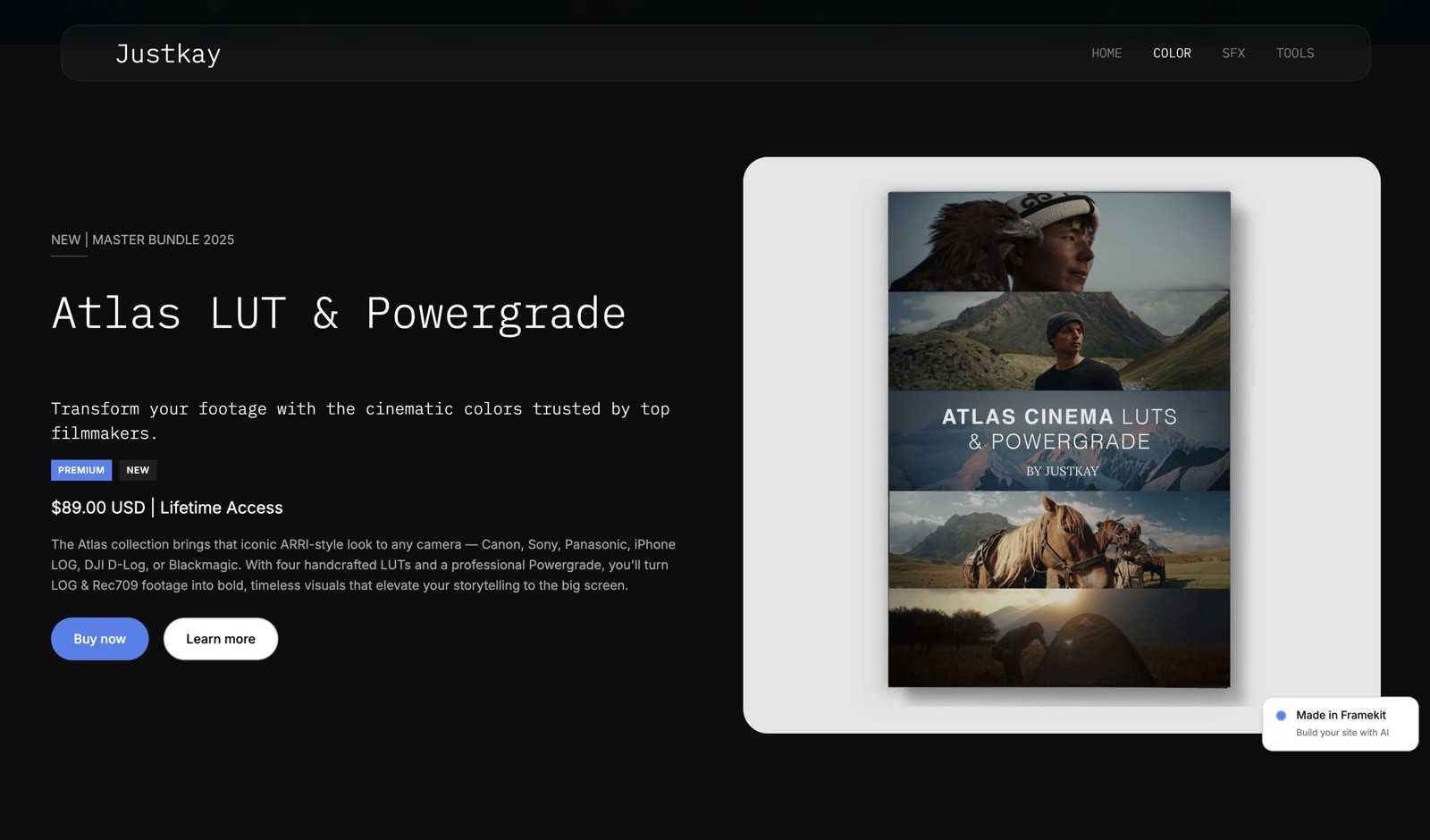
| After payment | Custom download page | Download on the confirmation page |
| Updated files | Not covered in what we read | Not pushed to past buyers |
| Checkout | Payhip checkout with card or PayPal; custom checkout fields, gifting | framekit.ai/buy with your name and logo and a "Powered by Framekit" line on every plan |
| Upsells | Cross-sell order bumps and abandoned-cart recovery | Not offered |
| Pricing options | Pay what you want, payment plans, pre-orders, variants | Fixed price, free products, discount codes on Pro and up |
| License keys | Uploaded or generated | Not offered |
| Free products | Yes | Yes, on every plan |
The rows that matter for creative files. Both platforms handle large LUT and preset packs; Payhip's 5GB per-file limit is generous, with no storage or bandwidth caps, and Framekit publishes no ceiling.
Note Payhip's default of three downloads per file, which is worth raising for presets, because a buyer setting up a third computer can otherwise hit it.
Payhip's PDF stamping, which prints the buyer's details into an ebook, is a genuine anti-sharing feature Framekit does not have.
Where Payhip Wins
Payhip beats Framekit on five specific things, and if any of them is central to your business, the cost tables above are not the deciding factor, because no Framekit plan adds them.
1. EU and UK VAT, collected and remitted. For anyone selling meaningfully into Europe, this saves registrations, quarterly filings and possibly an accountant.
2.
Courses, coaching and memberships. Payhip sells online courses with quizzes, certificates, drip content and progress tracking, one-to-one coaching with Zoom and Calendly scheduling, and memberships with tiers, free trials and recurring billing.
Framekit's store sells one-off downloads only.
3. Every feature on every plan. Payhip's pricing page says there is no feature-gating: the free plan has the same tools as Pro, and you pay only to lower the percentage.
On Framekit, discount codes need Pro and a custom domain needs Starter.
That has a price: a seller at $500 a month who wants launch codes pays $596 a year on Framekit Pro billed yearly, against $536 on Payhip's free plan with codes included.
4. A wider sales toolkit. Affiliate programs with tracked links, pay what you want, payment plans, order bumps, abandoned-cart recovery, license keys, PDF stamping, physical products and a built-in marketplace. Framekit has free products and discount codes.
5. PayPal at checkout. Buyers can pay with PayPal straight into your PayPal account. Framekit's checkout runs on Stripe only.
Verdict: Payhip is the better standalone selling platform, and for course creators, coaches and anyone shipping heavily into Europe it is the right purchase regardless of the fee comparison. If you are weighing it against other hosted stores, Gumroad vs Payhip and the best Payhip alternatives cover the rest of the field.

Where Framekit Wins

Framekit wins for creative professionals selling downloads alongside client work, because zero commission costs $39 a month rather than $99, the store sits inside a multi-page portfolio site, and the same plan carries client galleries, video review and decks that Payhip does not offer at any price.
Framekit is an AI website builder with a digital-download store, Frame.io-style video review, client galleries and Slides on one account, with storage pooled across them: 10GB on Free, 50GB on Starter, 300GB on Pro and 2TB on Business.
The texture. A product gets two front doors: a product section on your Framekit site, and a direct buy link at framekit.ai/buy you can share without any site at all.
Products are unlimited on every plan, free downloads work as lead magnets, and the buyer downloads on the confirmation page the moment payment clears.
The number that matters$372 a year, billed yearly, for 0% commission on every sale, against $1,188 for Payhip Pro.
The standout detailthe site around the store is a real portfolio. Ten pages on Free, 30 on Starter, 200 on Pro and unlimited on Business, each one indexable under your own domain from Starter, with AI that builds sections and writes copy.
A photographer's preset page can sit beside the series it was graded from.
The gotchaFramekit is not a merchant of record and does not handle VAT; it keeps its percentage on refunds; download links in order emails last 7 days; updated files are not pushed to past buyers; and the checkout always opens at framekit.ai/buy with a "Powered by Framekit" line, not on your own domain.
Skip it ifyou sell courses, coaching, memberships or physical goods, need affiliates or license keys, or want EU VAT handled.

Verdict: for a photographer or filmmaker selling presets, LUTs or templates next to commissioned work, Framekit is the cheaper store above $780 a month and the only one of the two that also runs the portfolio and the client deliveries.
The Store Inside a Portfolio Site
The practical reason a creative professional picks Framekit over Payhip is not the store itself but what surrounds it: a full portfolio site, client galleries for photo and video delivery, timecoded video review and decks, all on one plan and one storage pool.
For a wedding photographer who also sells Lightroom presets, that means the site that wins bookings, the galleries that deliver each wedding, and the preset store live in one account.
For a commercial filmmaker selling LUTs, the reel, the client review links for each cut, the treatment decks and the LUT store share it.
On Payhip you would add a portfolio builder, a gallery tool and a review tool beside it, three more subscriptions for a working creative.
Payhip's store builder is good at what it does: drag-and-drop pages, landing pages and custom CSS for a storefront. It is a store with pages, where Framekit is a site with a store. Which you need depends on whether selling downloads is the business or one part of it.

Moving From Payhip to Framekit: A Checklist
Moving from Payhip to Framekit means recreating products rather than importing them, and the decision to settle first is what happens to your EU and UK VAT, because Payhip stops collecting it on any sale that runs through your own Framekit store.
| Step | What to do | Why it matters |
|---|---|---|
| 1 | Export your Payhip customer list and sales | It is the asset that does not come back |
| 2 | Download every product file, image and description | There is no importer |
| 3 | List what Framekit cannot carry: courses, coaching, memberships, physical goods, license keys, affiliates | Those stay on Payhip |
| 4 | Decide your VAT setup for EU and UK buyers | Payhip collected it; on Framekit you are the seller |
| 5 | Connect a Stripe account in Framekit | Payments land there; the first payout typically takes 7 to 14 days |
| 6 | Recreate products and prices, plus a free lead magnet | Unlimited products on every plan |
| 7 | Rebuild discount codes on Pro or Business | Not available on Free or Starter |
| 8 | Swap the links in bios, videos and emails | Old links keep selling through Payhip |
| 9 | Keep the Payhip store live for a month | Links in circulation and past buyers' downloads keep working |
| 10 | Choose a plan by volume | Free under $780 a month, Business above it |
For a six-product catalogue, the re-upload is an afternoon. The tax decision in step 4 is the part that deserves an evening.

How to Choose Between Framekit and Payhip
Take these questions in order and stop at the first yes, because the first four are capability questions that settle the choice regardless of what the cost tables say.
1. Do you sell courses, coaching or memberships? Yes: Payhip. Framekit has no course player and no recurring billing.
2. Do you sell physical products as well as downloads? Yes: Payhip. Framekit sells digital downloads only.
3. Do you need EU and UK VAT collected and remitted for you? Yes: Payhip, or another merchant of record.
4. Do you grow through affiliates, or need license keys or PDF stamping? Yes: Payhip.
5. Do you also need a portfolio site, client galleries or video review? Yes: Framekit, which carries all three on the same plan.
6. How much do you sell a month? Under $780, either free plan at 5%. Between $780 and about $967, Framekit Business is cheaper and Payhip Free is next.
Above about $967, compare Framekit Business with Payhip Plus, and above $3,500 with Payhip Pro: Framekit Business is the cheaper of the two at every volume above $780.
Frequently Asked Questions
Is Framekit cheaper than Payhip?
Framekit is cheaper than Payhip above about $780 a month in sales and costs the same below it. Both free plans charge 5%.
At $2,000 a month of a $29 product, Framekit Business costs $1,316 a year with Stripe and Payhip's cheapest plan, Plus, costs $1,772; at $5,000 a month it is $2,733 against $3,549 on Payhip Pro.
Which Payhip plan is cheapest at my sales volume?
Payhip Free at 5% is cheapest below about $967 a month, Plus at $29 a month and 2% is cheapest from about $967 to $3,500 a month, and Pro at $99 a month and 0% is cheapest above $3,500. Those crossovers come straight from Payhip's published fees.
Does Payhip handle EU VAT and US sales tax?
Payhip collects and remits EU and UK VAT on your behalf automatically, according to its pricing page. It does not file US sales tax for you; you can set up other taxes and Payhip reports them.
Framekit handles no tax at all, so a seller selling into Europe gets real value from Payhip that Framekit does not provide.
Does Payhip or Framekit keep its fee when I refund a buyer?
Framekit keeps its fee on a refund: $1.45 on a $29 sale on Free, $0.87 on Pro and nothing on Business.
Payhip's help centre explains that refunds are issued from your PayPal or Stripe account but does not say whether Payhip's percentage is returned. On both, Stripe keeps its original processing fee, about $1.14 on $29.
How do payouts work on Payhip and Framekit?
On both platforms the money goes straight into your own payment account at the moment of sale, with no platform holding period: Payhip deposits to your PayPal or Stripe account, and Framekit to your Stripe account.
From there your processor pays your bank; Stripe typically makes the first payout 7 to 14 days after your first live payment.
Who handles chargebacks on Payhip and Framekit?
You do, on both, because the payment sits in your own Stripe or PayPal account. On Stripe, a dispute costs a $15 dispute fee for US accounts plus another $15 if you counter it, returned if you win. Framekit emails you and marks the order as disputed when Stripe reports one.
Can I sell courses or memberships on Framekit?
No. Framekit's store sells one-off digital downloads such as presets, LUTs, templates and ebooks, with no course player, no drip content and no recurring billing.
Payhip sells courses, coaching and memberships on every plan, so a creator whose income is recurring should use Payhip or a dedicated platform.
Does Framekit have an affiliate program feature like Payhip?
No. Framekit supports discount codes on Pro and Business but has no affiliate tracking.
Payhip lets sellers run their own affiliate programs with tracked links and monthly affiliate reports, and the seller pays affiliates directly, which suits creators who grow through other creators.
What is the file size limit on Payhip and on Framekit?
Payhip allows files up to 5GB each, with no storage or bandwidth limits, and asks you to zip executable formats. Framekit publishes no per-file ceiling or bandwidth allowance for store products. Both comfortably handle typical preset, LUT and template packs.
Is the Framekit checkout on my own domain?
No. Framekit sites and product pages can use your own domain from the Starter plan, but the payment step always opens on a hosted page at framekit.ai/buy with your name and logo and a "Powered by Framekit" line, on every plan.
Payhip offers a custom domain for its store on every plan.
Does Payhip lock features behind paid plans?
No. Payhip's pricing page says every plan has all features, unlimited products and unlimited revenue, and the plans differ only in the transaction fee: 5% on Free, 2% on Plus at $29 a month and 0% on Pro at $99 a month.
Framekit reserves discount codes for Pro and up and custom domains for Starter and up.
Which is better for selling Lightroom presets?
Framekit is the better fit for most photographers selling Lightroom presets, because the preset page sits on the same site as the portfolio that convinced the buyer, and Business at $39 a month removes the fee.
Payhip is better if you also sell an editing course, want PayPal at checkout or sell mostly to Europe and want VAT handled.
Our guide to selling presets from your website covers the setup.
Can I move my Payhip products to Framekit?
Yes, by recreating them: there is no importer, so you re-upload files and rebuild product pages, which for a small catalogue takes an afternoon.
Export your customer list first, keep courses and memberships on Payhip, and keep the Payhip store live for a month so links already in circulation keep working.
What happens to my Framekit store if I stop paying for a plan?
Framekit's Free plan is permanent and includes the store, so a lapsed subscription moves you onto Free's terms rather than taking the store offline: the fee returns to 5%, discount codes stop because they need Pro, and a custom domain needs at least Starter.
Payhip's free plan likewise keeps every feature at its 5% fee.
Payhip vs Gumroad vs Framekit: which keeps the most of a $29 sale?
On a $29 sale to a US card buyer, Framekit Business keeps $27.86, Payhip Pro also keeps $27.86 because both charge 0% plus Stripe's processing, and Gumroad keeps $24.46 after 10% plus $0.50 and processing.
The difference between Framekit and Payhip at zero commission is the plan price, $39 against $99 a month. Our Gumroad vs Framekit comparison covers the Gumroad side.
Final Verdict
Choose Payhip if you sell courses, coaching, memberships or physical products, need EU and UK VAT handled, grow through affiliates, or want PayPal and every feature on a free plan. Those are capability gaps rather than price differences, and no Framekit plan closes them.
Choose Framekit if you are a creative professional selling downloads beside client work, because zero commission costs $39 a month rather than $99, the store lives inside a real portfolio site, and the same plan carries client galleries, video review and decks.
Above $780 a month it is the cheaper of the two at every volume we priced.
Where Framekit loses is breadth: it does not sell anything recurring or physical, does not collect VAT, does not offer affiliates or license keys, and does not put the checkout on your own domain.
The trade-off is a narrower store inside a broader creative business, and below $780 a month both free plans cost exactly the same.
Related readingPayhip vs Podia, Lemon Squeezy vs Payhip, the best zero-commission selling platforms and Framekit's full pricing.