Framekit templates
Start from a designer-made template
 Use template
 Use template
 Use template
 Use template
 Use template
 Use template
 Use template
 Use template
Most client galleries fail in the same four places, and none of them is the photography. The cover is whatever frame uploaded first. The images arrive as one run of 600 with no chapters. Nothing anywhere says when downloads close.
And nobody has told the client what the little heart is for.
The result is a gallery that delivers files and produces nothing else: no album picks, no forwarded link that lands well, and three emails asking questions the delivery should have answered.
Knowing what to include in a client gallery is the difference between handing over files and designing the hour your client spends with them. The photographs are identical either way; everything around them is a decision.
A client gallery is a private web page that presents one shoot's finished photos and films to the client, with the structure, access rules and instructions that let them view, choose, download and share the work without needing to ask you anything.
A complete client gallery includes a chosen cover with the client's name and date, photos split into 4 to 7 named sets with the best 40 to 80 frames first, any film from the same shoot, a password plus a separate download PIN, favourites switched on with a stated pick limit, clear download rules, a deadline and lifespan, and, for commercial work, a licence line.
What the gallery page cannot hold, such as instructions and contact details on Framekit, goes in a four-line delivery email. First build: 30 to 45 minutes; with a house style, about 10.
This checklist was rewritten and re-verified on 12 October 2026 against what each gallery element actually does on Framekit, read from its product code, and against the competitor pages cited inline.
Two items in the earlier version have changed: Framekit galleries offer no web-size download choice, and they have no on-page welcome note, so both now come with a workaround rather than a promise.
Full disclosure: Framekit makes one of the gallery platforms named here. The checklist is written to work on any modern gallery tool, and where Framekit lacks an item, such as a print store, a size choice for downloads or a text block on the gallery page, it says so and names a platform that has it.
The Complete Client Gallery Checklist
A complete client gallery carries twelve things, each with a specific job in the client's experience, and every one of them has a predictable cost when it is missing, usually a support email, a missed sale or a forwarded link that lands badly.
| Include | Concrete target | Cost of leaving it out | Where it lives on Framekit |
|---|---|---|---|
| A chosen cover with name and date | One quiet, wide frame; faces near the centre | The gallery reads as a file dump | Cover photo, focal point, 17 cover styles |
| Named sets | 4 to 7 for a wedding, 2 to 4 for a session | Clients stall around frame 90 | Sets, starting with Highlights |
| The best frames first | 40 to 80 at the top of set one | Album picks come from the front, not the best | Drag order inside a set |
| Any film from the shoot | Under your plan's per-file video cap | A second link, a second login, a second email | Same gallery, every plan |
| A gallery password | Unique per gallery | One forwarded link opens another client's photos | Gallery Password |
| A separate download PIN | 4 to 6 digits | Guests download every full-resolution file | Download PIN |
| Favourites with a pick limit | "Up to 60 for the album by 30 June" | An email describing "the one by the window" | Hearts, named lists, notes |
| Download rules for this round | Off for proofs, on for finals | Unpaid proofs downloaded free | Download switch |
| A download deadline and lifespan | 90 days to download, 12 months online | Expired-link complaints in month fourteen | Auto Expiry plus reminder |
| A watermark where it earns its place | Proofs and guest viewing only | Screenshots of unpaid work | Image or text watermark on photos |
| A licence line for commercial work | Party, territory, period | Usage disputes with people who never signed | Delivery email or a read-me card |
| Instructions and contact details | Four lines | "How do I download?" by return | Delivery email, not the page |
Twelve items sounds like an evening. In practice nine of them are settings you choose once, save as a house style, and reuse; the other three are writing, and the writing is the part that removes the support emails.
Step 1: Cull to a Count the Client Can Actually Review
Cull before you build, to a number set by genre rather than by how many frames survived the first pass, because every near-duplicate in a gallery doubles the client's selection time and quietly pushes your strongest later work out of reach.
Typical delivered counts: 40 to 80 frames per hour for portraits, 400 to 700 for a full wedding day, 3 to 8 per person for headshots, and 50 to 150 per hour of event coverage.
Our guide to how many photos to deliver has the genre-by-genre reasoning.
Run three passes, not two. The first removes the technical failures, the second the obvious duplicates, and the third the frames that are fine but say nothing a neighbour does not say better. Twelve frames of the same pose read as indecision rather than generosity.
Deliver colour and black-and-white versions of the same frame only when both are genuinely the better photograph. Otherwise you have doubled the gallery and added nothing a client can choose between.
Export finished JPEGs in sRGB at full resolution, which usually means 8MB to 20MB a frame from a 24 to 45 megapixel camera.
Framekit accepts JPEG, PNG, WebP and GIF up to 100MB each and refuses RAW, DNG, TIFF, PSD and HEIC, so convert iPhone HEIC files before upload. A single Framekit gallery holds up to 5,000 photos.
Name the files for the client, not the camera.
Framekit shows each photo's filename under it in the full-screen viewer and keeps it on every download, so "Harper-Lee-Wedding-0142.jpg" is part of the delivery and "DSC_0142.jpg" is a small piece of carelessness the client sees on every frame.
Step 2: Choose the Cover as a Decision, Not a Default
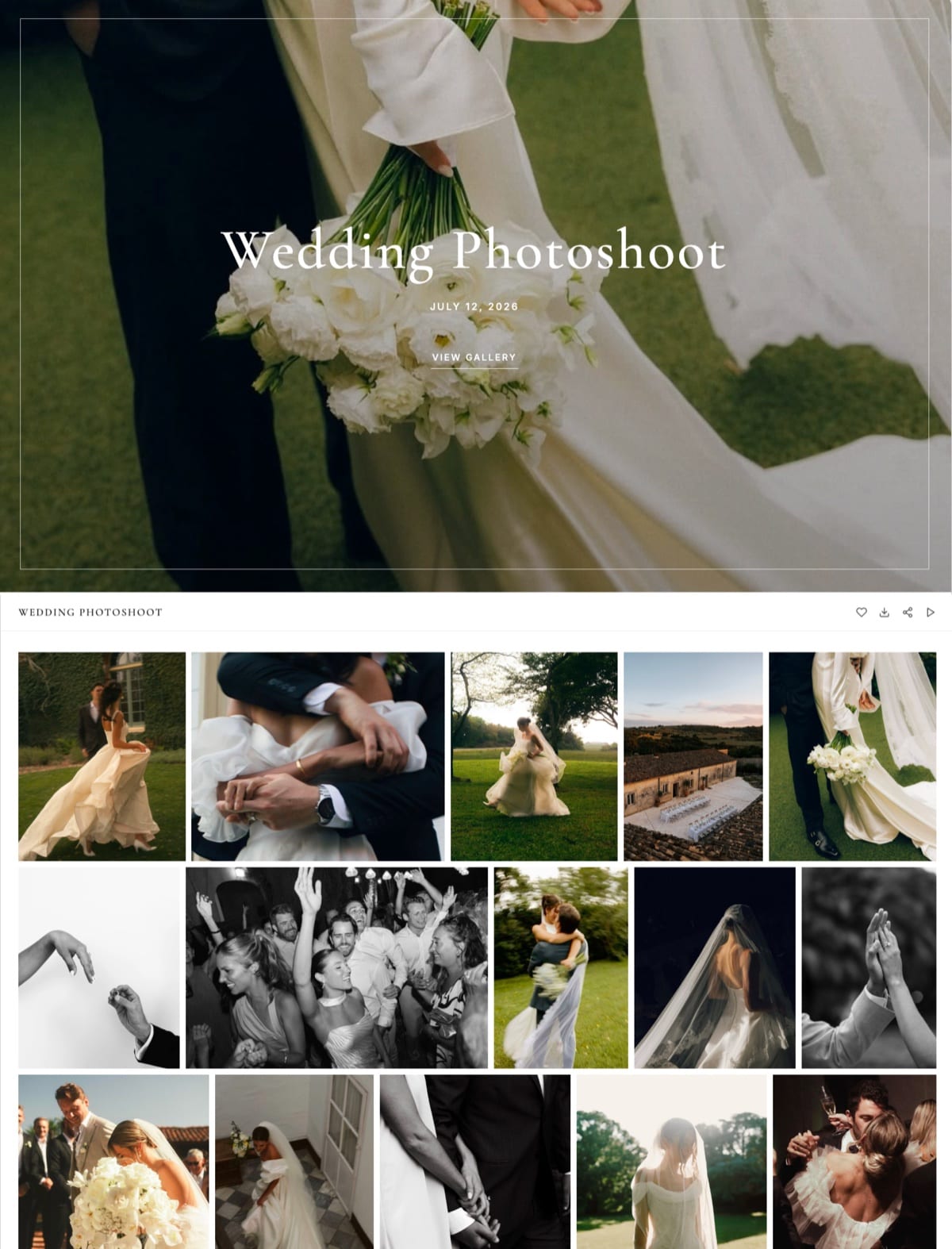
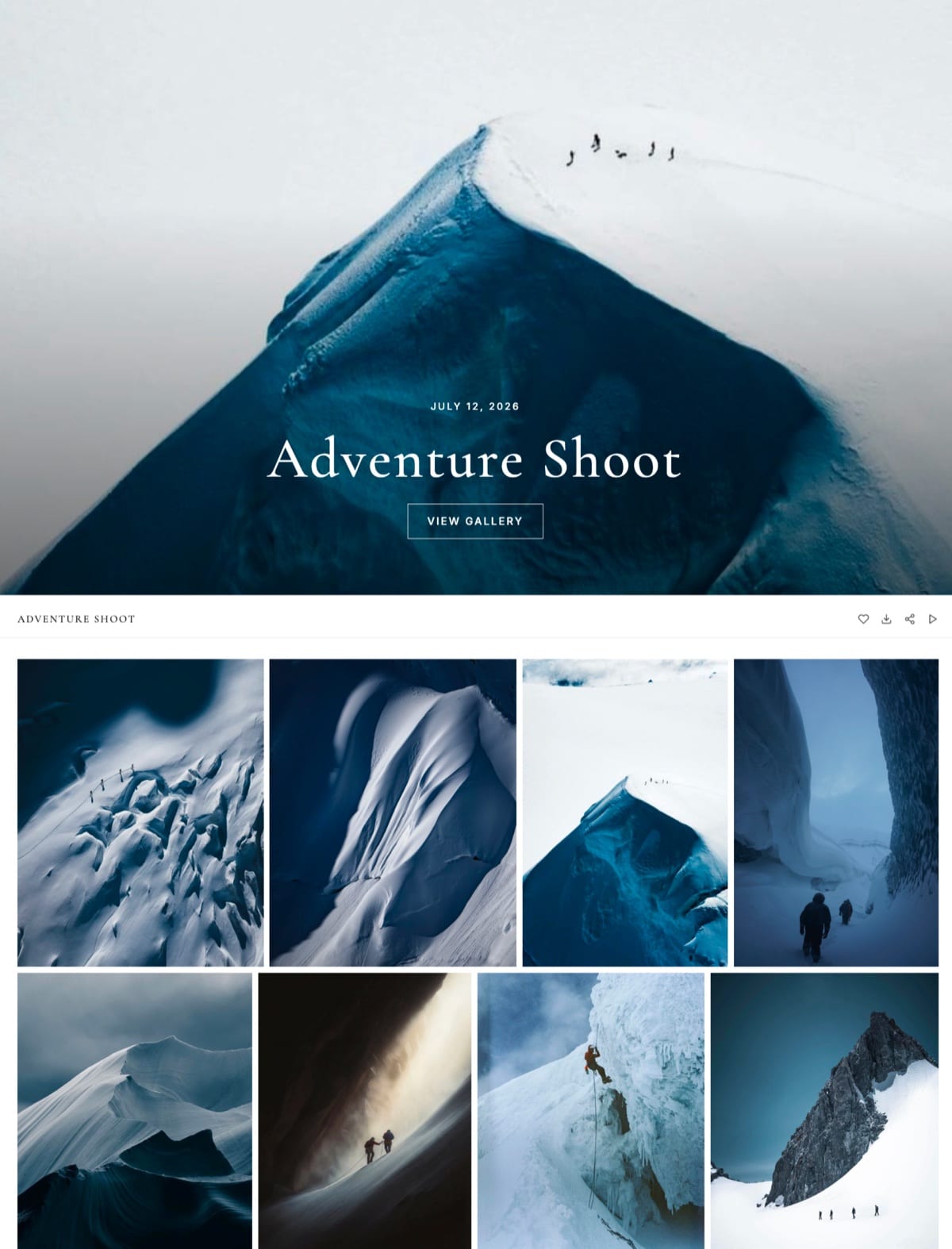
Choose the cover deliberately, because it is the first full screen the client sees, the image that appears when the link is shared in a message app, and the page every forwarded guest judges your studio by before they scroll a single row.
Pick a frame that survives two crops. It has to work wide on a laptop and tall on a phone. Faces near the centre survive both; a horizon on the bottom third does not.
On Framekit you can set a focal point on the cover photo so the important part stays visible as the crop changes, and the cover text switches between light and dark automatically from the image's brightness, or you can force either.
Put the client's name and the date on it. "Harper and Lee, 14 June 2026" reads as theirs. "Wedding Gallery" reads as yours, and generic titles are why clients cannot find the right link in their inbox a year later.
On Framekit the gallery name becomes the cover title and the toolbar label, and the event date sits under the title.
Match the cover style to the work. Framekit has 17 cover styles, from a centred title over a full-bleed photo to a scattered collage of thumbnails on a dark ground, plus 18 typography presets.
That sounds excessive until you deliver a boudoir set and a corporate headshot day in the same week and want them to look nothing alike.
Remember the link preview. When a client pastes a Framekit gallery link into a message, the preview image is the cover, resized for messaging apps, and the browser tab shows a small version of it too. A cover that reads at thumbnail size does twice the work.
Our guide to branding your client gallery covers styles, fonts and colours in depth.
Step 3: Split the Shoot Into Named Sets
Split anything over about 150 frames into four to seven named sets that follow the logic of the shoot, because a client scrolling 600 photos on a phone stalls around frame 90, while the same photos in six labelled chapters get opened one at a time and actually reviewed.
A wedding splits by the day: Highlights, Getting Ready, Ceremony, Family, Portraits, Reception. A brand shoot splits by use: Hero, Product, Lifestyle, Team, Crops. A family session under 80 frames rarely needs sets at all beyond the first.
Lead with highlights. Every Framekit gallery starts with a set called Highlights; keep it and fill it with your best 40 to 80 frames in the order you would show them in person.
That set is what a forwarded link shows a stranger first and what the slideshow plays first.
Name sets in the client's words. "Ceremony" beats "Block 2". "Square crops for social" beats "1x1 export". The names are instructions as much as labels.
Keep the order intentional. Chronological for weddings and events, strongest-first for portraits and commercial work.
Framekit slots each upload batch in by capture time, so a second shooter's card interleaves with yours rather than landing as a block at the end; if you rearrange a set by hand, later uploads append, so finish arranging after the last upload.
Sets organise the gallery, not the download.
A Framekit ZIP is flat, with no folder per set, is named after the gallery, and holds up to 2,000 photos per part, so if the client will work from the ZIP rather than the page, carry the order in the filenames: "01-Ceremony-0142.jpg" sorts where "DSC_0142.jpg" does not.
| Shoot | Sets that work | Typical count | Downloads | PIN | Watermark |
|---|---|---|---|---|---|
| Wedding, finals | Highlights, Getting Ready, Ceremony, Family, Portraits, Reception | 400 to 700 plus a film | On | On if guests get the link | Off |
| Wedding, album proofing | Highlights, then one set per chapter | Full set | Off | Not needed | On |
| Family or newborn | Highlights, then one set if over 80 frames | 40 to 80 | On | Optional | Off |
| Corporate headshots | One gallery per person | 3 to 8 each | On | Off | Off |
| Commercial campaign | Hero, Product, Lifestyle, Crops | 30 to 150 | On after sign-off | On | On until sign-off |
| Event for many guests | Highlights, then by part of the day | 50 to 150 an hour | On | On | Optional |
The headshot row is the one people get wrong: one shared gallery of 40 faces is a privacy problem, and with unlimited galleries on every Framekit plan, one gallery per person costs storage and nothing else.

Step 4: Put the Film in the Same Gallery
Put any film from the shoot in the same gallery as the stills, because a second link means a second email, a second place to forget, and a client who watches the highlight film on a different platform from the one where they choose album frames.
On Framekit, photos and videos share one gallery on every plan, Free included. Videos are transcoded so they play smoothly in the browser, are never watermarked, and sit in the grid and the slideshow with the stills.
Accepted containers are MP4, M4V, MOV, WebM and MKV, up to 2 hours a film.
The number to check is the per-file cap: 500MB on Free, 1GB on Starter, 2GB on Pro and 3GB on Business.
File size in megabytes is the bitrate in megabits per second times the running time in seconds, divided by eight, so an 8-minute highlight film at 16 Mbps is 960MB and fits Starter, while a 25-minute ceremony edit at 12 Mbps is 2,250MB and needs Business or a re-export.
Other platforms meter film differently.
Pixieset counts video in hours, 30 minutes on Basic up to 5 hours on Ultimate per its pricing page, and Pic-Time and ShootProof allot separate video storage by plan.
Our guide to delivering photos and video together compares the meters, and how to deliver a wedding film covers export settings.
Step 5: Set the Two Gates, Password and PIN
Set a gallery password and a separate download PIN on any gallery that will be forwarded, because the password decides who can open the page and the PIN decides who can save files from it, and that split is what lets a couple share the gallery freely without handing every guest the full-resolution set.
Password: unique per gallery. A studio-wide password means one forwarded link opens every client's photos. Framekit's password screen asks for the password before anything loads, and the share email can include it on its own line.
Download PIN: 4 to 6 digits, sent to the client only. Guests can browse, heart and play the slideshow; the PIN prompt appears only when someone tries to download. On Framekit the PIN is available on every plan and the Activity panel logs which downloads used it.
Email Registration: optional. Framekit can ask every visitor for an email before the gallery opens. It suits event galleries where you want to know who came in; it is friction for a couple's private wedding gallery.
Downloads on or off for this round. Off for a proofing round where the client is choosing what to buy, on for finals. Do not copy last week's settings into this week's gallery without looking.
Watermark only where it earns its place. Framekit watermarks protect what clients see in the gallery, not what they download: every download delivers the clean original.
A watermark alone therefore never protects an unpaid proofing round; downloads off, or a PIN you have not yet sent, does that. Watermarks can be your logo or text, in a corner, centred or tiled, and apply to photos only.
Our guide to protecting client photos online goes deeper.
Step 6: Switch On Favourites and Give Them a Number
Switch favourites on and give the client a number and a date, because a heart with no instruction gets used by a minority of clients, while "pick up to 60 for the album by 30 June" gets a list back within a week and turns album design into a conversation about real frames.
On Framekit the first heart a client taps asks only for their email address, with no password and no account, and their picks are saved under it.
They can sort photos into named lists of their own, such as "Album", "Parents" or "Hallway print", add a note to any photo, such as "warm this up" or "crop out the exit sign", and press Send to photographer when they are done, which notifies you in Framekit and by email.
Lists can be shared with a parent by email or link, and the gallery has Show favourites only and Download favourites, so whoever builds the album downloads exactly those frames.
Say what the heart does for them, not for you: "Heart anything you would like in the album, and I will design the spreads from your list." A reason produces picks; a feature does not.
If you sell prints and albums inside the gallery, favourites feed straight into a store on Pixieset, Pic-Time and ShootProof.
Framekit has no print store, so on Framekit favourites end with a list you act on yourself, which our guide to selling prints from a client gallery prices out honestly.
Step 7: Decide Download Sizes Before the Client Does
Decide what size files the client receives before they download, because a client given only 30MB originals will resize them badly in whatever tool is nearest, and your work ends up on social media softened, cropped and recompressed.
Know what your platform delivers. Some galleries offer a size choice at download.
Pixieset lists web-ready to high-resolution options, with full-resolution downloads from its Basic plan, per our Framekit vs Pixieset comparison. CloudSpot's free plan caps downloads at 2048 pixels.
Framekit has no size choice: every download, single photo or whole-gallery ZIP, is the full-resolution original you uploaded.
On Framekit, add a web set if it matters. If your clients share mostly on social media, export a second version of the 40 to 80 highlights at 2048 pixels on the long edge and add it as a final set called "For sharing".
It costs a few hundred megabytes and gives clients a file sized for the job, with its purpose in the name.
Tell clients what they are getting. One line in the delivery email does it: "Every download is the full-size file, ready for printing; the 'For sharing' set is sized for Instagram and WhatsApp."
Large galleries download as several ZIP parts on Framekit, and a client on a phone can choose "Email me when it's ready" and close the tab. Mention it so nobody thinks the download has stalled.
Step 8: State the Deadline and the Lifespan
State two dates, how long downloads stay open and how long the gallery stays online, because nearly every expired-link complaint traces back to a gallery that never said when it would close, and a date stated twice in writing is rarely disputed.
Common windows: 14 to 21 days for a proofing round, 90 days to download finals, 12 months online for finished consumer work.
On Framekit, Auto Expiry is off unless you set a date; when it passes, the gallery returns to draft with its files intact, and an optional reminder goes to you and every contact linked to the gallery 3 days before.
Our guide to how long client galleries should stay online works through the windows and the storage each one needs.
Put both dates in the delivery email on their own line. If you want a reminder earlier than 3 days, or in the client's language, send it yourself from the gallery's share screen a week before.
Step 9: Add the Licence Line on Commercial Work
Add a one-line licence summary to every commercial delivery, naming the licensed party, the territory and the period, because the person who downloads commercial images is usually a developer, a contractor or an agency who never saw your contract, and the delivery is the only place the terms will reach them.
A line that works: "Licensed to Northfield Group for web and social use, UK and EU, 12 months from 1 July 2026. Print, outdoor and paid advertising need a separate licence."
Framekit gallery pages carry no text block for notes, so put that line in the delivery email and in the invoice.
For campaigns where files travel far from the email, add a "read me" card: a single JPEG with the licence terms set in plain type, uploaded as the first frame of the first set.
It downloads with the ZIP, so it travels with the files to whoever opens them. This works on any platform.
Name commercial files to the client's pattern, such as "Northfield-SS26-001.jpg", because their systems often ingest files by name.
Our guide to delivering photos to corporate clients covers the rest of the commercial handover.
Step 10: Put What the Page Cannot Hold in the Email
Write a four-line delivery email for everything the gallery page itself does not carry, because on Framekit and several other platforms the page shows the photos, the controls and your studio name but no welcome note, no instructions and no link to the rest of your site.
What goes in the email, line by line: the link; the password on its own line; one sentence on favourites with the pick limit and date; both dates.
Add your phone number or email for print and album questions, and a link to your website if you want a forwarded gallery to lead somewhere, since a Framekit gallery shows your studio name but no navigation to your other pages.
Framekit sends the email from the gallery's share screen to up to 20 recipients at once, each receiving their own copy, with the cover photo, your message of up to 5,000 characters, a View Gallery button and, if you tick it, the password.
Six starter templates cover a ready gallery, a wedding, a portrait session, editorial selects, an event and a reminder, and your own templates save for next time.
Our guide to writing a photo delivery email has ready-to-copy versions.
Run It Yourself: The Six-Minute Phone Test
Test every gallery the way a client meets it, on a phone, in a private browser window, over mobile data, because the owner's view hides the password screen, the PIN prompt and the download behaviour, and every surprise in these six minutes is one a client would have hit first.
- Open the link in a private window. Check the password screen and that the cover crops well on a tall screen.
- Scroll to the third set and back. Note anything cropped badly or out of order.
- Heart three photos and add a note to one. Confirm you are asked only for an email.
- Download one photo. Confirm the PIN prompt, then check the file opens at full size with no watermark.
- Use Download favourites. Confirm the ZIP holds exactly three photos.
- Play the film, if there is one, and skip to the middle.
Then count. Sort the support emails from your last ten deliveries into password, PIN, download, deadline and "where is the film", repeat this test on your next ten galleries, and see which category disappears.
That count is the evidence that your checklist works, gathered from your own clients rather than from anyone's average.

What to Leave Out of a Client Gallery
Leave out anything that dilutes the work, confuses the selection or turns a gift into a shop, because more is not better in a client gallery, and five common inclusions actively make the delivery worse for the client opening it.
Near-duplicates. Covered in Step 1, and worth repeating, because it is the most common fault in delivered galleries.
Unedited or unapproved frames. Anything you would not publish should not be in a link a client will forward to forty people.
RAW files. Framekit refuses RAW uploads outright, and most delivery galleries carry finished files only.
If a contract promises camera files, deliver them separately; our guide to whether to give clients RAW files covers why most photographers do not.
Aggressive upselling. One clear route to prints is service. A gallery interrupted by offers reads as a shop and gets forwarded less.
Other clients' work. A gallery that links to a "recent work" page full of strangers' weddings is a privacy question waiting to be asked. Keep each gallery to its own client.
Where Framekit Fits and Where It Loses
Framekit carries nine of the twelve checklist items as settings on the gallery itself, on every plan including Free, and leaves three to your delivery email; it fits photographers delivering digital files and films, and loses wherever the gallery is expected to sell prints, offer download sizes or carry text.
It fits a hybrid studio putting stills and a film from the same day in one link, since video is in every plan and every gallery.
It fits a studio that wants favourites to arrive as named, annotated lists rather than a heart count. It fits anyone who wants the password, PIN, watermark and expiry on the free plan rather than behind a tier.
It loses to Pixieset, Pic-Time and ShootProof when prints and albums are part of the job, because favourites there feed a store with lab fulfilment and Framekit has none.
It loses to Pixieset when clients expect a choice of download sizes. It loses to any platform with an on-page welcome note if you want instructions inside the gallery rather than in the email.
It loses to PicDrop when clients need to upload files or review RAW selects, which our Framekit vs PicDrop comparison covers.
Building the Checklist in Framekit

Framekit is an AI website builder with client galleries, video review, Slides and a digital-download store on one account, so the gallery that carries this checklist is a page of your own portfolio site at /client/ plus the gallery's name, on a framekit.ai address on Free and your own domain from Starter.
The number that matters$0 for unlimited galleries with every item above, film included, inside a 10GB pool on Free. Starter is $9 a month ($7 billed yearly) for 50GB and your own domain, Pro $19 ($15 yearly) for 300GB, and Business $39 ($31 yearly) for 2TB.
The detail most checklists missthe same account runs Framekit's video review, so a filmmaker can collect frame-accurate notes on the cut, mark it approved, then put the final film into this gallery beside the stills without a second subscription.
The gotchano on-page text and no link to your other site pages, so instructions, contact details and the licence line live in the email or a read-me card; and no web-size download choice, so add a sharing set if clients need one.
What it does not dono print ordering or lab fulfilment, no price sheets, no native mobile app, no client uploads, no RAW, no unlimited storage, and no school or volume workflows.
Verdict: if your deliveries are digital files and films, Framekit holds the whole checklist on the free plan on a page of your own site; if prints are a real line in your accounts, build the gallery where the store is.

Frequently Asked Questions
What should a client gallery include?
A client gallery should include a chosen cover with the client's name and date, photos in 4 to 7 named sets with the best 40 to 80 first, any film from the shoot, a unique password, a separate download PIN, favourites with a pick limit and date, download rules for that round, a download deadline and gallery lifespan, a watermark where needed, and a licence line for commercial work.
How many photos should go in a client gallery?
Deliver 40 to 80 frames per hour for portraits, 400 to 700 for a full wedding day, 3 to 8 per person for headshots, and 50 to 150 per hour of event coverage, after three culling passes.
A Framekit gallery holds up to 5,000 photos, but clients stall far sooner, so split large deliveries into named sets with highlights first.
Can I add a welcome message or instructions to a Framekit gallery?
No. A Framekit gallery page shows the cover, sets, controls and your studio name, but has no text block for a welcome note.
Put instructions in the delivery email, which Framekit sends from the gallery with up to 5,000 characters of your own message, or upload a "read me" card image as the first frame. Pixieset and similar platforms do offer on-page text.
Can clients choose web-size or full-size downloads in Framekit?
No. Every Framekit download, single photo or whole-gallery ZIP, is the full-resolution original you uploaded, with no size choice and no watermark.
If clients need smaller files for social media, export the highlights at 2048 pixels and add them as a "For sharing" set. Pixieset offers a choice of download sizes if that matters to your clients.
Does a watermark stop clients downloading my photos?
No, not on Framekit. A Framekit watermark marks the photos clients see in the gallery, but downloads always deliver the clean original, so a watermark alone does not protect an unpaid proofing round.
Switch downloads off for that gallery, or set a download PIN and send it only after payment. Other platforms treat watermarked downloads differently, so test before relying on it.
Should a client gallery include the film as well as the photos?
Yes, when the shoot produced one, because one link is easier for the client than two. On Framekit, films sit in the same gallery as the stills on every plan, are never watermarked, and play in the slideshow.
Check the per-file cap first: 500MB on Free, 1GB on Starter, 2GB on Pro and 3GB on Business.
Do clients need an account to use a client gallery?
No, not on Framekit. A client opens the gallery with the link, plus the password and download PIN if you set them, and only types an email when they start hearting favourites or if you switch on Email Registration.
Neither step needs a password or account, which matters most for older relatives and clients abroad.
Should a client gallery have prices for prints?
Include one clear route to prints rather than a price list in the browsing experience. Pixieset, Pic-Time and ShootProof put a print store inside the gallery with lab fulfilment, which suits studios where prints are income.
Framekit has no print store, so on Framekit the route is a line in the delivery email inviting clients to send their favourites list for a print quote.
What should a commercial client gallery include that a family one does not?
A commercial gallery needs sets named for the client's outputs, files named to their pattern, downloads gated until sign-off, and a licence line naming the licensed party, territory and period.
On Framekit, put the licence in the delivery email and as a "read me" card at the top of the first set, so it travels in the ZIP to whoever downloads.
How long does it take to build a complete client gallery?
The first complete gallery takes 30 to 45 minutes and later ones about 10, once the cover style, typography, password pattern, watermark and email template are saved as a house style.
The six-minute phone test is extra and worth it every time, because it catches the settings a client would otherwise discover first.
Is Framekit or Pixieset better for building a complete client gallery?
Pixieset is better if prints, a choice of download sizes or on-page text matter, since it has a gallery store with lab fulfilment, size options and native mobile apps.
Framekit is better for digital files and films, because every checklist item, video included, is on its free plan, and the gallery sits on your own site beside your portfolio.
The Short Version
Cover with a name and date, sets with highlights first, the film in the same link, a password and a separate PIN, favourites with a number, the right download rules for the round, two dates, a watermark only where it earns its place, a licence line for commercial work, and a four-line email for everything the page cannot say.
Then build it somewhere that suits what the gallery has to do afterwards. If it sells prints, use a print-store gallery. If it delivers digital files and films, Framekit carries the checklist on the free plan on a page of your own site.
Related readingwhat a client gallery is, how to create a client gallery, how to organise client galleries, how to deliver photos to clients and are client galleries worth it.
Comparing platformsthe full client gallery platform comparison, Framekit vs ShootProof, Framekit vs CloudSpot and Pic-Time vs Pixieset.