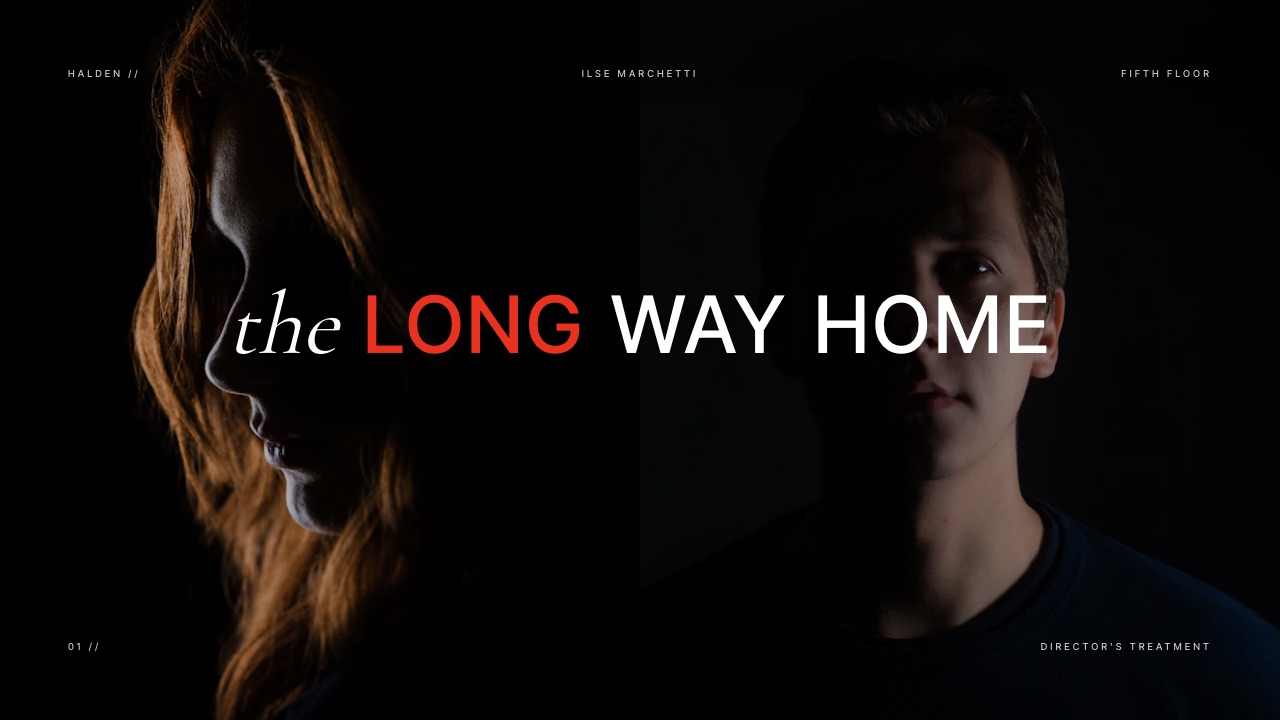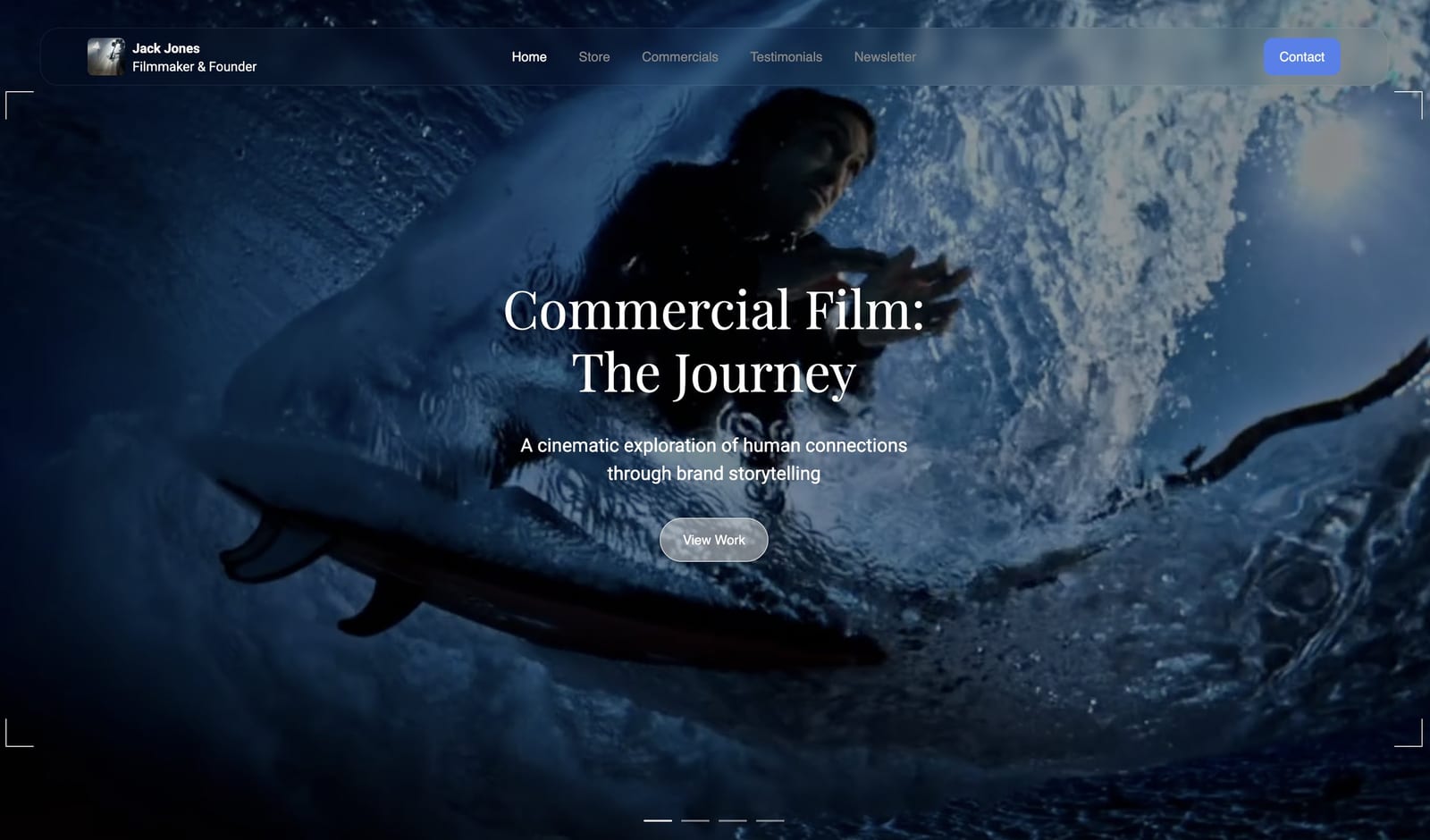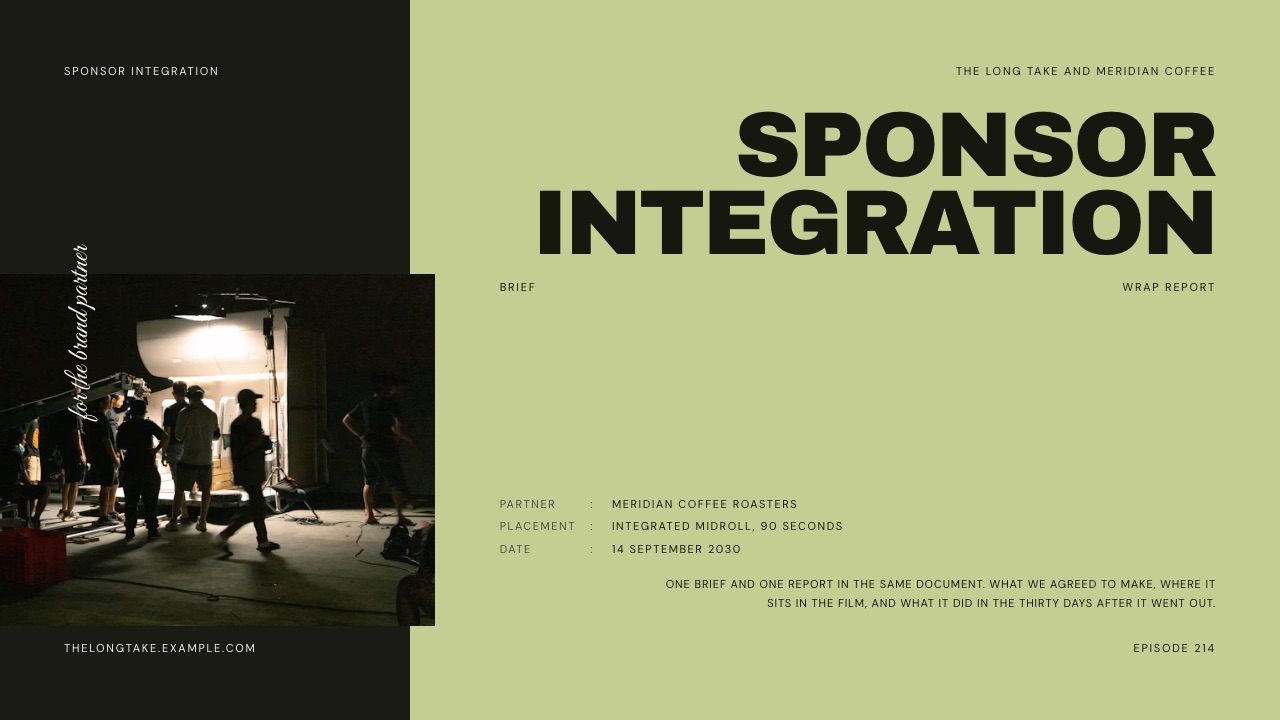
Framekit templates
Start from a designer-made template
 Use template
 Use template
 Use template
 Use template
 Use template
 Use template
 Use template
 Use template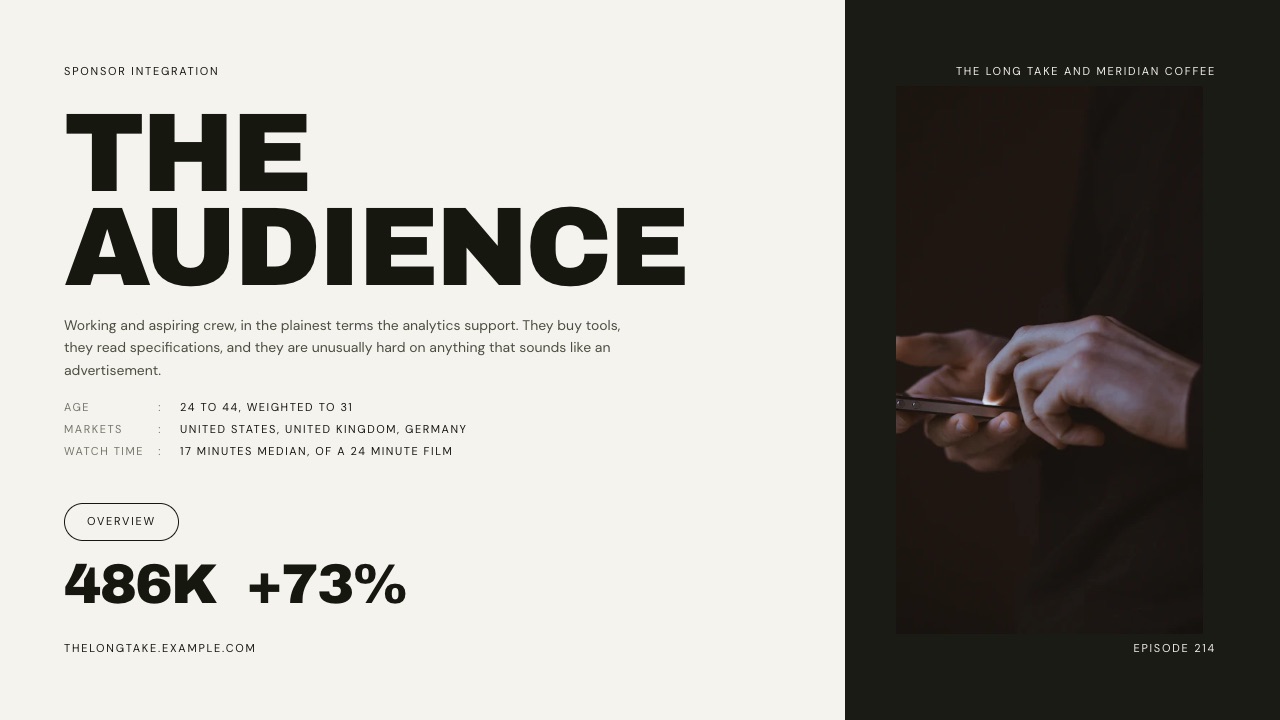
A filmmaking channel with 41,000 subscribers sends a coffee brand a screenshot of its analytics and a line that says "rates on request". The brand's partnerships lead may have dozens of creator pitches in the same inbox that week.
The ones that get a reply are the ones that already answer three questions: how many people will see the read, who they are, and how the brand will know it worked.
A good sponsorship deck template exists to force those three answers onto the page before you hit send.
Most sponsorship deck templates that rank today were built for event organisers selling banner space at a conference.
A creator is selling something different: sixty seconds inside a video, an episode or a newsletter that an audience chose to watch.
That changes what goes on every slide, and it adds a second document most creators never make, the report you send 30 days after the video goes live.
A sponsorship deck is a 10 to 12 slide presentation a creator sends a brand to propose a paid integration: it states the audience in the platform's own metrics, the exact deliverables, the price, the schedule, and how results will be reported back.
The best sponsorship deck template for a creator is one that carries the pitch and the wrap report in the same document, because brands renew on proof and 40% of creator-ad buyers rank ROI as their top KPI (IAB).
Framekit's YouTube Sponsor Integration Brief and Wrap Report template is built that way, 12 slides from Objectives to Next Round, and lives on the same account as your site; the trade-off is that Framekit deck links have no password or per-viewer analytics and the template library needs a paid plan.
Storydoc is the better pick if you need to know exactly who opened the deck, Beacons if you want a media kit that updates its own numbers daily, and Canva or Google Slides if you want a free start.
Full disclosure: Framekit is our product and its Slides tool is ranked first in the "where to build it" section below. We did not run sponsorship campaigns in the other tools; we read each vendor's pricing page and help docs in September 2026, rendered the Framekit templates shown here slide by slide, and every competitor section says plainly where that tool beats us. The template screenshots show a fictional channel and a fictional coffee brand, not a real deal.
How This Template Was Put Together and Checked
This guide was assembled in September 2026 from three kinds of evidence, kept separate so you can see which numbers are facts, which are arithmetic, and which are our judgement about what a brand wants to see on a slide.
Read at the source. Metric definitions come from the platforms themselves: YouTube Help for impressions click-through rate, average view duration, unique viewers and the Creator Partnerships program, Apple Podcasts for Creators for listener analytics, and Google Analytics Help for campaign tracking links.
Market context comes from the IAB's November 2025 creator ad spend report.
Rate ranges come from three named publishers: Hootsuite's influencer rates guide (updated 16 March 2026), 1of10's YouTube sponsorship rates guide (24 August 2026, which says it aggregates publicly reported creator rates and marketplace listings) and ADOPTER Media's podcast advertising rates guide (updated 22 July 2026).
Tool prices come from each vendor's own pricing page, read on 19 September 2026.
Calculated. The pricing section runs one carried example through those published ranges, and every multiplication is shown.
The example is hypothetical and labelled as such: a filmmaking-tutorial YouTube channel with 41,000 subscribers whose last ten long-form videos had a median of 21,000 views in their first 30 days.
It is a mid-sized, realistic channel, big enough to be worth a brand's time and small enough that it cannot just quote a famous creator's rate.
Judgement, flagged. Which slide goes where, how many words each deserves, and what makes a wrap report persuasive are editorial calls, not data. They are marked as advice rather than dressed up as findings.
We did not survey brands and we do not quote a response rate we cannot source.
Sponsorship Decks by the Numbers
These are the figures that shape how a creator pitch should be built, each traceable to a primary source linked in the sections below, so you can check any of them before you put it in front of a brand manager.
- $37 billion. The IAB's projection for US creator ad spend in 2025, up 26% year over year and growing about four times faster than the wider media industry's 5.7%.
- 40%. The share of creator-ad buyers who rank overall ROI as their top KPI for creator campaigns, per the same IAB report. That is the case for the wrap report in one number.
- 2% to 10%. The range YouTube says half of all channels and videos fall into for impressions click-through rate. Quoting yours without that context invites the wrong comparison.
- $10 to $50. 1of10's published range per 1,000 expected views for a YouTube integration, depending on niche. Education sits at $20 to $35, B2B and tech at $30 to $50.
- $15 to $30. ADOPTER Media's CPM range for a host-read podcast mid-roll, drawn from its data on more than 150,000 placed ads.
- 12 slides. The length of Framekit's YouTube Sponsor Integration Brief and Wrap Report template: nine slides for the brief and three held back for the report that follows the campaign.
Why a Sponsor Is Really Buying a Forecast
In one lineA brand cannot buy a video that does not exist yet, so a sponsorship deck is a forecast written in the platform's own metrics, and the wrap report is the receipt that proves the forecast was honest.
Look at a sponsorship from the brand's side. The partnerships lead is asked to spend a budget on a placement nobody has seen, inside content the brand does not control, delivered by someone it has never worked with.
What they can defend internally is a prediction with a method: median views over the last ten uploads, the share of the audience in the markets the brand ships to, the retention across the minute where the read will sit.
That is why screenshots of subscriber counts do so little. Subscribers are a vanity number to a buyer; YouTube's own help page on unique viewers notes that viewers are subscribed to dozens of channels and may not return for every upload.
A median of recent views is a forecast. A subscriber count is a history.
The IAB report makes the other half of the argument. Brands say their biggest hurdle is identifying the right creators, and among the things they are calling for are consistent reporting and better attribution.
A creator who sends a clean forecast before the deal and a clean report after it is solving the buyer's two stated problems at once.
So build the deck as two halves of one document. Slides 1 to 9 are the brief: who you are, who watches, what the brand gets, when.
Slides 10 to 12 are left as placeholders for the report, with the forecast already written in so that the comparison is ready the day the numbers come in.
Framekit's sponsor template is structured exactly this way, which is the main reason it leads this guide; you can reproduce the structure in any tool.
The 12-Slide Sponsorship Deck Template, Slide by Slide
In one lineEach of the twelve slides has one job, a word budget of roughly 25 to 80 words, and one piece of evidence it must carry, and a brand manager should be able to skim all twelve in under three minutes.
The table below is the template.
The slide names follow Framekit's YouTube Sponsor Integration Brief and Wrap Report so you can match them to the screenshots, but the structure works for a podcast, a newsletter or a short-form channel with the platform-specific changes covered further down.
| # | Slide | Its one job | What goes on it | Word budget | Evidence it must carry |
|---|---|---|---|---|---|
| 1 | Cover | Name the deal | Your channel, the brand, the campaign or episode, the date | 10 to 15 | The brand's name spelled their way |
| 2 | Index | Show the shape | The two halves: brief and report | 15 to 25 | Nothing, it is navigation |
| 3 | Objectives | Say what the brand wants | Awareness, new audience, sales or trust, in their words | 30 to 50 | The goal from their brief or your call |
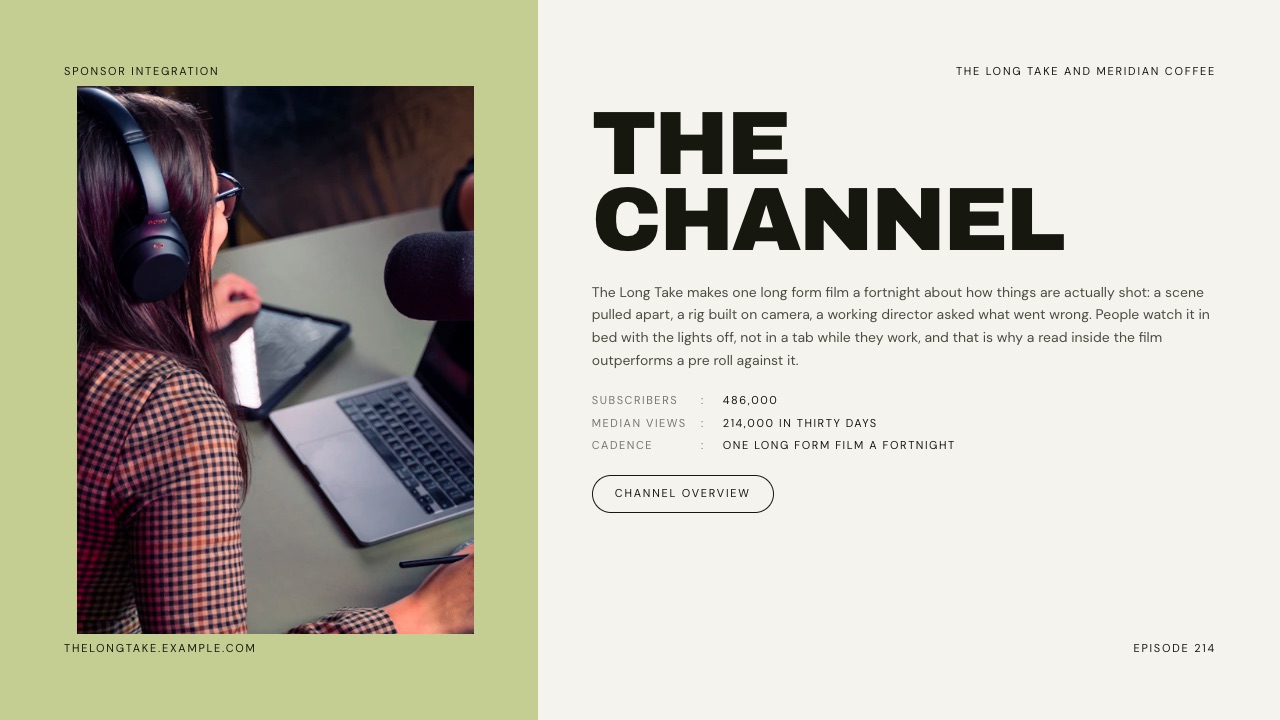
| 4 | The Channel | Prove the format fits | What you make, how often, why people watch | 50 to 80 | Median views, cadence, format |
| 5 | The Audience | Prove the people fit | Age band, top markets, watch behaviour | 30 to 60 | Platform analytics, dated |
| 6 | Deliverables | Remove ambiguity | Placement, length, links, cutdowns, report date | 60 to 100 | Exact seconds and exact assets |
| 7 | The Read | Show the creative | The beat, the transition in and out, any claims legal must clear | 50 to 90 | A script outline, not a finished script |
| 8 | Selected Frames | Show the look | Stills from past integrations or the planned set | 0 to 20 | Real frames, not stock |
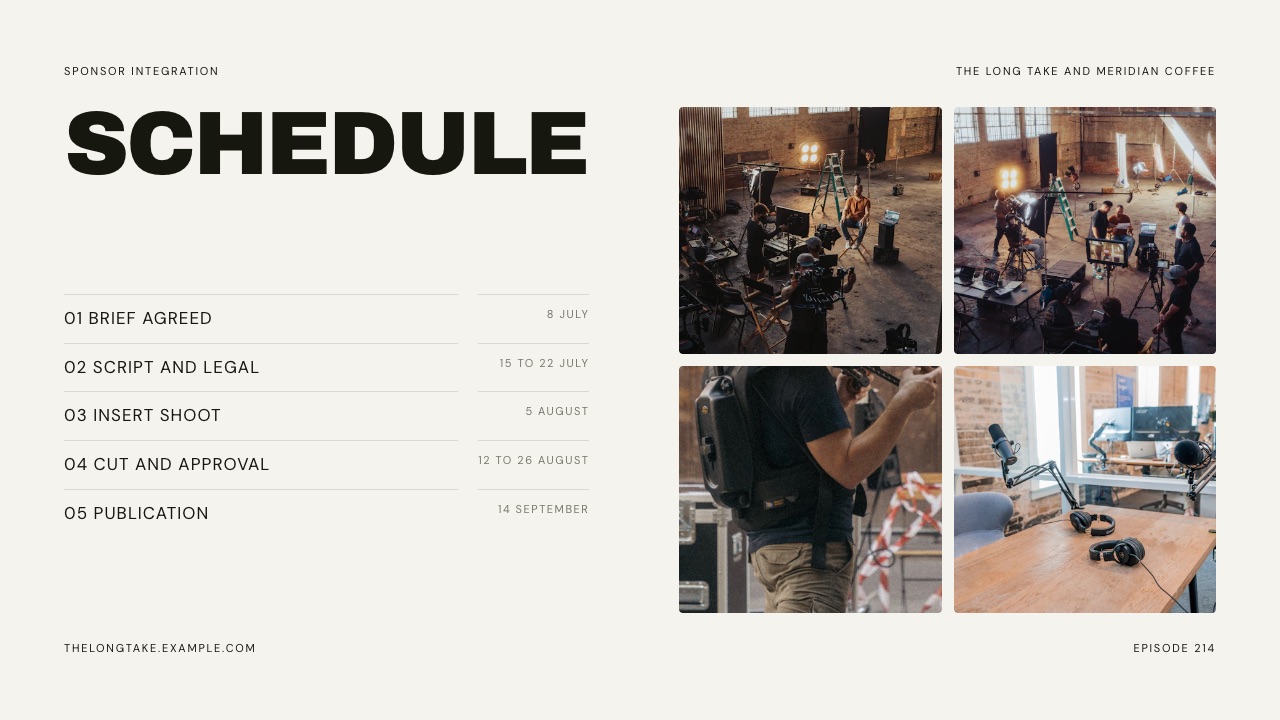
| 9 | Schedule | Make it bookable | Brief, script, legal, shoot, approval, publish | 25 to 50 | Dates with owners |
| 10 | Performance | Report against forecast | Views, retention through the read, clicks, redemptions | 30 to 60 | Actual next to forecast |
| 11 | What Worked | Earn trust | One thing to repeat, one to drop | 50 to 80 | A candid call, including a miss |
| 12 | Next Round | Ask for the renewal | The follow-up placement, adjusted from what worked | 25 to 50 | A specific offer and date |
The word budgets are our editorial recommendation. A brand manager reads a pitch like a proposal, not an essay, and any slide that runs past about 100 words is usually two slides or a paragraph that belongs in the email.
Slides 1 to 5: who the deal is for and who will see it
The cover names both parties and the placement, so the reader knows this proposal was written for them and not mailed to fifty brands.
Objectives is the slide most creators skip and brands notice: the IAB report lists the goals buyers name most as brand awareness (43%), reaching new audiences (41%), reputation and trust (35%) and online sales (32%).
Pick one, write it in the brand's words, and let every later slide point at it. Awareness is judged on views and retention, sales on tracked clicks and redemptions, and mixing them is how a report gets judged against a target nobody agreed.
The Channel carries three numbers: median views over a stated window, cadence and format length. Use the median of your last ten uploads, because one viral video drags an average up and sets a forecast you cannot meet.
The Audience states age band, top three countries and one behavioural number such as median watch time, with the date of the screenshot.
Slides 6 to 9: what the brand gets, and when
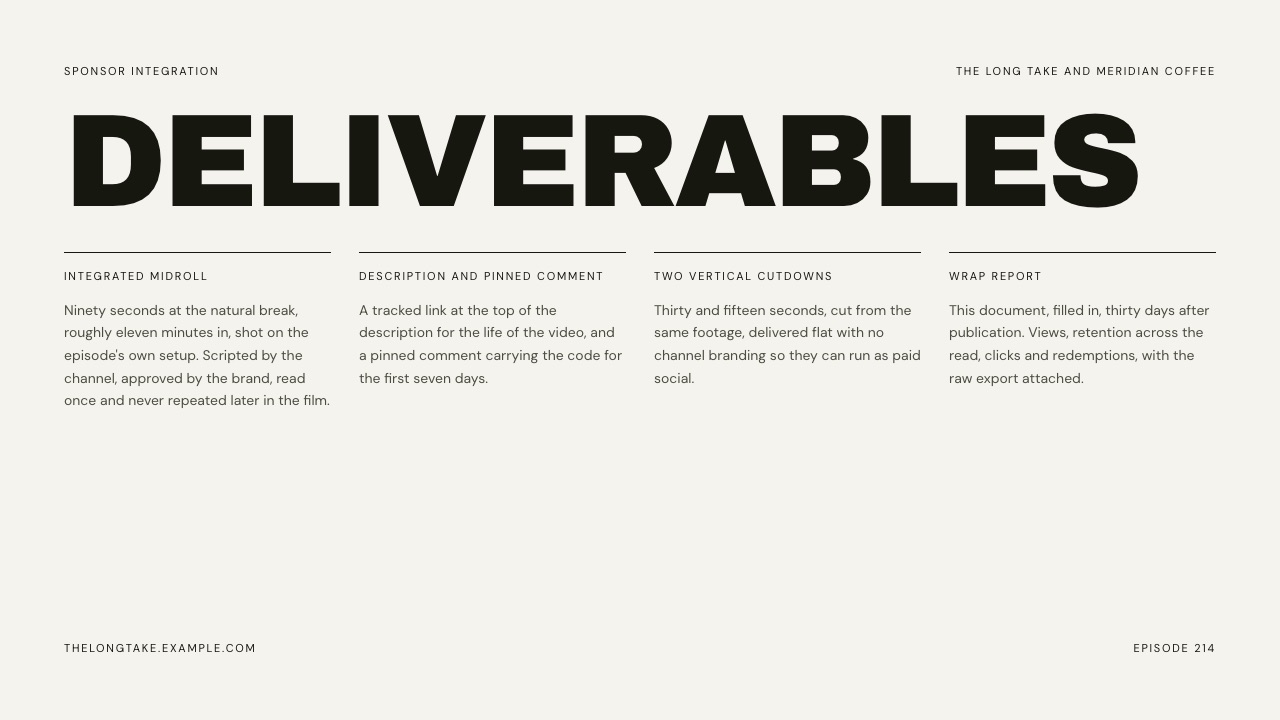
Deliverables is the contract in plain English.
The Framekit template's sample lists four items: a ninety-second integrated midroll at a natural break about eleven minutes in; a tracked link at the top of the description for the life of the video, plus a pinned comment with the code for seven days; two vertical cutdowns of thirty and fifteen seconds without channel branding, for the brand to run as paid social; and a wrap report thirty days after publication with the raw export attached.
"One integration plus socials" is how disputes start.
The Read describes the creative beat without a finished script: where it opens, how it returns to the video, and which claim needs legal sign-off.
In the sample, a brand request to call the coffee "award winning" is declined because the channel does not talk that way, and stating what you will not say is a trust signal brands weigh (creator reputation is the top selection criterion in the IAB report, at 58%).
Selected Frames is four to six real stills, never stock.
The Schedule lists five milestones with owners: brief agreed, script and legal, insert shoot, cut and approval, publication, plus how long the brand has to approve before the slot moves.
Slides 10 to 12 stay as placeholders when you pitch, with the forecast already written into Performance, so the brand sees before signing exactly how it will be able to judge you.
The Metrics a Brand Will Ask For, Defined by the Platforms
In one lineQuote every number in the definition the platform itself publishes, name the window it covers, and put the platform's benchmark beside it, because a brand compares your deck with the analytics its ad team already sees.
Creators lose credibility on metrics in a predictable way: they quote a number the brand's team calculates differently. "Engagement rate" alone is calculated several different ways depending on the tool.
The fix is to use the platform's own terms, cite the window, and let the definitions below do the arguing.
| Metric | The platform's own definition | Source | How to show it on a slide |
|---|---|---|---|
| Impressions click-through rate | How often viewers watched a video after seeing a registered impression on YouTube | YouTube Help | Your median CTR next to YouTube's note that half of channels sit between 2% and 10% |
| Average view duration | Average minutes watched among those who stayed to watch, calculated from engaged views | YouTube Help | Minutes, plus the video length, so the brand can see where a midroll lands |
| Unique viewers | The estimated number of viewers who watched over a period, available for windows up to 90 days | YouTube Help | A 90-day figure, stated as reach rather than as subscribers |
| Returning viewers | Viewers who have watched your channel before and came back | YouTube Help | A share, as evidence the audience knows you |
| Engaged listeners | People who listened to or watched at least 20 minutes or 40% of an episode | Apple Podcasts for Creators | The number that proves a mid-roll gets heard |
| Plays | The total number of times people pressed play on an episode | Apple Podcasts for Creators | Only alongside engaged listeners, never alone |
| Campaign link clicks | Sessions tagged with utm_source, utm_medium, utm_campaign and utm_content | Google Analytics Help | The brand's own analytics count these, so agree the tags before publishing |
The YouTube definitions are on the engagement metrics help page, the impressions and click-through rate FAQ and the unique viewers explainer.
The podcast definitions are on Apple's listener analytics page, and the tracking parameters are documented in Google's URL builder help article.
Two of these deserve extra care.
First, impressions CTR only counts impressions on YouTube itself; the help page notes that views from external websites and end screens are not part of it, so a channel with heavy embed traffic will look worse on CTR than it performs.
Say so on the slide rather than letting the brand discover it.
Second, the retention number that matters to a sponsor is not the channel average but retention across the minute where the read sits.
YouTube's key moments for audience retention report shows how well specific moments held attention, and you can compare against your ten latest videos of similar length.
Pull that for two or three past integrations and you have the most persuasive single slide in the deck.
If you are in YouTube Creator Partnerships
YouTube's brand-deal program is now called YouTube Creator Partnerships.
In the US it requires being 18 or older, in the YouTube Partner Program, in an available country and free of active Community Guidelines strikes, and it gives eligible creators a customisable media kit with audience insights.
It also lets you grant a brand partner access to one video, after which the advertiser can see that video's organic performance in Google Ads and use it in its advertising.
That makes your wrap report checkable, and it means the Deliverables slide must say whether ad use is included in the price.
How to Price the Integration Without Guessing
In one lineStart from your median views, multiply by a published CPM range for your niche, add production cost, then scale by format, and show the brand the method so the price reads as a calculation rather than a wish.
There is no public rate card for creator sponsorships, and anyone who gives you one number is guessing. What does exist are published ranges with stated methods.
The cleanest formula comes from 1of10's 2026 YouTube sponsorship rates guide: a floor rate equals median views of your last ten videos, times the niche CPM, divided by 1,000, plus production cost.
The guide puts integrations at $10 to $50 per 1,000 expected views depending on niche, and prices other formats as multiples of a 60-second read.
Here are the niche ranges it publishes, which matter because the same view count is worth very different amounts to a finance brand and to an entertainment brand.
| Niche (1of10, Aug 2026) | CPM range per 1,000 expected views |
|---|---|
| Finance and investing | $35 to $50+ |
| B2B, SaaS and tech | $30 to $50 |
| Business and marketing | $25 to $40 |
| Education | $20 to $35 |
| Health and fitness | $18 to $30 |
| Beauty and fashion | $15 to $25 |
| Food and cooking | $12 to $22 |
| Travel | $12 to $20 |
| Gaming | $10 to $20 |
| Entertainment and vlogs | $8 to $15 |
The worked example, every multiplication shown
The carried example is our hypothetical filmmaking-tutorial channel: 41,000 subscribers, a median of 21,000 views in the first 30 days across its last ten long-form uploads.
Filmmaking tutorials sit in education, so the education range of $20 to $35 applies. If the sponsor is a camera or software company, the channel can argue for the tech range instead, and the table shows both.
| Placement | Multiplier (1of10) | Education CPM $20 to $35 | Tech CPM $30 to $50 |
|---|---|---|---|
| 60-second integrated read (baseline) | 1x | $420 to $735 | $630 to $1,050 |
| 30-second mention | 0.5x to 0.7x | $210 to $515 | $315 to $735 |
| Dedicated video | 2x to 4x | $840 to $2,940 | $1,260 to $4,200 |
| Sponsored Short | 0.25x to 0.5x | $105 to $368 | $158 to $525 |
| Community post | 0.1x to 0.2x | $42 to $147 | $63 to $210 |
The baseline line is 21,000 x $20 / 1,000 = $420 at the bottom and 21,000 x $35 / 1,000 = $735 at the top.
Each other row multiplies the low end by the low multiplier and the high end by the high one: a dedicated video is $420 x 2 = $840 up to $735 x 4 = $2,940.
All figures are before production cost, which the formula adds on top, and before usage rights or exclusivity.
Sanity-check against a tier table
Tier tables are cruder but useful as a cross-check. Hootsuite's March 2026 rates guide puts YouTube creators with 10,000 to 50,000 followers at $500 to $5,000 per video, and 50,000 to 500,000 at $5,000 to $15,000.
The example channel's $420 to $735 read sits at or just below the bottom of its tier, which is what you would expect from a floor-rate formula before production and usage are added.
If your formula price lands far above your tier's range, check whether one viral video is inflating your median.
Podcasts price on downloads, not followers
Podcast sponsorship uses CPM on downloads per episode. ADOPTER Media's 2026 rates guide puts host-read mid-rolls at $15 to $30 CPM, host-read pre-rolls at $15 to $25, post-rolls at $5 to $10 and programmatic placements at $5 to $20, based on its data from more than 150,000 placed ads.
Rates are usually based on the average downloads an episode gets in its first 30 to 90 days.
A hypothetical show averaging 4,000 downloads per episode in 30 days would therefore quote $60 to $120 for a host-read mid-roll (4,000 x $15 / 1,000 and 4,000 x $30 / 1,000), or $240 to $480 for a four-episode package.
That is why podcast decks lean so hard on engaged listeners: the CPM is modest, so the pitch has to prove the ad is actually heard.
What pushes the price up
Hootsuite lists the factors that move a rate: usage rights, exclusivity, content type, scope, engagement, rush fees and niche. Two belong on the Deliverables slide as separate line items.
Usage rights, meaning the brand running your cutdowns as paid ads, is a distinct product from the organic read. Exclusivity, meaning no competing brand for a set period, costs you future deals, so price it by the length of the window.
Listing them separately lets a brand say yes to the read and negotiate on the extras without reopening the whole price.
The Wrap Report: the Half That Wins the Renewal
In one lineA wrap report puts actual results next to the forecast from the pitch, adds one candid lesson and one specific next offer, and it is the cheapest sales document a creator will ever make because the next deal starts inside it.
The wrap report is where many creator-brand relationships quietly end. The video goes live, the invoice gets paid, and nobody sends anything back.
The brand's team then has to pull numbers themselves, from a view that does not include your retention data, and the renewal decision gets made without you in the room.
Send the report thirty days after publication. That window matches the one you forecast in, and for podcasts ADOPTER notes most shows get over 80% of their downloads in the first week anyway. Use the same deck, with slides 10 to 12 filled in.
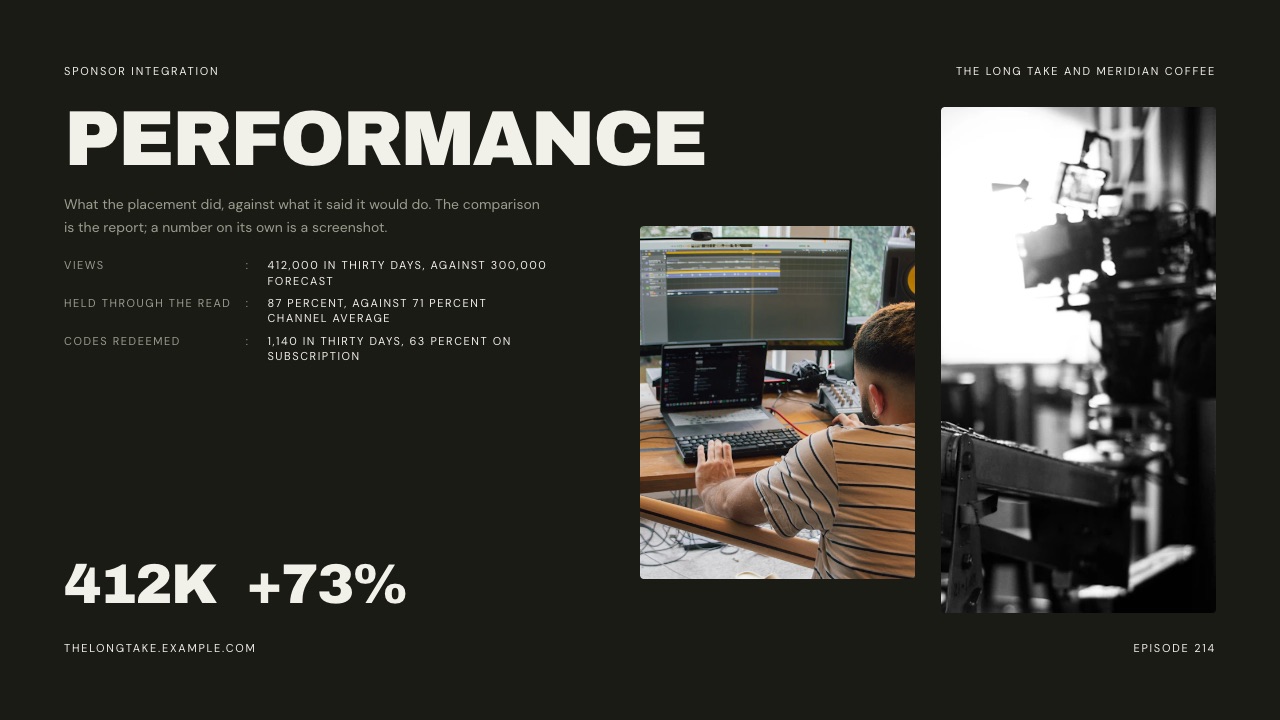
The table below is the structure for the Performance slide. The forecast column is filled from the carried example; the actual column is what you fill in thirty days later. We have left it blank on purpose rather than inventing a result.
| Line | Forecast in the pitch (example channel) | Actual after 30 days | Where the number comes from |
|---|---|---|---|
| Views in 30 days | 21,000 (median of last ten uploads) | Fill in | YouTube Analytics, video report |
| Retention through the read | Channel's typical retention at that minute | Fill in | Key moments for audience retention |
| Tracked link clicks | Agreed with the brand before launch | Fill in | Brand's analytics via UTM tags |
| Code redemptions | Brand's estimate, if it gave one | Fill in | Brand's order system |
| Short-form cutdown views | Only if cutdowns were in scope | Fill in | Platform insights for each post |
The Framekit template's sample Performance slide makes the same point in one line: the comparison is the report, and a number on its own is just a screenshot. Attach the raw analytics export, because a brand that can check your numbers trusts the ones it cannot check.
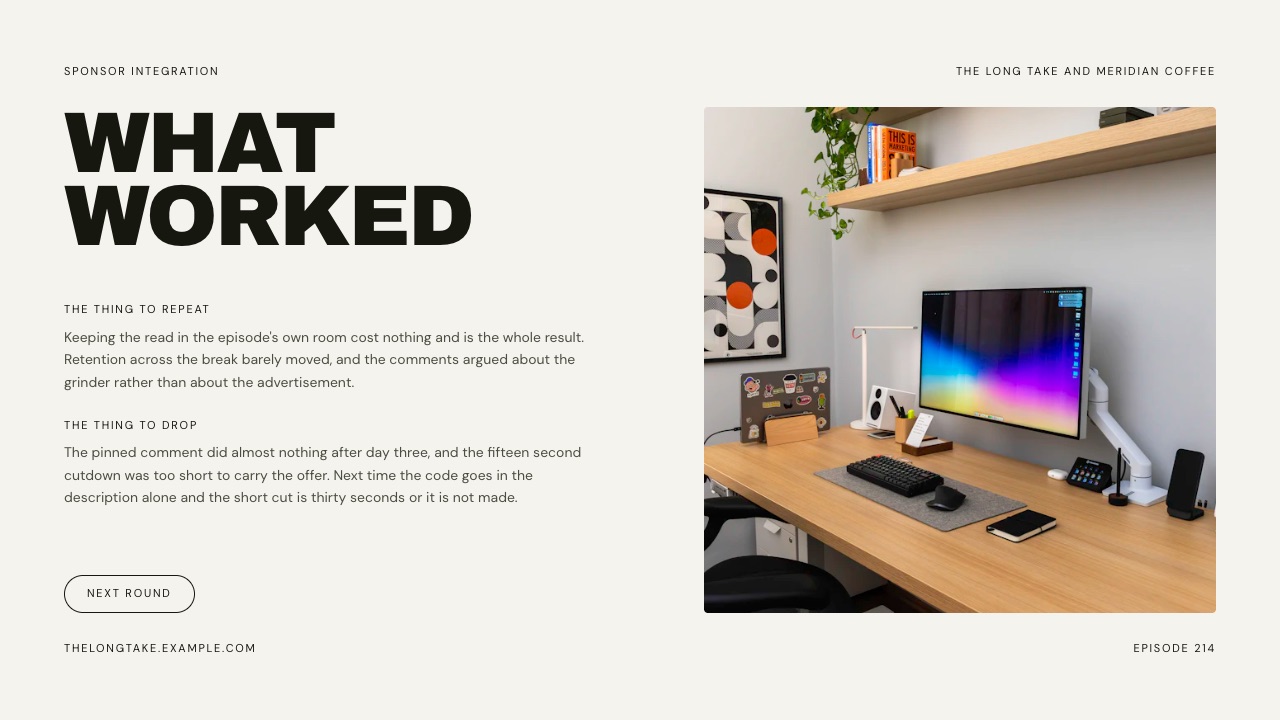
What Worked is the slide that earns the renewal. Name one thing to repeat and one thing to drop, with a reason for each.
The template's sample says the pinned comment did almost nothing after day three and that a fifteen-second cutdown was too short to carry the offer. A creator who volunteers a miss reads as a partner, not a vendor.
Next Round closes the loop with a specific offer: the adjusted placement, a date and a price. If the brand liked the read but not the cutdowns, offer the read alone at the next slot. The easiest renewal to say yes to is one that already reflects what the brand just learned.
Sponsorship Deck Examples by Platform
In one lineThe twelve-slide structure holds on every platform, but the Channel, Audience and Performance slides change their metrics, and a podcast or newsletter deck that borrows YouTube language looks like it was copied from someone else.
These are structural examples, not real creators: each row shows what the three platform-sensitive slides should carry. Where a platform publishes a definition, it is the one to use.
| Platform | The Channel slide leads with | The Audience slide proves | Performance reports | Typical placement to price |
|---|---|---|---|---|
| YouTube long-form | Median views of last ten videos, cadence | Age, markets, retention at the read | Views, retention through the read, clicks | 60-second integrated read |
| YouTube Shorts, TikTok, Reels | Median views per post over 30 days | Age, markets, share of views from non-followers | Views, shares, saves, link clicks | One post plus usage rights |
| Podcast | Downloads per episode in 30 days | Engaged listeners, completion | Downloads, promo code redemptions | Host-read mid-roll |
| Newsletter | Subscribers and opens on recent issues | Who subscribes and why | Clicks on the tracked link | A top-of-issue placement |
| Instagram feed | Reach per post over 30 days | Age, markets, follower overlap with the brand | Reach, saves, story link taps | Post plus stories bundle |
Three of these rows need a note. A YouTube deck earns its keep on the retention chart: two or three key-moments screenshots from past integrations, each labelled with the second the read started, answer the sponsor's fear that viewers skip.
A podcast deck swaps views for downloads per episode in the first 30 days and uses Apple's engaged listeners figure as proof the mid-roll is heard; our guide to the best website builders for podcasters covers where the sponsor page for a show should live.
A newsletter deck reports clicks on a tracked link, because that number lands in the brand's own analytics rather than in yours.
Short-form decks for Instagram or TikTok need the usage-rights conversation up front, since the brand often wants to run your video as an ad. Put organic posting and paid usage on separate lines.
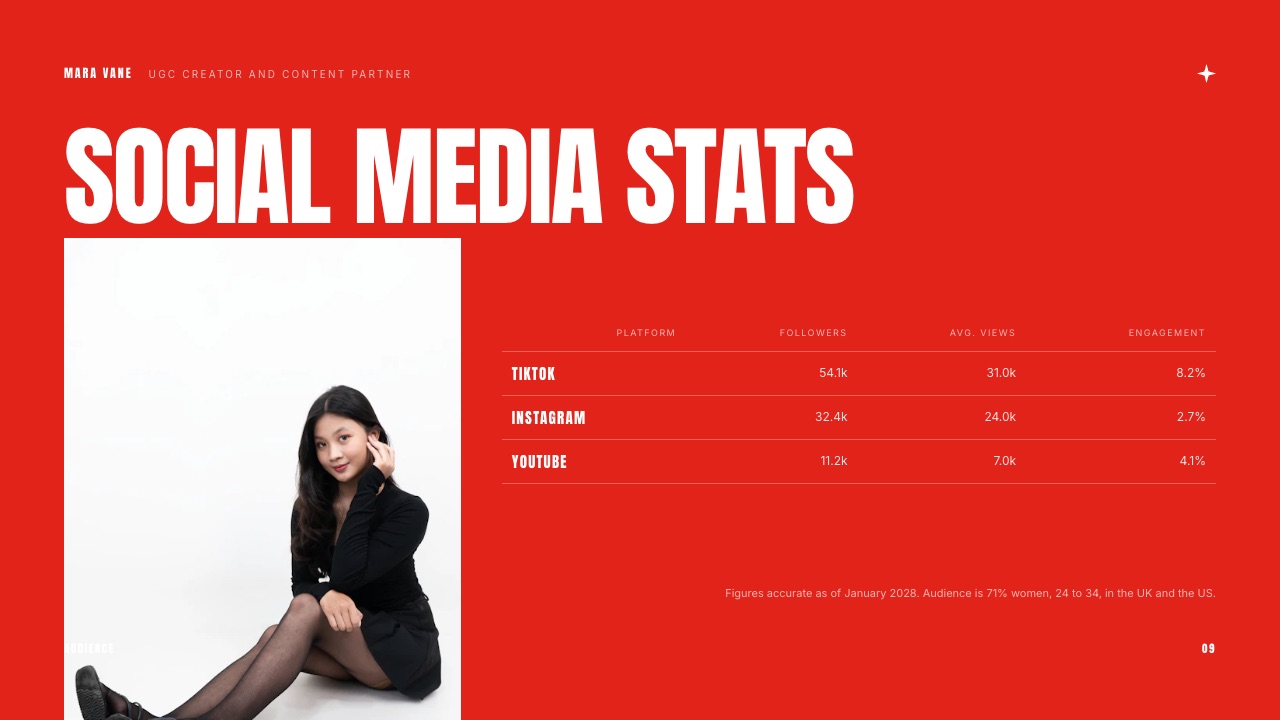
Framekit's UGC Creator Portfolio and Media Kit template carries a Social media stats slide laid out as platform, followers, average views and engagement, which is the right grid for a creator working across three apps.
Put the Disclosure Plan in the Deck
In one lineAdd one line to the Deliverables slide saying how the sponsorship will be disclosed on screen and in the description, because disclosure is a legal duty for both sides and a brand's legal team will ask anyway.
YouTube asks creators to tick the paid promotion box for branded content, sponsorships and endorsements; per its help page on disclosures, that adds a label at the start of the video, and it also says creators and their partners are responsible for complying with applicable law.
In the US, the FTC's Disclosures 101 guide for influencers says a video disclosure should be in the video itself, not only in the description, and that plain words such as "ad" or "sponsored" work better than vague ones like "sp" or "collab".
None of this needs its own slide.
One line on Deliverables, such as "Disclosed verbally at the start of the read, YouTube paid promotion label on, 'Sponsored by' in the first line of the description", answers the question before legal raises it and makes the approval loop shorter.
Where to Build Your Sponsorship Deck: 6 Tools Compared
In one linePick the tool by where the deck will be read and what you need to know afterwards: a link on your own site, a tracked link that reports who opened it, an auto-updating media kit, or a free file the brand can comment on.
The six tools below were compared on published features and prices, read at each vendor's own site on 19 September 2026. Prices are for one person, billed yearly where the vendor leads with yearly pricing.
| Tool | Best for | Free plan | Paid from | Who-opened-it analytics | Link password or gate |
|---|---|---|---|---|---|
| Framekit Slides | The deck, the site and the template on one account | Unlimited decks, PDF export | Starter $7/mo yearly ($9 monthly) for templates | Total view count only | No |
| Canva | A fast, polished free deck | Yes | Pro EUR 110/year (EU listing) | Not a focus | Not a focus |
| Storydoc | Knowing who opened it | Free account | $19.80/mo billed yearly | Basic on Starter, extended on Pro | Not verified |
| Beacons | An auto-updating media kit | Yes, 9% seller fee | $10/mo or $100/yr | Media kit viewers | Email gate listed |
| Google Slides | Free, commentable file | Yes | Free with a Google account | No | Google sharing permissions |
| Visme | Interactive decks with analytics | Yes, with Visme branding | $12.25/mo yearly; analytics on Pro | Pro plan | Privacy controls on Pro |
1. Framekit Slides: Best for Creators Who Want the Deck and Site Together
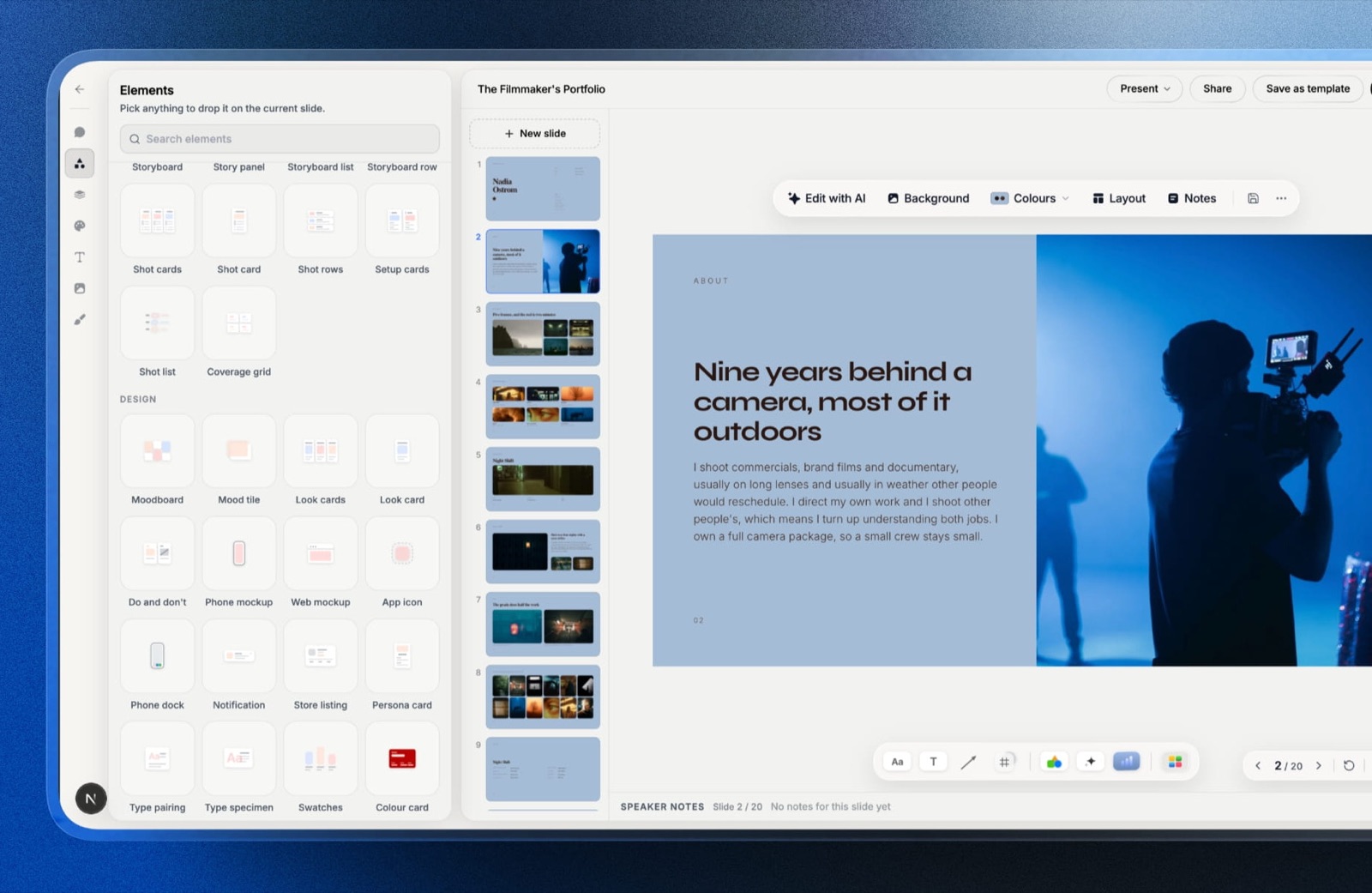
Framekit is an AI website builder for creators and filmmakers that also runs client galleries, video review, a digital-download store and Slides, the deck tool that holds the sponsor template in this guide.
The practical difference for a sponsorship deck is that the deck, the media kit page it points to and the site the brand will check are on one account and one bill.
The YouTube Sponsor Integration Brief and Wrap Report template is 12 slides: Cover, Index, Objectives, The Channel, The Audience, Deliverables, The Read, Selected Frames, Schedule, Performance, What Worked and Next Round.
It ships in Archivo Black and DM Sans on a chalk-and-pistachio palette, and every screenshot in this guide is a real render of it with its fictional sample content.
The sibling UGC Creator Portfolio and Media Kit template adds a Social media stats grid and a Packages slide for creators who sell content as well as placements.
The real numberdecks are unlimited on every plan including Free, and the AI slide writer, speaker notes, full-screen presenting, a share link and PDF export are all on Free. The template library needs Starter, $9 a month or $7 a month billed yearly.
PowerPoint export is Pro ($19 a month, $15 yearly) and is picture-based: each slide becomes a full-bleed image, speaker notes come across as real notes, up to 60 slides.
The standout detailYouTube and Vimeo embeds work on a slide, so the Selected Frames slide can hold the actual past integration rather than a still, and the Performance slide can sit next to the video it reports on.
The gotchaFramekit deck links have no password and no per-viewer analytics yet, only a total view count. If you need to know that the brand's head of marketing opened slide 6 twice on Tuesday, that is Storydoc's job, not Framekit's.
A brand that insists on an editable PowerPoint will also get picture slides, not editable text.
Skip it ifyou only ever send one deck a year and have no site, because the free tools below do a single file perfectly well.
Verdict: the best home for a creator who pitches regularly and wants the pitch, the wrap report and the website a brand will look up to live in one place, with the trade-off of no deck tracking.
2. Canva: Best for a Fast, Polished Free Deck
Canva is where most creators make their first sponsorship deck, and for good reason. Its template library runs to millions of designs, the editor is quick to learn, and the free plan finishes a deck without a paywall.
For a creator who wants a presentable PDF by tonight, it is hard to beat.
The real numberCanva Pro was listed at EUR 110 a year for one person for European buyers in September 2026, and the Pro plan's template count (3.6 million plus) is more than double the free plan's (1.6 million plus). We could not read a US price at the source, so none is quoted here.
The standout detailCanva's brand kit on Pro keeps your fonts and colours consistent across the deck, the media kit and the social posts you deliver, which matters when a brand reuses your frames.
The gotchathe most popular sponsorship templates are used by thousands of creators, and a partnerships lead who reads creator pitches every week will recognise the layout. Change the structure, not just the colours, or the deck reads as a form.
Skip it ifyou need to know who opened the deck or want it hosted on your own domain.
Verdict: the right starting point and a fine place to stay if your deals come through email and a PDF. If you have outgrown it, our list of Canva alternatives covers the next step.
3. Storydoc: Best for Knowing Who Opened It
Storydoc turns a deck into a scrolling, interactive web document and tells you how it was read.
For a creator pitching larger brands, where one deck goes to a partnerships lead and gets forwarded to three other people, that reading data is the difference between following up blind and following up on the slide they spent time on.
The real numberper Storydoc's pricing page, Starter is $19.80 a month billed yearly ($237.60) with 5 active documents and basic analytics; Pro is $36 a month billed yearly ($432) with 30 active documents and extended analytics.
Team pricing is by conversation with sales.
The standout detailthe active-document limit is the real constraint, not the price. Five live decks is enough for a creator with a handful of pitches out at once and tight for anyone running a pitch sprint.
The gotchaa scrolling interactive document is a different reading experience from slides. Some brand teams want a PDF to attach to an internal approval, so confirm that export works for your layout before you commit a whole pitch season to it.
Skip it ifyou pitch fewer than five brands a quarter, where analytics tell you little you could not learn from a reply.
Verdict: the best tool here for deck tracking, and worth paying for once your pipeline is big enough that knowing who read what changes your follow-up. Our guide to Storydoc alternatives compares it with other tracked-link tools.
4. Beacons: Best for a Media Kit That Updates Itself
Beacons is a creator platform built around a link-in-bio page, and its media kit is the part that matters here.
It connects to your social accounts and refreshes your audience and engagement numbers on its own, which solves the most common credibility problem in creator pitches: a deck with last spring's follower count.
The real numberper Beacons' pricing page, read on 19 September 2026, the free plan includes a daily-updating media kit and charges a 9% seller fee on store sales; Creator is $10 a month or $100 a year; Creator Plus is $30 a month or $300 a year and drops the seller fee to 0%; Creator Max is $100 a month or $900 a year.
The standout detailthe media kit feature list includes rate cards, a pricing calculator for base brand-deal rates, a past-projects section for brand logos and outcomes, an email gate before viewing, and media kit analytics that show who viewed your kit and when.
That last one is closer to Storydoc's tracking than anything in a general deck tool.
The gotchaa media kit is not a proposal. It tells a brand who you are, but it does not carry the specific deliverables, schedule and forecast for one deal, and it has no natural place for a wrap report.
Most creators who rely on Beacons still end up writing the deal-specific part in an email.
Skip it ifyour pitches are custom per brand and your numbers do not change week to week, such as a podcast with stable downloads.
Verdict: the best always-current media kit here and a strong first touch; pair it with a proper deck for the deal itself. If you are weighing it against a plain link page, see our Linktree vs Beacons comparison.
5. Google Slides: Best Free Option for Collaborative Edits
Google Slides is free with a Google account and does one thing for sponsorship work that the design-first tools do less well: it lets the brand's team comment directly on slide 6 and suggest changes to the deliverables.
For deals that go through two or three rounds of scope negotiation, that shared file is the working contract.
The real number$0 for a personal Google account. Google's product page lists comments, granular sharing permissions, offline editing and import of PowerPoint files, so a brand that sends a .pptx brief can open it in the same place.
The standout detailversion history means you can show what changed between the first pitch and the agreed scope, which settles most "we thought the cutdowns were included" conversations.
The gotchaSlides looks like Slides. Brands see hundreds of Google decks a year, and the default themes signal "internal document" rather than "creator with a point of view". Budget an hour for type and layout.
Skip it ifthe deck is doing a visual sales job, such as a travel or fashion creator selling the look of their work.
Verdict: the practical choice for scope negotiation and for creators working with agencies that live in Google Workspace. Our Canva vs Google Slides comparison covers when to switch.
6. Visme: Best for Interactive Decks on a Budget
Visme sits between a slide tool and an interactive-content tool: charts, data widgets and animated elements that suit a Performance slide heavy with numbers. For creators whose wrap reports carry a lot of data, it gives more chart options than Canva.
The real numberper Visme's pricing page, Basic is free with limits (50 slides per project, Visme logo on projects); Starter is $12.25 a month per person billed yearly ($147) and downloads JPG, PNG and PDF; Pro is $24.75 a month billed yearly ($297) and adds PPTX, HTML5, video and GIF downloads, brand kit, analytics and privacy controls.
The gotchathe features a sponsorship deck most wants, analytics and privacy controls, are on Pro, not Starter, so the realistic price is $297 a year.
Skip it ifyou mainly need slides that look good rather than slides that do things.
Verdict: a sensible choice for data-heavy wrap reports if you will pay for Pro; otherwise Canva or Google Slides cover the same ground for less. See our Visme alternatives guide for the wider field.
How to Choose: A Decision Guide
In one lineAnswer four questions in order, about where the deck is read, whether you need to track it, whether your numbers move daily, and whether the brand needs to edit it, and the right tool falls out of your answers.
Do you already have a website, or want one, that brands will check after reading your pitch? If yes, build the deck in Framekit Slides so the pitch, the wrap report and the site sit on one account, and link the deck from your media kit page.
If no, go to the next question.
Do you need to know who opened the deck and which slides they read? If yes, use Storydoc, and budget for Pro if you run more than five live pitches at once. If no, go on.
Do your follower and view counts change fast enough that a static deck goes stale within a month? If yes, keep a Beacons media kit as the always-current first touch and attach a short deal-specific deck. If no, go on.
Will the brand's team negotiate scope by editing and commenting on the file? If yes, use Google Slides. If no, use Canva for a polished PDF, or Visme if your wrap report is chart-heavy and you will pay for Pro.
Whichever tool you pick, keep the twelve-slide structure: the tool changes how the deck looks and where it lives, not what a brand needs to read.
Frequently Asked Questions
What should a sponsorship deck include?
A sponsorship deck should include the brand and placement on the cover, the brand's objective, your channel's median views and cadence, audience age and markets, exact deliverables with seconds and links, the creative idea for the read, a schedule with approval steps, and placeholders for performance, lessons and a next-round offer.
Twelve slides covers all of it. Put the price either on the deliverables slide or in the covering email, never on its own slide with no context.
How many slides should a sponsorship deck have?
A creator sponsorship deck works best at 10 to 12 slides: nine for the proposal and three held back for the wrap report. Framekit's YouTube Sponsor Integration Brief and Wrap Report template uses exactly 12.
Anything past about 15 slides usually means the audience section has turned into a media kit, which is better sent as a separate link.
How much should I charge for a YouTube sponsorship?
A YouTube sponsorship floor rate is median views of your last ten videos, times your niche CPM, divided by 1,000, plus production cost, per 1of10's 2026 guide, which puts niche CPMs between $8 and $50 per 1,000 expected views.
A channel with a 21,000 median in education ($20 to $35) has a floor of $420 to $735 for a 60-second read. Usage rights and exclusivity are priced on top.
What is the difference between a media kit and a sponsorship deck?
A media kit is a standing profile of who you are and who watches, sent to any brand, while a sponsorship deck is a proposal for one specific deal with deliverables, a schedule and a price.
Brands usually see the media kit first and the deck once there is interest. Beacons is strong at media kits that update themselves; a deck tool such as Framekit Slides, Canva or Google Slides handles the proposal.
Should I put my rates in the sponsorship deck?
Yes, put your rates in the sponsorship deck when you are pitching a specific placement, because a proposal without a price stalls on a round-trip email.
Show the price beside the deliverables, list usage rights and exclusivity as separate lines, and state how long the price is valid. For a cold first touch, a media kit with "rates on request" is fine.
What is a sponsorship wrap report?
A sponsorship wrap report is the document a creator sends about 30 days after an integration goes live, comparing actual results with the forecast from the pitch: views, retention through the read, tracked clicks and code redemptions, plus one lesson and a next-round offer.
The IAB reports 40% of creator-ad buyers rank ROI as their top KPI, so the report is often what decides a renewal.
Is Framekit's sponsorship deck template free?
Framekit Slides is free to use, with unlimited decks, the AI slide writer, share links and PDF export on the Free plan, but the full template library, including the YouTube Sponsor Integration Brief and Wrap Report, needs a paid plan starting at Starter ($9 a month, or $7 billed yearly).
You can build the same twelve-slide structure from scratch on Free.
Can I track who viewed my sponsorship deck in Framekit?
No, Framekit Slides does not show per-viewer analytics or password-protect deck links today; a shared deck shows a total view count only.
If knowing which brand contact opened which slide matters to your follow-up, Storydoc's analytics or Beacons' media kit viewer data are the better fit for that part of the job.
Do podcast sponsorship decks need different metrics?
Yes, podcast sponsorship decks should price on downloads per episode in the first 30 to 90 days rather than on followers, and prove attention with Apple Podcasts' engaged listeners metric (at least 20 minutes or 40% of an episode).
ADOPTER Media's 2026 data puts host-read mid-rolls at $15 to $30 CPM, so a show averaging 4,000 downloads would quote $60 to $120 per mid-roll.
Final Verdict
The best sponsorship deck template is the one that commits you to reporting back.
A pitch written as a forecast in YouTube's, Apple's or Google's own metrics, followed thirty days later by a report that sets actuals beside that forecast, answers the two problems brands say they have: finding the right creators and getting consistent reporting.
Build the twelve slides, fill slides 1 to 9 before you pitch, and leave 10 to 12 waiting for the numbers.
For a creator who pitches regularly and has, or wants, a site brands will check, Framekit Slides is our pick, because the sponsor template already carries both halves and it lives beside your website on one account.
Where Framekit loses is tracking: deck links have no password and no per-viewer analytics, so Storydoc is the better fit if you need to know who read what, and Beacons if your numbers change daily and you want a kit that updates itself.
Framekit is not for a creator who sends one deck a year and has no site; Canva or Google Slides will do that job for free.
Related readingcompare dedicated tools in our guide to the best media kit makers, see how a content creator media kit website turns the kit into a page, choose a home for the channel with the best website builder for YouTubers, weigh link-in-bio tools for the first touch, get sponsor cutdowns approved faster with video review tools for YouTube creators, and read how to share a presentation online before you send the link.
Pricing the deliverables inside the deck? The UGC rate card guide splits a quote into its four prices, and UGC portfolio examples shows how to present past brand work.