Framekit templates
Start from a designer-made template
 Use template
 Use template
 Use template
 Use template
 Use template
 Use template
 Use template
 Use template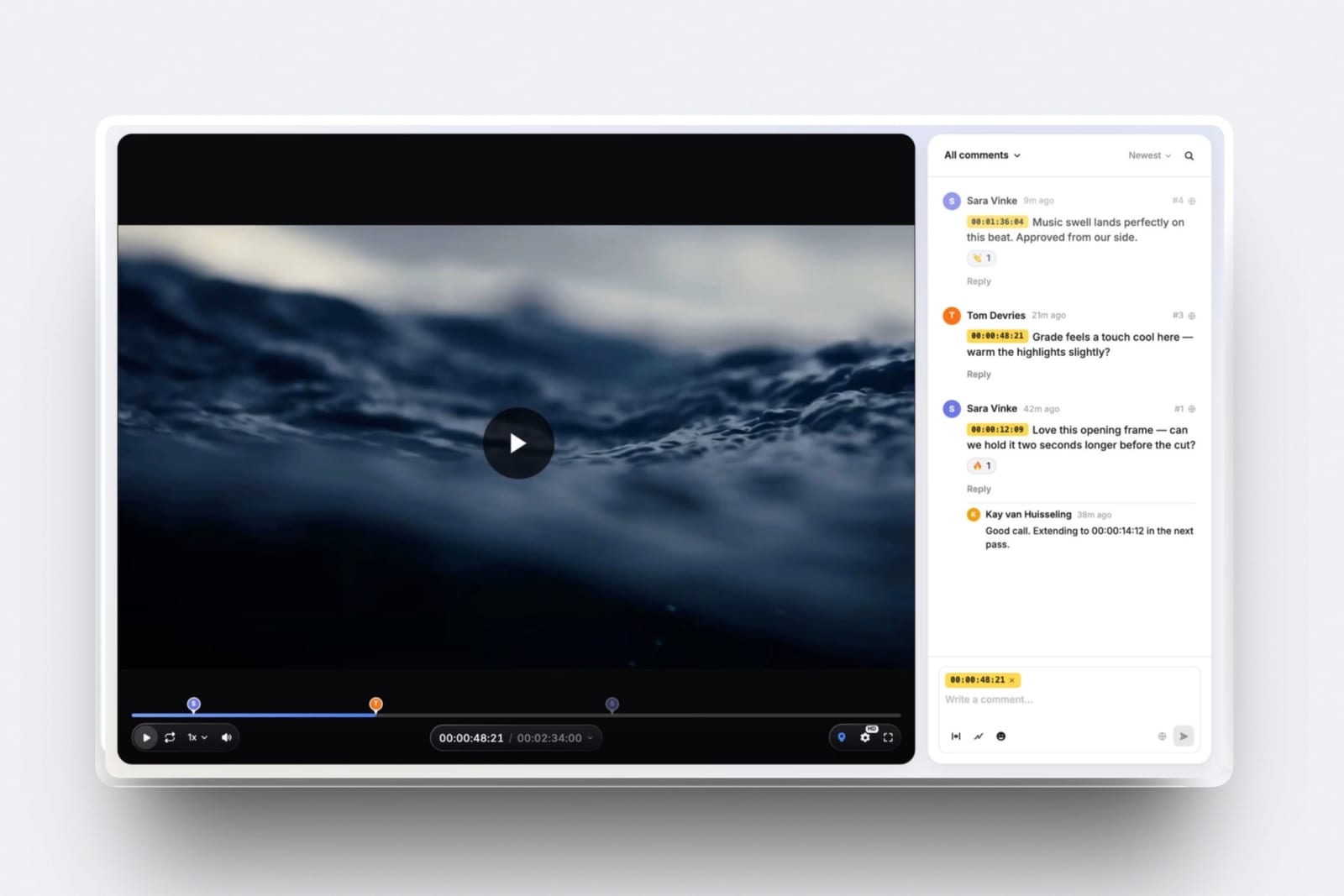
You shoot it, you cut it, you send it, and you are also the person who answers the email at 9pm asking whether the logo can be bigger. That is the job.
The software market, on the other hand, is built for a post house with a producer, and it shows in the price list: the cheapest paid plan at one well known tool is $199 a month, which is $2,388 a year, or about three quarters of a single $3,200 project fee.
Video review tools for solo filmmakers are not the same product as video review tools for teams, and the difference is not features. It is the minimum bill.
Almost every tool here includes seats, reviewer groups, workflow stages and storage tiers sized for a group, and a single person pays for all of it and uses one seat.
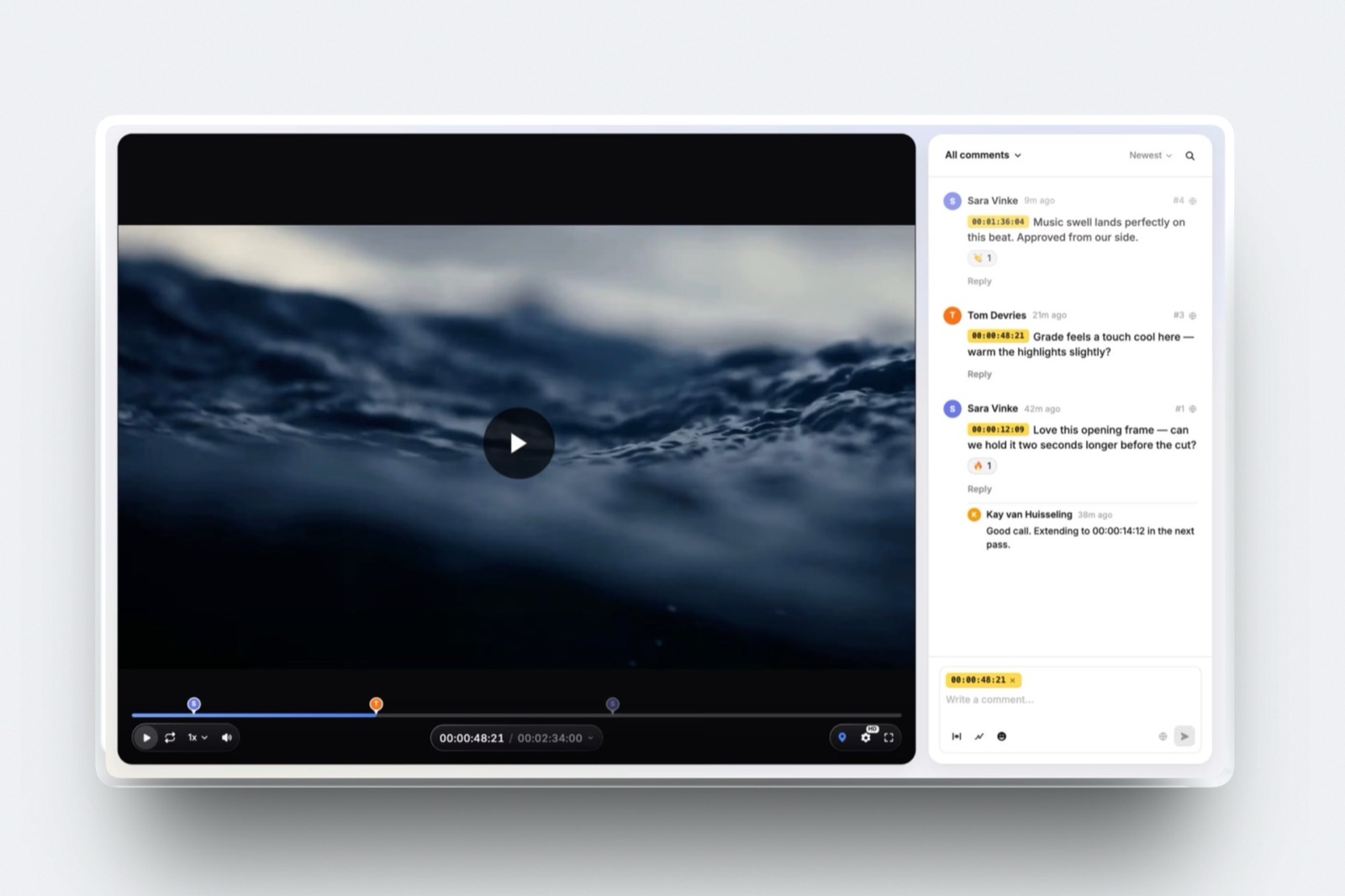
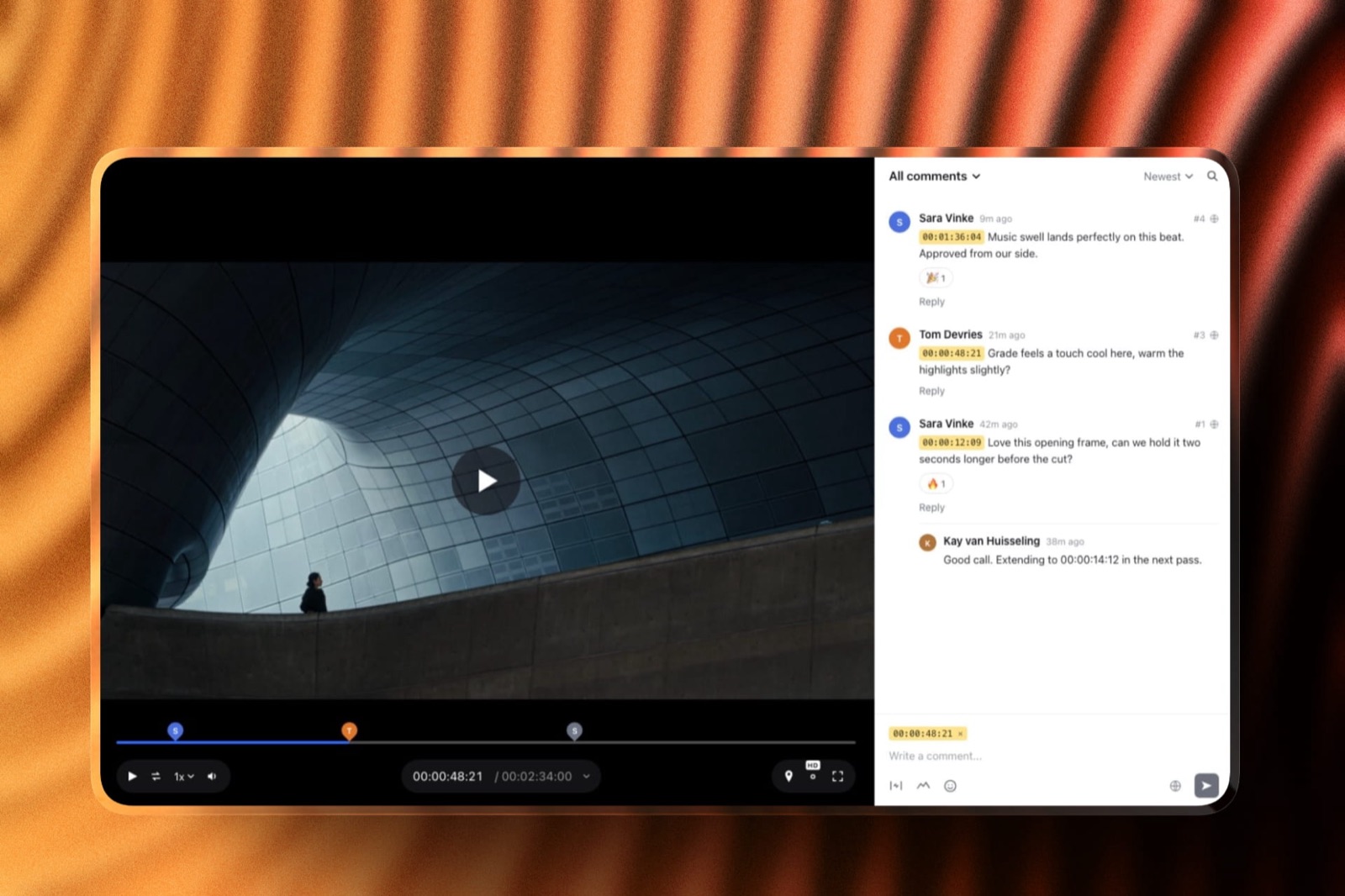
A video review tool is a page where a client watches a cut and leaves comments pinned to an exact timecode, with each new version stacked above the last so the old notes stay readable.
For one person the useful test is narrower than the feature list: can a client comment without making an account, does the tool keep versions in order, and what is the smallest amount you can pay and still get both.
Framekit is the best video review tool for a solo filmmaker in 2026 because the full review page, timecoded comments, drawing on the frame, version stacks, approval states and guest commenting with no account, is on the free plan, and the cheapest paid tier that removes the badge and puts reviews on your own domain is $7 a month billed yearly.
The trade-off is real: no Camera to Cloud, no editing-suite panels, no transcription, no frame compare and a hard two-hour limit per video.
Wipster Light at $9.95 a month is the cheapest dedicated single-seat plan, Frame.io is the right answer if you live inside Premiere or Final Cut, and Kollaborate Basic gives one person 30GB for $60 a year.
Full disclosure: Framekit is our own product and we rank it first here, so treat the ranking accordingly. Each competitor figure below was read on that company's own pricing page in September 2026 and every tool is linked, none of them was driven through a client job for this article, and no review scores appear anywhere because the sites that publish them block automated reading. Frame.io carries Camera to Cloud, transcription and editing-suite panels that Framekit does not have and probably never will.
How This Comparison Was Built
Twelve tools, one reader, and a deliberately narrow question, because a solo filmmaker does not have the luxury of evaluating a platform the way a production company does.
Read at the source. Every price, seat count, storage figure and feature claim here comes from the vendor's own pricing page, read in September 2026. Frame.io lists a free plan with up to two members, 2GB of storage and two projects, and Pro at $15 per member per month. Wipster lists Light at $9.95 a month billed annually with 50GB. Filestage lists a free plan capped at one active project and five new files a month, then Starter at $199 a month. Ziflow lists a free Personal tier with two users, 2GB and a single workflow stage. ReviewStudio lists a free Starter plan with unlimited users and three active reviews.
Calculated. The yearly figures are arithmetic on one carried example: a freelancer delivering 24 brand films a year at an average project fee of $3,200, one 90-second film a job, one reviewer at the client, two or three versions before approval.
A 90-second 4K H.264 at 40 Mbps is 5MB a second times 90 seconds, so about 450MB; three versions of a job is roughly 1.35GB and a year is about 32GB. None of that was measured, it is multiplication you can check.
Not claimed. No tool here was used on a live client project for this piece, there are no timings, and there are no star ratings.
Two tools are absent from the ranking for honest reasons rather than editorial ones: screenlight.tv did not respond at all when it was requested in September 2026, and SyncSketch renders its plan table in JavaScript so no price is readable in the page it serves.
What One Seat Actually Costs
In one lineRanked by the smallest annual amount a single person can pay and still get versions, approval and guest commenting, the spread across this market runs from zero to $2,388, and the top of that range buys features one person structurally cannot use.
- $0 is the real entry price at Framekit, ReviewStudio and Ziflow, and all three include guest commenting without an account.
- $60 a year is Kollaborate Basic, the cheapest paid plan here, with 30GB and no team members by design.
- $84 a year is Framekit Starter billed yearly, which is $7 a month, the cheapest paid tier that removes the badge and puts review pages on your own domain.
- $119.40 a year is Wipster Light at $9.95 a month billed annually, with 50GB, which is the cheapest plan built explicitly for one person.
- $156 a year is Vimeo Starter at $13 a month billed annually, where Vimeo's review features begin; they are not on its free plan.
- $2,388 a year is Filestage Starter at $199 a month, which includes ten seats a freelancer will never fill.
The Three Things a Solo Filmmaker Is Actually Paying For
The feature lists in this market are long and mostly irrelevant to one person, so it helps to name the three things that change your week and ignore everything else.
The first is guest access. If your client has to create an account to leave a note, some percentage of clients will reply by email instead, and you are back to translating prose into an edit list.
The second is version handling, because the argument you need to win in round three is about what changed since round two. The third is the minimum bill, which for a freelancer is not a line item but a share of a project fee.
| What it buys you | Why it matters to one person | Tools that do it at $0 |
|---|---|---|
| Guest commenting, no account | Your client comments the same day instead of replying by email | Framekit, ReviewStudio, Ziflow, Filestage |
| Version stacks with old notes kept | Round three is about what changed, and the record settles it | Framekit, Frame.io, ReviewStudio, Ziflow |
| An explicit approval state | The word approved becomes a button rather than an opinion | Framekit, ReviewStudio, Ziflow |
| Your own branding on the page | The client sees your studio, not a vendor's logo | None: this is the first real upgrade at every tool |
In one lineBranding is the honest upgrade trigger for a solo filmmaker, because every free plan in this comparison shows somebody else's name on the page your client opens, and that is the one limitation you will feel on a job that matters.
The Full Comparison Table
Here is the whole field on one screen, ordered as the reviews are ordered, with the cheapest plan a single person would realistically sit on rather than the headline tier each vendor promotes.
The weighting behind that order is simple and worth stating so you can disagree with it: minimum bill for one seat counts most, guest access second, version and approval handling third, and everything designed for groups, reviewer routing, seat administration, workflow stages, counts for nothing because one person cannot use it.
| Tool | Free plan for one person | Cheapest useful paid plan | Storage on that plan | The one thing it is best at |
|---|---|---|---|---|
| Framekit | Full review page, badge shown | $7/mo billed yearly | 50GB pooled, 15GB video | Everything on one account, nothing per seat |
| Wipster | Trial only | $9.95/mo billed annually | 50GB | A plan designed for exactly one person |
| Frame.io | 2 members, 2GB, 2 projects | $15 per member/mo | 2TB | Camera to Cloud and editing-suite panels |
| Kollaborate | No | $60 a year | 30GB | Storage per dollar with no seat maths |
| Vimeo | No review on free | $13/mo billed annually | 100GB | Playback and a public home for the film |
| ReviewStudio | 3 reviews, 5GB, unlimited guests | $12 per user/mo billed yearly | 25GB per user | The most generous free approval tool |
| Dropbox Replay | No | EUR 9 per user/mo plus a Dropbox plan | Your Dropbox plan | Reviewing files that never leave your folders |
| Ziflow | 2 users, 2GB, 1 stage | $199/mo billed annually | 1TB | 1,200 file types, not just video |
| Filestage | 1 project, 5 files a month | $199/mo | Not published per plan | Multi-stage client approval chains |
| Approval Studio | Trial only | $60/mo | 5GB | Print and packaging alongside MP4 |
| GoVisually | Trial only | $33 per user/mo, 3 user minimum | 150GB | Static design proofing |
| PageProof | Trial only | $249/mo or $2,499 a year | Unlimited | Flat rate with no seat counting at all |
In one lineFour of these twelve have no path for a single person at all, because their cheapest plan carries a user minimum, and knowing that before you book a demo saves you an hour and a sales call.
1. Framekit: Best Overall for One Person

Framekit is an AI website builder whose video review pages live on the same account as the site that sends clients to you, which for a one-person business means the review tool is not a separate subscription with its own dashboard and its own renewal date.
That is the argument for it, and it only works if the review page itself is good enough, so here is what is actually on it.
The real numberthe free plan includes the complete review page.
Timecoded comments, drawing on the frame, replies and reactions, guests commenting with no account, version stacks that keep the previous round's notes, four approval states (needs review, in progress, approved, needs changes), client downloads, a password on the share link, email registration, auto expiry and email notifications when a comment lands.
What free does not include is your own domain and the removal of the Framekit badge, which start at $7 a month billed yearly on Starter, or $9 monthly.
The detail nobody writes aboutthe approval states are four, not two. "Needs changes" and "in progress" exist alongside "approved", which sounds like a triviality until you have had the conversation where a client says a cut is fine and then keeps sending notes.
A state on the page is a fact you can point at. Branding goes further than a logo too: banner, fonts, accent colours and a light or dark theme, so the page reads as your studio rather than a tool.
The gotcha that bites in week threethe per-file ceiling and the storage pool are shared with the rest of your account.
Video uploads are capped at 500MB on Free, 1GB on Starter, 2GB on Pro and 3GB on Business, with a two-hour maximum length on any plan, and the same pool feeds your website and client galleries.
A 90-second 4K export at 40 Mbps is about 450MB, so the free plan works for short-form and stops dead at a 10-minute documentary cut.
Comment file attachments are also Pro and up, so a client who wants to attach a reference image needs you on $19 a month.
Who should skip itanyone whose review step has to reach into the edit. There are no Premiere, Resolve, Final Cut or After Effects panels, no Camera to Cloud, no transcription, no frame-by-frame compare or wipe and no session or forensic watermarking.
If your workflow depends on pulling comments into a timeline without leaving the application, Frame.io is the correct answer and this is not a close call.
Verdict: the best free review page in this comparison and the cheapest credible paid one, for a filmmaker whose client is a marketing manager rather than a post supervisor. If you need the cut, the delivery and the portfolio site on one bill it is the obvious pick; if you need the cut to talk to your NLE, it is the wrong tool. Our walkthrough of how to share a rough cut with a client covers the sequence either way.
2. Wipster: The Cheapest Plan Built for Exactly One Person
Wipster is the only tool in this comparison whose entry plan is named for the situation rather than the team size, and Light is genuinely a single-person product rather than a stripped team product, which is a different design decision with different consequences.
The real number$9.95 a month billed annually, or $11.95 month to month, for 50GB of storage, HD playback and delivery, unlimited sharing and unlimited projects.
The next tier up, Team, is $19.95 per user per month billed annually with storage starting at 250GB, so the cost of adding one collaborator is more than doubling your bill.
The detail nobody writes aboutWipster lists Adobe Premiere Pro and After Effects integrations across its tiers, including Light.
For $9.95 a month that is the cheapest route to comments arriving where you cut, and it is the single strongest reason for an Adobe-based freelancer to pick Wipster over a cheaper generic tool.
The gotchacustom branding, closed captions, variable playback speed and team-only comments all sit on Team rather than Light. So the plan designed for one person is also the plan where your client sees Wipster's presentation rather than yours, and the fix costs twice as much.
Who should skip itanyone who needs the review page to look like their own studio on the first paid tier. That is a normal thing to want on a $3,200 project, and it is a $19.95 a month feature here.
Verdict: the best paid single-seat plan for an Adobe editor and an awkward one for anybody who cares about branding, which is a strange split for a product aimed at freelancers. If you are weighing it against the wider freelance field, our video review tools for freelance editors comparison goes deeper on the editing-suite question.
3. Frame.io: Best If You Live Inside an Editing Suite
Frame.io is the category standard and the reason is not the comment box, it is everything wrapped around it: Camera to Cloud so takes upload from set, transcription and captions, panels inside Premiere and Final Cut, a comparison viewer, and a free plan that hands a solo filmmaker all of that at zero.
The real numberthe free plan is up to two members, 2GB of storage and up to two projects, with Camera to Cloud and transcription included.
Pro is $15 per member per month for up to five members with 2TB included plus 2TB per additional member, custom-branded shares, passphrase-protected shares, share-link expiry, comment attachments and one static watermark template.
Team is $25 per member per month.
The detail nobody writes about2GB of free storage is smaller than it sounds in a world of 4K exports. Three versions of a single 90-second 4K film at 40 Mbps is roughly 1.35GB, which means the free plan holds about one and a half jobs at a time.
The free tier is generous in capability and tight in capacity, which is the opposite of how most free tiers are built, and it means the free plan is a permanent exercise in deleting things.
The gotchathe jump from free to Pro is $180 a year for one person, and it is the only way to get branded shares, passphrase protection or link expiry, all of which a freelancer sending work to a client actually wants.
Priced per member, Frame.io is also the tool whose bill grows fastest the moment you hire your first collaborator.
Who should skip ita filmmaker whose clients are small businesses and whose edit never leaves one machine. Camera to Cloud is transformative on a set with a crew and irrelevant when you are the crew, and transcription matters most on interview-heavy work.
Verdict: still the best video review product in the world for a filmmaker embedded in Adobe or Apple tooling, and an expensive habit for one person delivering short brand films. Take the free tier, keep an eye on the 2GB, and upgrade when a client asks for a passphrase.
4. Kollaborate: Most Storage per Dollar, No Seat Maths
Kollaborate does something almost nobody else in this market does: it sells individual plans that explicitly have no team members, and says so plainly on the pricing page. You share links, people watch and comment, and there is no seat arithmetic anywhere in the product.
The real numberBasic is $7 month to month or $60 a year, which works out to $5 a month, for 30GB of storage, unlimited projects and unlimited bandwidth.
Freelance is $25 month to month or $180 a year for 250GB, and Freelance Plus is $40 or $300 a year for 500GB. The team plans start at $25 a month for 60GB and five members, with no per-member fee at all.
The detail nobody writes aboutcustom branding is listed as unavailable on all three individual plans and available on every team plan, including the $25 Small Business tier.
So the cheapest way to get a branded review page on Kollaborate is to buy a team plan you do not need, which is $180 a year, and you get five seats thrown in.
The gotchaunlimited bandwidth is a real advantage and 30GB is not much room. At roughly 1.35GB per job across three versions, Basic holds about 22 jobs before you start clearing space, which is under a year of steady freelance work.
Who should skip itanyone who wants a modern, polished client-facing page. Kollaborate is priced for filmmakers rather than designed for clients, and the presentation is the trade you are making for the storage.
Verdict: the best storage-per-dollar on this list if you are pragmatic about presentation, and the clearest pricing page of the twelve about what one person actually gets for the money.
5. Vimeo: Best When the Film Also Has a Public Life
Vimeo is the place the finished film ends up for most solo filmmakers anyway, and its review layer has the advantage of sitting next to the hosting, the player and the privacy controls you were going to pay for regardless.
The real numberreview is not on the free plan. Free is one seat and 1GB of storage. Starter at $13 a month billed annually is one seat, 100GB, and the tier where file transfer and video review begin, along with shared folders and version history.
Standard at $26 a month is five seats and 2TB, and Advanced is $76 a month for ten seats and 7TB.
The detail nobody writes aboutStandard's five seats for $26 a month is the cheapest per-seat arrangement anywhere in this comparison, which matters not at all to a solo filmmaker today and matters a great deal the year you start working with a regular collaborator.
It is the cheapest upgrade path out of solo in this whole field.
The gotchaVimeo's review tooling is one feature inside a large video platform, so upgrades are driven by hosting needs rather than review needs, and you can find yourself paying for streaming capability to get a review feature.
Its Premiere and Final Cut integrations sync timecoded comments into the timeline, which narrows the gap with Frame.io for Adobe editors.
Who should skip ita filmmaker whose work is all client-confidential and never public. You would be buying a publishing platform to use its comment box.
Verdict: the sensible choice when the same film needs a review link now and a public home later, and an odd one when review is all you need. Our guide to video hosting for client review covers that overlap in more detail.
6. ReviewStudio: The Most Generous Free Plan
ReviewStudio's free Starter plan is unusual in this market because the thing it limits is the number of open reviews rather than the number of people, and for a freelancer that is exactly the right way round.
Free gives unlimited users, unlimited guests, three active reviews at a time and 5GB of storage in total, with all file formats, task management, approval management, versioning, compare mode and present mode included.
Pro is $15 per user per month, or $12 billed yearly, for ten active reviews per user and 25GB per user, and it is where custom branding starts.
Advanced at $25 per user per month has a five-user minimum, which puts it out of reach for one person by design.
The gotcha is the 5GB total on free, which at roughly 450MB per 90-second 4K version holds about 11 files before you start archiving, and the three-active-review cap means a busy month forces housekeeping.
That is a fair trade for unlimited guests. Skip it if your clients need a page that looks like your brand, because that is the $144 a year upgrade.
7. Dropbox Replay: Best If Your Footage Already Lives There
Replay is worth considering only for the filmmaker whose rushes, project files and exports already sit in Dropbox, in which case the review layer adds itself to files that never move, which is a genuine workflow advantage rather than a marketing one.
It is an add-on, not a plan.
For European buyers it is listed at EUR 9 per user per month billed annually, which is EUR 108 a year, or EUR 11 per user per month billed monthly, and the page states that Dropbox Basic users must upgrade to a Plus or higher plan before buying it.
So the real monthly cost for one person is a storage plan plus the add-on, which makes it one of the more expensive entries here for a single seat once both lines are counted.
The advantage is that nothing is duplicated: no second upload, no second copy of a 4K master, no waiting twice.
The disadvantage is that Replay is a feature bolted to a storage product rather than a client-facing page, so branding and presentation are thin compared with anything purpose-built.
Skip it if you do not already pay Dropbox, because buying into the ecosystem to get the review tool is the wrong way round.
8. Ziflow: A Free Tier That Reviews Almost Anything
Ziflow is a proofing platform rather than a video tool, and its free Personal tier is the most capable free plan here for anyone whose work is not only video: 1,200 file types, unlimited proofs, unlimited reviewers, unlimited versions and pixel-level version comparison.
The limits are two users, 2GB of storage, one workflow stage, no workflow templates and 60 days of review history.
That last one is the detail that catches people, because a proof you created three months ago is simply gone from the free tier, which makes it unsuitable as any kind of record.
Paid starts at $199 a month billed annually for Standard with 15 users and 1TB, and $329 a month for Pro with 20 users and 2TB.
For a solo filmmaker the calculation is blunt. The free tier is genuinely useful and the first paid tier is $2,388 a year for fifteen seats. There is nothing in between.
Use the free tier for the odd job that mixes a film with print artwork, and do not plan to grow into the paid one alone.
9. Filestage: Right Product, Wrong Size
Filestage is very good at the thing it is built for, which is moving a file through named groups of reviewers in a fixed sequence, with internal and external rounds kept apart and reviewers who never make an account.
Its free plan is one active project, five new files a month and two reviewer groups, with ten team members included and unlimited reviewers.
Starter is $199 a month on the yearly plan, which the site advertises as two months free, and Business is $329 a month; every plan includes ten seats with more sold in bundles of five.
For a freelancer that pricing is not a barrier, it is a signal.
Filestage costs $2,388 a year and its value is in reviewer groups, approval sequencing, due dates and review reports, which are answers to problems created by having colleagues. One person has none of those problems.
Use the free tier when a client insists on a formal approval trail on a single project, and let the paid tiers belong to agencies.
10. Approval Studio: Only If Half Your Work Is Print
Approval Studio earns its place because a solo filmmaker who also delivers stills, key art and packaging comps needs those treated as first-class objects rather than as attachments, and this is the tool that does it, with four compare modes, 1000 percent zoom, a barcode reader and colour separation.
Its video support is real but narrow: the pricing page states the review tool supports video files in MP4 format with a dedicated interface, ticked on every tier.
Lite is $60 a month with five or more users and 5GB of storage, Pro is $160 a month and Pro XL is $300 a month with 15 or more users and 30GB.
External reviewers are unlimited, are not counted as users and do not need to register, which is the most generous guest policy in this comparison.
The problem for one person is the shape of the plans rather than the price alone: every tier starts at five users and 5GB, so the entry product is a small team plan. If your work is genuinely half print, it is worth the look. If it is video with the occasional JPEG, it is not.
11. GoVisually: Cheap Until You Need Video
GoVisually deserves credit for being explicit where most vendors are vague, and the explicit statement is an unwelcome one: its Lite plan, at $16 per user per month for one to five users, says "No video or GIF support" in the feature list.
Video and GIF support begin on Pro at $33 per user per month with a three-user minimum, which puts the cheapest video-capable configuration at $99 a month, or $1,188 a year, for a solo filmmaker who needs one seat.
Pro does bring 250 active projects, unlimited external reviewers, 150GB of storage, custom logo branding and an Adobe integration.
This is a design proofing tool that added video rather than a video tool, and the pricing reflects that lineage.
Skip it unless the majority of your reviews are static artwork and video is the occasional extra, in which case the three-seat minimum still makes it hard to justify alone.
12. PageProof: Flat Rate, Built for a Team You Do Not Have
PageProof takes the most interesting position in this market: a flat rate with no seat counting at all, no storage charges and unlimited reviewers, which is genuinely attractive if your reviewer count swings wildly from month to month.
Team is $2,499 a year or $249 a month, Team Plus is $4,999 a year and adds single sign-on, advanced co-branding, comment labels and scheduled proofs, and Enterprise is quoted. Unlimited proofs, unlimited storage and unlimited workflow templates are in the base plan.
For one person the maths is unambiguous. $2,499 a year is 78 percent of the carried $3,200 project fee, for a model whose entire value is not having to count people.
It is a well designed product for an agency and an irrational purchase for a freelancer, and it is on this list mainly so you recognise it when somebody recommends it to you without asking your headcount.
What Three Years of Each Tool Costs One Person
In one lineOver three years, which is roughly how long a freelancer keeps a tool before churn or a rebrand forces a review, the gap between the cheapest credible option and the mid-market default is about $288, and the gap between that cheapest option and the agency tier is nearly $7,000.
The comparison below assumes one person, the cheapest plan that gives branding on the client-facing page, and yearly billing where it is offered. Branding is the benchmark because a free plan with somebody else's logo is not a fair comparison against a paid plan with yours.
| Tool | Cheapest branded plan for one | Per year | Three years |
|---|---|---|---|
| Framekit Starter | $7/mo billed yearly | $84 | $252 |
| Kollaborate Small Business | $180 a year | $180 | $540 |
| ReviewStudio Pro | $12 per user/mo billed yearly | $144 | $432 |
| Frame.io Pro | $15 per member/mo | $180 | $540 |
| Wipster Team | $19.95 per user/mo billed annually | $239.40 | $718.20 |
| Filestage Starter | $199/mo | $2,388 | $7,164 |
| PageProof Team | $2,499 a year | $2,499 | $7,497 |
Run the same test on your own numbers in one minute. Take your average project fee, divide the tool's annual cost by it, and you have the share of one job the tool consumes each year.
At $3,200 a job, Framekit Starter is 2.6 percent of one project and Filestage is 74.6 percent of one. That ratio is the whole argument, and it is the one a freelancer should make instead of comparing feature grids.
One correction to the cheapest-branded framing, in fairness: Framekit's $7 tier also caps uploads at 1GB per file, so a filmmaker delivering long-form cuts will sit on Pro at $15 a month billed yearly, which is $180 a year and puts it level with Frame.io Pro and Kollaborate rather than ahead of them.
The Features You Are Paying For and Will Not Use
In one lineFour of the categories that push these prices up, seat administration, reviewer groups, multi-stage routing and single sign-on, exist to solve coordination problems that only appear at three or more people, and a solo filmmaker funds all of them without ever opening the settings page.
Seat administration is the first. Filestage includes ten team members on every plan including free, Ziflow gives 15 users on its $199 tier, PageProof refuses to count users at all.
Each of those is a real answer to a real problem, and each is priced into a plan you are buying for a single seat.
Reviewer groups and multi-stage routing are the second and third. The value of a two-stage workflow is that the legal reviewer does not see the file until the creative director has signed off. With one client contact there is one stage, and a two-stage workflow is an extra click.
Single sign-on is the fourth, and it is the clearest line in the sand. Framekit does not offer it, Frame.io puts it on Enterprise, Filestage puts it on Enterprise, ReviewStudio requires 20 users.
If somebody asks whether your review tool supports SSO, they are not a solo filmmaker's client.
What is worth paying for instead is narrow: your branding on the page, a password on the link, expiry so an old cut stops circulating, and enough storage that you are not deleting last month's job to make room for this one.
Everything else is a team feature wearing a feature list.
Which One Should You Pick
In one lineWork through these in order and stop at your first yes, because they are sorted by the size of the consequence rather than by the order the questions come up in forums.
Do your comments need to arrive inside Premiere, After Effects or Final Cut? If yes, your shortlist is Frame.io, Wipster and Vimeo, and the cheapest of the three for one person is Wipster Light at $9.95 a month billed annually.
If no, keep going.
Do you shoot with a crew, on set, where takes should upload as they happen? If yes, Frame.io is the only tool here with Camera to Cloud and the decision is already made. If no, keep going.
Is anything you send longer than two hours, or bigger than 3GB per file? If yes, Framekit is out by its own limits and you want Frame.io Pro or Kollaborate Freelance with 250GB. If no, keep going.
Do you need your studio's name on the page a client opens? If yes, the cheapest routes are Framekit Starter at $84 a year, ReviewStudio Pro at $144 a year and Kollaborate's $180 a year team plan.
If no, the free tiers at Framekit, ReviewStudio and Ziflow are all genuinely usable.
Do you also need somewhere to deliver the finished files, a portfolio site and a deck for pitching? If yes, that is the case for one account rather than four, which is what Framekit is for.
If no, a dedicated review tool is the cleaner choice and you should pick on the four questions above.
Is somebody asking you about single sign-on, reviewer groups or approval routing? If yes, you are being sized as a team, and the honest answer is Filestage or Ziflow at $199 a month rather than anything on the cheap end of this list.
Frequently Asked Questions
What is the best video review tool for a solo filmmaker in 2026?
Framekit is the best video review tool for a solo filmmaker in 2026 because the complete review page, timecoded comments, drawing on the frame, version stacks, four approval states and guest commenting without an account, is on the free plan, and the first paid tier that adds your own domain and removes the badge is $7 a month billed yearly.
Its limits are a two-hour maximum per video and a per-file cap of 500MB to 3GB depending on plan.
Is there a genuinely free video review tool for one person?
Three tools in this comparison offer a free plan a single person can work on: Framekit, which includes the full review page with a 500MB per-file cap and 10GB of pooled storage; ReviewStudio, which allows unlimited users and guests but only three active reviews and 5GB total; and Ziflow, which allows two users, 2GB and one workflow stage but deletes review history after 60 days.
Frame.io's free plan is capable but limited to 2GB of storage and two projects.
How much should a freelance filmmaker spend on review software?
A freelance filmmaker should spend under 5 percent of one average project fee per year on review software, which on a $3,200 project is $160 a year.
Framekit Starter at $84 and ReviewStudio Pro at $144 come in under that line; Frame.io Pro and Kollaborate's $180 team plan each sit $20 over it, or 5.6 percent of one job.
Filestage at $2,388 and PageProof at $2,499 a year are priced for agencies, and their value comes from seat and routing features a single person cannot use.
Does Frame.io have a free plan worth using?
Frame.io's free plan is worth using and its constraint is capacity rather than capability: up to two members, two projects and 2GB of storage, with Camera to Cloud, transcription and captions, frame-accurate comments, annotations and version stacks all included.
Since three versions of a 90-second 4K film at 40 Mbps is about 1.35GB, that 2GB holds roughly one and a half jobs at a time. Branded shares, passphrase protection and link expiry require Pro at $15 per member per month.
Do clients need an account to comment on a video review link?
Clients do not need an account to comment on Framekit, Filestage, Ziflow, ReviewStudio, Approval Studio or Vimeo review links, each of which says so on its own pages: Filestage states reviewers do not need to make an account, Approval Studio states external reviewers are not counted as users and do not register, and Vimeo's own FAQ confirms guest commenting.
Frame.io shares are built for outside reviewers but its pricing page does not state the account requirement either way.
This matters more than most feature comparisons admit, because a client who has to sign up replies by email instead, and an email note arrives with no timecode attached to it.
What is the cheapest way to put my own branding on a review page?
The cheapest branded review page for one person is Framekit Starter at $7 a month billed yearly, which is $84 a year and adds your own domain and the removal of the Framekit badge on review pages.
ReviewStudio Pro at $12 per user per month billed yearly is $144 a year.
Wipster puts branding on its Team tier at $19.95 per user per month, and Kollaborate puts it only on team plans starting at $180 a year, so its individual plans cannot be branded at all.
Can I use a client gallery instead of a review tool?
A client gallery is the wrong tool for a rough cut, because it is designed for collecting a finished job rather than arguing about an unfinished one: it has no timecoded comments, no version stack and no approval state.
Use a review page for the cut and a gallery for the final files.
Framekit runs both on one account, and our comparison of client galleries for videographers covers the delivery half of that split.
Which video review tools work with Premiere Pro?
Frame.io, Wipster and Vimeo all publish editing-suite integrations that bring review comments into the timeline, with Frame.io and Vimeo listing Premiere Pro and Final Cut Pro and Wipster listing Premiere Pro and After Effects on every tier including its $9.95 Light plan.
Framekit has no NLE panel of any kind, so comments are read in the browser and typed into an edit list by hand. If panel integration is central to how you work, do not choose a tool that lacks it.
Is Dropbox Replay worth it for one person?
Dropbox Replay is worth it for one person only if you already pay for Dropbox, because it is an add-on at EUR 9 per user per month billed annually for European buyers, on top of a Plus or higher plan, and Dropbox states that Basic users must upgrade before buying it.
The advantage is that the review happens on files that never move or duplicate. If you do not already use Dropbox, buying the storage plan to reach the review feature makes it one of the most expensive single seats here.
What happens to my old review links if I stop paying?
Free and paid tiers treat history very differently, and this is the question most people ask only after the fact. Ziflow's free tier keeps proofs for 60 days and then they are gone, while its paid tiers keep unlimited history.
Framekit keeps review pages on the free plan without a history cap but caps total storage at 10GB, so old files compete with new ones.
Before downgrading anything, export or download the versions and the comment threads you might need for a dispute.
Final Verdict
For one person delivering client work, Framekit is the pick, because the free plan is a working plan rather than a trial, the paid step that matters for a professional page costs $84 a year, and the review page carries the parts a freelancer actually uses: timecoded comments, drawing on the frame, version stacks that keep the old notes, four approval states, a password on the link, expiry, and a client who never makes an account.
Where Framekit loses is the edit itself.
There is no Premiere, Resolve or Final Cut panel, no Camera to Cloud, no transcription, no frame compare and no single sign-on, and there is a hard two-hour ceiling per video with per-file caps from 500MB to 3GB.
A documentary editor cutting 40-minute assemblies, a DP working on a set that wants takes in the cloud before the truck is loaded, or an editor whose entire process depends on comments appearing in the timeline, should be on Frame.io and should not feel bad about the $180 a year.
The runners-up are honest ones. Wipster Light is the cheapest plan actually designed for a single human. Kollaborate gives the most storage per dollar.
ReviewStudio's free tier is the most generous if you can live inside three active reviews.
And if somebody recommends Filestage or PageProof to you as a freelancer, ask for their headcount before you take the advice, because those plans are $2,388 and $2,499 a year for seats you cannot fill.
Related readingour roundup of free video review tools goes deeper on the zero-cost tier, how to give feedback on a video is the page to send your client before round one, the best tools to send video to clients covers delivery rather than review, and white label client review tools compares the branding options in detail.