Framekit templates
Start from a designer-made template
 Use template
 Use template
 Use template
 Use template
 Use template
 Use template
 Use template
 Use template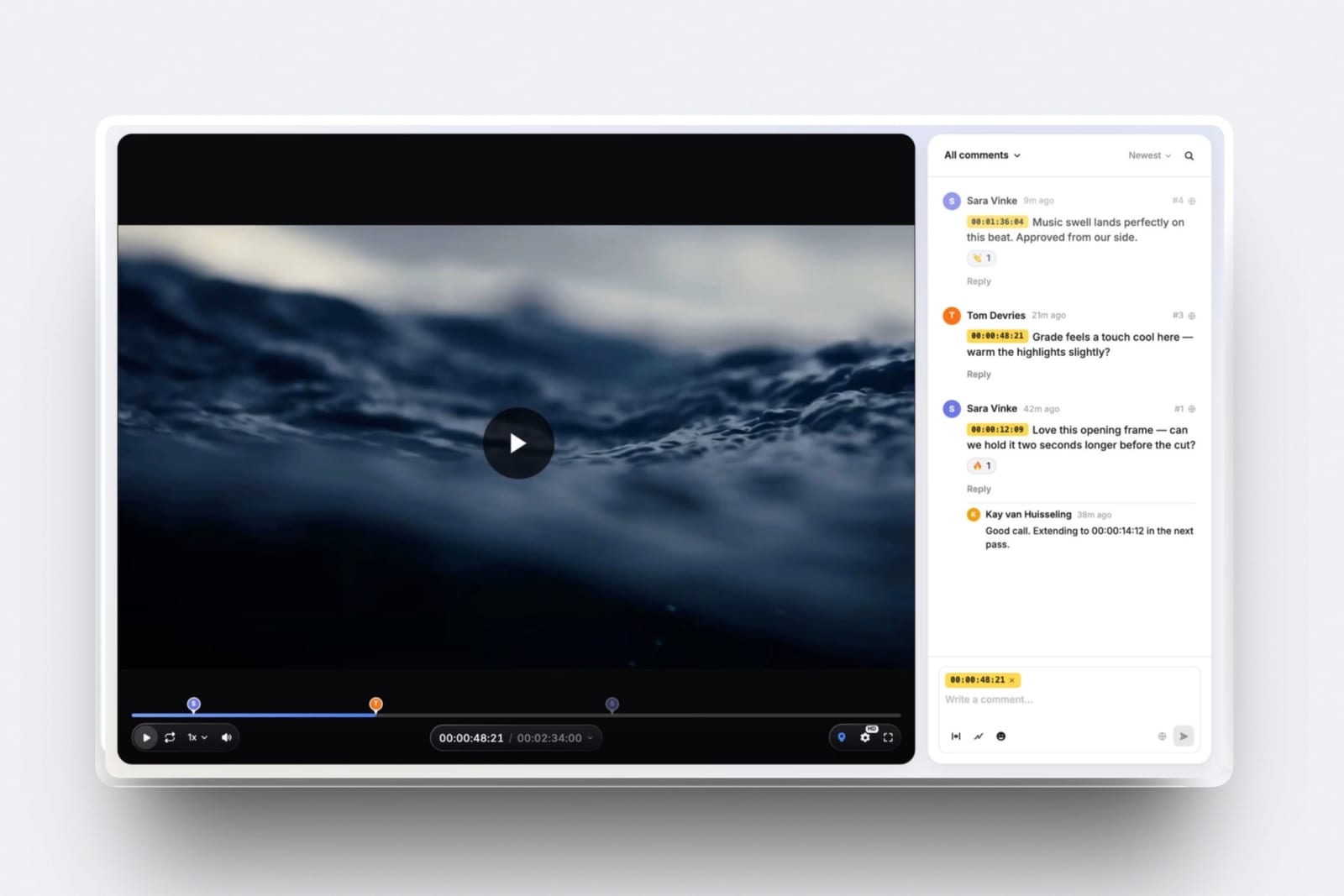
If you are the editor who found this page, you can stop reading and send the link to your client. Everything below is written for the person watching the cut and typing the notes, which is where a revision round is actually won or lost.
Here is what it costs to give feedback on a video badly. A marketing manager watches a 90 second brand film, writes eleven lines of prose into an email, and forwards it to two colleagues who reply-all with six more.
The editor now holds 17 opinions, no timecodes and two direct contradictions, and the first hour of the next round goes on working out which shot each line refers to.
You paid for that hour, and at the $75 rate used throughout this guide it cost more than the notes were worth.
A video note is one piece of feedback attached to one timecode on one named cut, written so the editor can find the frame without asking you. That is the whole standard. Everything in this guide is a way of hitting it.
Good video feedback names a timecode, describes the problem instead of prescribing the fix, and arrives once as a single consolidated list from one decision maker.
Type it into a tool that pins comments to the frame instead of into an email, because a note without a timecode makes your editor guess and guessing is what turns two rounds into four.
Framekit Video Review pins each comment to the exact frame and lets guests write without an account, with Frame.io and Dropbox Replay the obvious alternatives if your team already works in one of them; the trade-off is that consolidating notes takes you longer and saves the person cutting a whole round.
Full disclosure: Framekit is our product, and its Video Review tool is one of the three ways this guide suggests you send notes. Competitor facts here come from each vendor's own pricing and help pages read in September 2026 and are linked inline. Frame.io beats us outright on Camera to Cloud, editing-app panels and transcription; Dropbox Replay compares versions side by side and we do not.
What counts as a usable note
A usable note is one your editor can act on without replying to ask a question, and the test is mechanical, not a matter of taste or politeness.
Read your note back and ask two things: can the editor find the exact frame from what you wrote, and does the note say what is wrong instead of what to do about it. If the answer to either is no, the note is not finished yet.
Notes fail in four predictable ways. Failure 1: no anchor, so nobody knows where to look. Failure 2: a prescribed fix, so the editor executes an instruction that may not solve the underlying problem.
Failure 3: delivery in pieces, so each one restarts the work. Failure 4: no weight, so a throwaway aside gets treated as a mandate and a deal-breaker gets treated as an aside.
In one lineEvery failure mode in client video feedback comes down to a missing anchor, a prescribed fix, a fragmented delivery or an unlabelled priority, and all four are fixable by the person writing the note, not the person receiving it.
How this guide was put together
This is a procedure and not a product comparison, so the research behind it splits three ways and each part is labelled where it appears so you can tell what carries weight. Nothing here rests on a statistic we cannot show you the source for.
Read at the source. Every price, storage figure and feature claim about a third-party tool in this guide was read on that vendor's own pricing or help page in September 2026 and is linked inline at the point it is used.
That covers Frame.io pricing, Dropbox Replay, Wipster pricing, Vimeo privacy settings and Loom pricing.
Calculated. The cost arithmetic uses one carried example throughout: a 90 second brand film, round three, one marketing manager and two colleagues, and an editor billing $75 an hour. Substitute your own rate and the shape of the answer does not change.
Reported by users. Where this guide describes what tends to happen on a thread instead of what a tool does, it is flagged as a pattern and not dressed up as data.
No survey figures, review scores or revision-round averages appear anywhere in this post, because none of the ones circulating online trace back to a source worth citing.
Video feedback by the numbers
The numbers that matter here are small, checkable and mostly about what your tools will and will not let you do, which is why they are worth reading before you write a single note. Each figure below was read at the vendor's own page in September 2026.
- 17 notes, 0 timecodes: the carried example in this guide, and roughly the shape of every email thread that ends in a second revision round.
- $75 an hour: the rate used for the arithmetic below, so one hour of decoding notes costs the same as ten minutes of actual cutting plus a coffee.
- $0: what a Frame.io Free account costs, capped at 2GB of storage, 2 members and 2 projects.
- $15 per member per month: the Frame.io Pro price, and the tier where a share link can finally carry a passphrase or an expiry date.
- EUR 9 per user per month billed annually: Dropbox Replay as listed for European buyers, which is EUR 108 for the year.
- 5 minutes: the maximum length of a screen recording on Loom's free Starter plan, which is exactly long enough to bury twelve notes where nobody can find them.
Step 1. Watch the cut once with your hands off the keyboard
Watch the whole thing through before you write anything down, because the first pass is the only time you will ever see this cut the way its audience will, and you cannot get that pass back once you have started scrubbing.
Editors can tell when notes were written during a first viewing: they arrive front-loaded, with nine notes in the first 20 seconds and silence after that.
The reason is simple. The first watch tells you whether the piece works. The 2nd tells you why. If you mix them you end up correcting details in a sequence you are about to ask to have removed, which is the single most expensive kind of note there is.
What goes wrongyou pause at 0:04 to write about a title card, lose the thread, and never form an opinion about whether the film holds for 90 seconds.
What to do insteadpress play, put your hands in your lap, and at the end write two sentences about the whole thing before you touch the timeline.
On the carried 90 second film that costs you 90 seconds and removes about a third of the notes you were going to send, because a third of them turn out not to matter once you have seen the ending.
Then watch it again and take notes properly.
Step 2. Put a timecode in front of every note
Start every note with the timecode it refers to, written as minutes and seconds, because without it your editor is searching a timeline for a shot they have watched four hundred times and can no longer see freshly.
This is the single highest-value habit in this guide and it costs you about two seconds a note.
Timecodes do three jobs at once. They locate the note. They let two notes about the same shot be merged instead of executed twice.
And they make it obvious when four people are all describing the same problem in four different vocabularies, which happens more than anyone on the thread realises.
Write it as 0:37, not "about halfway" or "the bit with the hands". If the note covers a range, give both ends: 0:37 to 0:44.
If the note is about the whole piece, say so explicitly and put it at the top under a heading, because a general note buried between two shot notes gets treated as a shot note.
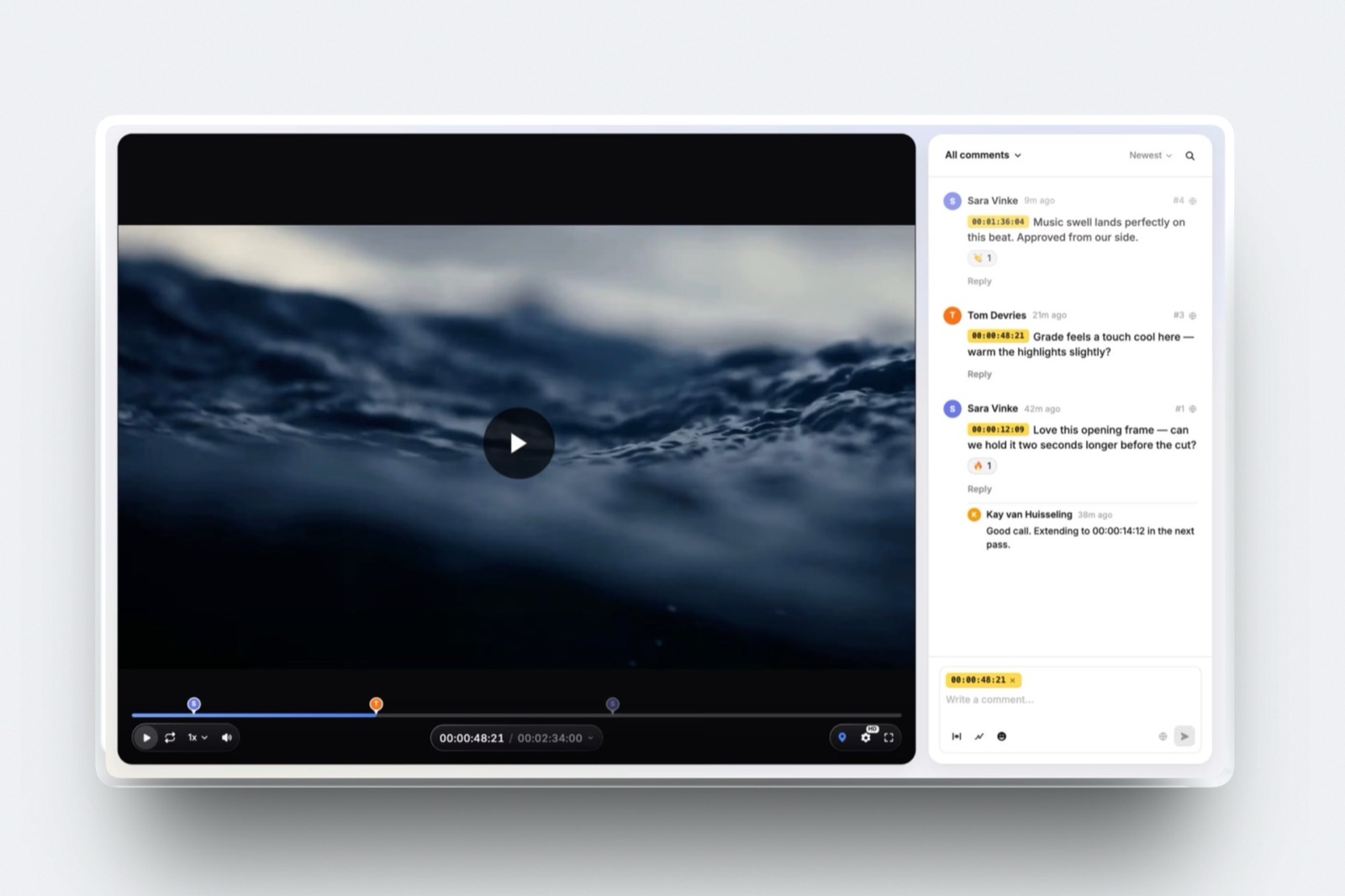
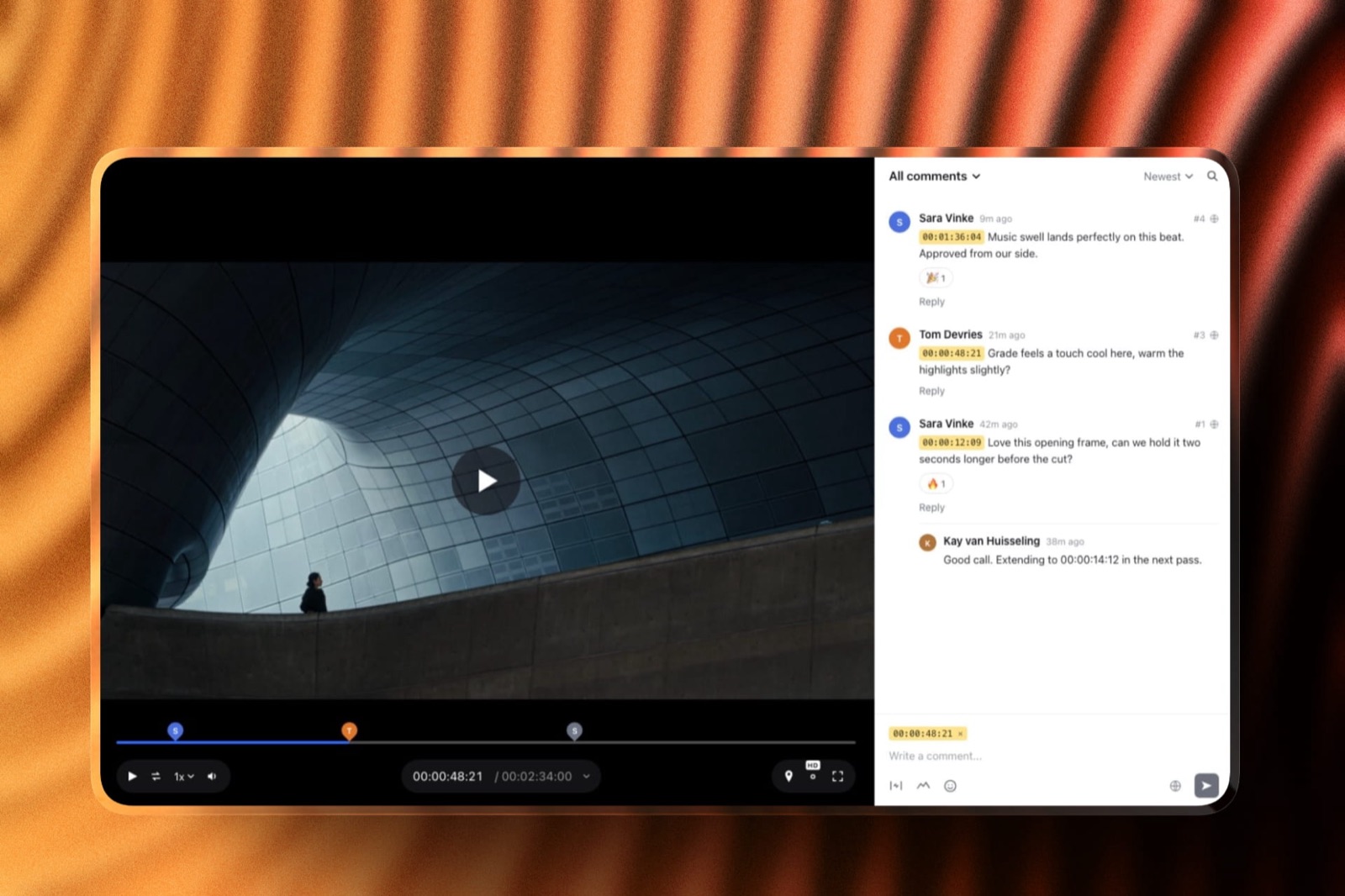
The better version of this stepuse a tool that attaches the timecode for you. In Framekit Video Review you pause, type, and the comment pins itself to that exact frame, then shows up as a marker on the timeline that the editor can click.
You can also draw on the frame, which turns "the thing on the left" into a circle around the thing on the left.
Guests do not need an account, which matters more than it sounds: the reason clients fall back to email is almost always a signup wall.
In one lineA timecode in front of every note is the difference between a list your editor can work through in order and a list they have to reverse-engineer, and it is the one change in this guide that costs the person writing the notes nothing at all.
Step 3. Describe the problem, not the fix
Say what is not working and let the editor choose the remedy, because the fix you can imagine is limited to the shots you have seen and the editor is holding every take that did not make the cut.
A prescribed fix is a smaller request than it looks: it forecloses six better answers you will never be offered.
This is the note that produces a second round more reliably than any other. You write "cut the drone shot", the editor cuts the drone shot, and the sequence still feels slow because the drone shot was not the problem.
Now you have spent a round and learned nothing, and the honest note you were circling ("the middle drags") never got said.
The ruleproblem first, and a fix only if you explicitly mark it as optional. "0:22 the middle drags here, I lose the thread. One idea: the drone shot could go, but you will know better."
Where prescribing is finebrand rules, legal copy, names, logos, product details and anything with a correct answer. If the client's tagline is wrong, say what it should be. Nobody needs creative latitude on a trademark.

In one lineDescribing the problem instead of prescribing the fix keeps every solution on the table including the five the editor can reach and you cannot, and it is the difference between buying a change and buying an improvement.
Step 4. Say "I do not like this" in a way the editor can use
You are allowed to dislike something without being able to justify it, and pretending otherwise is why clients invent fake technical reasons for what are really taste calls. The useful move is to say plainly that it is a taste call, then give the editor one anchor to steer by.
The unusable version is "I do not like the music". The usable version has three parts: the timecode, the feeling, and a direction or a reference. "0:00 to 0:18, the music feels corporate and I wanted it to feel handmade.
Closer to the second reference in the brief than the first."
If you cannot name the feeling, name a comparison.
Two named references beat a paragraph of adjectives every time, and two lines beat 20, and they are also checkable: the editor can play the reference and tell you in one sentence whether what you are asking for is reachable in this footage.
This is exactly the material that should have been agreed up front in the creative brief, and if it was, quote the line from the brief instead of re-describing it.
The one sentence that saves a round"This is a taste note, not a brief note, so overrule me if it fights the edit."
What not to dodo not soften a taste note into a technical one. "The music is too loud at 0:06" when you mean "I do not like the music" sends the editor to the mix and wastes both of you a day.
Twelve notes, rewritten
The fastest way to learn this is to read real notes next to their repaired versions, so here are 12 taken from the kinds of threads that produce a third round, each with the reason it stalls the edit. Read the middle column: that is the part you are trying to avoid causing.
| Note as sent | Why it stalls the edit | Note rewritten |
|---|---|---|
| "Can you make it pop?" | No anchor, no problem, no direction. The editor guesses at grade, sound, pace or all three. | "0:00 to 0:12 feels flat next to the reference in the brief. The grade reads greyer than I expected." |
| "The beginning is too slow" | "Beginning" is not a timecode and "slow" could mean pace, music or shot length. | "0:00 to 0:09 we are on the empty street for a long time before anything happens." |
| "Cut the drone shot" | A prescribed fix. If the drone shot is not the cause, you lose a round finding out. | "0:22 the middle drags and I lose the thread. The drone shot may be the reason." |
| "Love it! Just a few tweaks" | Sets the tone for a note list the editor will now under-read. | "Overall this works. Six notes below, two of which are must-fix." |
| "The colours look weird on my phone" | Device and brightness unknown, so the editor cannot reproduce it. | "0:40 skin tones look green to me on an iPhone at full brightness. Fine on my laptop." |
| "Make the logo bigger" | Classic prescribed fix with no problem attached. | "1:18 the logo is hard to read at the size it plays on a phone." |
| "It is not what we discussed" | The editor cannot act on a comparison to a memory. | "1:04 we agreed in the brief that the voiceover leads here and the music sits under it. Right now they are level." |
| "Can we see another version?" | Open-ended and expensive. A version of what, and against what test? | "Could we see 0:22 to 0:35 with the interview line instead of the music bed, to compare?" |
| "My colleague hates the ending" | Second-hand and unattributable, so nobody can resolve a conflict. | "Sam in brand thinks 1:20 lands abruptly. I agree. Ending needs one more beat." |
| "The audio is bad" | Could be level, noise, room tone, sync or music choice. | "0:48 to 0:52 the room tone jumps when the shot changes. Audible on headphones." |
| "Just small things, see attached doc" | Moves the notes into a second place the editor has to reconcile with the first. | "Seven notes, all in the review page, timecoded. Nothing outside it." |
| "Can this be done by tomorrow?" | A deadline hidden inside a note list instead of stated as a constraint. | "These are all the notes. We need the final by Thursday 5pm, so tell me today if that is not realistic." |
In one lineNine of these 12 repairs are the same repair, which is to add a timecode and replace an instruction with a description, and the other three are about saying out loud who wants the change and by when.
Step 5. Gather every other opinion before you send yours
Collect the notes from everyone whose approval the film needs and merge them into one list before anything reaches the editor, because a thread where three people comment independently is not three sets of notes, it is one set of notes plus two rounds of contradiction management that you are paying an editor to do.
The merge is the part people skip, and on the carried example it is the part that saves the hour, which is $75. When you sit the notes side by side, three things happen. Duplicates collapse.
Contradictions become visible while they are still cheap to resolve. And notes that nobody actually cares about quietly fail to survive the exercise.
What goes wrongthe legal review lands two days after the creative notes, so the editor cuts the same sequence twice. Ask all three, legal, brand and the budget holder, to watch on the same day, before you write anything.
How to do it in a review toolinvite everyone to the same page, ask them to leave comments there instead of replying to an email, then read the comment list yourself and post a single summary note at the top that says which of them are being actioned.
In Framekit Video Review everyone can reply and react in the same thread, and guests do not need an account, so the usual excuse for defecting back to email does not apply.
If your team already lives in Frame.io or Dropbox Replay, use those instead: what matters is that there is exactly one place.
In one lineMerging every stakeholder's notes before they reach the editor turns three partial rounds into one complete one, and the contradictions you find while merging are the cheapest contradictions you will ever resolve.
Step 6. Rank each note must, prefer or ignore
Label every note with its weight, because an editor with an unranked list of 17 items has to either do all of them or guess which ones you meant, and both of those answers cost you something. Three labels are enough, and a 4th stops being used by week two.
| Label | What it means | What the editor does with it |
|---|---|---|
| Must | The film cannot ship with this in it. Brand, legal, factual, or a genuine deal-breaker. | Actioned first, always, and flagged back if it is not possible. |
| Prefer | You would like it changed and you will live without it. | Actioned if time and the edit allow, discussed if it fights something else. |
| Ignore if it costs time | An observation you are recording, not requesting. | Read, noted, left alone. |
Two rules make the labels work, and both are about proportion. Keep musts under a quarter of the list, which on the carried 17 notes means 4 and not 12, because a list that is all musts is an unranked list wearing a costume.
And never let a must appear for the first time in round three: if it was a must, it was a must in round one, and discovering it late is a brief problem, not an edit problem.
Step 7. Send one list, from one place, with a decision maker and a date
Send the whole list in a single delivery, name the one person whose approval ends the round, and state the date you need the next cut by, because a round with no owner and no deadline is not a round, it is an open conversation that bills by the hour.
This is the step that converts good notes into a finished film.
The covering message does four things and runs to about five lines. It gives the note count. It names who signs off. It says whether anything is still outstanding. And it gives a date.
Here is the shape, using the carried example:
Seventeen notes are in the review page, all timecoded, four marked must. I sign off; Sam has seen it and their notes are already merged in. Legal came back clear this morning so nothing further is coming. If we can have the next cut by Thursday 5pm we will approve the same day.
Compare that with the version most editors get, which is three emails over two days, no count, no owner and a quiet fourth email on Friday adding a note from someone who was on holiday.
In one lineNaming a single decision maker and a single delivery date is what converts a pile of notes into a round with an end, and it is the one part of this process the editor genuinely cannot do for you.
What not to send an editor
Some formats make feedback worse no matter how good the content is, and the common thread is that they all move the notes somewhere the editor cannot work from. Avoid these four and you will have removed most of the friction before you write a word.
A screen recording of you talking over the cut. It feels generous and it is the hardest possible format to work from: the editor cannot skim it, cannot search it, cannot tick items off, and has to transcribe it before they can start.
Loom's free Starter plan caps recordings at 5 minutes and 25 videos, which is enough rope to bury 12 notes in a place nobody will ever find them again. If you have already recorded one, watch it back and type the notes out.
A phone video of your screen. Sent to show a playback glitch. Send the timecode and describe what you saw instead, and say what you watched it on.
A second document. If the notes live in a review page, keep them all in the review page. A doc plus a page means the editor reconciles two lists, and reconciliation is where notes get dropped and then re-raised in round four.
Notes from someone who has not seen the brief. Forwarding a note from a colleague who joined yesterday is a way of laundering an unbriefed opinion into a requirement. If the note is right, own it and label it. If it is not, it does not need forwarding.
Where to put your notes
The tool matters less than the discipline, but it matters more than nothing, because the right tool enforces about half of this guide for you and the wrong one quietly punishes anyone who tries. Here is what the five options cost and, more usefully, what each one will not do.
| Where the notes go | What it costs | How reviewers get in | What it will not do |
|---|---|---|---|
| Framekit Video Review | Free plan included; paid from $9/mo Starter, $19/mo Pro, $39/mo Business | No, guests comment without signing up | No Camera to Cloud, no editing-app panels, no transcription, no side-by-side version compare |
| Frame.io | Free at $0 (2GB, 2 members, 2 projects); Pro $15 per member per month | Reviewers can comment via a share link | Free tier is capped at 2 projects, and passphrase protection starts on Pro |
| Dropbox Replay | EUR 9 per user per month billed annually as listed for European buyers | Reviewers open a shared link | Needs a Dropbox plan underneath it, so it is rarely a standalone purchase |
| Wipster | Light $9.95/mo billed annually with 50GB; Team $19.95 per user per month | Reviewers open a review link | Storage on the entry plan is small for long-form or multi-cam projects |
| Email plus a Vimeo link | Vimeo password protection requires a paid plan | No | Nothing pins a comment to a frame, so you are back to writing timecodes by hand |

Prices and limits above were read on each vendor's own page in September 2026: Frame.io, Dropbox Replay, Wipster and Vimeo's privacy settings help article, which states plainly that the Password and Unlisted settings are available with paid plans only.
Which one would we useif your editor already sent you a link, use that link.
If you are choosing, the deciding question is whether your reviewers will sign up for anything, and for most of them the honest answer is no, which is why guest commenting matters more than any feature on the list.
For a fuller ranking of the category, the video review tools guide compares them on storage, branding and approval workflows, and the client feedback tools guide for designers covers the same problem for still images and web work.
Framekit is an AI website builder that also runs the review page your editor is asking you to leave notes on, which is why the link you were sent may already do everything in this section without you installing anything.
Which approach fits your project
Work down these questions in order and stop at the first one that describes your situation, because the right amount of process depends on the number of people who can veto the film and the number of rounds you have paid for.
Most projects need less ceremony than they get, and a film with five approvers needs more.
Is exactly one person approving, and is this round one or two? Then a timecoded list in the editor's review page is enough. Skip the labels, skip the covering memo, write 10 good notes and a date.
If not: do three or more people have a veto? Then run Step 5 properly. Watch on the same day, merge into one list, and put your name on it as the person who decides. The merge is worth more than any tool you could buy.
If not, but this is round three or latersomething upstream is broken and more notes will not fix it. Stop, re-read the brief, and write one message that says what the film is for and what would make it finished.
The creative brief guide is the version of that conversation you should have had in week one, and the client approval software roundup covers how to record the sign-off once you get there.
If the notes are about stills, frames or a web page instead of a moving cut: use an annotation tool built for that, because pinning a comment to a coordinate on an image is a different job from pinning one to a frame.
The video annotation tools roundup covers the overlap.
If your editor has not sent a review link at allask for one before you write anything. It is a reasonable request, it takes them two minutes, and it will save you more time than it saves them.
Frequently Asked Questions
How do I give feedback on a video without sounding rude?
Giving feedback on a video reads as rude when it is vague, not when it is direct.
"I do not like the music at 0:00 to 0:18, it feels corporate and I wanted handmade" is easier to receive than "something is off about the vibe", because the first one is about the film and the second one is about the editor's judgement.
Name the timecode, name the problem, and say plainly when something is a taste call and not a brief call. Editors do not want softer notes, they want notes they can act on.
What is a timecode and how do I write one?
A timecode is the position of a moment in the video, written as minutes and seconds, for example 0:37 for 37 seconds in. Write it at the start of the note, not the end, so the editor can sort the list and work through the timeline in order.
If the note covers a stretch, give both ends as 0:37 to 0:44.
A tool built for video review attaches the timecode for you: in Framekit Video Review a comment left while paused pins itself to that frame, and Frame.io and Dropbox Replay both put comment and markup tools on the player itself.
Should I send my notes in an email or a review tool?
Use a review tool if your editor offers one, because an email cannot pin a comment to a frame and every note in it has to be located by hand.
Framekit Video Review lets guests comment without creating an account, which is the main reason clients fall back to email in the first place.
If you must use email, number the notes, put the timecode first on each line, and send the whole list in one message, not three. Never split notes across an email and a document.
How many revision rounds should a video take?
Two rounds is normal for a short brand film and three is common when three or more people approve. There is no credible published average, so treat anyone quoting one with suspicion.
What actually drives the count is whether stakeholders watch on the same day and whether notes describe problems or prescribe fixes.
A prescribed fix that does not solve the real problem reliably adds a round, which on an editor billing $75 an hour is the most expensive sentence in this guide.
Is it okay to say I do not like something without a reason?
Yes, as long as you label it as a taste call and give one anchor. Say "this is a taste note, not a brief note" and then either name the feeling you wanted or point at a reference.
That lets the editor tell you in one reply whether what you want is reachable in the footage that exists.
What does not work is disguising a taste note as a technical one, because the editor then goes and fixes the mix when the real issue was the track.
Who should sign off on a video edit?
One person, named before the round starts, and ideally the person who owns the budget. Collecting comments from five colleagues is fine; letting five colleagues each approve is not, because approval by committee has no end state.
In Framekit Video Review the approval status on a cut moves through needs review, in progress, approved and needs changes, so the decision is recorded on the file itself, not in somebody's inbox.
Can I send a screen recording of myself watching the cut instead?
You can, and your editor will quietly wish you had not. A screen recording cannot be skimmed, searched or ticked off, so it has to be transcribed before any work starts, and Loom's free plan caps recordings at five minutes anyway.
If talking is genuinely faster for you, record it for yourself and then type the notes out with timecodes. Ten typed lines beat a nine minute video every time.
What should I do when two stakeholders disagree?
Resolve it before the notes leave your side, because an editor cannot arbitrate between two clients and will either pick one and annoy the other or ask, which costs a day.
Put both notes next to each other with their timecodes, decide which one ships, and send the decision, not the argument. If you genuinely cannot decide, send both, mark them as a conflict, and say who will break the tie and when.
Does Framekit Video Review cost anything for the client?
No. Framekit Video Review has a free plan for the person sharing the cut, and the people leaving notes never pay or sign up, because guests can comment, reply and react without an account.
Paid plans start at $9 a month on Starter and add things the reviewer never sees, such as review pages on a custom domain and no Framekit badge.
The per-file ceiling runs 500MB, 1GB, 2GB and 3GB from Free through Business, and no single video can run past 2 hours.
What if my notes are mostly about the music?
Say so at the top as a single general note instead of spreading it across eight timecodes, because music affects the whole piece and eight separate notes will read as eight separate fixes.
Name what the current track does wrong, name what you want instead, and give a reference if you have one.
Then be explicit about whether the track is a temp placeholder or the licensed final, since editors frequently cut to temp music and clients frequently react to it as if it were final.
Can I ask for a version I can show internally before I send notes?
Yes, and it is worth asking for explicitly instead of forwarding the link you were sent.
Ask whether the link can be password protected and whether downloads are off, then send the link and not a file, so there is only ever one copy in circulation.
Framekit review pages can carry a password, an email registration step and an expiry date, and Frame.io adds passphrase protection and share link expiration from its Pro plan at $15 per member per month.
Final Verdict
Write the timecode, describe the problem, rank the note, merge everyone's list into one, name who signs off, and give a date. Six habits, none of which require a tool, all of which get easier with one.
If you do nothing else from this guide, do the timecode: it is free, it takes two seconds, and it removes the single largest source of wasted time in a revision round.
For the tool half of the answer, a review page that pins comments to frames is worth more than any feature comparison, and Framekit Video Review is a reasonable default because the people leaving notes do not need an account and the free plan is genuinely usable.
Verdict: Use a review page that timecodes comments for you, keep every note in that one place, and put a name and a date on the round.
Where Framekit loses is the technical end of post production.
It has no Camera to Cloud, no Premiere or Resolve panel, no transcription and no side-by-side version compare, so if your editor works in an editing-app panel all day or the agency needs forensic watermarking on every share, Frame.io is the better fit and this guide still works inside it.
Framekit also does not do contracts, invoicing or scope-change billing, so when the notes turn into a scope conversation you need a dedicated tool for that half; the contract and proposal tools roundup covers it, and what video editing costs per hour is the context both sides should be reading.
Related readingthe best video review tools ranks the category, free video review tools covers the no-budget end, Frame.io versus Vimeo settles the head-to-head most teams argue about, how to present design work to clients applies the same discipline to stills and layouts, and the creative brief guide is where a third round of notes gets prevented in the first place.
If the cut you are looking at is an early one, how to share a rough cut with a client explains what the editor meant by temporary, and editors setting this up should read how to send a video to a client for review.