Framekit templates
Start from a designer-made template
 Use template
 Use template
 Use template
 Use template
 Use template
 Use template
 Use template
 Use template
The first time you share a rough cut with a client, you are not really asking for feedback.
You are asking them to believe that a four minute wedding film with temp music, no grade and three placeholder titles will one day be the thing you promised them, and nothing in the file itself makes that case.
That is why the same cut can land two completely different ways. Sent bare, a four minute assembly reads as the finished film and gets marked accordingly.
Sent with a version label, a five line note naming the three things that are still temporary and a link you can switch off, it reads as progress and gets the notes you actually wanted.
A rough cut is an assembled but unfinished version of a video, structurally complete enough to watch end to end but still carrying temporary music, unfinished sound, no final grade and placeholder graphics.
The whole problem of sending one is that the client cannot see which of those four things are choices and which are scaffolding.
Share a rough cut as a labelled, password-locked link with downloads switched off and a short covering note that lists exactly what is temporary, then ask one specific question instead of inviting general notes.
The differentiator is control after sending: a link carrying three switches, password, expiry and downloads, beats a file you cannot recall.
Framekit Video Review does password, expiry, email registration and stacked versions on every plan including the free one; Frame.io is the better fit for teams who need share-link passphrases alongside Camera to Cloud, and Dropbox Replay is worth it if your review lives next to your storage.
Full disclosure: Framekit is our own product and its Video Review tool is one of the options below. Third-party prices and limits here were read on each vendor's own pricing and help pages in September 2026 and are linked where they are used. Frame.io beats us on forensic and session-based watermarking, which is the control a studio actually uses against leaks, and Dropbox Replay compares two versions side by side while we stack them instead.
Why an unlabelled rough cut costs you trust
A rough cut with no frame around it invites the client to review the wrong thing, and the damage is not the wasted round so much as the impression that this is the standard of work they have bought.
Once a client has decided that your grade looks flat, every later conversation starts from that position.
The mechanics are worth being precise about. A client who does not know the music is temporary will write notes about the music, and one who does not know the three title cards are placeholders will ask why the font is wrong.
Each of those notes costs the same to answer as a real one and improves nothing, and the carried film has four of them waiting in it: the music, the three title cards, the grade and the mix.
The frame is four things and takes about 10 minutes to build: a version label, a covering note that names what is temporary, a link with controls on it, and one question you want answered. The rest of this guide is the seven steps that build it.
In one lineThe cost of sending a rough cut bare is not one wasted revision round, it is that the client starts judging your finished work against an impression formed from scaffolding they were never told was scaffolding.
How this guide was researched
This is a procedure and not a ranking, so the evidence behind it divides three ways and each type is labelled where it is used, which lets you weigh the tool claims separately from the craft advice.
Read at the source. Every third-party price, plan limit and feature claim below was read on the vendor's own pricing or help page in September 2026 and linked at the point of use: Frame.io pricing, Dropbox Replay, Wipster pricing, Vimeo privacy settings, Vimeo password protection, WeTransfer plan limits and Google Drive file limits.
Calculated. The carried example throughout is a four minute wedding film at first cut: roughly 1.4GB as a review export, temp music, no grade, three placeholder titles, one couple plus one parent on the link.
Where the guide does arithmetic, the inputs are on the page so you can redo it with your own numbers.
Reported by users. Anything describing how clients tend to behave is flagged as a pattern and not presented as measurement.
No survey data appears in this post, because the figures circulating about client revision behaviour do not trace back to a source worth citing.
Rough cut delivery by the numbers
These are the figures that decide which of the options below can actually carry your cut, and all six were read on the vendor's own page in September 2026, not taken from a comparison site.
- 3 GB in any 30-day period: the free WeTransfer allowance, which is two review exports of the carried four minute film and then nothing until the window rolls.
- 500MB per video on Free, rising to 1GB, 2GB and 3GB: the per-file upload caps on Framekit Video Review across Free, Starter, Pro and Business.
- 2 hours: the maximum length of a single video on a Framekit review page.
- Paid plans only: the tiers on which Vimeo makes the Password and Unlisted privacy settings available, per Vimeo's own help documentation.
- $15 per member per month: where Frame.io starts offering passphrase protection and share-link expiration, on its Pro plan.
- 5 TB: the maximum size of a single file on Google Drive, which is why Drive keeps winning arguments it should lose.
Step 1. Decide whether the cut is ready to leave the timeline
Send a rough cut only when the structure is the thing you want tested, because structure is the only question a rough cut can answer honestly and everything else on the timeline is still moving.
If you are unsure whether the story works, that is exactly the right moment. If you are unsure whether the grade works, it is not.
Three tests before you export. Test one: does it play end to end with no gap where a shot is missing. Test two: is every section in the order you intend to keep. Test three: can you say in one sentence what you want the client to tell you.
If any answer is no, you are sending a cut to buy time instead of information, and the notes will reflect that.
What goes wrongan editor sends a cut at 60 percent to show progress, the client reads it as 100 percent, and the next three weeks are spent recovering a first impression instead of finishing a film.
The alternative when you genuinely need to show progresssend a 30 second section instead of the whole four minutes, and say that is what you are doing. A 30 second fragment that is visibly a fragment does the reassurance job without inviting a verdict.
Step 2. Name the version before you export it
Give every export a version label that a non-technical client can read, because a filename like "final v2 NEW copy" tells a couple nothing and the label is the first piece of framing they see. The label does more work than any other 12 characters in the project.
Use a scheme with a stage word and a number, not a date and an adjective. Stage words communicate where you are in the process; dates communicate only that time has passed.
| Version label | What it means | What the client should react to |
|---|---|---|
| Rough Cut 01 | Structure assembled, temp music, no grade, placeholder graphics | Order, length, what is missing, whether the story lands |
| Rough Cut 02 | Structure revised after the first round of notes | Whether the changes fixed the thing they raised |
| Fine Cut 01 | Structure locked, sound design started, grade roughed in | Pacing inside scenes, specific shot choices, music direction |
| Picture Lock | No further structural changes, only finishing | Nothing structural, only errors and approvals |
| Master 01 | Graded, mixed, titles final, delivery spec applied | Sign-off, or a factual error |
Put the label in three places so it survives being forwarded: the file name, the title of the review page, and the first line of your covering note. On the carried wedding film that means the couple sees "Rough Cut 01" before they see a frame of video, which is the point.
In one lineA version label that a client can read without asking what it means is the cheapest expectation-setting device in post production, and putting it in the filename, the page title and the note means the framing survives the forward to a parent.
Step 3. Write the covering note that frames the cut
Send five lines with the link, because the note is the difference between a client reviewing your film and a client reviewing your scaffolding, and it is the only chance you get to tell them what not to look at.
Write it before you send, not in reply to the first confused message.
The note has five jobs and one paragraph each is too much. Name the version. List what is temporary, specifically. Say what you want them to look at. Say who should watch and who should not yet. Give a date.
Here is the whole thing for the carried wedding film:
This is Rough Cut 01. The music is a temporary placeholder, the colour is ungraded and the three title cards are position-only, so please ignore all three for now. What I would like from you is whether the story order works, especially the speeches section from 2:10. Could you and your mum watch it together and send one combined list by Friday, and please do not share the link further yet.
Four sentences and 71 words, covering all five jobs, and every argument you would otherwise have next week is pre-empted in them. Note the two moves people skip: naming the section you want tested, and asking them not to forward the link.
Both are polite and both are load-bearing.
What goes wrongthe note says "let me know what you think", which is an invitation to review everything including the things that do not exist yet. Ask a question with an answer.
In one lineListing exactly which elements are temporary, by name, converts the three most common wasted notes on a first cut into notes the client never writes, and it takes about ninety seconds to type.
Step 4. Send a link you control, never a file
Send a link to a page you own instead of a 1.4GB exported file, because once a file is downloaded you have lost every control you might later want, including the ability to replace a cut that has an error in it.
This is the single structural decision in this process and everything in Step 5 depends on it.
A file has three problems. Problem one: it cannot be updated, so the version with the sync drift stays in circulation forever. Problem two: it cannot be revoked, so an unfinished cut lives on a client's desktop indefinitely.
Problem three: it carries no context, so the moment it is forwarded, your covering note is gone and the film is being judged bare by someone who never read it.
File transfer services make this worse in a way that is easy to miss.
WeTransfer's free tier allows up to 10 transfers or 3 GB in any 30-day period, which is about two exports of the carried four minute film, and what arrives is a downloadable file with no version context attached.
Google Drive will happily take a single file up to 5 TB, which is why editors keep using it, but a Drive link gives you a filename and a preview player, not a framed review page.
What to send insteada review page, which is a hosted player with your version label on it, comments pinned to timecodes, and three switches for password, expiry and download.
In Framekit Video Review the page carries your logo, banner, fonts and accent colours on paid plans, so the client is looking at your studio instead of a generic file host, and guests leave notes without creating an account.
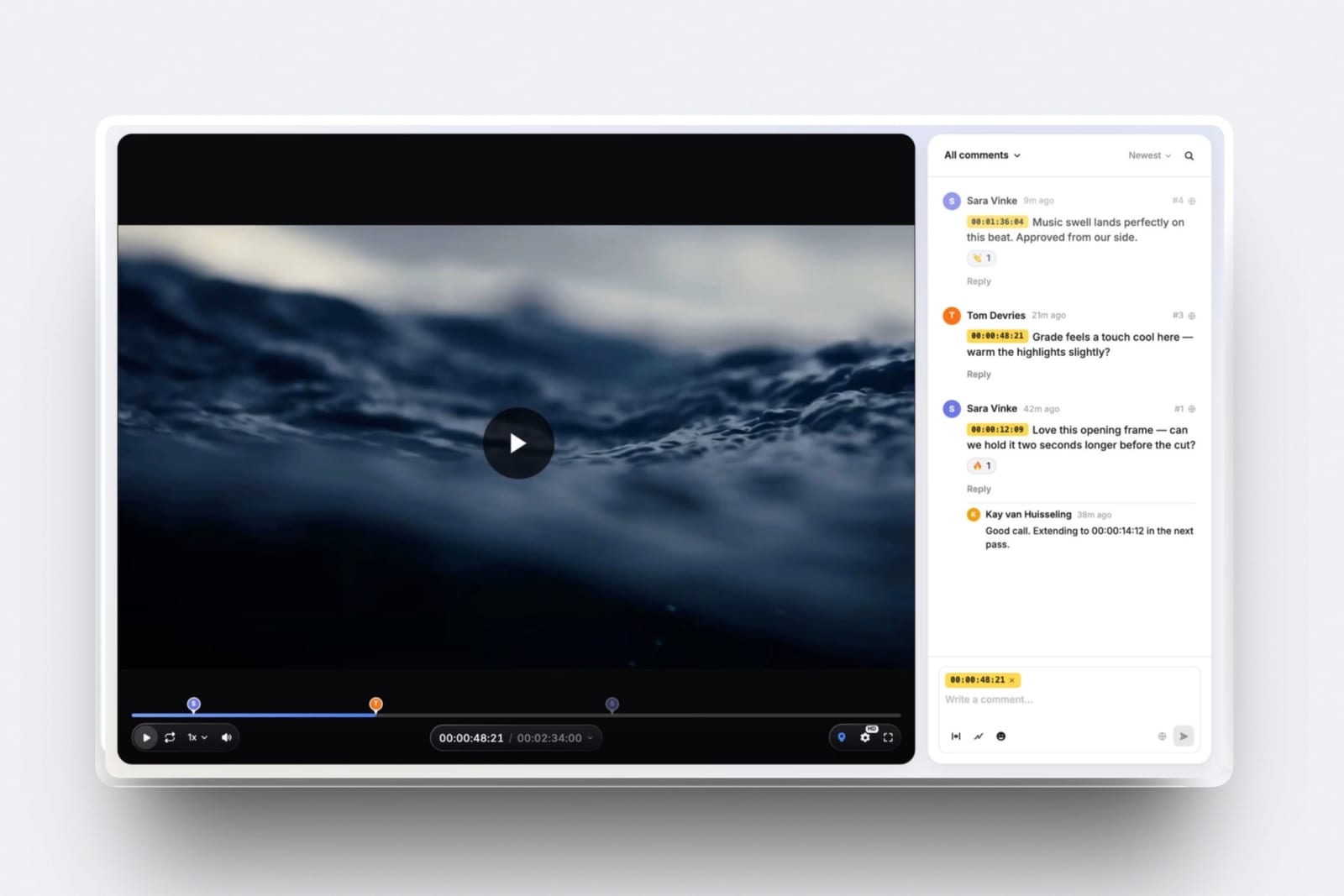
In one lineThe difference between a link and a file is that one of them can still be changed, expired or corrected after you press send, and on a rough cut that is the only property that matters.
Step 5. Set the password, the expiry and the download switch
Turn on the three controls that match the risk of this specific cut, because they stop different things and stacking all of them on a wedding film is theatre while leaving all of them off on an unannounced product launch is negligence.
Decide once, at send time, and write the choice in your project notes.
| Control | What it actually stops | What it does not stop |
|---|---|---|
| Password on the link | Someone who finds the URL from a forwarded email opening the cut | The person you gave the password to sharing both together |
| Email registration | Anonymous viewing, and gives you a list of who opened it | A colleague using a personal address to look |
| Auto expiry | The cut staying watchable months after the project ends | Anything during the window it is live |
| Downloads off | A copy of an unfinished cut spreading as a file | A screen recording of the playing video |
| Visible watermark | A copy being passed off as a finished piece | A determined leak, which needs forensic watermarking |
Framekit Video Review carries password-locked share links, email registration, auto expiry and download control on every plan, including the free one.
Frame.io puts passphrase protection and share link expiration on its Pro plan at $15 per member per month, and Dropbox Replay lists password-protected review links and digital watermarking.
Vimeo is the outlier worth knowing about: its own help documentation says both the Password and Unlisted settings are available with paid plans and that password protection requires a paid plan, so a free Vimeo account cannot do the basic thing this step asks for.
The honest limitnone of these controls stops a client pointing a phone at the screen.
If you are sending a cut that genuinely cannot leak, you want session-based or forensic watermarking, which Frame.io offers on Enterprise and Framekit does not offer at all.
For everything below that bar, a password plus downloads off is proportionate and takes 15 seconds.
Step 6. Ask one question and give a date
End the covering note with one question and one deadline, because an open invitation produces scattered notes from whoever happens to reply first and a specific question produces an answer you can cut with. This is also the step that protects your schedule.
The question should be the thing you are genuinely uncertain about. On a first cut that is almost always structural: does the order work, is it too long, does the opening earn the next 30 seconds.
Ask it about a named section with a timecode, the speeches from 2:10 on the carried film, so the client knows where to concentrate.
The deadline does two jobs. It tells the client when their silence starts costing them, and it gives you a defensible point at which the round closes. Say what happens after it: "if I do not hear back by Friday I will assume the structure is approved and move to sound".
What goes wrongnotes arrive over nine days in four messages, and the cut is re-opened three times. Ask for one combined reply from a named person, so those four messages become one.
If you want the full version of that argument, the client approval software roundup covers how teams record a decision so it stops being re-litigated.
Step 7. Stack the versions instead of renaming them
Keep every cut of a project on one page as a stack of versions instead of a fresh link each time, because separate links are how a client ends up giving you notes on last week's cut and how you end up arguing about whether a change was made.
The stack is also your record of what was asked for and when.
Two rules keep a stack useful, and both are about where a note lives. Old comments stay attached to the version they were left on, so you can prove a note was addressed without relying on memory.
And the newest version is the one the link opens, so there is no way for a client to land on an old cut by accident.
Framekit Video Review stacks versions in order and keeps the notes from earlier ones, with approval statuses moving through needs review, in progress, approved and needs changes on each.
Dropbox Replay goes further with side-by-side version comparison, which is genuinely better when a client wants to see the before and after of one change, and that is a real gap on our side and not a detail.
The video versioning and revision tools roundup compares how each platform handles the stack.
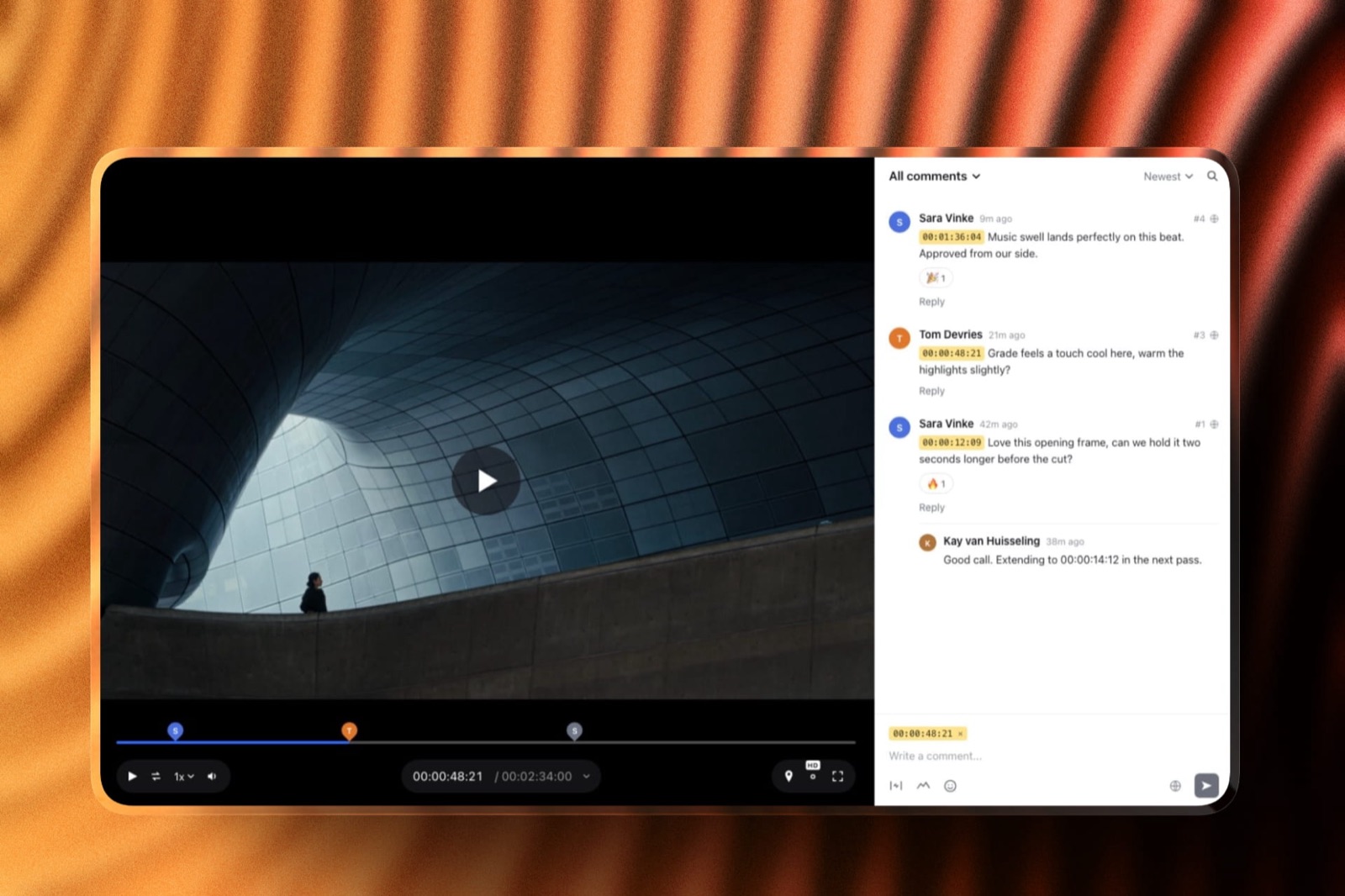
In one lineStacking versions on one page with the old notes attached turns a revision history into evidence, which is what you need on the day a client says a change was never made and you need to show the comment it came from.
Temp music, placeholder titles and the things clients react to
Clients react hardest to the elements that are least finished, which is the opposite of what a rough cut needs from them, and knowing the order of that list lets you defuse it in advance. Name all four in the covering note and most of the reaction never happens.
Temp music. The single biggest source of noise on a first cut. Clients form an emotional read from the track and then defend it, which is how a placeholder ends up in a licensing conversation.
Say in writing that the track is temporary, say when the real one arrives, and consider cutting to something tonally close to the licensed track you intend to use so the gap is small.
Placeholder titles and graphics. The three position-only cards invite font and brand notes that are irrelevant now and inevitable later. Label them on screen if your tool allows it, or say "the three title cards are position only" in the note.
No grade. Ungraded footage reads as flat and cold, and a client who does not know they are looking at raw footage will tell you the film looks sad. About 10 words of the covering note prevent it.
Sound. Unmixed dialogue against temp music is the most common cause of "I cannot hear the speeches". Say whether the mix has happened.
In one lineThe four elements clients react to most on a rough cut are temp music, placeholder graphics, the ungraded image and the unmixed sound, and naming all four in one sentence of the covering note removes most of the notes you did not want.
How to stop a rough cut being forwarded
You cannot technically prevent forwarding, so the goal is to make forwarding harmless instead of impossible, and that is a combination of controls and one sentence of social instruction. Anyone selling you certainty here is selling something.
Start with the ask. "Please do not share this link further yet" does more work than editors expect, because most forwarding is thoughtless and not deliberate. Put it in the covering note, not in the email signature.
Then make the link less useful to a stranger. A password means a forwarded URL alone opens nothing. Email registration means you can see who watched. Downloads off means what circulates is a link, not a file, and a link you can switch off.
Auto expiry means the problem has an end date even if you forget about it.
Accept the residual risk honestly. A visible watermark deters casual reuse and a screen recording defeats everything on this list.
If the project genuinely requires that a leak be traceable to a person, you need session-based or forensic watermarking, which is a studio-grade control that Frame.io sells on Enterprise and Framekit does not have.
For most freelance and small-studio work, password plus expiry plus downloads off is the right stopping point, and the password-protected video sharing tools guide compares who offers what.
Where to host a rough cut
The hosting choice is really a choice about how much control you keep after pressing send, and the six options below differ more sharply than their marketing suggests. Here is what each one costs and where each one gives up.
| Option | Cost as listed in September 2026 | Password | Expiry | What it will not do |
|---|---|---|---|---|
| Framekit Video Review | Free plan; Starter $9/mo, Pro $19/mo, Business $39/mo | Yes, on every plan | Yes, on every plan | No forensic or session watermarking, no Camera to Cloud, no editing-app panels, no side-by-side compare |
| Frame.io | Free at $0 with 2GB, 2 members, 2 projects; Pro $15 per member per month | Passphrase from Pro | Share link expiration from Pro | Free tier caps you at 2 projects, which one wedding season will exhaust |
| Dropbox Replay | EUR 9 per user per month billed annually as listed for European buyers | Yes | Managed through shared link settings | Sits on top of a Dropbox plan, so it is rarely bought on its own |
| Wipster | Light $9.95/mo billed annually with 50GB; Team $19.95 per user per month | Yes | Yes | 50GB on the entry plan is thin for multi-cam or long-form |
| Vimeo | Password and Unlisted are paid-plan settings | Paid plans only | Not a link-level control | A free account cannot password protect a video at all |
| WeTransfer or Drive | Free tier: 10 transfers or 3 GB per 30 days on WeTransfer | Paid tiers only | Transfer-level, not review-level | Sends a file, not a framed review page, so the context is gone on the first forward |

Which one we would usefor a solo editor or a small studio sending a first cut to a non-technical client, a review page with password, expiry and download control available without paying is the practical answer, which is where Framekit Video Review sits.
For a post house with a Premiere panel workflow and Camera to Cloud, Frame.io is not a close call and you should read the Frame.io pricing breakdown instead of this table.
Already on Frame.io and feeling the per-member pricing at team size? The Frame.io alternatives comparison is the one to read next.
Framekit is an AI website builder whose Video Review pages carry the password, the expiry and the download switch on every plan, including the free one, which is unusual enough in this category to be worth checking against the table above.
Which setup fits this project
Answer these in order and stop at the first branch that matches, because the right amount of protection and process depends on who is watching and what happens if the cut escapes, not on how much the project is worth.
Is this a private client film, such as a wedding or a family piece? Then a password-locked review page with downloads off and a plain covering note is enough. Skip watermarking, skip registration, keep the note warm and specific.
If not: is the cut commercially sensitive before a launch date? Then add email registration so you know who opened it, set an expiry that matches the embargo, and put a visible watermark on the export.
If the sensitivity is genuinely studio-grade, you need forensic or session-based watermarking and Framekit is the wrong tool for that step.
If not, but four or more people will commentthe risk is contradictory notes, not leaks. Keep the controls light and spend the effort on Step 6, naming one person to send one combined reply.
A white-label client review page helps here for a different reason, which is that agency clients behave better on a page that looks like the agency.
If the cut is over your plan's per-file capexport a review-quality H.264 instead of the master, which for the carried four minute film is about 1.4GB against a multi-gigabyte ProRes.
The video compression tools roundup covers the settings, and the review export is not the file you deliver at the end.
If the client has asked twice for the file instead of the link: find out why before refusing. The two common reasons are showing the cut to somebody offline and a network that blocks the player, and both have answers that are not "here is the master".
Frequently Asked Questions
How do I share a rough cut with a client without them thinking it is finished?
Share a rough cut with a client as a labelled version on a review page, with a covering note that names each temporary element, and it will not be mistaken for finished work.
Call the version "Rough Cut 01" in the filename, the page title and the first line of the note, then list what is temporary: temp music, ungraded image, position-only titles, unmixed sound.
That one sentence prevents most of the notes you do not want.
Should I send a link or a file?
Send a link. A file cannot be updated, revoked or contextualised once it leaves, so an early cut with an error in it stays in circulation permanently and your covering note disappears the moment it is forwarded.
A review page keeps the version label, the comments and all three controls attached to the video. Use a file only when the client cannot use a player at all, and then send a watermarked review export, not a master.
Can I password protect a rough cut for free?
Yes, on some platforms. Framekit Video Review includes password-locked share links, email registration and auto expiry on its free plan.
Vimeo does not: its help documentation states that password protection requires a paid plan, and that both the Password and Unlisted privacy settings are available with paid plans only.
Frame.io has a free tier but puts passphrase protection and share link expiration on its Pro plan at $15 per member per month.
What should I call the version I send?
Use a stage word and a number that a non-technical client can read, such as Rough Cut 01, Fine Cut 01, Picture Lock or Master 01.
Stage words tell the client where you are in the process and therefore what to react to; dates and adjectives do not.
Put the same label in the filename, the review page title and the first line of the covering note, so the framing survives being forwarded to someone who never saw your message.
How do I stop a client forwarding a rough cut?
You cannot prevent forwarding, so make it harmless instead.
Ask plainly in the covering note that the link is not shared further, put a password on it so a forwarded URL opens nothing on its own, switch downloads off so what circulates is a revocable link, and set an expiry date.
A visible watermark deters casual reuse. Only forensic or session-based watermarking makes a leak traceable, and that is an Enterprise-grade control Framekit does not offer.
Should the client be able to download the rough cut?
Not before picture lock. A downloaded rough cut is an unfinished version of your work that you can never correct or withdraw, and it is the copy that gets shown to a friend with no context attached.
Leave downloads off until picture lock, then turn them on for the delivery.
The exception is when a client needs to review offline for a genuine reason, in which case send a watermarked review export instead of opening downloads on the page.
How long should a rough cut link stay live?
Set the expiry to the end of the round plus a buffer, which for most projects is two to four weeks and not forever.
A cut that stays watchable for a year is a cut that gets rediscovered and re-reviewed by someone who was not on the original thread. Framekit review pages support auto expiry on every plan and Frame.io offers share link expiration from Pro.
Keep the finished master available for longer through a separate delivery link.
What do I do about temp music on a rough cut?
Say in writing that it is temporary, say when the licensed track arrives, and choose a temp that is tonally close to what you actually intend to license.
Temp music is the biggest single source of noise on a first cut because clients form an emotional read from it and then defend that read.
If a client falls for a temp track, tell them immediately what licensing it would cost instead of letting the expectation harden over two more rounds.
Is Framekit Video Review free for the client?
Yes. People invited to a Framekit review page comment, reply and react as guests without creating an account or paying anything, which is the main reason clients use a review tool at all instead of replying by email.
The person sharing the cut can stay on the free plan too, with password, expiry and download control included; paid plans from $9 a month add review pages on a custom domain, removal of the Framekit badge and your own uploaded fonts.
Can I share a rough cut alongside stills from the same shoot?
Yes, and it beats sending a gallery link and a review link two days apart. Framekit client galleries take video as well as photos, with watermarking, a gallery password and a separate download PIN, so a hybrid shoot can land in one place.
Per-file video limits apply by plan: 500MB on Free, 1GB on Starter, 2GB on Pro and 3GB on Business.
The client galleries for videographers guide covers when a gallery beats a review page.
What resolution should a rough cut be?
Export a review-quality H.264 at the delivery resolution instead of the master, because review players stream a compressed version anyway and a smaller file uploads without a fight.
For the carried four minute wedding film that means a 1080p H.264 of about 1.4GB, not a ProRes master. Keep the master untouched: the review export exists to be watched and commented on, not to be the deliverable.
Final Verdict
Label the version, name what is temporary, send a link and not a file, put a password and an expiry on it, switch downloads off, ask one question and give a date.
Seven decisions, about 10 minutes, and they remove most of the reasons a first cut goes badly.
The tool matters less than the frame you put around the cut, but a review page does three of those seven for you, the link, the password and expiry, and the download switch, while an email attachment does none of them.
For most freelancers and small studios, Framekit Video Review is a sensible default because the controls that matter here are on the free plan and the client never signs up for anything.
Verdict: Send a labelled, password-locked review link with downloads off and a five line note that names every temporary element, then ask one specific question with a date on it.
Where Framekit loses is anything that needs to survive a determined leak or a heavy post pipeline.
There is no forensic or session-based watermarking, no Camera to Cloud, no Premiere or Resolve panel, no transcription and no side-by-side version compare, so a studio protecting an unreleased trailer or an editor who lives inside an NLE panel should use Frame.io and run this same process there.
Framekit also does not handle contracts, scope changes or invoicing, so the paperwork half of a revision argument needs a dedicated tool; what to charge for video editing is the context worth reading before that conversation.
Related readingthe video review and approval tools guide ranks the category, video hosting for client review covers the player side, password-protected video sharing tools goes deeper on the controls in Step 5, Frame.io versus Vimeo settles the comparison most editors start with, and video review tools for wedding videographers is the niche version of the carried example in this guide.
When the cut is locked, how to deliver final video files to clients covers the spec sheet that prevents the follow-up email, and how to give feedback on a video is the page to send with the link.
