Framekit templates
Start from a designer-made template
 Use template
 Use template
 Use template
 Use template
 Use template
 Use template
 Use template
 Use template
The photo delivery email arrives at the moment a client is most excited, most likely to share and most likely to spend, and most photographers send four words and a link: "Hi! Here are your photos."
That email gets opened and gets a download. It produces no album picks, no forwarded link to the friend who is getting engaged, no review, and two replies asking for the password and whether the link expires.
Learning how to write a photo delivery email is learning to put six facts in the right order on a phone screen. Once the order is right, the same email works for a wedding, a headshot day and a commercial campaign, with only the details swapped.
A photo delivery email is the message that hands a client their finished gallery, gives them the access details, sets the download deadline and gallery lifespan, and asks for the one action that should follow delivery, whether that is choosing favourites, sharing the link, ordering prints or leaving a review.
Write the photo delivery email in six parts, in this order: a subject under 50 characters that names the client, one specific line about the shoot, the gallery link with the password on its own line, two or three instructions with numbers ("pick up to 60 for the album by 30 June"), both dates (download deadline and how long the gallery stays online), and a single ask.
Keep it under 150 words. Nine ready-to-copy templates are below. On Framekit you can send it from the gallery itself to up to 20 recipients at once, with the cover photo, a View Gallery button and the password added for you.
This guide was rewritten and re-verified on 12 October 2026.
Framekit's share email limits, templates and layout were read from its product code that day, Pixieset's and Pic-Time's email features from their help centres, and the templates were rewritten so each one states both dates and only one ask.
Full disclosure: Framekit makes one of the gallery platforms whose email tools are described here. The templates work from any inbox or platform, and the comparison says plainly where Pixieset's sharing emails do more than Framekit's, including delivery status for each email and a download PIN field.
The Six Parts of a Delivery Email
A delivery email that works has six parts, each one producing one specific behaviour from the client, and leaving any of them out reliably produces a predictable reply, a missed deadline or a gallery that is downloaded and then forgotten.
| Part | Concrete target | What it produces | What leaving it out costs |
|---|---|---|---|
| Subject line | Under 50 characters, names the client | The email is found again in a year | "Which email was the link in?" |
| One specific line | One sentence about a real moment | It reads as a person, not a system | Lower share rate, flatter tone |
| Link and access | Link or button in the first screen, password on its own line | A first open without friction | One reply asking for the password, every time |
| Two or three instructions | Each with a number or a date | Favourites, downloads, the right sharing | An email describing "the one by the window" |
| Both dates | Download deadline and gallery lifespan | Urgency without a dispute | Expired-link complaints in month fourteen |
| One ask | Share, review or order, never all three | One thing actually happens | Nothing happens after the download |
Under 150 words is the target for the whole body. That is long enough for all six parts and short enough that the link, the password and both dates fit on a phone screen with one scroll.
Step 1: Write a Subject Line Under 50 Characters
Write a subject line under 50 characters that names the client and the shoot, because that is roughly what a phone shows before truncating, and because in a year the client will search their inbox for their own names, not for "gallery delivery".
Good: "Your wedding photos are ready, Anna and Jonas" (45 characters). "Harper family portraits, ready to view" (38). "Northfield SS26 finals delivered" (32).
Weak: "Gallery delivery" (no name, reads as a notification). "Your photos!!!" (no shoot, no name, looks like spam). "IMPORTANT: download your photos before they expire" (reads as a threat).
Put the shoot type in the subject when the client is a business that receives several shoots a quarter. Put the names in when the client is a person. Framekit allows subjects up to 150 characters, which is a ceiling, not a target.
Step 2: Open With One Specific Line
Open with one sentence about a specific moment from the shoot, because one real detail proves a person wrote the email and remembers the day, while a paragraph of warmth above the link pushes the thing the client opened the email for below the fold.
"That moment during the speeches when your dad had to stop and start again is still my favourite frame of the year." "The set by the doorway light turned out exactly as I hoped." "The rain held off for the exterior shots, just."
One line. Not three. Everything warm you want to say can go in the sign-off, after the link, the password and the dates.
Step 3: Put the Link and the Password in the First Screen
Put the gallery link, or a button, and the password on its own line within the first screen of the email, because most clients open delivery emails on a phone and scroll once, and every gallery sent without a visible password generates a reply asking for it.
The link. A button if your platform sends the email, a bare link on its own line if you send from your inbox. Never a link hidden under the word "here" in the middle of a paragraph.
The password. On its own line, labelled: "Password: harper0614". Use a different password per gallery, so one forwarded email never opens another client's photos.
The download PIN, if you use one. A PIN gates downloading separately from viewing, so a couple can forward the link to forty guests who can look and heart but not save every file.
Put the PIN on its own line too, or send it by text message for sensitive work such as boudoir.
Sending the PIN by a second channel adds security only when the second channel is genuinely different; two emails to the same inbox add nothing but confusion.
On Framekit, the share email adds the View Gallery button and, if you tick the option, the gallery password on its own line beneath it. It does not add the download PIN, so type the PIN into your message when you want the client to have it.
Step 4: Give Two or Three Instructions, Each With a Number
Give the client two or three instructions and attach a number or a date to each, because "let me know your favourites" gets a list back in two months or never, while "heart up to 60 for the album by 30 June" gets one back within a week.
Favourites"Tap the heart on any photo you would like in the album, up to 60, by 30 June. When you are done, press Send to photographer." On Framekit the first heart asks only for an email address, no account, and clients can sort picks into named lists and add a note to any photo.
Downloads"The download arrow at the top right saves the whole gallery or just your favourites; you will need the download PIN below." Mention that very large galleries arrive as several ZIP parts, and that on Framekit a client on a phone can choose "Email me when it's ready" and close the tab.
Sharing"You are welcome to forward this email to family; they can view and heart photos, but downloads need the PIN." Make sharing permission explicit, because wedding galleries reach parents within the hour whether you say so or not.
Every Framekit download is the full-resolution original, so if you also want clients to have social-media-sized copies, add a "For sharing" set and say so in one line.
Step 5: State Both Dates on Their Own Line
State two dates on a line of their own, the download deadline and how long the gallery stays online, because nearly every expired-link complaint traces back to a gallery that never said when it would close, and a date stated in writing is rarely disputed later.
"Downloads open until 10 January 2027. The gallery stays online until 10 October 2027."
Common windows are 14 to 21 days for a proofing round, 60 to 90 days to download finals and 12 months online for finished consumer work.
Our guide to how long client galleries should stay online works through the windows, the storage each needs and what expiry does on each platform.
If you set an expiry date on Framekit, an optional reminder goes to you and every contact linked to the gallery 3 days before it, so link the client as a contact in the gallery settings.
For a longer runway, send the reminder template below about a week before the download deadline.
Step 6: Make One Ask, Matched to the Job
Close with exactly one ask chosen to fit the job, because an email that requests favourites, a review, a print order, a social share and a referral gets none of them, while one clear request at the moment of delight often gets done the same evening.
| Job | The one ask | Why it fits |
|---|---|---|
| Wedding | Share the link with family and friends | The gallery is the best advertisement you have, and couples forward it anyway |
| Family or newborn | Reply with favourites for a print quote | Prints and gifts are where portrait income lives |
| Headshots | Download your files and update your profiles this week | Downloads are the whole job; nothing else matters |
| Editorial or selects | Mark the frames to take forward | The selection decides the retouching scope |
| Event | Forward the link to speakers and guests | Coverage is valued by how many people find their photo |
| Commercial | A two-line testimonial, after sign-off | Business clients give references when asked at the right moment |
Save the review request for the follow-up email a week later, once they have actually looked. Asking for a review before the client has opened the gallery asks them to rate an email.
Step 7: Decide Where to Send It From
Send the delivery email from wherever the client will trust it and you can see what happened next, which means choosing between your gallery platform's share screen and your own inbox, and each route trades branding and tracking against control over the sender address.
| Route | What the client receives | What you can see afterwards | Limits worth knowing |
|---|---|---|---|
| Framekit share screen | Studio name, gallery title, cover photo, your message, View Gallery button, optional password | Share count; the Activity panel shows downloads and favourite lists | 20 recipients a send, 100 a day, message up to 5,000 characters; PIN not added automatically |
| Pixieset share email | Your template with optional password, download PIN and expiry date fields | Email history with each recipient's status: sent, soft bounce or hard bounce | Expiry reminders configurable up to three times |
| Pic-Time Email Packages | Your edited emails, plus expiry alerts at 7, 4 and 1 days | Not covered in the help articles we read | Email Packages are where every automated email is edited |
| Your own inbox | Plain email from your address with a link | Replies in your own thread; no download data | You type the password, PIN and dates by hand each time |
Pixieset's sharing templates can insert the collection password, download PIN and expiry date, and its email history shows whether each invite was sent or bounced, per its help centre articles on email templates and email history.
Pic-Time's expiry alert schedule is documented in its help article on expiration emails.
A practical split: send the delivery from the platform, so the client gets the cover photo and a button, and send the follow-ups from your own inbox, so replies land in a thread you already read.

Ready-to-Copy Delivery Email Templates
The templates below are ready to copy into any email client or gallery share screen: replace the words in square brackets, keep the order, and delete the link and password lines if you send from Framekit, because its share email adds the button and, if you tick it, the password for you.
Wedding delivery template
Subject: Your wedding photos are ready, [names]
Hi [names],
That moment during the speeches when [specific detail] is still one of my favourite frames this year.
Your gallery: [link]
Password: [password]
Download PIN: [PIN]
Tap the heart on any photo you would like in the album, up to [60], by [date], then press Send to photographer. The download arrow saves the whole gallery or just your favourites. You are welcome to forward this to family; they can look and heart, but downloads need the PIN.
Downloads open until [date]. The gallery stays online until [date].
If you love them, forwarding the link to the people who were there is the kindest thing you can do for a photographer.
Congratulations again,
[name], [studio]
Family and newborn template
Subject: [Family name] portraits, ready to view
Hi [name],
The set by [specific detail] turned out exactly as I hoped.
Your gallery: [link]
Password: [password]
Heart your favourites as you go. When you have picked the ones you would like printed, reply to this email and I will send sizes and prices within two days.
Downloads open until [date]. The gallery stays online until [date], so grandparents can find it again at Christmas.
Warmly,
[name]
Headshot day template
Subject: Your headshots from [company], ready to download
Hi [name],
Your headshots from [date] are ready. There are [5] finished frames in your private gallery.
Your gallery: [link]
Password: [password]
Tap the download arrow to save all [5] at full resolution. If HR needs one specific frame, heart it and press Send to photographer so I know which one is the official version.
Downloads open until [date]; please save your files this week.
Thanks for making it easy,
[name]
Editorial selects template
Subject: Selects ready for review, [project]
Hello [name],
The selects from [date] are ready. I have split them into [Heroes, Details and Alternates] so the team can move quickly.
Gallery: [link]
Password: [password]
Heart the frames you want retouched and add a note to any that need a different crop. Retouching is quoted for up to [20] frames; anything beyond that I will confirm before starting.
Please send selections by [date]. This gallery closes on [date] once finals are delivered.
Best,
[name]
Proofing round template
Subject: Proofs ready, choose your [12] by [date]
Hi [name],
Your proofs are ready. These are watermarked previews to choose from; the finished files come after you pick.
Gallery: [link]
Password: [password]
Heart the [12] you would like edited and press Send to photographer. Add a note to any photo if you want something changed. Downloads are off for this round on purpose.
This proofing gallery closes on [date, 14 to 21 days away]. Finals follow within [10] working days of your picks.
Thank you,
[name]
Event coverage template
Subject: Photos from [event] are live
Hello [name],
The photos from [event] are ready: [number] images across [the keynote, the breakouts and the evening reception].
Gallery: [link]
Password: [password]
Please forward this to speakers and attendees; anyone with the password can view and save favourites. Everything is full resolution and cleared for [licence summary].
Downloads open until [date]. The gallery stays online until [date].
Thanks for having me,
[name]
Commercial finals template
Subject: Final files delivered, [campaign]
Hi [name],
The finals from [shoot] are delivered, split into [set names] so each team can find what it needs.
Gallery: [link]
Password: [password]
Download PIN: [PIN]
Files are full-resolution sRGB JPEGs named [Client-Campaign-001]. Licence: [licensed party], [use], [territory], [period]. If another agency needs access under a separate licence, send them my way.
Downloads open until [date]; the gallery stays available for reference until [date].
When the campaign is live, a two-line testimonial would help me a great deal.
Best,
[name]
Photos and film together template
Subject: Your photos and film are ready, [names]
Hi [names],
Your gallery now holds both the photos and the [11-minute] film, so everything from the day is in one place.
Your gallery: [link]
Password: [password]
The film sits at the top of the first set; tap it to play, or press the slideshow button and the gallery plays through on its own, pausing on the film until it ends. Heart photos for the album as you go, up to [60] by [date].
Downloads open until [date]. The gallery stays online until [date].
[name], [studio]
Download deadline reminder template
Subject: One week left to download your photos
Hi [name],
A quick reminder that downloads on your gallery close on [date]. After that the gallery stays viewable until [date], but saving full-resolution files will need a reactivation.
Your gallery: [link]
Password: [password]
If you have already saved everything, ignore this. If not, the download arrow at the top right saves the whole gallery; large galleries arrive in several parts.
Thanks,
[name]
Sending the Email From Framekit's Share Screen

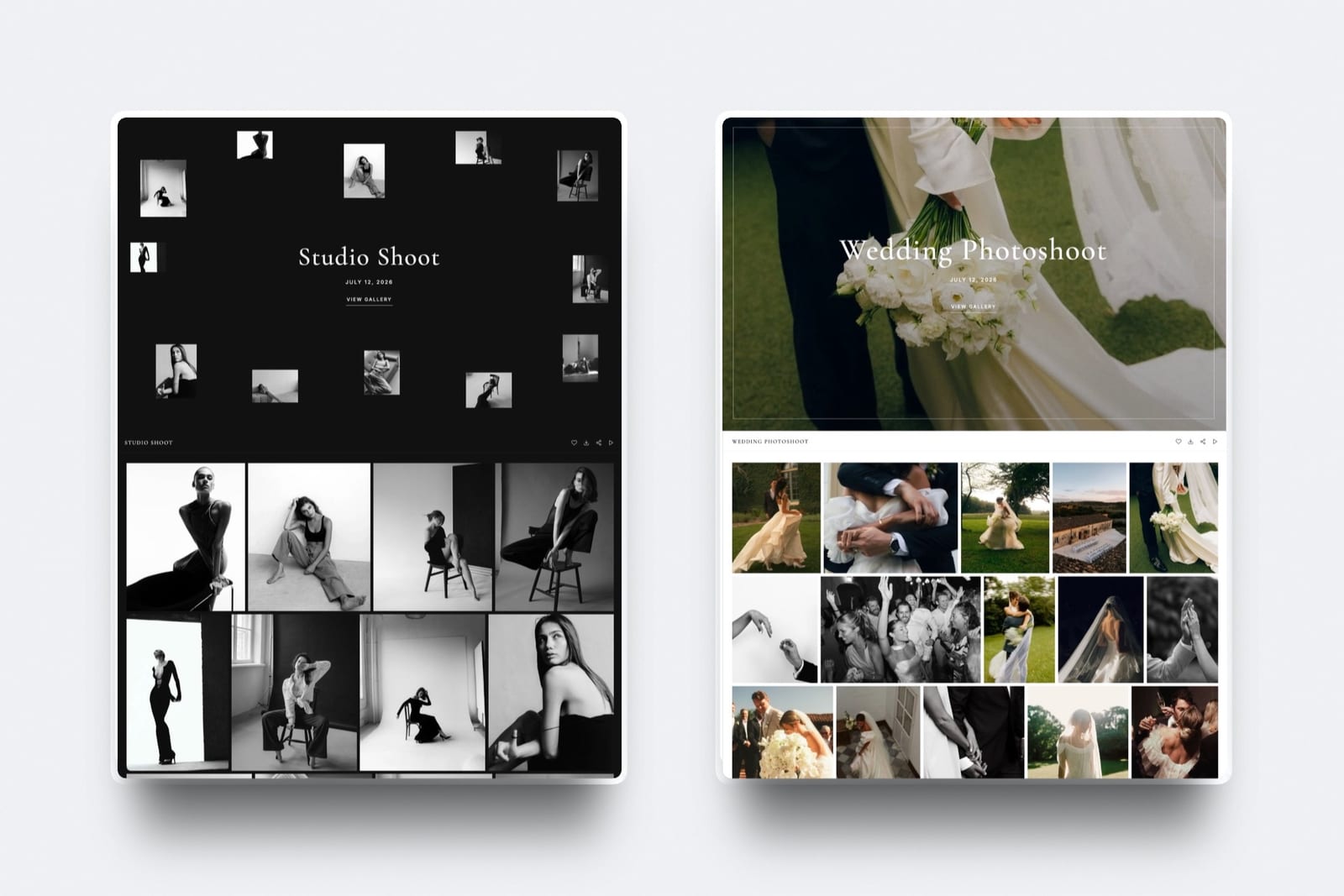
Framekit is an AI website builder with client galleries, video review, Slides and a digital-download store on one account, and every gallery has a share screen that emails it for you, on every plan including Free, once the gallery is published.
What the client receivesyour studio name above the gallery title, the cover photo, your message of up to 5,000 characters, a View Gallery button, the gallery password if you tick the option, and a plain link underneath for anyone whose email app hides buttons. A plain-text version travels with it.
The design controlsthree email themes (classic, light and dark), your own button colour and text colour, and five button shapes from square outline to pill, so the email matches the gallery's look.
The number that mattersup to 20 recipients per send and 100 a day, and each recipient gets their own copy, so a couple, two parents and a planner never see each other's addresses.
The templatessix starter templates, for a ready gallery, a wedding, a portrait session, editorial selects, an event recap and a gallery reminder, plus any of your own you save. The starters are a fine first draft; the templates in this guide add the dates and the single ask they leave out.
The gotchathe download PIN is never inserted for you, and the button and password label are in English even when the gallery itself is set to one of its six other languages, so for a client in Madrid write the message in Spanish and expect two English words on the button.
There is also no per-email delivery status, so if a client says nothing arrived, check spam and resend rather than looking for a bounce report.
Verdict: for most deliveries, sending from the gallery's share screen gives the client a branded email with the cover photo and a working button in under a minute; if you need bounce tracking or a PIN field in the template, Pixieset's sharing emails do more.
Run It Yourself: The Test Send
Send every new template to yourself and to one other address on a different email provider before a client sees it, because the version that looks right in a draft window can hide the button, split the password across lines or land in a spam folder, and replies may not go where you expect.
- Send the email to your own address and to a second address on another provider, such as a Gmail and an Outlook account.
- Open both on a phone. Confirm the link or button, the password and both dates are visible with one scroll.
- Tap the button. Confirm it opens the right gallery and asks for the password.
- Check the spam folder on both accounts. If it landed there, shorten the subject, remove capital letters and exclamation marks, and send again.
- Press Reply. Note which address the reply goes to. If it is not one you read daily, add "Reply to [your email]" in the sign-off.
- Time yourself reading it. Over 40 seconds means it is too long.
Then measure. Count the replies to your last ten delivery emails that asked for something the email should have said: the password, the PIN, the deadline, how to download. Use the new template on the next ten and count again.
The difference is the evidence, from your own clients, that the order matters.
What Most Photographers Get Wrong
The four mistakes that cost the most are three paragraphs before the link, no stated deadline, several asks at once and no second email, because each one either creates a support reply or leaves the gallery opened once and never acted on.
Three paragraphs before the link. On a phone that is two screens of scrolling before the thing the client opened the email for. Warmth belongs in one line above the link and the sign-off below it.
No deadline. "Your gallery is ready" with no dates produces both late downloads and clients who feel no urgency at all.
Asking for everything. Favourites, a review, a print order, a share and a referral in one email gets none of them. One ask per email.
Never sending a second email. The reminder a week before the download deadline recovers late downloaders and reopens the print conversation.
Check activity first: Framekit's Activity panel lists every download with the client's email, photo count and PIN used, plus every favourite list, so you can skip the reminder for clients who already saved everything.
The Follow-Up Sequence After Delivery
Plan the delivery email as the first of four short messages, each with one job and a date, because the gallery's useful life runs for a year and the delivery email alone only covers its first evening.
| When | Message | Its one job | Send from |
|---|---|---|---|
| Day 0 | Delivery email | First open, password, both dates | Gallery share screen |
| Day 5 to 7 | Short check-in | Nudge anyone who has not opened or downloaded; ask for the review | Your inbox |
| A week before the download deadline | Reminder template | Late downloads, print conversation | Gallery share screen or inbox |
| 3 days before expiry, if set | Automatic reminder | Last chance to save files | Framekit sends it to you and linked contacts |
| First anniversary | One-line note | Album upgrades, prints, a referral | Your inbox |
Our guide to getting clients to download their photos covers the check-in in detail, and using client galleries to get referrals covers the anniversary note.

Where Framekit Fits and Where It Loses
Framekit fits photographers who want the delivery email sent from the gallery with the cover photo, a button and the password in under a minute on the free plan, and it loses to platforms that track each email's delivery, insert a PIN and expiry date automatically, or run long reminder sequences.
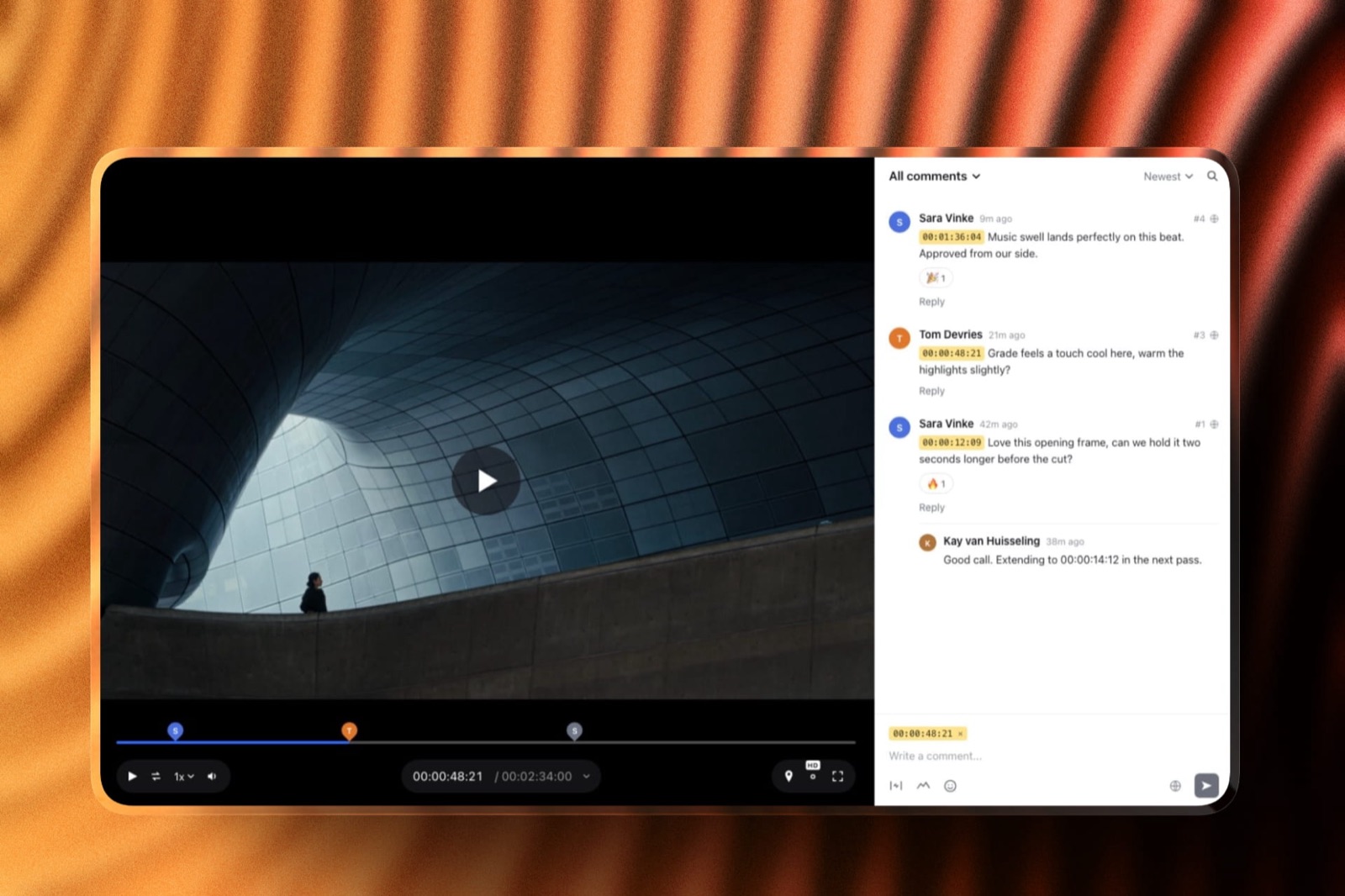
It fits a hybrid studio, since the email points to one gallery holding the photos and the film, and the same account runs video review for the approval round before delivery.
It fits a studio that wants the email styled to the gallery, with three themes and a custom button, without a paid plan.
It loses to Pixieset on email tooling: Pixieset's templates insert the download PIN and expiry date, its email history shows sent, soft-bounce and hard-bounce status per recipient, and its expiry reminders can go out up to three times on days you choose.
It loses to Pic-Time on automated sequences, since Pic-Time alerts clients at 7, 4 and 1 days and can run a last-chance store promotion before expiry.
It loses to both whenever the email is meant to lead to a print order, because Framekit has no print store.
Our Framekit vs Pixieset and Framekit vs Pic-Time comparisons put numbers on those trades.
Frequently Asked Questions
What should a photo delivery email say?
A photo delivery email should say six things in order: one specific line about the shoot, the gallery link, the password on its own line, two or three instructions with numbers such as a favourites limit and date, the download deadline and gallery lifespan, and one ask.
Keep the body under 150 words so the link, password and dates fit on one phone screen.
Should I send the gallery password in the same email as the link?
Yes, for most work. Sending the password in a second email to the same inbox adds no security and doubles the chance of confusion.
Put the password in the delivery email on its own line, and if downloads need protecting, use a separate download PIN sent in the email or by text message. For boudoir and other sensitive work, send the PIN by text.
How do I send a client gallery by email from Framekit?
Publish the gallery, open its share screen, add up to 20 recipient addresses, choose a starter template or your own, edit the subject and message, tick the option to include the password if you want it, and send.
Each recipient gets their own copy with your studio name, the cover photo and a View Gallery button. Framekit allows 100 recipients a day.
Does Framekit's share email include the download PIN?
No. Framekit's share email can include the gallery password on its own line, but never inserts the download PIN, so type the PIN into your message when the client should have it, or send it separately.
Pixieset's sharing templates can insert the download PIN and expiry date automatically, which is one place its email tooling does more.
What subject line should I use for a photo delivery email?
Use a subject under 50 characters that names the client and the shoot, such as "Your wedding photos are ready, Anna and Jonas" or "Northfield SS26 finals delivered".
Avoid generic subjects like "Gallery delivery", which read as notifications, and avoid capital letters or several exclamation marks, which push the email toward spam folders.
How long should a photo delivery email be?
Under 150 words for the body. That fits a one-line opener, the link, the password, two or three instructions, both dates and one ask on a phone screen with one scroll.
Anything longer pushes the link or the dates below the point where most clients stop reading, which is when the support replies start.
When should I send the delivery email?
Send it on a weekday evening or weekend morning, when clients have time to look properly rather than glance between meetings, and only after you have opened the gallery yourself on a phone in a private window.
For corporate clients, send during working hours so the email reaches whoever handles the files before the end of their day.
Should I write the delivery email in the client's language?
Yes, when the client is more comfortable in another language, because the email carries the instructions and dates.
Framekit galleries can be shown in English, Spanish, German, French, Dutch, Portuguese or Italian, set per gallery, but the share email's button and password label stay in English, so write your message in the client's language.
Pixieset translates its automatic emails.
How do I know if the client received the delivery email?
On Pixieset, the email history shows each recipient's status, including soft and hard bounces.
On Framekit there is no per-email status, so check the gallery's Activity panel for downloads and favourite lists instead; if nothing appears after five days, ask the client to check spam and resend.
Sending to two addresses can help for business clients.
Should I ask for a review in the delivery email?
Usually not. Ask for a review in the check-in email five to seven days later, once the client has actually looked at the photos.
The delivery email's one ask should match the job: a share for a wedding, favourites for a print quote for a family, downloads for headshots, selections for editorial work.
Is Framekit or Pixieset better for sending gallery emails?
Pixieset is better if you rely on email tooling, because its templates insert the download PIN and expiry date, its history shows bounces, and its expiry reminders can go out three times.
Framekit is better if you want the email sent from a free plan, styled to the gallery with three themes and a custom button, and pointing at one gallery that holds the photos and the film.
The Verdict
A delivery email that works is short and ordered: a subject that names the client, one real line, the link and password in the first screen, instructions with numbers, both dates, one ask.
Write it once per job type, save it as a template, and test-send every new version to yourself on a phone before a client sees it.
Where you send it from matters less than the order, but it matters. If you need bounce tracking, PIN fields and long reminder sequences, Pixieset and Pic-Time do more.
If you want the email to arrive with the cover photo and a button, from the same free account that holds the gallery, the film and your site, Framekit's share screen does that in under a minute.
Related readinghow to deliver photos to clients, how long photo delivery should take, what to include in a client gallery, how to create a client gallery and how to deliver photos to corporate clients.
Choosing where to send fromthe full client gallery platform comparison, is Pixieset worth it, Framekit vs ShootProof and client gallery vs WeTransfer.